
How WebDAV Extends HTTP: Methods, Properties, and Locking
Most administrators meet WebDAV without ever choosing it. A document management system offers to open files "in place." A scanner wants a URL to deliver scans to. A user asks why their mapped drive to some appliance mounts read-only. Behind all of these sits the same protocol: WebDAV — Web Distributed Authoring and Versioning. It is a set of extensions that turn an ordinary web server into a file store you can browse, write to, and organize. It uses the same HTTP that carries every web page.
This article explains what those extensions actually are. There are seven new methods layered onto HTTP, a metadata system called properties, and folders called collections. There is a locking model for keeping two editors from destroying each other's work. The payoff for understanding them is practical, not academic. Nearly every WebDAV quirk you will meet in production traces directly back to a design decision covered here. That includes drives that mount read-only, files that refuse to save because they are "in use," directory listings that crawl. This is part of our WebDAV series, and it is the foundation the other articles build on.
No prior WebDAV experience is assumed. We will recap the HTTP basics as we go, and every term is defined the first time it appears.
The Problem WebDAV Was Built to Solve
The web began as a read-only medium. A browser could fetch pages, but putting content onto a web server required a second, entirely separate system. That was usually FTP, with its own accounts, its own client, and its own firewall headaches. Authors lived a double life: edit locally, upload over one protocol, verify over another.
WebDAV was the standards community's answer: make the web itself writable. The goal was distributed authoring — groups of people, scattered across networks, editing shared documents directly on the server that publishes them. They would use the same protocol their browsers already speak. The extensions were standardized through the IETF (the body that maintains internet standards), and the current specification lives in RFC 4918.
The "V" in the name deserves a footnote before it confuses you. It stands for versioning — keeping a history of document revisions — which was part of the original ambition. But versioning proved hard enough that it was split off into a separate extension (called DeltaV) that most servers never implemented. In practice, the V is a fossil. WebDAV as actually deployed is about authoring: reading, writing, organizing, and locking files.
Knowing the goal explains the shape of the protocol. WebDAV was designed for people editing documents in place, not for bulk file delivery. That is why it has locks (two editors must not collide), properties (documents need metadata like authorship), and collections (documents need organizing). It is also why WebDAV lacks things a transfer protocol would consider essential, like resumable uploads or efficient synchronization. It is a filing cabinet bolted onto a web server, not a delivery service.
The HTTP You Already Know Is the Foundation
HTTP, stripped to its essentials, is a request-and-response protocol. The client sends a request consisting of a method (the verb), a path, and some headers. The server answers with a three-digit status code, headers, and usually a body. You have almost certainly met these methods. The method GET fetches a resource, and HEAD fetches just its headers. The method PUT creates or replaces a resource, and DELETE removes one. The method POST submits data to be processed, and OPTIONS asks the server what it supports.
Two properties of HTTP matter enormously for everything that follows. First, HTTP is stateless: every request stands alone, carries its own authentication, and finishes cleanly. There is no session in the protocol itself — a "WebDAV session" is just a series of independent HTTP requests. Second, HTTP travels over the web's standard ports — port 80 for plain traffic and port 443 for TLS-encrypted traffic. It passes through firewalls and proxies as ordinary web traffic.
WebDAV inherits all of this unchanged. Same ports, same TLS, same proxies, same authentication schemes. That inheritance is WebDAV's genuine superpower: it works anywhere the web works, with no special firewall rules, which is more than most file protocols can say. (For the broader family of file movement over the web, see our HTTP and HTTPS file transfer series.) What HTTP alone cannot do is behave like a file system. It has no folders, no metadata queries, no way to say "this file is being edited." Those are the gaps the extensions fill.
The Seven New Methods
WebDAV adds exactly seven methods to HTTP's verb list. The diagram below shows the relationship: a new layer of verbs sitting on the same protocol, ports, and infrastructure as the web itself.
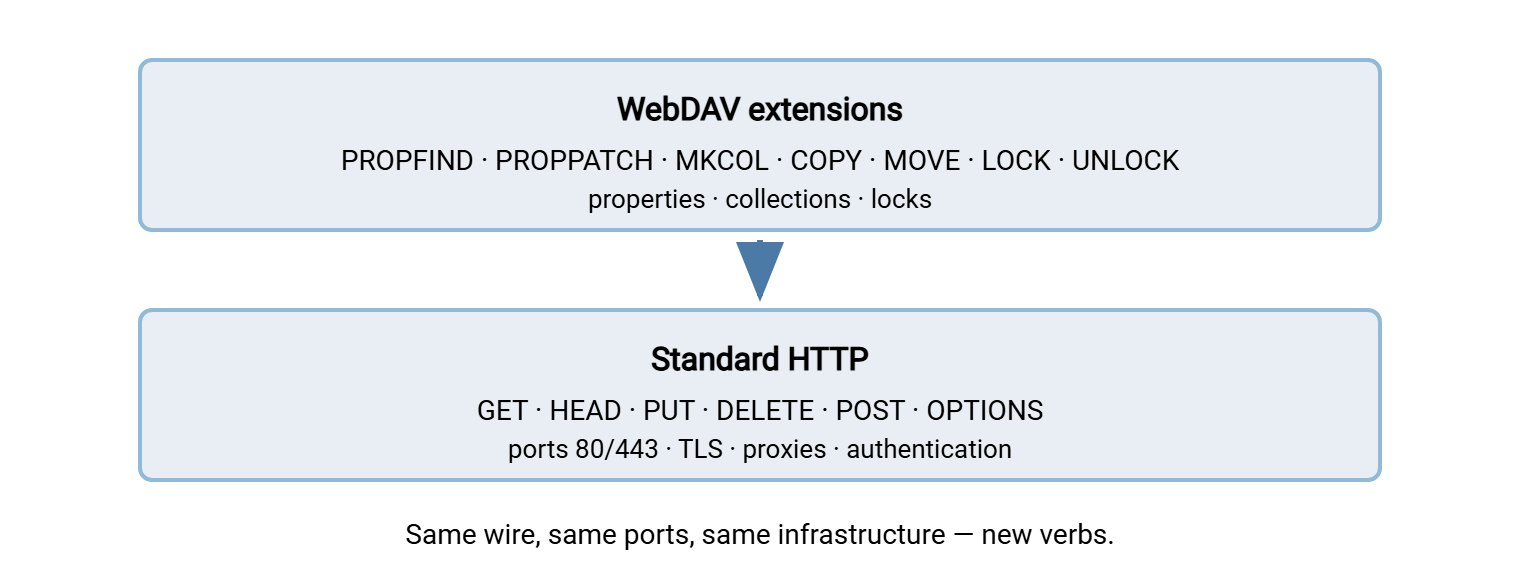
Here is what each verb does, with the everyday file-manager action it corresponds to:
| Method | What it does | File-manager equivalent |
|---|---|---|
PROPFIND |
Read a resource's properties; list a folder's contents | Opening a folder; viewing file details |
PROPPATCH |
Set or remove properties in one atomic batch | Editing a file's metadata |
MKCOL |
Create a collection | New folder |
COPY |
Duplicate a resource server-side, to a Destination path | Copy and paste |
MOVE |
Move or rename a resource server-side | Rename; drag to another folder |
LOCK |
Reserve a resource for writing; returns a lock token | "This file is in use by another user" |
UNLOCK |
Release a lock, identified by its token | Closing the document |
The old HTTP methods keep their jobs and gain file-manager meanings of their own. The method GET downloads a file, and PUT uploads one (creating it or replacing it whole). The method DELETE removes a file — or an entire folder tree, if aimed at a collection. And OPTIONS asks the server which of all these verbs it actually supports. A surprising amount of WebDAV troubleshooting consists of discovering that some device in the middle allows the familiar verbs and blocks the new ones. We dissect that failure pattern in troubleshooting WebDAV.
Notice which method does the everyday heavy lifting: PROPFIND. Every directory listing, every file-details view, every "has anything changed?" check is a PROPFIND. When you watch WebDAV traffic in a log, PROPFIND typically outnumbers every other method combined. That fact matters later when we talk about performance.
Collections: Folders Over HTTP
A collection is WebDAV's word for a folder: a resource whose job is to contain other resources. Collections are what let a flat web server present a hierarchy you can navigate like a directory tree.
MKCOL creates one. It creates exactly one level at a time. If you ask for /projects/reports/drafts/ and reports does not exist yet, the server refuses with 409 Conflict rather than inventing the missing parents. Clients that create deep trees must therefore walk down level by level, one MKCOL per layer.
Listing a collection is where the Depth header enters. Depth is WebDAV's way of saying how much of the tree a request should cover:
- Depth: 0 — just this resource itself.
- Depth: 1 — this resource plus its immediate children. This is a folder listing.
- Depth: infinity — this resource and everything beneath it, the entire subtree.
Depth-infinity PROPFIND sounds wonderful — one request, the whole tree. And most servers refuse it. On a large tree it is an invitation to build a gigantic response while holding resources the whole time. With infinity off the table, clients enumerate trees level by level. That is why browsing a deeply nested WebDAV share feels slower the deeper you go: each level is another round trip.
COPY and MOVE round out folder management, and they have a genuinely elegant property: they happen entirely on the server. The client sends the method, the source path, and a Destination header naming the target. The server does the work internally. Renaming a ten-gigabyte file over WebDAV is instant, because MOVE moves nothing across the network. (Contrast that with protocols where a "move" degenerates into download-then-upload.) An Overwrite header — T or F — tells the server whether clobbering an existing target is acceptable. With F, a collision fails with 412 Precondition Failed.
Properties: Metadata You Can Query
A property is a named piece of metadata attached to a resource, expressed in XML. Every property has a namespaced name and a value. The specification defines a set of live properties — ones the server itself maintains and guarantees to be accurate. These include getcontentlength (file size), getlastmodified (timestamp), and getetag (a version fingerprint that changes when content changes). They also include resourcetype (which marks whether a resource is a collection) and supportedlock (what locking it offers). Beyond those, clients may attach dead properties — arbitrary metadata the server stores verbatim and returns on request without understanding it. These might be a document's author, a review status, anything an application dreams up.
You read properties with PROPFIND and write them with PROPPATCH. A PROPFIND request carries a small XML body naming the properties you want (or asking for all of them). The Depth header decides whether you are asking about one resource or a folder's worth. Here is a realistic exchange — a client listing a folder, trimmed to its essentials:
PROPFIND /projects/ HTTP/1.1
Host: files.example.com
Depth: 1
Content-Type: application/xml

<?xml version="1.0"?>
<propfind xmlns="DAV:">
  <prop>
    <displayname/>
    <getcontentlength/>
    <resourcetype/>
  </prop>
</propfind>

HTTP/1.1 207 Multi-Status
Content-Type: application/xml

<?xml version="1.0"?>
<multistatus xmlns="DAV:">
  <response>
    <href>/projects/</href>
    <propstat>
      <prop>
        <displayname>projects</displayname>
        <resourcetype><collection/></resourcetype>
      </prop>
      <status>HTTP/1.1 200 OK</status>
    </propstat>
  </response>
  <response>
    <href>/projects/report.docx</href>
    <propstat>
      <prop>
        <displayname>report.docx</displayname>
        <getcontentlength>48211</getcontentlength>
        <resourcetype/>
      </prop>
      <status>HTTP/1.1 200 OK</status>
    </propstat>
  </response>
</multistatus>
That 207 Multi-Status response code is a WebDAV invention worth pausing on, because nothing else in HTTP works this way. A single WebDAV request can touch many resources — a Depth: 1 listing, a DELETE of a whole collection, a MOVE of a subtree. Each resource can succeed or fail independently. So the server answers 207, meaning "the real answers are inside," and the XML body carries an individual status per resource. The empty <resourcetype/> on the file, versus the <collection/> marker on the folder, is how clients tell files from folders.
Remember: a 207 response is not a success code — it is an envelope. A tool can report "207 Multi-Status, request complete" while individual resources inside failed with 403 or 423. When a bulk operation half-works, read the multistatus body; the per-resource statuses are where the truth lives.
Locking: How WebDAV Prevents the Lost Update
Imagine two people open the same document from the same server. Both edit. Both save. Whoever saves second wins, and the first person's work silently evaporates. This is the lost update problem, and it is the single scenario WebDAV's locking model exists to prevent. Remember, the protocol was built for shared authoring, where this collision is a daily occurrence rather than a rarity.
The model works like a coat check. A client that intends to edit sends LOCK on the resource. If the server grants it, the response contains a lock token — an opaque string (formatted as a URI beginning opaquelocktoken:). That token works like a claim ticket. From then on, any request that would modify the locked resource — PUT, PROPPATCH, MOVE, DELETE — must present the token. Clients do that in an If header. A write that arrives without the token is refused with 423 Locked. When the editor finishes, UNLOCK (with the token in a Lock-Token header) releases the reservation.
The essential exchange, trimmed:
LOCK /projects/report.docx HTTP/1.1
Host: files.example.com
Timeout: Second-600
Content-Type: application/xml

<?xml version="1.0"?>
<lockinfo xmlns="DAV:">
  <lockscope><exclusive/></lockscope>
  <locktype><write/></locktype>
  <owner>alex-workstation</owner>
</lockinfo>

HTTP/1.1 200 OK
Lock-Token: <opaquelocktoken:e71d4fae-5dec-22d6-fea5-00a0c91e6be4>

PUT /projects/report.docx HTTP/1.1
If: (<opaquelocktoken:e71d4fae-5dec-22d6-fea5-00a0c91e6be4>)
Content-Length: 48630
...file contents...
A few details fill out the picture. Locks come in two scopes. There is exclusive (one holder, everyone else refused — what editors almost always use). There is shared (several cooperating holders at once, rarely seen in practice). Locks are write locks: they block modification, not reading — anyone can still GET a locked file. A lock can cover a single resource or, with a Depth header, an entire collection subtree. And locks expire. The client proposes a lifetime in the Timeout header; the server grants what it pleases (often shorter). A client that wants to keep editing must refresh the lock before it lapses.
The sequence below shows the whole dance, including the collision the lock exists to cause.
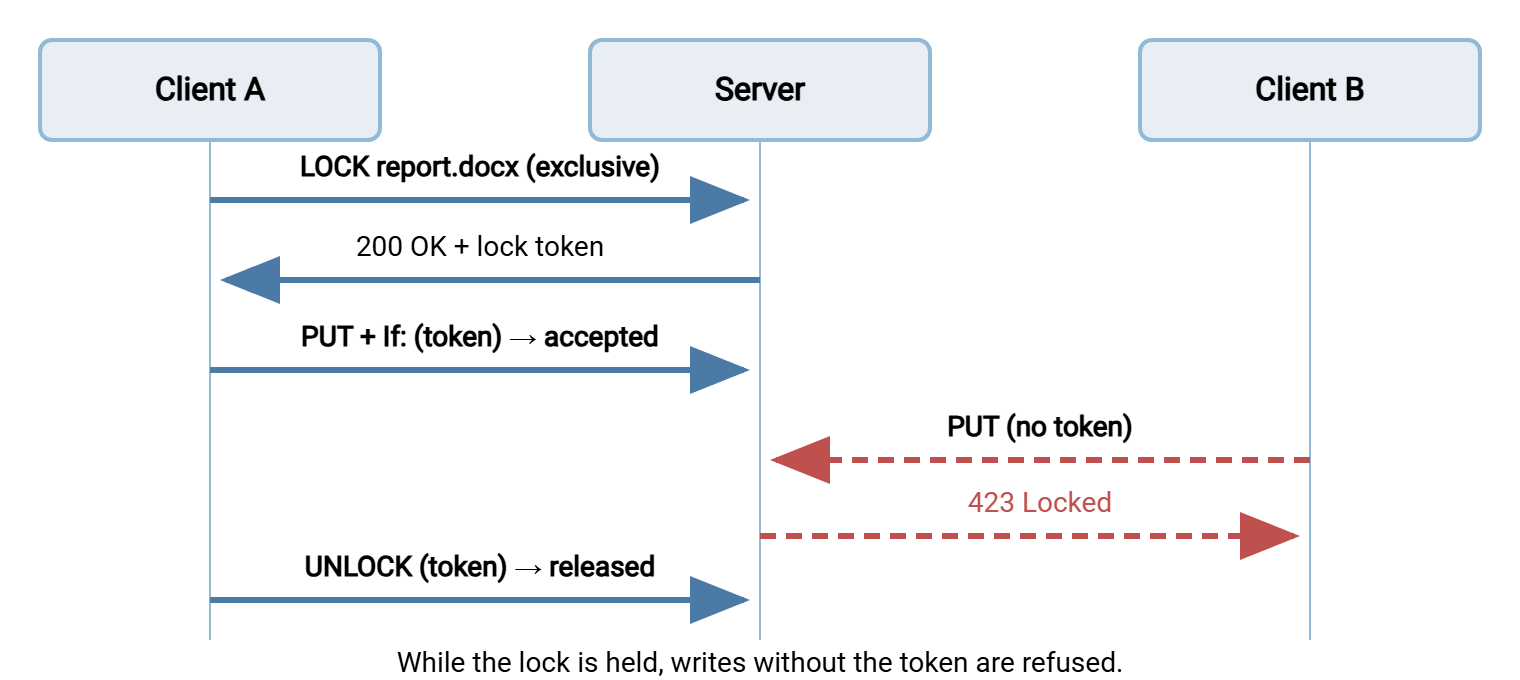
Now the operational reality: the locking model's weak point is the orphaned lock. Suppose client A's laptop crashes mid-edit. The lock token existed only in that client's memory; it is gone. The lock itself, however, lives on the server, faithfully refusing everyone's writes until its timeout expires. That is why "the file says it's locked but nobody has it open" is one of the classic WebDAV support tickets. The lockdiscovery property lets you inspect who holds a lock and for how long, and most servers give administrators a way to clear one. We walk through that diagnosis in the troubleshooting guide.
Compliance Classes: Why Some Mounts Are Read-Only
Not every WebDAV server implements everything, and the protocol has an honest mechanism for saying so. When a client sends OPTIONS, a WebDAV server answers with a DAV header listing its compliance classes:
OPTIONS /projects/ HTTP/1.1
Host: files.example.com

HTTP/1.1 200 OK
DAV: 1, 2, 3
Allow: OPTIONS, GET, HEAD, PUT, DELETE, PROPFIND, PROPPATCH,
       MKCOL, COPY, MOVE, LOCK, UNLOCK
Class 1 is the core: methods, properties, collections. Class 2 adds locking — LOCK and UNLOCK. Class 3 signals conformance with the revised specification's tightened rules. The Allow header, alongside, lists the concrete methods this resource accepts.
This little handshake explains a mystery that sends many administrators searching: why a WebDAV drive mounts read-only. Several operating-system clients check for class 2 before allowing writes, on the reasoning that editing without locking invites the lost update problem. Point such a client at a class-1-only server — common on minimal or embedded implementations — and it quietly mounts the share read-only. No error message connects the effect to the cause. When you meet a mysteriously read-only mount, an OPTIONS probe of the server should be your first move. See our mounting guide for the per-platform behavior.
How the Design Explains the Quirks
Everything above is the protocol as designed. Here is how each design choice turns into behavior you will observe in production — the connective tissue between this article and the rest of the series.
Metadata lives behind round trips, so browsing is chatty. A file manager showing a folder needs names, sizes, types, and dates — a PROPFIND. Open a subfolder: another PROPFIND. Check whether anything changed: PROPFIND again. Each is a full HTTP request-response cycle. On a link with 60 milliseconds of latency, a tree of thirty folders costs seconds of pure waiting before a single byte of file content moves. WebDAV browsing feels fine on a LAN and increasingly syrupy as latency grows.
PUT replaces whole files, so large files are fragile. The standard gives GET a way to fetch a byte range, but uploads have no standardized equivalent. A PUT is the entire file, in one request, or nothing. A connection hiccup at gigabyte nine of ten means starting over — there is no resume. Timeouts in proxies and gateways compound this, which is why large-file behavior gets its own section in the troubleshooting article.
HTTP is stateless, so credentials are everywhere. Every request authenticates afresh. Clients hide this by caching credentials aggressively — in memory, in credential stores, per mount. The day a password changes, some cache somewhere keeps replaying the old one, and the resulting account lockouts are a rite of passage. Statelessness also means the server sees no "logout." Access control must be enforced request by request, a point that matters when securing an endpoint.
The metadata is XML, and parsers disagree. Namespaces, character encodings, optional elements: the specification allows variety, and client implementations interpret it with different degrees of care. Two clients can talk to the same server and disagree about what they see. This is why WebDAV interoperability has a folkloric quality — most combinations work, and the ones that do not fail in oddly specific ways.
Locking is optional, so writability is negotiable. As covered above: class 2 is an option, some clients demand it, and the mismatch surfaces as read-only mounts rather than clear errors.
The mental model to keep: WebDAV is a filing cabinet built from web requests. Every folder view, rename, and save is one or more stateless HTTP round trips. So latency multiplies, uploads are all-or-nothing, and any middlebox that manhandles unusual HTTP methods can break it. Hold that model and the quirks stop being mysterious.
Where to Go From Here
You now know what WebDAV actually is: HTTP plus seven verbs, XML properties, collections with Depth semantics, and a coat-check locking model. It is a design built for editing documents in place. Its strengths (firewall-friendliness, server-side COPY and MOVE) and structural weaknesses (chattiness, whole-file uploads, optional locking) follow directly from that purpose.
The rest of the series turns the theory into practice. Mounting remote storage as a drive covers the operating-system clients and their honest limits. WebDAV vs SFTP vs SMB places the protocol among its rivals so you can pick the right tool per job. And when an endpoint lands in your lap, securing a WebDAV endpoint is the hardening pass to run before anything else.
Frequently Asked Questions
What port does WebDAV use?
Is WebDAV the same thing as HTTP?
What is PROPFIND in plain terms?
Why does my WebDAV drive mount as read-only?
Does a WebDAV lock stop people from downloading a file?
What happened to the "versioning" in WebDAV's name?
From the Sysax team: we build secure file transfer software for Windows. Sysax Multi Server is an FTP, FTPS, SFTP, and HTTPS server. Sysax FTP Automation handles scheduled, scripted transfers. Free trials are on the download page.