
Designing Lockouts and Throttling Without Self-DoS
The instinct is right: if attackers get to guess passwords, take away their guesses. The usual first attempt at that instinct is wrong: "lock any account after three bad passwords until an administrator unlocks it." That policy feels tough, and it creates a bigger problem than the one it solves. It hands every attacker on the internet a switch that shuts off your legitimate users. It converts your own partners' clumsy moments into outages.
The goal of this article is a lockout and throttling design that does the job it was meant to do — make password guessing hopelessly slow. It must avoid the two failure modes that plague naive implementations. Those are self-inflicted denial of service (your defense becoming an attacker's weapon) and partner self-DoS (your own users tripping the trap during normal work). We will separate throttling from lockout and walk a state machine that shows how the pieces fit. We will do the arithmetic that proves backoff works and settle the unlock question that everyone gets wrong the first time.
This is part of our Brute-Force Defense series and builds directly on the anatomy of credential attacks. Read that first if the terms dictionary, stuffing, and spray are not yet second nature. A lockout design only makes sense once you know which attacks it is aimed at.
Three Different Tools, Often Confused
People say "lockout" for three mechanisms that behave very differently. Getting the vocabulary straight is half the design.
- Throttling slows attempts without ever refusing them outright. After a few failures from a source, each new attempt is accepted more and more slowly. Nobody is locked out; guessing just becomes unbearably slow.
- Blocking (temporary lockout) refuses attempts entirely for a set period once a threshold is crossed. It can be scoped to a source address ("this IP is blocked for 30 minutes") or to an account ("this username is locked for 15 minutes").
- Banning is a long or indefinite block, usually of a repeat-offender source. It is the subject of its own article — log-driven auto-banning. In practice, banning is implemented by watching logs and updating a firewall, one layer below the transfer service.
The single most important design choice is what you count against. Counting failures against the source address is safe and effective. Counting them against the account is where self-DoS is born. The rest of this article is, in a sense, an argument for preferring the former and handling the latter with great care.
Why Per-Account Hard Lockout Is a Weapon
Walk through what a hard per-account lockout actually does from the attacker's side. Suppose the rule is "lock any account after five failed passwords until an admin intervenes." An attacker who wants to disrupt your business does not need to crack anything. They only need to know an account name — and account names are the guessable half of a credential, often a partner's company name or an email address. They deliberately fail five logins against it, the account locks, and your partner's nightly transfer job starts failing. The attacker spent five packets; you spent a support escalation and a broken flow. Repeat across every account name they can guess, and the attacker has taken your service down without cracking a single password.
That is the self-DoS trap: the account under attack is the victim, and a hard per-account lockout punishes the victim while costing the attacker nothing. There is a second, quieter version that does not even need an attacker. A partner whose scheduled job is running a stale password produces the metronome-tempo failure every fifteen minutes. We cover that in the authentication series' reading of auth failures. That partner will lock its own account before anyone has read the log. A configuration error becomes an outage, automatically.
Remember: a per-account lockout that can be triggered by anyone who knows the account name is a denial-of-service feature you built for attackers. If you take one rule from this article, make it this: count and block by source first, and keep any per-account lock short, automatic, and noisy.
The Better Primary Control: Per-Source Throttling and Blocking
The offending unit in a dictionary run or a spray is the source hammering your service, not the account it happens to be aiming at. Counting failures per source and responding to the source fixes the self-DoS problem at its root. A legitimate partner logging in from their known address simply never accumulates failures. Only the attacker does, and the response lands on the attacker.
Per-source control also degrades gracefully. Rather than a hard on/off lock, the friendliest and most effective shape is progressive backoff: the first couple of failures cost nothing. Each additional failure from that source adds a growing delay before the next attempt is even considered. A human who mistypes twice notices no delay. A machine grinding a wordlist runs face-first into seconds, then minutes, of enforced waiting. The economics collapse without a single hard lockout to manage.
A Lockout State Machine You Can Reason About
It helps to picture the whole thing as a state machine that each source address moves through independently. A source starts in Normal and slips into Throttled as failures accumulate. It gets Temp-Blocked if it crosses the threshold, and escalates to Banned if it keeps coming back. Every blocked state has an automatic path back to Normal when its timer runs out. The diagram below traces those transitions.
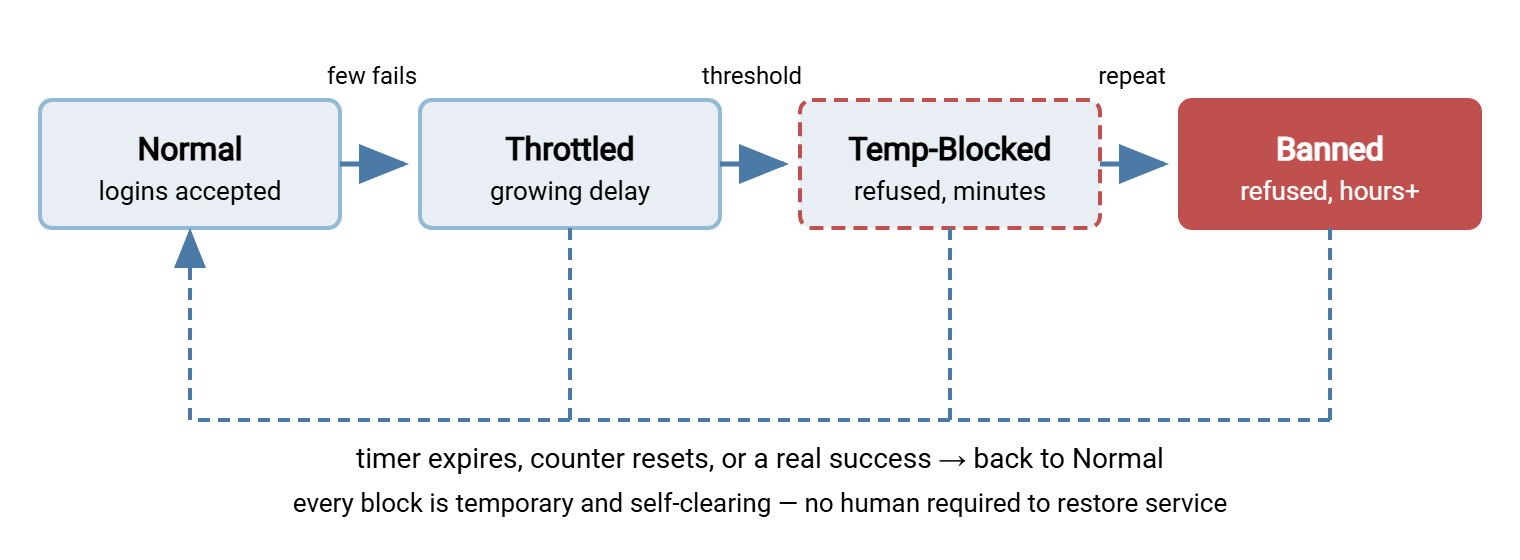
Three properties of this machine are what make it partner-safe. First, a legitimate source never leaves Normal, because it does not generate a stream of failures. Second, every blocked state clears itself — there is no permanent state that requires a human to undo. So an attack cannot create a backlog of manual unlock work. Third, escalation is earned: a source has to misbehave, get blocked, wait, and misbehave again to reach a long ban. That means the harshest response is reserved for the most obviously malicious traffic.
The Arithmetic of Backoff
It is worth proving to yourself that gentle-sounding controls actually defeat guessing, because the numbers are more dramatic than intuition suggests. Consider a progressive delay that does nothing for the first two failures and then doubles: 2 seconds, 4, 8, 16, and so on, capping at a couple of minutes. Here is the schedule and what it does to an attacker's throughput from a single source:
PROGRESSIVE BACKOFF (per source) - illustrative schedule

  Failure #   Delay before next attempt is accepted
  1           0 s      (free - forgive the honest typo)
  2           0 s      (free)
  3           2 s
  4           4 s
  5           8 s
  6           16 s
  7           32 s
  8           64 s
  9           120 s    (cap)
  10+         120 s    (cap holds)

  Without throttling: a source can try thousands of
  passwords per minute.

  With this schedule: after ~8 failures the source is
  limited to about 30 attempts per HOUR. A wordlist that
  would take minutes now takes years - the attacker leaves.
That is the whole magic trick. You do not need to lock anyone out to make guessing pointless; you only need to make each additional guess cost more than the last. The first two free failures keep the policy invisible to real users, who essentially never fail more than twice. Everything past that is aimed squarely at machines. Pair this per-source backoff with the strong, unique passwords from your authentication policy and even an attacker who somehow evades the throttle is guessing against a space too large to search.
One detail decides whether the schedule stays fair: the counter window. Failures should decay rather than accumulate forever. A source that fails three times, waits an hour, and then makes an honest attempt should not still be carrying yesterday's penalty. Use a rolling window — "failures in the last N minutes" — so the count melts away during quiet periods and only a source that keeps failing keeps paying. A counter that never resets eventually blocks legitimate users who happened to fumble a login weeks apart, which is just self-DoS on a slow fuse.
A related refinement is where the delay is applied. Some services slow the response itself — holding the connection open a beat longer before answering, sometimes called tarpitting — which ties up the attacker's own resources as a bonus. Others simply refuse new connection attempts from the source until the delay elapses. Either achieves the throughput collapse in the table. The choice is usually made for you by what your transfer software and host firewall support, and both are fine.
The Per-Account Safety Net, Done Gently
Per-source control handles the internet. But there is a residual case it does not cover: an attacker distributing a slow spray across many source addresses, each contributing only a failure or two, aimed at one account. For that you may still want a per-account backstop — just not the hard kind. A gentle per-account net follows three rules:
- Generous threshold, short duration. Something like ten failures within fifteen minutes triggers a lock that expires on its own in fifteen minutes. Long enough to interrupt a spray, short enough that a partner's bad morning self-heals before they finish writing the support ticket.
- Never permanent. Manual-unlock-only locks are reserved for confirmed incident response, never for routine policy. A policy that requires a human to restore normal service is a policy an attacker can weaponize into unbounded work for your team.
- Always noisy. A per-account lock should always fire a notification, because it means either a real attack is under way or a legitimate account is broken. Either way a human should know. A silent lock is an outage nobody is looking at.
The quiet prerequisite that makes even this gentle net almost never fire is source allowlisting. An account that can only be reached from its known partner addresses cannot accumulate failures from the open internet, so the lockout question barely arises for it. That is why the next article, IP allowlisting and geo-restrictions, is the natural companion to this one. Allowlisting shrinks the population of sources that can trip any of these controls down to almost nothing.
Unlock Paths: The Question Everyone Gets Wrong
Designing the lock is the fun part; designing how it ends is the part that determines whether your help desk drowns. There are four ways a block can clear, and a healthy design leans hard on the first.
- Automatic expiry should be the default for everything. Source blocks, throttle counters, and per-account soft locks all clear themselves on a timer. This is what keeps an attack from generating a queue of manual work.
- Self-service recovery — a documented, out-of-band way for a real user to prove who they are and regain access — handles the rare case where someone genuinely locks themselves out and cannot wait. For transfer partners this is usually a phone call to a known contact, not a self-serve web form.
- Administrator unlock, after out-of-band verification, is for the exceptions. The critical word is verification: never treat an inbound "please unlock my account and remind me of the password" message as proof of identity. Unlock requests are a classic social-engineering opening.
- Deliberate non-unlock is the right answer when the block is doing its job. A banned attacker source stays banned. A compromised credential gets revoked, not unlocked — which shades into the emergency revocation drill in the partner credential lifecycle.
Cover Every Door
A throttling policy only protects the interfaces it is switched on for. A transfer server frequently speaks several protocols at once — FTP, FTPS, SFTP, HTTPS — plus a separate administrative interface. An attacker will happily find the one you forgot to cover. When you design thresholds, write down every authenticating surface and confirm each is protected. Give the admin interface the strictest treatment of all because it should almost never see a failed login in the first place.
Where the transfer software itself does not implement per-source backoff, the job moves down a layer to the host firewall driven by log watching — again, the auto-banning pattern. The substrate this all rides on is solid authentication and complete logging. A server such as Sysax Multi Server authenticates users across its protocols and records every attempt to its activity log. That per-attempt record, with source address and outcome, is what any throttling or banning layer reads to decide who to slow down. Getting those records off the box and into something that can act on them is covered in transfer logging and audit.
Monitor the Lockouts Themselves
A lockout is not only an action; it is a signal, and the best designs treat the lockout event as a monitoring input rather than a fire-and-forget outcome. Three patterns deserve attention:
- Any lock of a partner or service account. These accounts should almost never lock. When one does — whatever the cause — files have likely stopped moving, and the business impact means a human should know before your partner calls.
- A lockout storm. A sudden spike in blocks across many sources or accounts is either a large campaign or a misfiring rule. Both need eyes.
- The success after the streak. The most important line in any auth log is a success that follows a run of failures on the same account. A lock that fires after that success is a smoke alarm sounding after the fire. Your monitoring must catch the success, not just the lock.
Turning these into alerts that fire on the right patterns — and stay quiet for the nightly guess-list noise that needs no human — is the whole subject of watching credential attacks in your logs, the article that closes this series.
Wrapping Up
Good lockout design is mostly a matter of counting against the right thing. Count and throttle by source, and legitimate users never feel it while machines grind to a halt against progressive delay. Keep any per-account lock generous, short, self-expiring, and noisy, so it interrupts a spray without ever becoming an attacker's off switch or a partner's outage. Lean on automatic expiry so an attack cannot bury your team in manual unlocks. Verify identity out of band on the rare real unlock, and treat every lockout as a signal worth watching. Do that and you get the thing you actually wanted — guessing made pointless — without building the denial-of-service tool that naive lockouts hand to the very people you are defending against.
Next, tighten the source question further with IP allowlisting and geo-restrictions. Or automate the source blocking with log-driven auto-banning. Or remove the guessing target entirely with ending password attacks by design.
Frequently Asked Questions
Should I lock accounts or block IP addresses?
How many failures should trigger a lockout?
Won't throttling annoy legitimate users who mistype?
Should locked accounts require an administrator to unlock them?
What is a self-DoS in the context of lockouts?
From the Sysax team: we build secure file transfer software for Windows. Sysax Multi Server is an FTP, FTPS, SFTP, and HTTPS server. Sysax FTP Automation handles scheduled, scripted transfers. Free trials are on the download page.