
Ending Password Attacks by Design
Every article so far in this series has made password guessing harder — slower with throttling, noisier with banning, rarer with allowlisting. This one makes it impossible, at least for the accounts that qualify, by removing the thing being guessed. If there is no password on an account, no amount of guessing can find it. That is not a clever trick; it is the logical end of the whole problem, and it is available to more of your accounts than you probably think.
The attack-ender is key-only authentication. This article explains why keys end password guessing where throttling only slows it. It walks the move to key-only for the accounts that can take it, then treats two ideas people constantly overrate. One is the honest, limited value of running services on nonstandard ports. The other is what "security through obscurity" genuinely buys versus what it only pretends to. The goal is a transfer endpoint whose password attack surface is, by design, close to zero.
This is part of our Brute-Force Defense series and leans on the mechanics in our SSH key management series. This article makes the security case for keys; that one shows you how to generate, distribute, and rotate them properly.
Why Keys End What Throttling Only Slows
To see why keys are categorically different, look at what each authentication method exposes to the network. Password authentication puts a small, human-chosen secret at the end of a login prompt that anyone on the internet can reach. The attacker's job is to produce that secret, and since humans choose from a limited, predictable space, guessing is a viable — if slow — strategy. Every control in this series exists to make that guessing uneconomical, but the guessable secret is still there, still reachable, still the target.
Public-key authentication removes the guessable secret from the conversation entirely. You generate a key pair: a private key stays on the client and never crosses the network. A public key lives on the server and is safe for anyone to see. At login, the server issues a challenge that can only be answered by whoever holds the private key. It checks the answer against the stored public key. No secret is transmitted, and there is nothing small enough to guess — the key space is astronomically large, far beyond any brute-force reach. An attacker offering passwords to a key-only server is simply rejected by the protocol before any guessable check exists. The door has no keyhole to pick.
The diagram below contrasts the two surfaces. The password door faces the internet with a secret an attacker can try to produce. The key-only door offers nothing to guess, so the risk moves off the network entirely and onto the client. There it becomes a key-custody problem instead of a guessing problem.
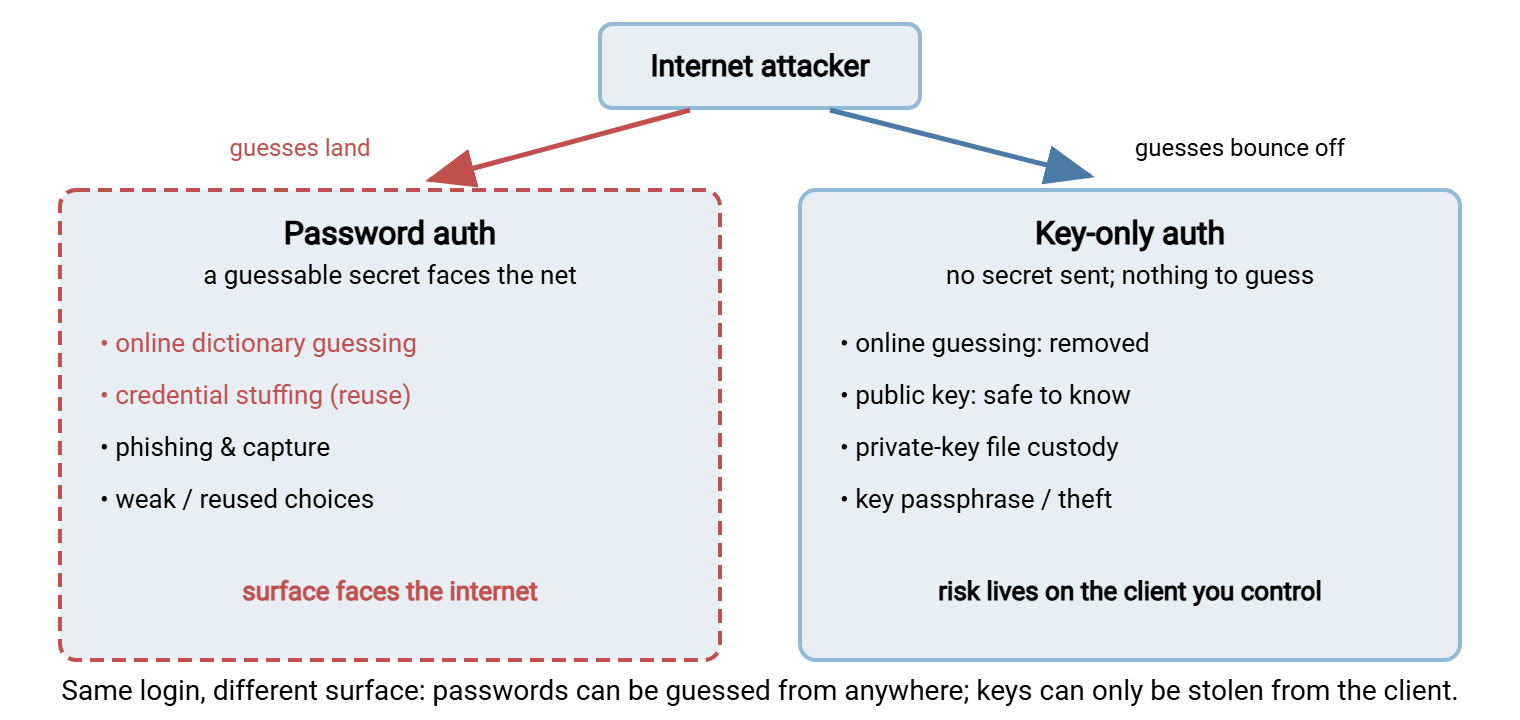
This is why key-only authentication is the strongest single lever in brute-force defense. It does not make the attack harder; it makes the attack meaningless. The residual risks — someone stealing the private key file, or a weak or absent key passphrase — are real and worth managing. But they are client-side custody problems, not network-facing guessing problems. They are addressed head-on in the SSH key management series.
The One Step That Actually Ends It
Here is the subtlety that trips people up: adding keys does not end password guessing. A server that accepts either a key or a password still has the password door wide open. Attackers will keep knocking on it regardless of how many of your users switched to keys. The attack only ends when you disable password authentication so the password door does not exist. Adding keys is preparation; removing passwords is the act.
The safe way to get there is a staged cutover that never breaks a working flow. Add keys alongside passwords, verify every account and job authenticates by key across a full business cycle, and only then turn passwords off. Confirm afterward that a password attempt is refused at the protocol level and that the password-failure noise in your logs collapses.
CUTOVER TO KEY-ONLY SSH / SFTP AUTH - RUNBOOK

  1. INVENTORY   list every account that logs in by password,
                 and every job or partner that uses each one.
  2. GENERATE    create a key pair per user or job (see the
                 SSH key management series for how and where).
  3. DISTRIBUTE  install each public key in the account's
                 authorized_keys on the server. Leave password
                 auth ON for now - both methods work in parallel.
  4. VERIFY      confirm every account and job authenticates
                 with its key. Watch the logs for a full cycle
                 (a week or more) so nightly jobs prove themselves.
  5. CUT OVER    once every account works by key, DISABLE
                 password authentication on the service. This is
                 the step that actually ends the guessing.
  6. CONFIRM     attempt a password login - it must be refused
                 before any password check. Re-read the logs:
                 the password-failure noise should fall away.
  7. HOLDOUTS    accounts that truly cannot use keys stay on
                 password + MFA + allowlist + throttling, and go
                 on the list to migrate or retire later.

KEY POINT: steps 1-4 add keys; step 5 removes the target.
Keys alongside passwords still allow guessing. Passwords must be
turned OFF for the attack to actually end.
Remember: keys plus passwords is not key-only. As long as the server will still accept a password, the guessing continues and every control in this series is still doing work. The security win arrives at the moment you disable password authentication — that single toggle is what turns "harder to guess" into "nothing to guess."
Where Key-Only Fits, and Where It Doesn't
Key-only authentication is a natural fit for a large share of transfer work, and an awkward one for the rest. Being honest about the boundary keeps you from either missing an easy win or forcing keys where they do not belong.
It fits best on SSH-based transfers — SFTP and SCP — because public-key authentication is built into SSH. It fits especially well for unattended machine-to-machine jobs, where keys are not just more secure but genuinely more convenient. A scheduled transfer authenticating with a key needs no password stored in a script and no human to type anything. That is why keys are the standard for automation. A Windows SFTP server such as Sysax Multi Server speaks SSH2 and authenticates its users by this mechanism. Our guide to SFTP authentication covers how that key negotiation works in practice.
It fits awkwardly, or not at all, in a few places you should plan around:
- FTPS and HTTPS do not use SSH keys — they authenticate over TLS, where the equivalent "no password to guess" control is a client certificate (mutual TLS). The idea is the same — prove possession of a private credential rather than reciting a guessable one — but the machinery differs. The method comparison lives in our transfer authentication series.
- Interactive human users who genuinely need to log in with a password cannot always be moved to keys. For them, layer multi-factor authentication on top of the password and keep the throttling and banning from earlier in this series doing their job.
- Legacy partners whose software cannot do key authentication need a transition plan, not an ultimatum. Keep them on password plus allowlist plus throttling as a compensating stack while you work them toward keys or a modern endpoint.
The Residual Risk: Key Custody
Ending password guessing does not end all risk — it relocates it. With key-only auth, the attacker's path is no longer "guess the secret over the network" but "obtain the private key from the client." That is a genuinely harder job for them and a manageable one for you, but it deserves honest attention rather than a victory lap.
The private key is now the whole secret, so it must be protected like one. SSH enforces this to a degree — it refuses to use a private key whose file permissions are too loose. The rest is your discipline: keys live in protected locations, never in shared folders or version control, and never travel by email. A stolen key file is a stolen credential, so the offboarding and rotation habits in the SSH key management series matter as much as the cutover itself.
Automation forces one honest tradeoff. An unattended job cannot type a passphrase, so its key is usually stored without one. That means the private key file itself is the entire defense, unlocked and ready on disk. That is acceptable when the file is well protected and the key is tightly scoped. But it raises the stakes on file permissions and on restricting what each key is allowed to do on the server. Constraining an automation key to a single source and a single command, so a stolen copy is far less useful, is exactly the kind of control the key-management series covers under authorized-keys restrictions. The point is not that keys are risk-free; it is that key-custody risk on a client you control is a much better problem than a guessable secret exposed to the entire internet.
The Honest Case for Nonstandard Ports
A perennial suggestion for reducing attacks is to move your service off its standard port — SSH off port 22, FTP off port 21 — to a nonstandard number. This is worth doing for one honest reason and dangerous to do for a dishonest one.
The honest reason is noise reduction. The overwhelming majority of automated guessing is untargeted bulk scanning that only knocks on standard ports. That is because scanning every port of every address is more expensive than scanning one port of every address. Move your service to an unusual port and most of that ambient noise simply stops arriving. Your logs get quieter. And — this is the real benefit — the guessing that remains is more likely to be someone who found your port deliberately. That makes a genuine targeting attempt easier to spot against the reduced background. As a log-hygiene measure, it is legitimate and cheap.
The dishonest reason is believing it is a security control. It is not. A nonstandard port stops no one who has decided to attack you specifically. A targeted scan walks every port and finds your service in minutes, at which point the guessing resumes exactly as before. Moving the port changes how much noise you receive, not whether you can be attacked. Treat it as security and you will feel protected while remaining exactly as exposed, which is worse than not moving the port at all.
There is also a real cost. Every partner and client now has to be told the nonstandard port, and every piece of documentation has to record it. Every "why can't I connect" ticket gains a new possible cause. Weigh that friction against the noise-reduction benefit honestly — and never let a moved port substitute for the auth hardening that actually matters. On the same theme of not advertising yourself unnecessarily, trimming version banners and verbose errors is covered in our hardening series.
What Obscurity Does and Doesn't Buy
Nonstandard ports are one instance of a broader idea worth getting straight: security through obscurity — hiding details in the hope attackers won't find them. Obscurity is a fine supplement and a fatal foundation, and there is a simple test that tells you which role a given measure is playing.
Ask: "If the attacker learns this secret, am I still safe?" For real security controls, the answer is yes. An attacker who learns your public key gains nothing — they still cannot log in without the private key. An attacker who learns your username still faces key-only authentication. These controls do not depend on secrecy; they work even when the details are known, which is the hallmark of genuine security. For obscurity measures, the answer is no: an attacker who discovers your nonstandard port, or your hidden directory, or your unadvertised hostname, is immediately back to full exposure. The obscurity bought time and quiet, nothing more.
So use obscurity for what it is: a way to reduce casual attention and log noise, layered on top of controls that hold even when nothing is hidden. Never let it be the thing you are actually relying on. A key-only server on a nonstandard port behind an allowlist is well designed. But it is the key-only part carrying the security, with the port and the allowlist trimming noise and shrinking the audience.
The Endgame: A Server With No Password to Attack
Put the pieces together and you arrive at a transfer endpoint that is genuinely boring to attack. Key-only authentication removes the guessable secret. An allowlist removes most of the internet's ability to even connect. A nonstandard port and trimmed banners drain the ambient noise. And monitoring watches the quiet that remains for the rare signal worth a human. An attacker who scans this server finds a port that answers, refuses passwords outright, and only accepts connections from addresses that are not theirs. There is nothing to guess and, often, no way to knock. That is what "by design" means — you did not out-fight the attacker, you removed the fight.
Wrapping Up
You can spend forever making password guessing harder, or you can end it. Key-only authentication ends it, because a login with no guessable secret cannot be guessed. The risk shifts from the network to client-side key custody, which is a far better problem to have. The move is a staged cutover, and its decisive step is disabling password authentication, because keys alongside passwords still leave the door open. Around that core, nonstandard ports and obscurity earn their keep as noise reducers but never as controls; the test is whether you are still safe once the secret is known. Combine key-only auth with allowlisting and monitoring and you get a transfer server with essentially no password attack surface at all.
Continue with the mechanics in our SSH key management series. Revisit IP allowlisting to see how the two combine. Use watching credential attacks in your logs to confirm the noise really did fall away after you cut over.
Frequently Asked Questions
Does key-only authentication really stop brute-force attacks?
If I add SSH keys, is password guessing over?
Does moving SSH off port 22 make me more secure?
What about FTPS or HTTPS, which don't use SSH keys?
Is security through obscurity ever worth it?
From the Sysax team: we build secure file transfer software for Windows. Sysax Multi Server is an FTP, FTPS, SFTP, and HTTPS server. Sysax FTP Automation handles scheduled, scripted transfers. Free trials are on the download page.