
Embedding a Transfer Client vs Delegating to Transfer Infrastructure
The case for involving an application in moving files is made in when applications need file transfer built in. Once an application is involved, a real architectural decision follows. It deserves better than a reflex. Option one: link a transfer library into the application, so the app itself opens connections to remote servers. Option two: have the application write files to a handoff point and let your managed transfer layer do the moving. That layer is the scheduled jobs, watch folders, and transfer tooling that operations already runs.
Developers tend to assume the first; administrators tend to assume the second; both assumptions are sometimes wrong. This is a genuine trade, not a disguised recommendation. Embedding buys control and immediacy at the price of coupling and inherited operational work. Delegating buys operability and reuse at the price of latency and indirection. This article — part of our Embedding Transfers in Applications series — lays out both architectures and gives each side its real wins. It ends with a decision table you can take into the design meeting.
The Two Architectures, Side by Side
First, precise definitions, because the words get used loosely.
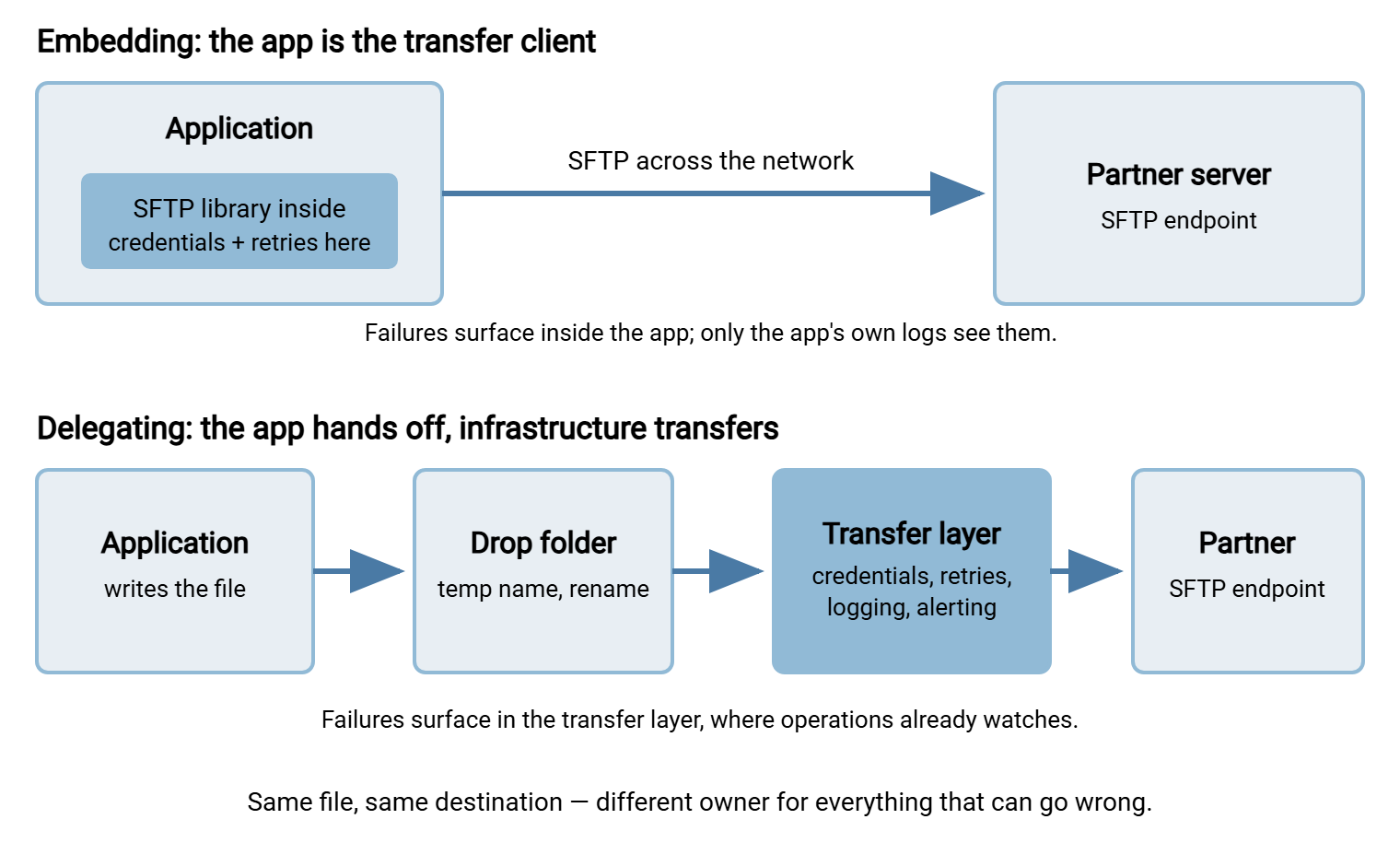
Embedding means the transfer client lives inside the application process. The app links an SFTP or FTPS library, holds the remote credentials, opens the connection, moves the bytes, and interprets every error itself. The transfer is a function call in application code.
Delegating means the application's responsibility ends at a handoff point — most commonly a watched folder on local disk or a nearby share. The app writes the finished file there. The transfer layer notices it and carries it to the destination, applying its own retry, logging, and alerting policies. The transfer is somebody else's job, connected to the app by a folder and a naming convention.
The diagram below shows both shapes for the same outbound flow. Notice where the credentials, retry logic, and monitoring live in each — that placement, more than anything else, is what you are choosing.
What Embedding Genuinely Wins
Delegation advocates sometimes talk as if embedding were only ever a mistake. It is not, and pretending otherwise leads teams to contort simple designs. Embedding wins real things:
- Immediacy. The application knows the transfer's outcome the moment it happens, in-process, as a return value or exception. A business rule may say "mark the order exported only after the file is confirmed delivered." In that case, an in-process result is the most direct implementation there is — no polling another system's status, no correlating two logs.
- Dynamic destinations. When host, folder, or account are computed at runtime — per-customer endpoints, per-device addresses — the app already has the data. A fixed catalog of transfer jobs cannot express that flow at all. Embedding handles it naturally.
- Latency. A handoff adds a hop and, usually, a detection delay before the transfer layer notices the file. Embedded transfers start now. For most batch flows the difference is irrelevant; for a genuinely interactive fetch, it is the whole point.
- Fewer moving parts. One deployable, no watched folders, no second system in the diagnosis path. For a small team with no transfer infrastructure and one modest flow, embedding can honestly be the simpler total system.
- Rich error detail. The app sees the exact failure — authentication rejected, permission denied on the remote folder, timeout after N seconds. It sees this at the moment of failure, with full application context attached. That detail can drive precise handling: a different message to the user, a different compensating action per error class.
- One system to diagnose. When something misbehaves, the investigation stays inside a single codebase and a single log. It does not span an application, a folder, and a transfer tool that must be correlated by timestamps and file names.
Notice what these wins have in common. They matter most when the transfer is entangled with application state and least when the flow is a scheduled batch to a fixed destination. That correlation does most of the deciding for you.
What Delegating Genuinely Wins
- Failure visibility where the responders are. Transfer infrastructure is watched: its logs are collected, its failures alert, and its dashboards get looked at every morning. Those are the disciplines our transfer job monitoring series describes. A failed transfer inside an application, by contrast, surfaces as a log line in a file the ops team has never opened. The delegated failure gets seen; the embedded one gets discovered.
- Credentials out of the application. The transfer layer's job definition holds the partner connection details; the application never sees them. That single property removes the app from credential rotation, from secret-storage reviews, and from a whole class of leak scenarios. That is the subject of keeping credentials out of application code.
- Battle-tested mechanics for free. Retry with backoff, error classification, notifications, scheduling, logging — a mature transfer tool has had these hammered flat by years of production use. Embedded code has to earn that maturity one incident at a time. The inherited checklist is long enough that making in-app transfers reliable is its own article.
- Change without redeploys. Partners change hosts, rotate credentials, reorganize folders. In the delegated design these are configuration edits in the transfer layer; the application is untouched. In the embedded design each is an application config change or release.
- One place for many flows. When three applications send to the same partner, delegation gives you one credential set and one retry policy. You get one log to search and one team to call. Embedding gives you three of everything.
- Cleaner audit story. Central transfer logs, uniform in format, are what reviewers and partners expect to see. Reconstructing delivery evidence from per-application logging is possible and never pleasant.
The Costs, Told Straight
Embedding's bill. The application inherits everything a transfer tool would have done: retry engineering, partial-file discipline, duplicate protection, host-key trust, credential custody, monitoring hooks. The library itself becomes a security-sensitive dependency to track and update. And the organization's transfer knowledge fragments — every embedding app re-answers questions the transfer team already answered, sometimes differently, sometimes wrongly. The quiet failure mode is the worst of it: transfers that break silently inside an app and stay broken for days because nothing watched them.
Delegation's bill. Latency and asynchrony first: the app writes a file and walks away. So "did it arrive?" becomes a question answered later, from the transfer layer's records — awkward when a workflow genuinely blocks on delivery. Indirection second: diagnosing "where is my file?" now spans two systems and a folder. Sloppy handoffs create their own failures. That is why the drop must follow the write-then-rename discipline from our partial-file safety series. This keeps the watcher from ever grabbing a half-written file. Infrastructure third: somebody must run the transfer layer. If your organization has none, delegation means standing one up — real work, though it pays off across every subsequent flow. The mechanics of doing the folder handoff well are the territory of our watch folders and event-driven transfers series.
A delegated design also needs its seam specified. The folder between app and transfer layer is an interface, and interfaces need contracts — otherwise each side quietly invents assumptions the other violates. Write the contract down in a paragraph both teams sign off on:
The handoff contract (one per drop folder)
------------------------------------------
Location:   \\appserver\outbound\partner-invoices\
Producer:   billing app, service account BILLSVC
Writes:     to *.tmp, then rename to final name (atomic)
Naming:     INV_YYYYMMDD_HHMMSS_<sequence>.csv
Consumer:   transfer layer watch task "partner-invoices-out"
On success: file moved to \done\ (kept 30 days)
On failure: file moved to \error\ + alert to ops alias
Never:      producer edits or deletes a file after rename;
            consumer touches *.tmp files
Finally, there is the question under all the other questions: ownership. Architecture follows the org chart more than anyone admits. If the transfer lands in the application, the application team owns its failures. That ownership includes failures that page at night, and lasts through the years after the original developer leaves. If it lands in the transfer layer, the ops team owns it, and must be staffed and informed enough to do so. They need to know the flow exists, what "late" means for it, and whom to call on the partner side. The worst outcome is the unowned middle: an embedded transfer the app team considers "done" and the ops team cannot see. Whichever box the arrow leaves in your diagram, write a name next to it.
Remember: you are not choosing whether retries, credential handling, and monitoring will exist. You are choosing where they live — inside each application, or once, in a transfer layer built for them. Every row of the decision table below is that same question wearing a different shirt.
The Decision Table
Score your flow row by row, with the people who will live with each answer in the room. Those are the developer who writes the code and the administrator who answers the alerts. A column that collects most of the marks is a strong signal. A split verdict usually means "delegate the routine part, embed the genuinely dynamic part." The middle-ground section below shows what that looks like.
| Question | Favors embedding | Favors delegating |
|---|---|---|
| When is the destination known? | Computed at runtime, per request or per customer | Fixed per flow; changes rarely |
| Does the workflow block on delivery? | Yes — app state must reflect the outcome immediately | No — delivery within minutes is fine |
| Who responds when it fails at night? | The application team, genuinely on call for it | The ops/transfer team |
| Does managed transfer tooling already exist? | No, and this is a single small flow | Yes — monitored jobs and watch folders are running today |
| How many apps reach the same partners? | Only this one, and likely to stay that way | Several — centralizing pays immediately |
| Where should partner credentials live? | App team runs a real secrets discipline and accepts custody | In the transfer layer; the app never holds them |
| Partner changes host or folder — who acts? | An app config change or release is acceptable | A transfer-layer config edit, no release |
| Audit and delivery evidence? | App-level logging satisfies reviewers | Central, uniform transfer logs are expected |
The Middle Ground: Driving the Transfer Layer from Code
The table presents two poles, but the space between them is real, and it is where many of the best designs land. Delegation does not have to mean "drop a file and hope" — there are handoffs with progressively tighter coupling:
- The plain watch folder. Loosest coupling: the app writes the file; a folder-monitoring transfer tool does the rest. With Sysax FTP Automation, for instance, the watched folder triggers the outbound transfer task. Retry on failure, error handling, and email notification are the tool's configuration rather than anyone's code. The app needs no transfer awareness at all.
- The programmatic trigger. The application invokes a defined transfer task by name and, if it wishes, waits for the result. This keeps app-controlled timing while the tool owns protocol mechanics, credentials, and error policy. This is a documented surface, not an invented one. Sysax FTP Automation's Enterprise edition exposes a COM interface that can be driven from VBScript, JavaScript, C#, or VB .NET. So a Windows application can launch a managed, tested transfer task instead of embedding a protocol library. You get most of embedding's immediacy with delegation's operability.
- The internal file API. Larger shops sometimes wrap the transfer layer behind an internal HTTP endpoint that applications call. That is the pattern explored in REST APIs for file transfer. More to build, but it gives developers the interface they are most comfortable with while keeping protocol work central.
If your reason for embedding is only "we need to know it was sent," the middle ground usually dissolves it. If the reason is dynamic destinations chosen per request, the middle ground helps less. In that case, true embedding is the honest answer, done with the care described in using transfer libraries inside your application.
The Same Flow on a Bad Night, Both Ways
Abstract trade-offs become concrete at 2 a.m., so run the movie twice. The flow: the ERP produces invoice files through the evening; each must reach the partner's SFTP server before their 6 a.m. import. Tonight the partner's server is refusing connections for four hours.
Embedded version. The ERP's export module throws a connection timeout. The exception is caught and logged — into the application's log file, on the application server, at severity "warn". That is what the developer chose three years ago. There is no retry loop; the module was written against the happy path. The transfers silently fail all night. At 8 a.m. the partner calls about missing invoices. The app team greps logs, finds the timeouts, and re-runs exports by hand while everyone asks why nothing alerted. The fix — retries, alerting, a status view — becomes a development ticket that waits for the next release.
Delegated version. The ERP writes files into the drop folder exactly as always. From its point of view, nothing is wrong, because nothing about its job is wrong. The transfer layer's task fails to connect, retries on its configured schedule, and emails the operations alias after the threshold. The email goes out at 2:15 a.m., with the error text and the queue of pending files in view. When the partner's server returns at 5:40, retries drain the backlog with no human action. The morning check confirms delivery before the partner's import window. The distinction is not that delegation prevented the outage — nothing on your side could. The failure happened where failure handling already lives, in front of the team already watching. Recovery was configuration rather than heroics. The general craft of retrying well is our retry and error handling series; the point here is who owns the craft.
And the middle-ground version, for completeness: the ERP triggers a managed transfer task programmatically and records "submitted" against each invoice. The task fails, retries under the tool's policy, and alerts operations. The ERP's status view shows the invoices still pending because the task has not reported success. Both teams see the same truth from their own side, and neither had to write retry code. The night is no less broken — the partner's server is still down. But every system tells the truth about it, which is most of what resilience means in practice.
To be fair to embedding, consider an embedded client written to the standard of the in-app reliability checklist. That means retries, backoff, and alerts wired to the ops channel. That client survives the same night just as gracefully. The question the movie really asks is whether that standard will actually be built and maintained inside the application, or only assumed. If the honest answer is "probably not, given our roadmap," that answer belongs in the decision, not in next year's postmortem.
Deciding, and Writing the Decision Down
Work the table, choose the smallest architecture that meets the flow's honest requirements, and record the reasoning. Write two paragraphs in the design doc saying which rows drove the call. The record matters because these decisions get relitigated every time an incident embarrasses whichever side was chosen. Written trade-offs turn that from argument into review. And revisit when the facts change. A second application sending to the same partner is the classic trigger for consolidating an embedded flow into the transfer layer.
If the verdict is delegation, your next read is the watch folder series for the handoff mechanics. In that case, also read the scenarios article if you skipped it. If the verdict is embedding, continue with choosing and using a transfer library. In that case, budget time for credentials and reliability, because they are now yours.
Frequently Asked Questions
Is delegating always the "safe" choice?
Doesn't a watched folder just add a place for files to get stuck?
How does the application find out whether a delegated transfer succeeded?
What is the strongest legitimate reason to embed?
Can we start embedded and move to delegation later?
From the Sysax team: we build secure file transfer software for Windows. Sysax Multi Server is an FTP, FTPS, SFTP, and HTTPS server. Sysax FTP Automation handles scheduled, scripted transfers. Free trials are on the download page.