
Making In-App Transfers Reliable
The transfer feature worked in the demo. It uploaded the file, the file arrived, the ticket closed. Then production happened. The partner's server went down for a weekend maintenance window. A connection died at ninety percent. The same invoice got sent twice after a crash. A month of exports quietly failed while the application logged polite warnings into a file nobody reads. None of this means the developer did a bad job. It means the application has joined a harsh business — unattended file movement — without the equipment the incumbents carry.
When you embed a transfer client, you inherit the entire reliability checklist that mature transfer tooling implements as a matter of course. That includes retry logic, failure classification, duplicate protection, partial-file discipline, integrity checks, and monitoring. This article — part of our Embedding Transfers in Applications series — maps that checklist onto application logic piece by piece. It makes the case for the single most important structural rule (no transfers on the request path). It shows how to make in-app failures visible to the people who fix things.
The Checklist You Just Inherited
Here is a useful exercise for any team about to embed. List what a managed transfer job gives you before a single line of custom code. Then find each item's new home inside your application. The left column below is, not coincidentally, close to the configuration sheet of a scheduled-transfer tool like Sysax FTP Automation. It lists retry and error handling, folder monitoring, and notifications. That is exactly the point: these capabilities exist as checkboxes somewhere because every unattended flow eventually needs them. Treat the right-hand column as your feature backlog, because production will file these tickets for you otherwise:
| What a mature transfer tool provides | What it becomes inside your application |
|---|---|
| Retry with backoff on transient failures | A retry loop with delay, jitter, and a give-up threshold, with attempt state stored per job |
| Error classification (retry this, not that) | Mapping the library's exceptions to transient vs permanent, and never retrying bad credentials |
| Queued, scheduled execution | A job record and a background worker — transfers never run in a user's request |
| Partial-file safety at the destination | Uploading to a temporary name, renaming only when complete — and the mirror rule on downloads |
| Duplicate protection across reruns | Idempotent job design: deterministic names, a sent-ledger, safe re-execution after crashes |
| Integrity verification | Size and, where possible, hash comparison after transfer, before the job is marked done |
| Logging, notifications, and status views | Structured log events with job context, a queryable status, and alerts on final failure |
| Credential storage and rotation | The whole discipline of keeping credentials out of application code |
Nothing in the left column is optional equipment. Every row exists because some plain failure — a reboot, a slow network, a resent file — happens weekly somewhere. The rest of this article walks the rows that deserve the most engineering attention.
Rule One: Never Transfer on the Request Path
The request path is the code that runs between a user's action and the response they wait for — the web request, the button handler. The rule, stated straight: a user's click should not wait on a partner's SFTP server. Not "should rarely," not "unless it's usually fast." Should not.
The reasons are mechanical, not stylistic. A remote transfer's duration is controlled by the least reliable pieces of the chain. Those are the partner's server load, their throttling, their maintenance windows, and the WAN in between. On a good day, connect-authenticate-upload takes two seconds; on a normal bad day, thirty. During their backup window, it takes five minutes or hangs until a timeout ends it. Web stacks respond to slow handlers badly and predictably. Requests time out at the gateway while the transfer grinds on invisibly. The user retries, launching a second copy of the same upload. Worker threads pile up behind the slow partner until the pool is exhausted. At that point the entire application is down, for every user, because one partner's server is slow. Add the retry logic this article is about to require, and a request-path transfer would hold a user's browser through minutes of backoff. The design cannot be patched; it has to be inverted.
The rule holds even for the interactive cases that seem to demand immediacy. The on-demand fetch — a user requesting a specific remote file right now — still runs in a worker. The difference is only that the user's page polls or subscribes for the result and shows progress honestly. "Fetching from the device — this can take up to a minute" with a live status beats a frozen browser tab every time. It keeps one stuck device from jamming the application for everyone else. And note that moving work to a worker does not repeal the timeout rules from the library article. A background thread hung forever on a dead socket is quieter than a hung request, which makes it worse.
The background worker pattern
The inversion is old, boring, and correct: the request path records intent, a background worker does the work, and status flows back asynchronously. The diagram shows the shape — the click's job ends at a durable record, and everything slow or unreliable happens behind it.
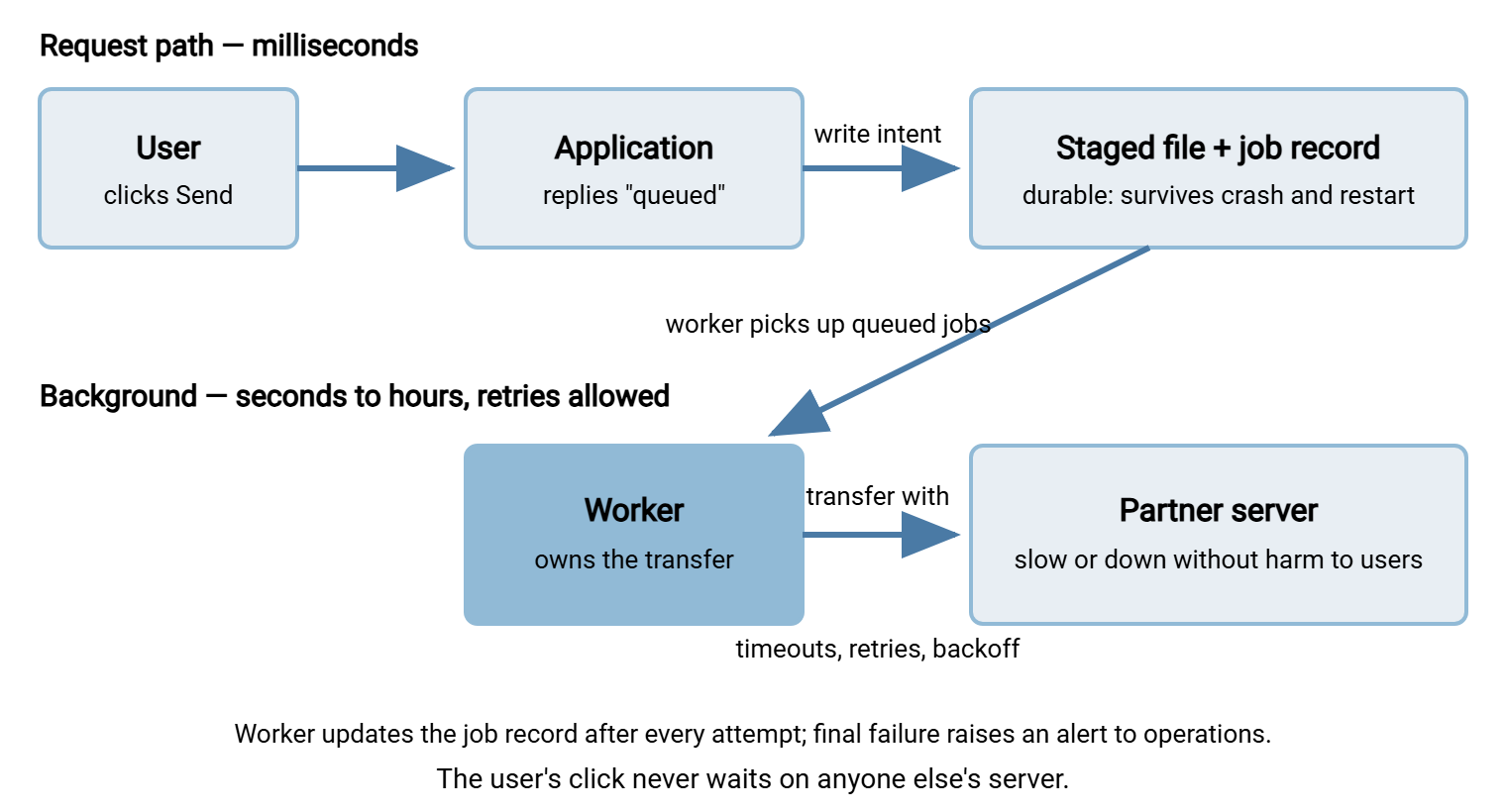
The worker itself can be modest. It can be a thread inside the application that polls the job table, or a separate service. It can be a scheduled task that sweeps pending jobs every minute. What matters is the job record — the durable row that is the single source of truth about each transfer. A workable minimal shape:
transfer_job
------------
job_id          unique identifier
file_path       staged local copy (immutable once queued)
destination     logical name — resolved to host/dir via config
remote_name     final name at destination (deterministic)
status          queued | in_progress | done | failed
attempts        count so far
next_attempt_at when the worker may try again (backoff lives here)
last_error      classified: transient | permanent + message
created / finished timestamps
Two details carry most of the crash-safety. The staged file is written before the job is marked queued, and never modified after. So a job can always be re-run from its inputs. And on startup, the worker recovers: any job found in_progress was interrupted by a crash and goes back to the queue. That one startup query is the difference between "the server rebooted" and "the server rebooted and eleven invoices silently never left."
Concurrency deserves one early decision rather than a later surprise. If you run more than one worker — or the same worker on two app instances — each must claim a job before touching it. Typically, it uses an atomic status update ("set to in_progress where status is queued, and tell me if I won"). Without that claim, two workers will faithfully deliver the same file twice in perfect parallel. Cap concurrent transfers per destination as well: partners limit sessions per account, and three workers connecting at once can hit that ceiling. For most flows the simplest configuration is also the most robust — one worker per destination, jobs processed in order. It has the pleasant side effect of making the day's activity trivially easy to read in the logs.
Retries and Backoff, In App Logic
Retry design has its own series — retry logic and error handling — so here is the app-shaped summary. First, classify before retrying. A timeout, a dropped connection, a host-unreachable are transient — retry them. A failed login, an unknown remote directory, a rejected host key are permanent — retrying cannot help and actively harms. Repeated authentication failures walk your service account straight into the server's lockout protections (see auth failures and lockouts). Note the irony: aggressive retrying of a bad password turns your app into the brute-force attack. Permanent failures skip the retry loop and go directly to a human.
Second, back off with jitter: wait longer after each failure — one minute, five, fifteen, sixty. Include a little randomness so fifty queued jobs do not all pounce the instant the partner's server limps back. Third, set a budget: a maximum attempt count or deadline, after which the job is marked failed and alerted. The retry-forever job is just a silent failure with extra steps. The job record's attempts and next_attempt_at fields hold all of this state, which means retries survive restarts. The worker's poll loop implements backoff for free by only picking up jobs whose time has come.
Choose the retry's granularity consciously, too. Retrying the whole job — reconnect, re-upload from the staged file — is simpler and safer than trying to resume a half-sent stream. For typical business files the wasted bandwidth is trivial. Resume earns consideration only for genuinely large files over slow links, and it drags in protocol-specific complications. If that is your situation, weigh it deliberately rather than inheriting whatever the library happens to do.
Idempotency: Safe to Run Twice
Reruns are not an edge case; they are the system working as designed. A worker crashes after the upload completes but before the job record updates — the recover-on-start logic then runs the job again. A timeout fires on your side after the server actually stored the file. An operator re-queues a job during an incident. In every case the same file may travel twice, so the flow must be idempotent. Running it again must leave the world in the same state, not create invoice_final_2.csv beside its twin. The design tools, in rough order of preference:
- Deterministic remote names. The remote name derives from the job's business identity —
INV_<invoice-number>.csv— never from a fresh timestamp generated per attempt. A rerun then overwrites-or-matches its own earlier self instead of multiplying. - Check before sending. The worker lists the destination first. If the file is already there with the expected size (or hash), the job marks itself done without transferring. This closes the crashed-after-upload window neatly.
- A sent-ledger. A durable record of delivered business items — invoice numbers, not filenames — consulted before any send. Strongest, and the pattern to reach for when duplicates have real cost downstream.
The receiving side of your flows deserves the same thinking — the full treatment is in our duplicate detection and idempotency series.
Partial-File Safety, Both Directions
A transfer that dies midway must never leave something that looks like a finished file. Uploading: transfer to a temporary name (.tmp, or a partner-agreed convention). Rename to the final name only after the bytes are all present — verified by size at minimum, hash where the far side supports it. The rename is what the partner's watch-folder automation is waiting for. If you skip the discipline, their systems will eventually ingest half an invoice file. This is the founding scenario of our partial-file safety series. Downloading: mirror image — pull to a local temp name, verify, rename, and only then let your own processing see it. And in both directions, verification before "done" is what makes the job record honest. Our article on verifying transfers end to end covers how far that checking can and should go.
The convention is an agreement, not a private habit — so put it in the partner conversation at onboarding. Some receivers ignore anything with a .tmp extension; some expect a marker file after the data file. A few run settle checks on their side and need nothing from you. Whichever contract you land on, write it into the integration notes. The day either side changes their automation is the day an undocumented convention becomes an incident.
The classic in-app transfer bug, for the record: upload succeeds, process crashes, job re-runs, file sends again — with a fresh timestamped name. It is a three-way failure of idempotency (nondeterministic names), crash design (status updated too late), and partial-file thinking (no check of what already arrived). The fixes above are cheap; the duplicate-invoice conversation with a partner is not.
Surfacing Failures to the People Who Fix Things
Everything so far handles failure; this section makes failure visible, and it is the step embedded transfers most often skip. A managed transfer job that fails shows up on the transfer team's console. An embedded transfer that fails emits a log line inside an application. Application logs are read when someone is already investigating, which is exactly backwards for a failure nobody knows about yet. The disciplines that close the gap:
- Log transfer events distinctly and completely. Write one structured event per attempt and per final outcome, carrying job id, file, destination, attempt number, duration, and the classified error. Do not leave a bare "upload failed" adrift in the request log.
- Alert on final failure and on permanent failure — not on every retry. Retry noise trains people to ignore the channel; the two events above are the ones that need a human.
- Expose status where operations can see it without a developer. A queryable job table, a small status page, or events forwarded into the same monitoring the transfer team already watches. The goal is that "did yesterday's exports go?" is a lookup, not an archaeology project.
- Watch for absence, not just errors. The worst failure emits nothing: the worker died, the queue drains nowhere, zero errors are logged because zero attempts are made. The countermeasure is a freshness check — "alert if no successful transfer to this partner in N hours". That is the technique our transfer job monitoring series builds out.
- Name the owner. Decide, in writing, who is paged: the app team, the ops team, or a shared rotation. An alert without an owner is a log line with better formatting.
A small ritual ties it together: the daily summary. Send one automated message each morning — files sent per destination yesterday, failures and their dispositions, oldest queued job. That turns the job table into something humans actually glance at. It catches the slow rots (a queue quietly growing, a partner rejecting one file type) that alerts tuned for emergencies sleep through. Teams that run this for a month stop being surprised by their own transfer flows, which is the entire objective.
The Delegation Shortcut, Honestly Offered
Step back from the full list — worker, retries, ledger, temp names, alerts — and notice that you have been specifying a small transfer product. That is not an argument against building it; sometimes the flow genuinely belongs inside the app, and now you know the real scope. But it is worth a last look at the alternative from embed vs delegate, because the checklist is precisely what delegation buys pre-built. Drop the staged file into a folder that Sysax FTP Automation monitors. Then the retry behavior, error handling, and email notifications are the tool's configuration rather than your backlog. Need the app to stay in the driver's seat? The Enterprise edition's COM interface lets a Windows application trigger a defined, tested transfer task from C#, VB .NET, or script and consume the result. That is the worker pattern with the hard middle already implemented. The right choice varies by flow; the wrong choice is rebuilding the checklist by accident, one incident at a time.
Reliability Is a Property You Add on Purpose
The demo proves the protocol works. Reliability is everything layered above it. Intent is recorded durably, work is done off the request path, and retries classify and back off. Jobs are safe to run twice, there are no half-files at either end, and failures announce themselves to a named owner. Build down the inherited checklist deliberately and the embedded transfer earns the same trust as the managed kind.
Two companions complete the picture. See keeping transfer credentials out of application code for the secret-handling row of the checklist. Then see testing file transfer integrations, where you get to inject every failure this article described, on purpose, before production does.
Frequently Asked Questions
Our transfers usually take under two seconds. Can they stay in the request path?
Do we need a message queue product to do the worker pattern?
How many times should we retry before giving up?
What if the user needs to know the file was actually delivered?
Is all this still necessary if we hand the file to transfer infrastructure instead?
From the Sysax team: we build secure file transfer software for Windows. Sysax Multi Server is an FTP, FTPS, SFTP, and HTTPS server. Sysax FTP Automation handles scheduled, scripted transfers. Free trials are on the download page.