
Encrypt-Before-Send Workflows That Don't Break Automation
Encrypting one file by hand is easy. The demo during partner onboarding goes flawlessly: run the command, watch the .pgp file appear, upload it, everyone signs off. Then the flow goes into production — unattended, nightly, nobody watching. The two ugly failure modes of automated encryption get their chance. The first is the pipeline that silently stops: files pile up in a folder for three weeks because a key expired. You learn about it from the partner's escalation. The second is worse — the pipeline that silently degrades: a script error skips the encryption step. The job cheerfully delivers plaintext for a month while every dashboard stays green.
Both failures share a root cause: the encryption step was bolted onto a transfer job as an afterthought. There was no structure around what happens when it misbehaves. The fix is not smarter scripting. It is a pipeline design in which every file's state is visible, every hand-off is deliberate, and every failure is loud.
This article gives you that design: a staged, folder-based pipeline for encrypt-then-transfer on the sending side and decrypt-on-arrival on the receiving side. It gives you the naming conventions that make the pipeline self-documenting. It also gives you the error-handling rules that make it trustworthy at 2 a.m. It is part of our PGP and at-rest encryption series and assumes the key-pair basics from how PGP file encryption works.
The Pipeline Shape: Stages with One Job Each
A robust encrypt-before-send flow is a short assembly line. Each stage does exactly one thing, takes its input from one folder, and delivers its output to the next folder. The full path from source application to partner application looks like this:
- Drop: the source application writes the plaintext file into a drop folder. Its involvement ends here.
- Encrypt: a job picks up completed files from the drop folder and encrypts each with the partner's public key. It writes the ciphertext to the outbound folder and disposes of the plaintext deliberately.
- Transfer: a transfer job sends everything in the outbound folder over an encrypted channel — SFTP, FTPS, or HTTPS. It moves each file to a sent-archive folder only after the transfer is confirmed.
- Receive: on the partner's side (or yours, for inbound flows), files land in an inbound folder as ciphertext.
- Decrypt: a job decrypts arrivals into a processing folder where the receiving application takes over; the ciphertext original is kept or purged per policy.
The diagram below shows the line end to end. Notice the property that makes the whole design worthwhile. From the moment the encrypt stage finishes until the decrypt stage runs, the file is ciphertext everywhere. That includes the outbound folder, the wire, the transfer server, the partner's inbound folder, and every backup taken along the way.
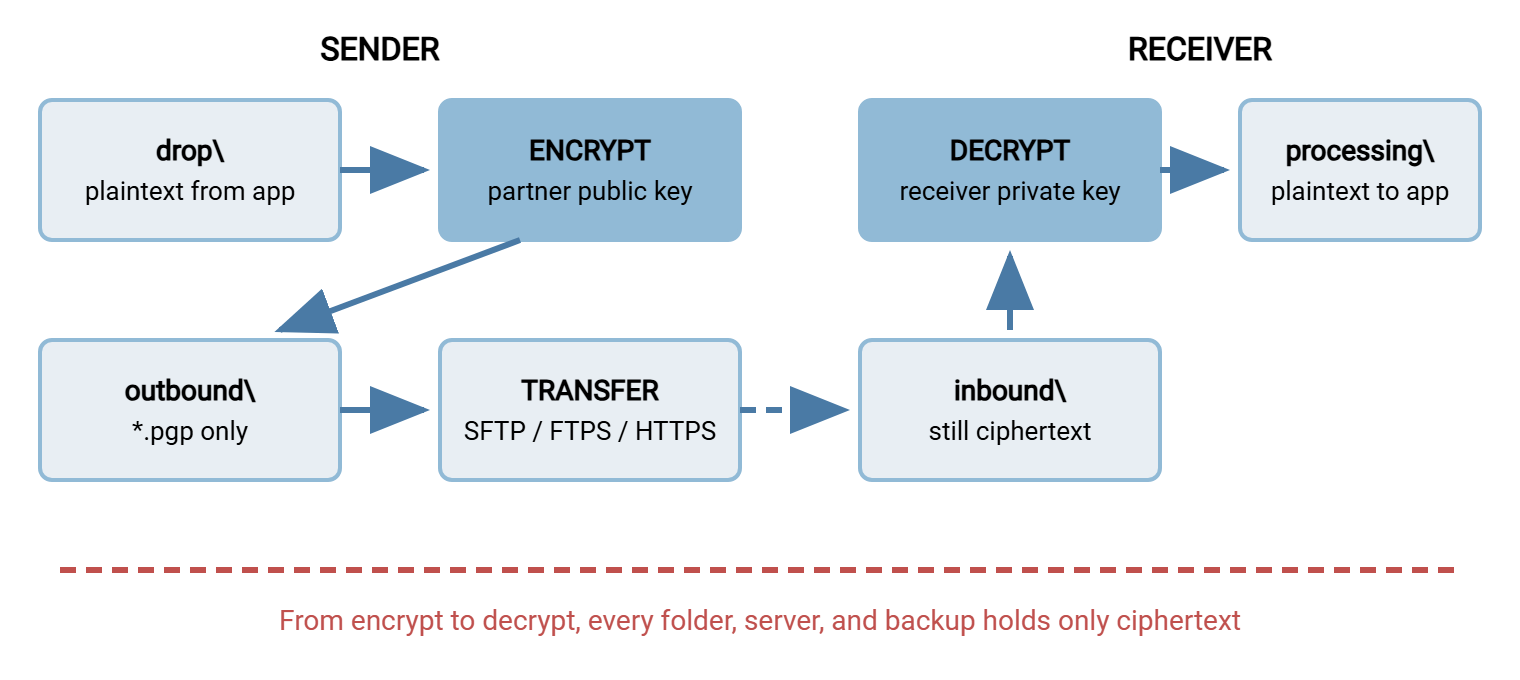
Two stages are deliberately kept apart even though tools can merge them: encrypt and transfer. Separating them means a transfer failure leaves an encrypted file safely queued in outbound\ rather than entangled in a half-finished combined step. It also means the transfer job can be dumb by design — its only rule is "send what is in this folder." Integrated workflow tools preserve this separation internally as distinct tasks even when one schedule drives both.
Folder-Based Design: the State Machine You Can See
Why folders, rather than a database or clever in-script state? Because in a folder pipeline, the location of a file is its status. Anyone — including the on-call admin who has never seen this system — can answer "where is yesterday's invoice batch?" with a directory listing. A file in drop\ has not been encrypted. A file in outbound\ is sealed and awaiting transfer. A file in sent\ is confirmed delivered. Nothing needs to be reconstructed from logs to know the state of the world right now.
Folder pipelines have one classic trap, and it deserves a name: the partial-file pickup. The encrypt job wakes up, sees a file in the drop folder, and starts work — but the source application is still writing that file. The result is a truncated payload, perfectly encrypted, delivered with full confidence. The receiving side decrypts a valid-looking file that is missing its last thousand rows. The standard defenses, any one of which suffices:
- Temp-name-then-rename: the writer produces
report.csv.tmpand renames it toreport.csvonly when complete. A rename within the same disk volume is atomic — it either has happened or has not. So the pickup job, which matches only*.csv, can never see a half-written file. - Settle time: the pickup job ignores files modified within the last few minutes. Cruder, but effective when you cannot change the writer.
- Companion done-marker: the writer drops
report.csv.doneafter the data file completes, and the pickup keys on the marker.
This is the same completeness discipline that applies to any automated transfer. Our fundamentals article on reliable transfer and integrity covers it from the transport angle, and everything there applies doubly here. An encrypted partial file cannot be casually eyeballed for sanity the way a plaintext one can.
Naming Conventions That Carry the State
In an encrypted pipeline, filenames do double duty: they are the only human-readable thing left once the content is sealed. They are also what your automation matches on. A few rules pay for themselves immediately:
- Append, never replace, the extension.
acme_invoices_batch041.csvbecomesacme_invoices_batch041.csv.pgp. The double extension preserves what the file will be after decryption; stripping to.pgpalone throws that information away and guarantees a guessing game later. - Make the transfer job match ciphertext only. The send task picks up
*.pgp(or*.gpg) and nothing else. This one glob pattern is a structural safety net. Even if a plaintext file somehow lands inoutbound\, the transfer job is constitutionally unable to send it. - Name for the reader on the other side. Include the sender, the flow, and a sequence or batch identifier — the partner's operators triage by filename alone. Avoid names that advertise sensitive content; the outer filename travels unencrypted.
- Reserve a visible prefix or extension for in-progress work (
.tmp,.part) and make every job's match pattern exclude it. The convention only works if it is universal.
Write the conventions down in the runbook next to the folder map. The test of a good naming scheme is that a stranger can look at any file anywhere in the pipeline and know what it is. They can tell where it is going and whether it is safe to touch.
Decrypt-on-Arrival: the Mirror Image
The receiving side runs the same pipeline backward, with three decisions worth making explicitly.
Decide where plaintext first exists. The decrypt job reads from inbound\ and writes plaintext into processing\. That folder should live on the internal system that consumes the data — not on the internet-facing transfer server. Decrypting on the edge server recreates exactly the at-rest exposure the whole scheme exists to avoid; pull the ciphertext inward first, then decrypt. (This is the same keep-data-off-the-edge instinct behind DMZ transfer design.)
Decide what "verified" means before the application eats the file. At minimum, the decrypt step's own integrity check must pass. OpenPGP detects tampering and truncation at decryption time, so treat any integrity warning as a hard failure, not a log line. If the partner signs their files, verify the signature here too. That closes the "who really sent this?" question. The mechanics belong to our signatures and non-repudiation series. And remember that an encrypted file is opaque to malware scanning by design. Content inspection can only happen after decryption, in the processing area. That tension is explored properly in the malware scanning for file flows series.
Decide the fate of the ciphertext original. Keeping the .pgp file briefly in a received-archive\ folder is cheap insurance — it lets you re-run a failed decrypt or prove what arrived. Keeping it forever is a retention liability like any other. Set a window and automate the purge. Note that archived ciphertext is only as durable as your private key: rotate keys carelessly and the archive becomes noise.
Error Handling That Fails Loudly
Now the heart of the matter. An encrypt-before-send pipeline has one cardinal rule, and every other error-handling decision derives from it:
The cardinal rule: the failure mode of an encrypt-before-send pipeline must never be "sent it anyway, unencrypted." When encryption fails, the file stays put, the plaintext goes nowhere, and a human hears about it. A stopped pipeline is an incident; a pipeline that quietly ships plaintext is a breach.
Concretely, failing loudly means designing each failure case in advance:
- Encryption step fails (missing key, expired key, unreadable input, disk full): the file remains in
drop\or moves tofailed\. Nothing is written tooutbound\; an alert fires. Because the transfer job only matches*.pgp, even a botched partial output cannot leak. But the alert is what turns a stuck file from a three-week mystery into a same-day fix. Expired partner keys are the most common culprit; the renewal calendar from managing PGP keys with partners is the prevention. - Transfer step fails (endpoint down, credentials rejected, network drop): the ciphertext stays queued in
outbound\. The job retries on a schedule with a retry limit — endless silent retrying is just failure with extra steps. After the limit, alert. Nothing about a transfer failure is a security event; the file is sealed while it waits. - Cleanup fails: plaintext disposal after encryption deserves the same scrutiny as encryption itself. If the job cannot remove or archive the source plaintext, that is an alert too. Otherwise cleartext accumulates in
drop\forever. Then you have rebuilt the retention problem described in protecting files at rest on the transfer server. - Success is verified, not assumed. The move from
outbound\tosent\happens only after the transfer completes and, ideally, after a size or checksum comparison against the remote copy. Delete-on-send with no confirmation is how files vanish without a trace.
Finally, monitor the pipeline as a queue, not just as a set of jobs. The single most informative health signal is file age per stage folder. Anything sitting in drop\ or outbound\ longer than one expected cycle means a stage ahead of it is broken. That holds even if no job has reported an error. A five-line scheduled check that alerts on "oldest file exceeds N hours" catches entire categories of silent failure that per-job monitoring misses.
The Pipeline Design Checklist
Everything above, condensed into the checklist to walk before an encrypt-before-send flow goes to production. Paste it into the change ticket and check items off literally:
ENCRYPT-BEFORE-SEND PIPELINE CHECKLIST

Stages and folders
[ ] Separate folders exist per stage: drop, outbound, sent, failed
    (receiving side: inbound, processing, received-archive)
[ ] Each stage has exactly one job reading it and one destination
[ ] Partial-file defense in place (rename-when-complete, settle
    time, or done-marker) and tested with a slow writer

Naming
[ ] Encrypted files keep the original name + appended .pgp/.gpg
[ ] Transfer job matches ciphertext extensions ONLY
[ ] In-progress files carry a temp extension every job ignores
[ ] Naming scheme documented in the runbook

Keys
[ ] Correct partner public key imported; fingerprint verified and
    recorded (never trust an unverified key in production)
[ ] Key expiry dates in the renewal calendar with a 60-90 day lead
[ ] Test decrypt performed by the partner on a sample file

Failure behavior
[ ] Encryption failure = file stays put + alert (fail closed)
[ ] No code path exists that sends plaintext on any failure
[ ] Transfer failure = retry with a limit, then alert
[ ] Plaintext cleanup failure raises an alert
[ ] Move to sent\ happens only after confirmed transfer

Monitoring
[ ] Age-of-oldest-file alert on every stage folder
[ ] Job logs capture per-file outcomes with timestamps
[ ] A deliberate failure drill has been run end to end
    (wrong key, locked file, unreachable endpoint)
The last line is the one teams skip. Break your own pipeline on purpose — point a test flow at a revoked key, lock a file mid-run, firewall the endpoint. Watch what actually happens. The drill takes an hour and reliably finds the one failure case that was designed to be loud but is, in fact, silent.
Scripts or a Workflow Engine?
Everything in this article can be built from a scheduler, a scripting language, and the gpg command. For a single simple flow, that is a fine, transparent solution. The costs appear with scale: by the fifth partner you are maintaining a small distributed application of glue scripts. Every one of the checklist items above — retries, alerting, per-file logging, folder monitoring — is code you wrote. You must keep it working through OS updates and staff changes.
Workflow engines exist to make that checklist someone else's tested code. Sysax FTP Automation is built along exactly the lines this article describes: it monitors folders for arriving files. It performs OpenPGP encryption and decryption as steps inside a scheduled task. It runs the transfer over FTP, FTPS, or SFTP, and applies retry and error handling around the sequence. So encrypt-then-send or receive-then-decrypt runs as one defined, logged workflow rather than a chain of hand-rolled scripts. On the other end of the wire, the receiving endpoint is commonly a server such as Sysax Multi Server. It provides the encrypted SFTP or FTPS channel and the per-account folder layout that keeps partners separated. For the transfer leg's own reliability patterns — scheduling, retries, connection profiles — see automating SFTP transfers, which pairs naturally with this article.
Whichever route you choose, the design is identical. Stages with one job each, state visible in folders, ciphertext-only beyond the encrypt stage, and failures that wake someone up. Tools change; the shape is permanent.
The Pipeline, Summarized
An encrypt-before-send workflow earns trust when you can answer four questions without looking at code. Where is any given file right now? (Its folder says.) Can plaintext ever reach the partner? (No — the transfer job matches only ciphertext.) What happens when a step fails? (The file stops moving and a person is told.) And who can read the file between the two ends? (Nobody — from encrypt to decrypt it is sealed on every disk and every wire.) Get those four answers by design, and the nightly run becomes the most boring part of your infrastructure. That is precisely the goal.
To go deeper on the moving parts: managing PGP keys with partners covers the key lifecycle this pipeline depends on. And when file-level encryption is worth the overhead helps you decide which flows justify this machinery in the first place.
Frequently Asked Questions
Should the plaintext be deleted right after encryption?
How do we test the pipeline before the partner is ready?
Why did the partner receive a file that decrypts but is incomplete?
Can encryption and transfer really run as one automated step?
Do we need to keep the .pgp files after they are sent?
What is the most common cause of these pipelines failing in production?
From the Sysax team: we build secure file transfer software for Windows. Sysax Multi Server is an FTP, FTPS, SFTP, and HTTPS server. Sysax FTP Automation handles scheduled, scripted transfers. Free trials are on the download page.