
How PGP File Encryption Actually Works
Sooner or later a partner, a bank, or an auditor says the words: "please PGP-encrypt the files before you send them." If you have never worked with it, PGP arrives looking like a wall of jargon — key pairs, fingerprints, ASCII armor, something called a keyring. The temptation is to copy commands from a colleague's old runbook and hope. That works right up until something breaks, and then the jargon is all you have.
The good news: the ideas underneath PGP are genuinely simple. There are only three of them — a clever kind of lock, a speed trick, and the same lock run in reverse. None requires mathematics to understand. PGP (Pretty Good Privacy) is the name that stuck to the scheme. OpenPGP is the open standard that defines it today. Tools like GnuPG (the gpg command) implement that standard. When this article says PGP, it means the OpenPGP family as a whole.
By the end you will know exactly what happens, step by step, when a file is PGP-encrypted and decrypted. You will know why the design uses two kinds of encryption at once and how encrypting differs from signing. You will also know why this particular tool fits files that travel across many systems. This article is part of our PGP and at-rest encryption series. If you have not yet read encryption at rest vs in transit, it explains why file-level sealing exists at all.
The Problem PGP Solves: Sharing a Secret Without Meeting
Start with the older, simpler kind of encryption. Symmetric encryption uses one key for both directions: the same secret locks the file and unlocks it. It is fast, extremely well studied, and effectively unbreakable with a good key. Password-protected archives work this way, and so does the encryption inside TLS and SSH once a connection is established.
Symmetric encryption has one famous weakness, and it is not the math — it is the delivery problem. If you encrypt a file for a partner with a shared secret, the partner needs that secret. How do you get it to them? Email it, and anyone who reads the mailbox can decrypt everything you ever send. Phone it over, and it ends up on a sticky note, shared by every file you ever exchange, impossible to change without another phone call. Multiply by twenty partners and you are running a secret-distribution bureaucracy where one leak quietly compromises years of traffic.
Asymmetric encryption (also called public-key encryption) dissolves the delivery problem. Instead of one shared key, each party generates a key pair: two mathematically linked keys where what one encrypts, only the other can decrypt. One half is declared public and can be handed to anyone — posted on a website, emailed in the open, printed on a business card. The other half is private and never leaves its owner. Nothing secret ever needs to travel, which is the entire point.
Public and Private Keys in Plain Words
The analogy that makes key pairs stick: a public key is an open padlock. The private key is the only key that opens it. You can hand out copies of your open padlock by the thousand. Anyone can snap one shut on a box addressed to you — that is encryption. Notice that snapping a padlock shut requires no secret at all. But once it clicks shut, the sender themselves cannot reopen it. Only you can, because only you hold the key to that padlock. That is decryption.
Written as rules, and worth memorizing because half of all PGP confusion is a violation of one of them:
- To send a file to a partner, you encrypt with the partner's public key. Not yours. Encrypting to your own key produces a file only you can open — a classic first-week mistake.
- Only the partner's private key can decrypt it. Not their public key, not your keys, not the tool that did the encrypting. After you encrypt a file to a partner, you cannot open the result yourself (unless you also encrypted it to your own key). More on that later.
- The private key cannot be derived from the public key. The mathematical link runs one way. Publishing the public key gives an attacker no path to the private one — that asymmetry is what the mathematics guarantees.
Two supporting terms complete the vocabulary. A key pair carries a user ID — a name and email such as Acme Transfers <transfers@example.com>. That is a label, not proof of anything: anyone can generate a key claiming any name. Authenticity comes from the fingerprint, a short unique string derived from the key itself. Compare the fingerprint your partner reads to you over the phone with the fingerprint of the key you imported. If they match, you hold the genuine key and not an impostor's. Verifying fingerprints is the single most important habit in PGP practice. The follow-up article on managing PGP keys with partners builds a whole workflow around it.
Remember: the public key encrypts; the private key decrypts. You encrypt outbound files with the recipient's public key, and nothing you send ever contains a secret key. If an instruction ever asks you to send someone a private key, the instruction is wrong.
The Hybrid Trick That Makes It Fast
Here is the wrinkle the padlock story hides: asymmetric encryption is computationally expensive and is designed to protect small pieces of data, not gigabytes. Encrypting a large file directly with a public key would be painfully slow. Symmetric encryption has the opposite profile — enormously fast on bulk data, but stuck with the delivery problem.
PGP's core design insight is to use each kind for what it is good at. This is called hybrid encryption, and every PGP-encrypted file you will ever handle is built this way:
- The tool generates a fresh random session key — a one-time symmetric key used for this file and never again.
- The file itself is encrypted with the session key, using fast symmetric encryption. This is the bulk of the work and it runs at disk speed.
- The session key — a few dozen bytes — is then encrypted with the recipient's public key. Asymmetric encryption only ever touches this tiny piece.
- Both parts are packaged into one output file: the locked session key up front, the symmetrically encrypted payload behind it.
Decryption mirrors it exactly: the recipient's private key unlocks the session key, and the session key unlocks the file. The padlock analogy extends naturally — the file rides in a strongbox closed with a fast combination lock. The combination rides alongside it in a small envelope sealed with the recipient's padlock. The diagram below shows the whole round trip.
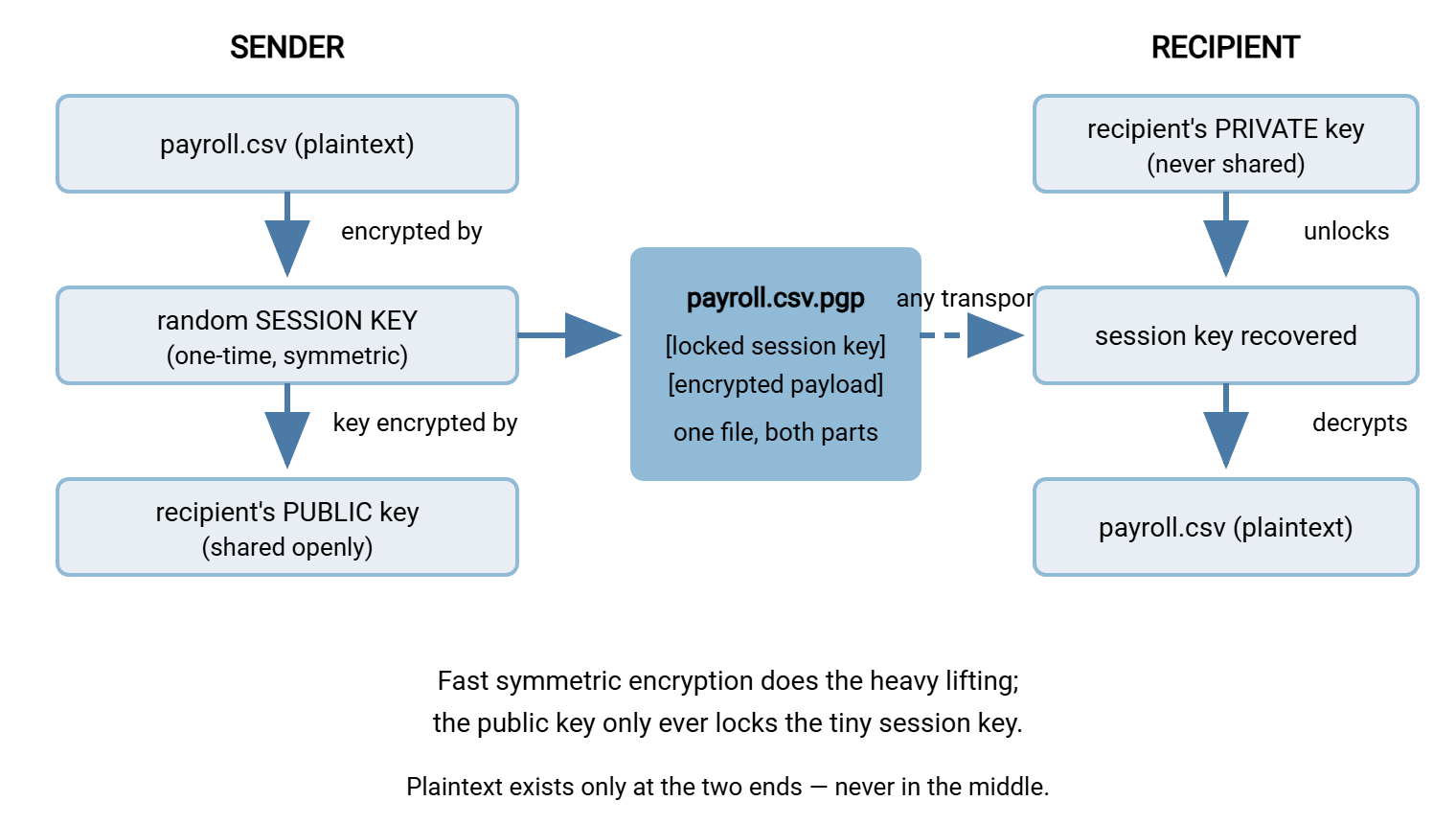
The hybrid design also explains a feature that seems magical until you see the mechanism: encrypting one file to several recipients at once. The file is still encrypted exactly once with one session key. The tool then encrypts that session key separately with each recipient's public key and stacks the resulting small envelopes at the front of the file. Any one of the matching private keys can recover the session key and open the payload. This is also how sensible workflows let the sender re-open their own outbound files: encrypt to the partner and to your own key. Then both sides can decrypt while the file itself remains sealed to everyone else.
What Actually Happens, Step by Step
With the two-layer idea in place, the full sequence a PGP tool performs is short. When you encrypt:
- Compress. The file is typically compressed first — ciphertext cannot be compressed afterward, because good encryption output looks like random noise.
- Generate the session key from a cryptographically strong random source.
- Encrypt the payload with the session key, including an integrity check so any tampering or corruption is detected at decryption time rather than passing silently.
- Encrypt the session key to each recipient's public key.
- Package everything into the output file.
The output arrives in one of two containers. Binary format is the compact default, usually named .pgp or .gpg. ASCII armor is the same data re-encoded as plain printable text, usually named .asc. It begins with a recognizable -----BEGIN PGP MESSAGE----- line. Armor is useful when the file must survive systems that only handle text, such as email bodies. Either way the content is identical ciphertext; armor is a wrapper, not extra security.
Decryption runs the film backward: read the envelopes and find one that matches a private key on the recipient's keyring. This is the local store where a PGP tool keeps the keys it knows. Unlock the session key, decrypt the payload, verify the integrity check, decompress, and write out the original file. If no private key on the keyring matches any envelope, decryption fails immediately — there is no partial success and no brute-forceable middle ground.
A Hands-On Walkthrough with gpg
Reading about keys is no substitute for ten minutes at a prompt. The sequence below uses the gpg command-line tool, which is available on effectively every platform. Graphical tools and automation engines expose the same operations with the same concepts. First, each side generates its own key pair, once:
# Generate your key pair (interactive: name, email, passphrase)
gpg --gen-key

# See what is on your keyring now
gpg --list-keys

# Export YOUR PUBLIC key to a text file you can send to anyone
gpg --armor --export transfers@example.com > ourkey-public.asc
The exported .asc file contains only the public half — safe to email, post, or hand over on a call. Your partner does the same and sends you theirs. Now each side imports the other's public key. Next comes the step that separates professionals from the hopeful — each verifies its fingerprint through a second channel:
# Import the partner's public key into your keyring
gpg --import partnerkey-public.asc

# Display its fingerprint...
gpg --fingerprint payments@partner-example.com

# ...and read it aloud on a phone call, or compare against the
# fingerprint published in the partner's onboarding portal.
# Match = you hold the genuine key. Mismatch = stop and investigate.
With keys exchanged, day-to-day use is two commands. Encryption names the recipient; decryption finds the right private key automatically:
# Encrypt a file so only the partner can open it
gpg --encrypt --recipient payments@partner-example.com payroll.csv
#   -> writes payroll.csv.gpg, ready to transfer

# Encrypt to the partner AND your own key, so you can re-open your copy
gpg --encrypt -r payments@partner-example.com -r transfers@example.com payroll.csv

# Decrypt a file that arrived for you
gpg --output report.csv --decrypt report.csv.gpg
#   (prompts for your passphrase to use your private key)
Run those against a test file and the abstractions become concrete: you will see that encrypting requires no secrets at all. You will see that decrypting the partner-only file on your own machine fails exactly as the rules predict. And you will see that the .gpg output is unreadable noise to every tool except one holding the right private key.
Encrypting vs Signing: the Same Keys, Run in Reverse
PGP's key pairs support a second operation that trips up newcomers because it uses the same keys in the opposite direction. Signing answers a different question. Encryption answers "can anyone except the recipient read this?" Signing answers "did this really come from the claimed sender, unmodified?"
The mechanics are the mirror image. To sign, the sender uses their own private key to compute a signature over the file. Only the private key's holder could produce that signature. Anyone holding the sender's public key can then verify the signature, confirming both origin and that the file has not changed since signing. Notice the reversal: encryption is public-key-in, private-key-out; signing is private-key-in, public-key-out.
| Question | Encrypting | Signing |
|---|---|---|
| Whose key does the sender use? | Recipient's public key | Sender's own private key |
| Who can perform it? | Anyone (public keys are public) | Only the key's owner |
| Who can reverse/check it? | Only the recipient (private key) | Anyone (verifies with public key) |
| What it guarantees | Confidentiality | Origin and integrity |
The two operations combine naturally: sign with your private key, then encrypt with the partner's public key. The file is then both confidential and provably yours. Many partner specifications require exactly that pairing. Signing opens onto a larger subject — proof of origin, non-repudiation, evidence you can show a third party. That subject has its own series: digital signatures and non-repudiation. For this article, the takeaway is simply to keep the directions straight and to recognize "please sign and encrypt" as two operations, not one.
Why PGP Fits Files That Cross Systems
Step back from mechanics and ask why this particular design became the standard for business file exchange. Three properties line up unusually well with how files actually move.
The protection is part of the file. A PGP-encrypted file is just a file. It can ride SFTP, FTPS, HTTPS, email, a USB stick, or a cloud share. None of those carriers can weaken it — the seal is independent of the transport. In a multi-hop path (source, DMZ transfer server, partner gateway, partner application), every intermediate system stores only ciphertext. Compare that with transport encryption, which as the first article in this series showed, restarts at every hop and leaves plaintext at each endpoint.
Nothing secret is ever shared. Onboarding a new partner means swapping two public keys and verifying two fingerprints. There is no shared password to deliver securely, rotate jointly, or leak. Each side guards exactly one secret — its own private key — no matter how many partners it exchanges files with.
It is an open standard with universal reach. Because OpenPGP is a published standard, a file encrypted by any conforming tool decrypts with any other. Your partner may run a mainframe job, a Linux script, or a Windows automation product; interoperability holds. That is also why workflow tools build it in natively. Sysax FTP Automation, for example, performs OpenPGP encryption and decryption inside its transfer workflows. So a scheduled job can encrypt with a partner's public key and send the result over SFTP in one unattended sequence. Typically, it sends to a server endpoint such as Sysax Multi Server providing the encrypted channel. Building that pipeline so it fails loudly instead of silently is the subject of encrypt-before-send workflows.
What PGP Does Not Do
Trust in a tool should include knowing its edges. Four honest limits:
- It does not protect plaintext after decryption. Once the recipient legitimately opens the file, an ordinary plaintext copy exists on their system, protected only by their access controls. End-to-end means protected between the ends, not beyond them.
- It does not hide everything. The encrypted file's outer name and approximate size are visible to anyone observing the systems involved. So is the fact that it was sent. Choose output filenames accordingly —
acme_payroll_full.csv.pgpannounces more than it should. - It does not manage keys for you. The mathematics is the easy part. Knowing whose key is whose, verifying fingerprints, handling expiry and revocation, and guarding private keys is an ongoing discipline. That discipline is its own article.
- It is unforgiving of key loss. There is no vendor back door and no reset link. If the only copy of a private key (or its passphrase) is lost, every file encrypted to it is permanently unreadable. This is a feature against attackers and a hazard to the disorganized. Key backup is not optional.
The Mental Model to Keep
Compress everything in this article to four sentences and it still holds. Every party has a key pair: the public half is an open padlock anyone may snap shut, the private half is the only thing that opens it. A PGP file is a fast symmetric cipher doing the heavy work, with its one-time session key riding along, locked to the recipient's padlock. Signing is the same machinery in reverse — the private key produces, the public key checks — and proves origin rather than hiding content. Because all of the protection lives inside the file itself, it survives any route through any number of systems, which is exactly the property a file that crosses organizations needs.
From here, the practical path continues with managing PGP keys with partners — generation choices, safe exchange, expiry, and revocation. Then comes automating encrypt-before-send so the sealing step never depends on a human remembering it.
Frequently Asked Questions
What is the difference between PGP, OpenPGP, and GPG?
If I encrypt a file for a partner, why can't I open it myself?
Can one encrypted file go to several recipients?
What happens if the private key is lost?
Is PGP encryption actually unbreakable?
Does the recipient need to be online when I encrypt or send?
From the Sysax team: we build secure file transfer software for Windows. Sysax Multi Server is an FTP, FTPS, SFTP, and HTTPS server. Sysax FTP Automation handles scheduled, scripted transfers. Free trials are on the download page.