
Presigned URLs: Temporary, Credential-Free Transfer Explained
The request sounds simple every time it comes in: "we need to get this one file to an outside contractor" — or receive one from them — "and they don't have an account with us." Creating a real user account for a single transfer feels absurd: provisioning, password delivery. The account then lingers forever, unused, waiting to show up in your next security review. Emailing the file fails for its own reasons. What you want is a link that is the permission: send it, it works for a while, and then it stops working on its own.
That is exactly what a presigned URL is, and it has become one of the most common transfer mechanisms on the modern web. It is how object storage services hand out temporary access and how many web applications offload uploads. It is how "click here to download your export" links usually work. This article explains the mechanism from the inside. It covers how the signature is computed, what it genuinely guarantees, and the limits people forget (anyone holding the link can use it). It covers why revocation is harder than it sounds, and where presigning beats accounts — and where it decidedly does not.
This is part of our HTTP/HTTPS File Transfer series. No prior cryptography is assumed; the one primitive involved is explained in plain terms as we go.
The Problem: Access Without an Account
Classic access control has three steps. The server knows who its users are (identity). It checks that the person connecting is really one of them (authentication — passwords, keys). Then it checks what that user may do (authorization). It is the right model for ongoing relationships, and it is heavyweight on purpose: accounts are durable things with lifecycle, audit trails, and cleanup obligations.
A one-shot transfer to an outsider fits that model badly. The relationship lasts a day; the account lasts until someone remembers to delete it. So people route around the model — usually via email attachments, with their size caps and their habit of scattering copies across mail servers.
The presigned URL takes a different approach entirely, borrowed from an old idea in computer science called a capability. Instead of asking "who are you, and are you allowed?", the server issues a token that itself embodies a narrow permission. It says "whoever presents this may perform this one operation on this one file, until this time." Possession is the permission. A door key works the same way: the lock never asks your name.
How the Signing Actually Works
A presigned URL is an ordinary URL with a few extra query parameters. Here is the anatomy, spaced out for reading:
https://files.example.com/files/q3-report.pdf
    ?expires=1750000000          ← when this link stops working (a timestamp)
    &sig=7f2c1ab84e...c9d41      ← the signature protecting all of the above
The interesting part is sig. The server that issues the link holds a secret key — a random value that never leaves it. To mint the URL, the server concatenates the things it wants to authorize into one string. Those are typically the HTTP method, the path, and the expiry time. The server computes an HMAC over that string. An HMAC (hash-based message authentication code) is best understood as a keyed fingerprint: a short value computed from the message and the secret. It has two properties that matter here. Nobody can compute the correct fingerprint without the secret, and changing even one character of the message changes the fingerprint completely.
So the issuing server computes, conceptually:
string_to_sign = "GET" + "/files/q3-report.pdf" + "1750000000"
sig            = HMAC-SHA256(secret_key, string_to_sign)
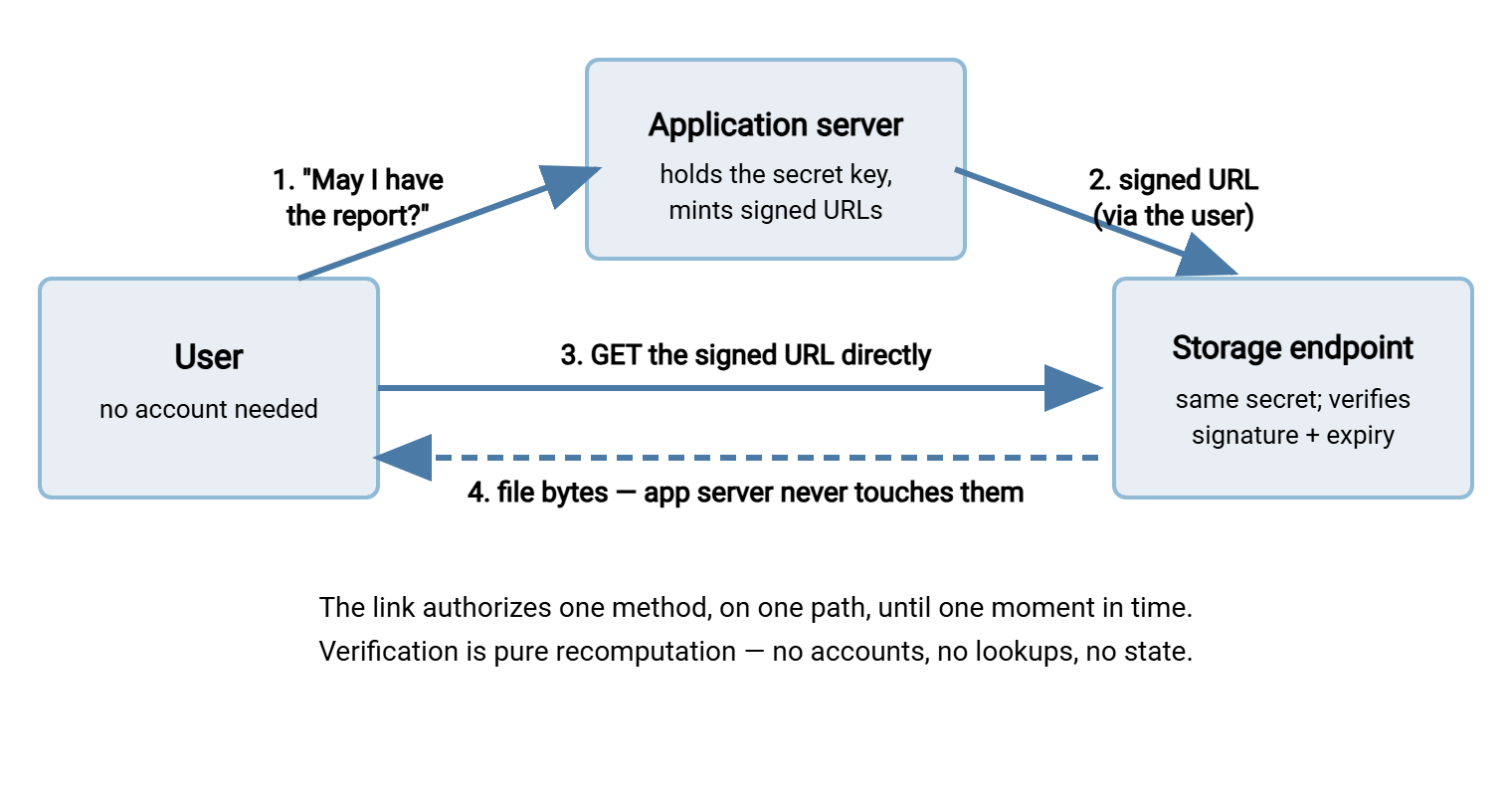
and appends expires and sig to the URL. When anyone later presents that URL, the receiving server — which holds the same secret — rebuilds the exact same string from the request. It uses the method used, the path requested, and the expiry parameter supplied. It recomputes the HMAC. If the result matches sig and the expiry has not passed, the request proceeds. Suppose anything was altered — a different filename in the path, a pushed-back expiry, a PUT where a GET was signed. In that case, the recomputed fingerprint no longer matches and the request is refused.
Method, path, and expiry are the minimum ingredients, but the same trick extends to anything the issuer wants to pin down. Implementations commonly fold extra conditions into the signed string. Those include the exact content type an upload must declare, a maximum object size, and specific required headers. Sometimes they include the client address range allowed to use the link. Whatever is included in the signed string becomes unforgeable; whatever is left out remains the presenter's choice. When you read any signed-URL scheme's documentation, "what exactly gets signed" is the first question worth answering, because it defines the entire perimeter of the grant.
Notice what is not involved: no user database lookup, no session, no state at all. The URL carries everything needed to verify itself, which is why presigning scales so well. It is also why the issuing application and the serving endpoint can even be different machines. Commonly, those are an application server that mints URLs and an object storage service that honors them. That separation is the basis of a popular architecture: the application authenticates the user and issues a presigned PUT URL. The user's browser then uploads directly to storage, keeping gigabytes of traffic off the application server entirely.
The diagram below shows the full round trip for a download; an upload works identically with PUT as the signed method.
What the Signature Genuinely Guarantees
Understood correctly, presigning gives you a short, strong list of properties:
- The grant cannot be altered. Method, path, and expiry are locked by the signature. A recipient cannot stretch a one-hour download link into a one-week one, point it at a different file, or turn a download grant into an upload grant. Any edit invalidates the fingerprint.
- No real credentials are exposed. The secret key never travels; the recipient gets a derived value useful for exactly one operation. Compare that with sharing an account password, which unlocks everything the account can do until someone remembers to change it.
- Scope is minimal by construction. One verb, one object. Even a leaked link cannot be used to browse, list, or delete — those operations were never signed.
- It expires without cleanup. The link dies on schedule with no deprovisioning task, no lingering account, nothing to forget.
- Verification is stateless and cheap. The serving side recomputes one HMAC. No database in the request path, which is why storage services can honor these at enormous scale.
The Limits, Stated Honestly
Now the other column, because presigning is routinely oversold. The core fact to internalize: a presigned URL is a bearer instrument — like cash, or a concert ticket. It does not know who is presenting it, and it does not care.
- Anyone with the link can use it, until expiry. Not "the contractor you sent it to" — anyone. If it is forwarded, pasted into a group chat, or copied from a screen share, every holder has the same power as the intended recipient.
- Links leak through boring channels. Email gets forwarded. Chat histories are searchable by whole teams. URLs land in browser history, proxy logs, and any log that records query strings. None of these are exotic attacks; they are Tuesday.
- There is no identity in the audit trail. The server can log that the link was exercised, from which address, at what time — but not who the presenter was. If your compliance regime requires knowing which person downloaded a file, a bearer link cannot provide it, whatever the expiry.
- TLS is load-bearing. The signature rides in the URL. Serve it over plain HTTP and anyone on the path can read a live, valid capability off the wire. Presigned URLs are an HTTPS-only mechanism, full stop.
- The clock is part of the protocol. Verification compares expiry against the server's clock. Skewed clocks produce links that die early or, worse, linger past their intended lifetime.
Remember: a presigned URL is cash, not a check. It grants its power to whoever holds it, it cannot be made out to a named person, and once handed over it is out of your control until it expires. Every design decision about presigning flows from that one sentence.
Revocation Realities
Here is the question that separates people who have thought about presigning from people who have only used it. The contractor's laptop was just stolen — how do you kill the link you sent this morning?
Uncomfortably, the honest answer is usually "you wait." Statelessness — the very property that makes presigning cheap — means the serving endpoint keeps no list of issued links. So there is no record to delete. Your realistic options:
- Rotate the signing key. Every link signed with the old key dies instantly — including every other outstanding link. It works, and it is a sledgehammer. (Some systems mitigate this with multiple named keys, so rotation can be narrower.)
- Add revocation state. Keep a deny-list of cancelled signatures and check it on every request. Entirely possible — and it quietly abandons statelessness, putting a lookup back into the hot path. Object storage services generally do not offer per-link revocation for exactly this reason.
- Move or rename the object. The signature covers the path; if the path no longer resolves, the link fails. Crude, occasionally perfect.
- Let short expiry do its job. The mainstream answer: issue links so short-lived that revocation rarely matters, because the exposure window is minutes, not weeks.
The design stance that follows: treat issuance as the security event. Authenticate and authorize the requester properly before minting, log every issuance (who asked, for what object, expiring when), and keep lifetimes short. Control is front-loaded; after the link leaves, the only lever left is time.
The same stance dictates how you treat the secret key itself. Everything in this scheme reduces to that one value: whoever holds it can mint valid links for any object, forever. So the secret belongs in a secrets store or a root-only configuration file, never in application code or a repository. The minting endpoint deserves the same protection as an authentication service. Key rotation should be a rehearsed routine, not an emergency procedure invented the day a laptop goes missing. A calm, scheduled rotation also caps the blast radius of a leak nobody noticed.
Designing Expiry Well
Expiry is the one dial you fully control, so set it deliberately rather than accepting a default. The guiding question is: how long does the legitimate workflow actually need?
- Machine-to-machine: minutes. Your own script may request a URL and immediately use it. That pattern pairs naturally with the curl recipes — a presigned PUT is just
curl -T file "URL". For that pattern, sixty seconds of validity is generous. Add a small allowance for clock skew between issuer and verifier. - Human recipients: hours. A person reads email on their own schedule. Working-day lifetimes — a few hours to one day — cover time zones and lunch breaks without leaving a live capability in an inbox all month.
- Large transfers: cover the whole transfer. The link must remain valid as long as the transfer runs. A multi-gigabyte download over a slow line can outlive a stingy expiry mid-stream. Estimate worst-case duration and pad it. Remember that a resumed or retried request must still present a valid link, so resume strategies and expiry have to be designed together.
- "Single-use" needs state. A pure signature cannot count uses. If a link must die after first use, the server has to remember that it was used. That is a deliberate, small piece of statefulness some designs accept.
A sensible default policy: the shortest expiry that does not generate support tickets, with one documented longer tier for genuine exceptions.
Where Presigning Beats Accounts — and Where Accounts Win
Presigning is the right tool when the relationship is brief and narrow. Examples are the one-off delivery to an outside party and the "download your export" link inside an application. Another is the browser upload sent straight to storage so the application server stays out of the data path. Another is the device or script that should never hold long-lived credentials at all. Here are a few concrete shapes admins will recognize. One is sending a log bundle to a vendor's support team without opening anything permanent. Another is receiving a single large deliverable from a design agency. Or a fleet of kiosks fetches their nightly content with links minted fresh each run, so no kiosk ever stores a password worth stealing.
Accounts win when the relationship is ongoing or audited. A partner who sends files every week deserves a durable identity, not an endless drip of expiring links. That is the territory of standardized transfer protocols. See our SFTP series and this pillar's own HTTPS versus SFTP decision guide for that boundary. Compliance regimes that require per-person audit trails rule out bearer links by definition. And recurring flows deserve real tooling. A file transfer server such as Sysax Multi Server gives external parties actual authenticated accounts — over HTTPS in a browser, or SFTP for their automation. It has activity logging that says who did what, which is precisely what a bearer link can never say.
A Homemade Signer, for Understanding Only
Nothing demystifies the mechanism like producing a signature yourself. This shell fragment mints a conceptually complete presigned URL:
SECRET="long-random-value-known-only-to-the-server"
EXPIRES=$(( $(date +%s) + 900 ))                       # valid for 15 minutes
STRING="GET /files/q3-report.pdf $EXPIRES"
SIG=$(printf '%s' "$STRING" | openssl dgst -sha256 -hmac "$SECRET" -r | cut -d' ' -f1)
echo "https://files.example.com/files/q3-report.pdf?expires=$EXPIRES&sig=$SIG"
Run it twice with a different path or expiry and watch the signature change completely — that is the tamper-proofing in action. But treat this as a classroom exercise, not a product. Real implementations must canonicalize carefully (is /files/../files/x the same path? uppercase hex or lower?). They must compare signatures in constant time and handle key rotation. These are the sort of edge cases where homemade security quietly fails. You may be tempted to build a small signed-link service into an internal tool. In that case, read building a safe internal file drop first for where the DIY boundary sensibly sits.
The Version to Tell a Colleague
A presigned URL is a link that carries its own permission. The server signs "this method, this path, until this time" with a secret only it knows. Later it verifies the signature by recomputing it. That gives you temporary, tamper-proof, account-free access that expires on its own. That access goes to whoever holds the link, with no practical way to recall it early. So authenticate at issuance, log at issuance, and keep lifetimes short. Use real accounts the moment the relationship becomes recurring or the audit trail needs names.
From here, one natural next read is when HTTPS beats SFTP for the wider decision about web-based transfer. Another is files over REST APIs, where presigned URLs reappear as a standard design pattern for offloading file traffic.
Frequently Asked Questions
Are presigned URLs secure?
Can I cancel a presigned URL after sending it?
What stops someone from just editing the expiry time in the URL?
Do presigned URLs work for uploads too?
How long should a presigned link stay valid?
Is a presigned URL the same as a "share link" from a file-sharing service?
From the Sysax team: we build secure file transfer software for Windows. Sysax Multi Server is an FTP, FTPS, SFTP, and HTTPS server. Sysax FTP Automation handles scheduled, scripted transfers. Free trials are on the download page.