
Building a Safe Internal File Drop Over HTTPS
The request arrives in every IT inbox eventually, usually phrased as something small: "we just need a place where people can put big files." Marketing has video files too large for email. A scanner in the records office produces PDFs that need to reach one team. A department keeps mailing spreadsheets around and someone finally objects. And if IT does not provide an answer, the organization will improvise one. That might be a personal cloud account, a USB stick, or an ancient anonymous FTP server someone found still running.
A small internal file drop is an authenticated web page where users upload files that the right people can then retrieve. It is a perfectly reasonable thing to build or assemble. It is also one of the easiest things in IT to build irresponsibly. That is because a naive upload endpoint is a gift to attackers and an unmanaged one becomes a liability that simply grows. This tutorial walks through the drop done properly. It covers the minimum feature set, an architecture that contains mistakes, and the handling rules that close the classic holes. It covers malware scanning and retention. Just as important, it gives an honest marker for where DIY should stop and a real product should take over.
This is part of our HTTP/HTTPS File Transfer series. The wire-level mechanics of what a browser sends when a user clicks "upload" are covered in how web upload works. This article assumes those basics and focuses on doing the receiving side safely.
What a File Drop Is — and Is Not
Scope discipline first, because most file-drop disasters are scope failures. A drop is a one-direction inbox: senders put files in, designated recipients take files out, and files have a short, bounded life. That is the whole contract.
It is not a network share — no live editing, no mapped drives, no concurrent access semantics. That world, and when to leave it, is covered in our network shares versus file transfer series. It is not a sync service, not a collaboration platform, and emphatically not an archive. Nothing should live in a drop longer than the handoff it exists to serve. It is, at its best, the civilized replacement for oversized email attachments.
One more boundary belongs in the definition: internal. This tutorial's design is for a drop reachable by your own authenticated users on your own network or VPN. The moment the audience includes external partners or the open internet, the threat model, the compliance stakes, and the support burden all change class. That is the handoff boundary we return to at the end.
The Minimum Responsible Feature Set
Whether you assemble the drop from a web server and scripts or deploy a small application, five features are non-negotiable. Treat anything missing one of these as unfinished, not minimal:
- HTTPS with a trusted certificate. Credentials and file contents travel this channel; it must be encrypted. Use a certificate the clients genuinely trust — from your internal certificate authority, deployed to managed machines. A drop that trains users to click through certificate warnings is teaching precisely the wrong lesson. The habit will follow them to sites that matter more.
- Authentication on every request. No anonymous uploads, even "just internally." Anonymous inboxes collect the network's sludge, provide zero accountability when something malicious appears, and cannot answer the first incident-response question: who put this here? Tie the drop to your existing directory via the web server or reverse proxy. Use single sign-on if available, so users never learn a new password for it.
- Size limits. A cap chosen deliberately (say, a few gigabytes) and enforced early — at the front proxy, where an oversized request is refused before it consumes bandwidth and disk. Remember from the size-limits discussion that limits stack: set the proxy and application caps to agree, and document the number where users see it.
- Type restrictions. Use an allowlist of what the drop accepts (documents, images, archives — whatever the actual workflows need), not a blocklist of known-bad extensions. A blocklist is a game of whack-a-mole you lose by default.
- An audit log. Who uploaded what, when, from where; who downloaded it. Append-only, kept apart from the files themselves, retained longer than the files. When something goes wrong, this log is the difference between an answer and a shrug.
An Architecture That Contains Mistakes
The safe drop is a short pipeline. A hostile file will arrive one day, uploaded from some compromised but fully authenticated laptop. The pipeline's job is to make sure that file lands somewhere inert and stays there until it has been inspected. The diagram shows the flow.
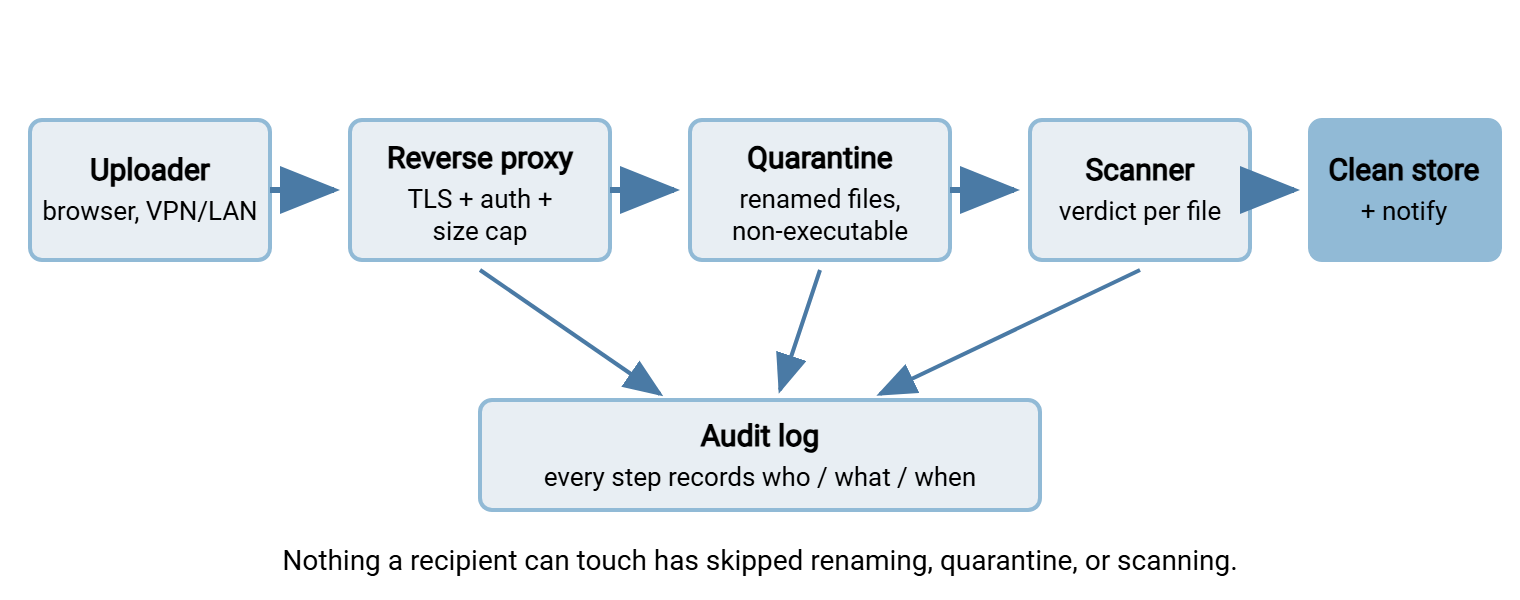
The two storage areas are the heart of it. The quarantine is where every upload lands first: a directory outside any web-served path, on its own volume. It is mounted so nothing on it can execute, and holds files under server-generated names. Only the scanner reads it. The clean store is where files appear — with recipients notified — only after a scanner verdict. Recipients cannot see, list, or fetch anything still in quarantine. That means the window between "hostile file arrives" and "hostile file is detected" is a window in which no human can click on it.
Assembling the Pieces
Nothing in that architecture requires exotic software, and there are two sensible ways to realize it. The first is assembly from parts you already run. Any mainstream web server or reverse proxy provides TLS termination, directory-integrated authentication, and request-body caps as ordinary configuration. That means the custom part — the upload handler — stays small. Keep it that way deliberately: the handler's whole job is receive, rename, write to quarantine, log. Every enforcement duty you can push out to the proxy is one less thing your own code can get wrong.
The second path is deploying an existing small drop application — plenty exist as self-hosted packages. Evaluate candidates by reading their documentation against this article's checklist, line by line: server-side renaming? storage outside the web root? a scanning hook? automatic retention? forced-attachment downloads? A missing feature you would have to bolt on yourself should count as absent, because bolted-on security is where assembly projects quietly become software projects.
Whichever path you take, finish with an abuse test in staging before you announce anything. Upload a file whose name contains traversal segments and confirm it lands renamed in quarantine. Upload an HTML file and confirm the download comes back as an attachment, not a rendered page. Send an oversized file and confirm the proxy refuses it early. Feed it a standard antivirus test file and confirm quarantine holds and someone gets alerted. Fifteen minutes of deliberate misbehavior tells you more than any design review.
Handling Rules That Close the Classic Holes
Upload endpoints have a small canon of famous vulnerabilities, and every one of them is closed by a handling rule you can implement in an afternoon. These rules are where DIY drops most often fail, so treat the list as required reading rather than reference:
- Never use the client's filename. The
filenamefield in an upload is attacker-controlled text. Fed naively into a file path, a name like..\..\web\shell.aspxwalks out of your upload directory and into your web root. That is the classic path traversal. Generate a random server-side name for storage, keep the original strictly as display metadata, and sanitize even that before showing it to anyone. - Store outside the web root, serve through code. If uploaded files live where the web server serves content directly, then uploading executable content and browsing to it hands an attacker code execution. Files belong on a path the web server does not map; downloads happen through a handler that checks authorization and streams the bytes.
- Force downloads to be downloads. Serve retrievals with
Content-Disposition: attachmentand an accurate, conservative content type. Otherwise an uploaded HTML file opens in the browser, on your internal domain, running script with your users' cookies. That is stored cross-site scripting via the file drop. - Distrust the declared type. The
Content-Typea client sends is another suggestion. Enforce your allowlist by inspecting the file itself (magic-byte checks are a start), not by believing the label — and never by extension alone. - Quota the volume, separately. The drop's storage must be a volume whose filling inconveniences the drop, not the operating system, the logs, or anything else sharing a disk. Pair the per-upload size cap with per-user and total quotas.
- Rate-limit per account. Authenticated does not mean well-behaved; a looping script or a compromised account should hit a ceiling quickly and loudly.
Remember: every field an uploader controls — filename, content type, the bytes themselves — is untrusted input. The drop stays safe exactly as long as nothing an uploader sent is ever used directly as a path, served back verbatim, or executed. All six rules above are that one sentence, applied.
The Malware Scanning Hook
Scanning is a pipeline stage, not a checkbox. Here is the workable pattern. A watcher notices a new file complete in quarantine and invokes the scanner (an on-host engine or a scanning service your organization already licenses). The watcher records the verdict in the audit log. Then it either promotes the file to the clean store and notifies the recipient, or leaves it quarantined and alerts an admin. Two design rules keep the stage honest:
- Fail closed. A file the scanner cannot process — encrypted archive, corrupt container, scan timeout — is not "probably fine." It stays in quarantine and a human decides. The same applies when the scanner service itself is down: uploads may continue, but nothing gets promoted until scanning resumes.
- Bound the expansion. Archives deserve suspicion in proportion to their convenience. A decompression bomb — a tiny archive that expands to terabytes — can take out a naive scanning host. Cap the expansion ratio, depth, and time you will spend per file; a file that exceeds the caps fails closed, per the rule above.
Keep expectations calibrated: scanning is a filter, not a guarantee. It catches the commodity malware that makes up most real incidents; it will not catch everything crafted. That is why the scanner is one stage in an architecture with other stages — type allowlists, non-executable storage, forced-download serving. Those other stages assume something hostile will eventually get through the filter and make sure it lands harmlessly.
Retention: The Drop Must Empty Itself
A drop with no deletion policy quietly becomes the organization's worst archive: unindexed, unowned, full of stale personal data and forgotten confidential files, growing forever. The fix is a retention rule enforced by machinery, not memory. Every file expires — fourteen days is a common default for handoff workflows. Expiry is advertised right in the interface ("files are deleted automatically after 14 days") so the drop never gets mistaken for storage.
Implementation is a scheduled janitor job that deletes expired files and logs what it removed. Two subtleties earn their mention. First, monitor the janitor. A cleanup job that dies silently converts your tidy drop into the unmanaged archive it was supposed to prevent, discovered months later as a full disk. Second, retention for the audit log is a separate, longer clock. You want the record of who uploaded what to outlive the files themselves, because questions arrive late.
The Responsible-DIY Checklist
Everything above, in the form you can pin to the change ticket. A DIY drop that honestly ticks every box is a respectable piece of infrastructure; any unticked box is your to-do list:
RESPONSIBLE FILE-DROP CHECKLIST
Access
[ ] HTTPS only, certificate the clients actually trust
[ ] Every upload and download tied to an authenticated account
[ ] Rate limits per account; alerts on abuse
Handling
[ ] Server generates stored filenames; client name is metadata only
[ ] Files stored outside the web root on a non-executable volume
[ ] Size cap at proxy AND application; type allowlist, verified by content
[ ] Downloads served with forced "attachment" disposition
Scanning
[ ] Every file scanned in quarantine before anyone can retrieve it
[ ] Fail closed: unscannable or flagged files stay quarantined
[ ] Archive expansion bounded (ratio, depth, time)
Lifecycle
[ ] Retention TTL deletes files automatically; TTL shown to users
[ ] Dedicated volume with quotas; full drop cannot harm the host
[ ] Cleanup job monitored — its silence is an alert
Accountability
[ ] Append-only audit log, retained longer than the files
[ ] A named owner; patching and review on the calendar
[ ] Written criteria for when this drop must graduate (next section)
Where DIY Should Hand Off to a Real Product
Here is the honest boundary, and it is less about technology than about what the thing has become. A DIY drop is the right answer while it is a convenience. That means internal users, modest volume, one workflow, and an owner who can patch it on a slow afternoon. It stops being the right answer when any of these appear:
- External parties. Partners, vendors, or customers on the open internet mean real attack surface, real availability expectations, and identity management for people not in your directory. That is a product's job.
- Compliance obligations. When an auditor asks for per-user access reports, retention evidence, or transfer histories, you want features that exist, not scripts you promise to write.
- Scale of accounts. A handful of internal users is administration. Hundreds of accounts with resets, lockouts, and onboarding is a workload that hand-built tooling turns into a part-time job.
- Two-way and multi-protocol demands. Users may need folders, permissions, downloads and uploads. Or a partner may ask for SFTP because their automation requires it (the pattern from when HTTPS beats SFTP). The moment either happens, you are rebuilding a file transfer server one feature request at a time.
- Criticality. When a business process stops if the drop is down, the drop needs support, updates, and documentation from somewhere sturdier than one person's goodwill.
Crossing that line does not discard your work — it graduates it. Everything this article made you decide (authentication source, limits, retention, logging) becomes configuration in a purpose-built server instead of code you maintain. That is exactly the niche of Sysax Multi Server: browser-based HTTPS file transfer with user accounts, encryption, and activity logging out of the box. It also provides SFTP and FTPS from the same server when the machine-to-machine requests arrive. That is the secure drop as an afternoon of configuration on a Windows box rather than a standing engineering commitment. The checklist above still applies; the difference is who wrote the code that satisfies it.
The Version to Tell a Colleague
An internal HTTPS file drop is a fine thing to build if you build it like you mean it. That means it is authenticated always and encrypted always. It means uploads are renamed and quarantined on inert storage, scanned before anyone can touch them. It means the drop is size- and type-limited at the front door, self-emptying on a schedule, and logged end to end. Build it with the checklist and give it an owner. Write down, on day one, the conditions under which you will retire it in favor of a real file transfer server. The drops that end up in incident reports are almost never the ones that failed a checklist item; they are the ones nobody was honest about having outgrown.
Related reading in this series includes how web upload works for the mechanics underneath the form. It includes presigned URLs for account-free sharing done with eyes open. It includes large files over HTTP for when the drop's users start moving serious gigabytes.
Frequently Asked Questions
Is an internal file drop safe if it's only reachable on our LAN?
Why can't I just trust the filename the user uploaded?
Do I really need malware scanning for internal uploads?
How long should files stay in the drop?
At what point should I stop maintaining a DIY drop?
From the Sysax team: we build secure file transfer software for Windows. Sysax Multi Server is an FTP, FTPS, SFTP, and HTTPS server. Sysax FTP Automation handles scheduled, scripted transfers. Free trials are on the download page.