
Jobs That Survive Reboots, Patches, and Missed Windows
A schedule is a set of assumptions wearing a clock. "Run at 02:10" quietly assumes the machine will be on at 02:10. It assumes the network, the VPN, and the file share will be up, and that no other process is holding the files. Most nights the assumptions hold. Then comes patch night — or a power blip, a hung service, a maintenance window someone booked without checking the job calendar. Every scheduled transfer discovers what it was really configured to do when the world was not ready.
This article is about engineering for those nights. It covers what cron and Task Scheduler honestly do about a run that never happened. It explains how to decide per flow whether a missed window should be caught up or skipped. It covers the startup-ordering problem that makes at-boot jobs fail, and dependency checks that wait for shares and VPNs properly. It covers scheduling around maintenance windows, and the reboot drill that proves all of it before reality tests it for you. It is part of our Scheduled Jobs series and pairs with cron and Task Scheduler compared, which introduces the two schedulers' behavior at a higher level.
One Patch Night, Three Different Outcomes
Picture the standard setup: an invoice push scheduled for 02:10, and a patching job that takes the machine down from about 01:40 to 03:00. Downstream, a partner's system expects the file by 04:00. What happens next depends entirely on configuration choices someone made — or failed to make — months earlier. With default settings on either scheduler, the 02:10 run silently never happens, and the first sign of trouble is the partner's complaint after breakfast. With catch-up enabled, the job runs a few minutes after the machine returns, the file lands around 03:10, and nobody ever opens a ticket. And with a badly designed catch-up, the late run collides with something else or sends a file twice. The diagram below shows the timeline and the fork.
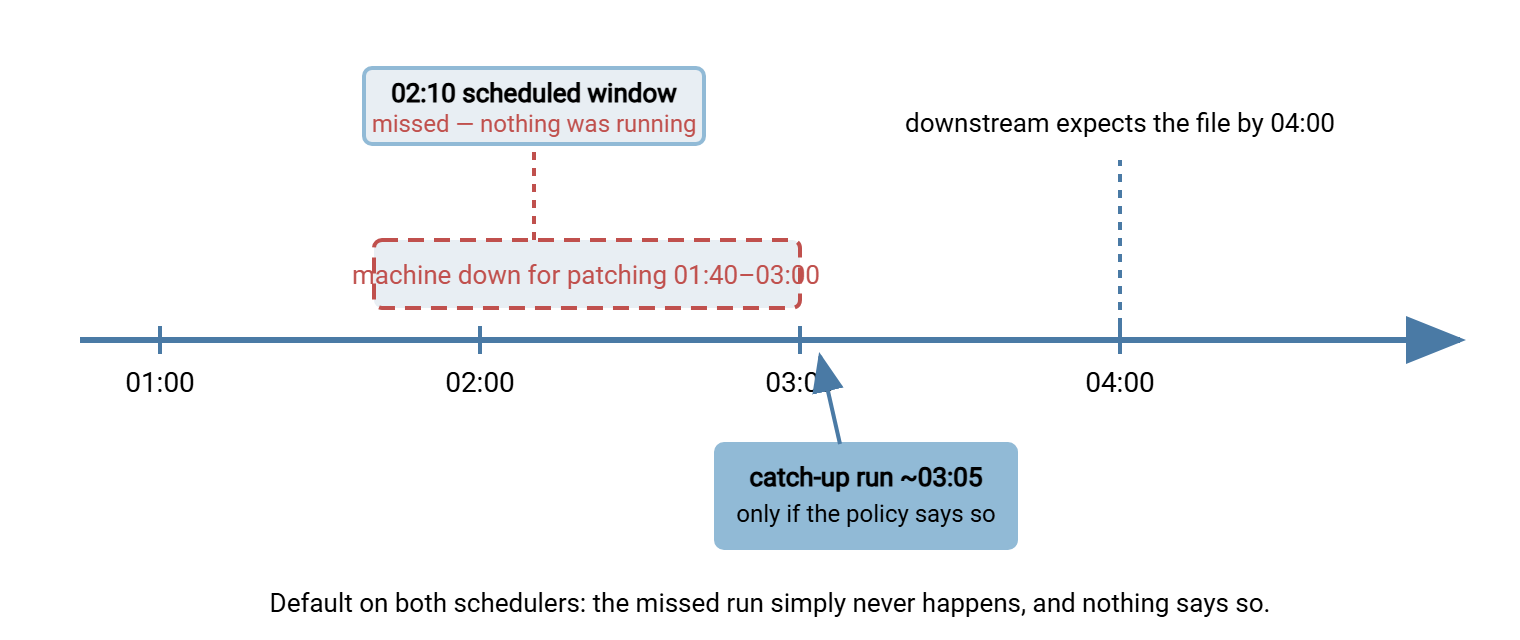
Everything in this article exists to make sure the outcome on that timeline is the one you chose in advance, not the one the defaults chose for you.
What Each Scheduler Honestly Does About a Missed Run
Classic cron skips it, silently and completely. Cron matches jobs against the current minute; a minute that passed while the machine was down is simply gone. There is no record that a run was missed — no log line, no error, nothing to alert on. Cron offers two partial compensations. The @reboot crontab keyword runs a command when the cron daemon starts, so a job can do its own "did I miss anything?" reasoning at boot. And anacron-style catch-up is a companion mechanism designed for machines that are not always on. It records when each daily, weekly, or monthly job last ran and launches overdue ones shortly after startup. Its honest limitation: it thinks in days, not minutes, so it guarantees "the nightly job eventually ran today," never "it ran at 02:10."
Task Scheduler also skips by default — but makes catch-up a per-task setting: "Run task as soon as possible after a scheduled start is missed." Two honest details about that checkbox. The catch-up run happens shortly after the machine and the scheduler service are back — a few minutes, typically — not the instant the OS boots. That is usually a blessing since boot-time is exactly when the network is not ready. And catch-up produces one make-up run, regardless of how many windows were missed; a task scheduled hourly that missed six windows does not run six times. Do not confuse it with the separate "if the task fails, restart" setting: missed-start handles the machine was not available, restart-on-failure handles the job ran and failed. A resilient task often wants both.
One more honesty note: sleep counts as down. A machine that suspends overnight misses its windows exactly as if it had been powered off. That is how transfer jobs on workstation-class hardware "randomly" stop running when a power plan changes. Task Scheduler has a condition for this — "Wake the computer to run this task". It does what it says where the hardware's power settings cooperate. It is worth enabling on the machines where sleep is possible, and worth not depending on anywhere important. Machines that carry scheduled transfer duty should simply not sleep.
Can you at least see a miss afterward? On Task Scheduler, partially: with the task's history enabled, launches and completions are logged as events. So a night with no launch event is detectable — if something looks. Cron records nothing, so the visibility has to come from the job itself. Have every run append one line to a ledger — timestamp, job name, outcome. Then "we missed a window" becomes a gap you can query instead of a fact nobody owns. The reboot drill at the end of this article checks exactly that.
Catch Up or Skip? Decide Per Flow
Whether a late run is better than no run is not a scheduler question — it is a business question about the specific flow, with a safety question attached. Ask two things. First, does anything downstream wait for this run's output? If yes, skipping means a person or system goes without. Second, does the next regular run naturally cover the gap? A job that transfers "everything new since last time" self-heals at the next window; a job that builds and sends "today's file" does not. The answers sort almost every transfer job into one of the rows below.
| Job pattern | If one window is missed | Right policy | How to implement |
|---|---|---|---|
| Incremental pull — "everything new since last run" | Nothing is lost; next run collects a double helping | Skip | Leave defaults; verify the next run's larger batch fits its window |
| Daily export consumed downstream by a deadline | Downstream misses its deadline; business impact | Catch up | Missed-start setting or anacron-style daily; freshness alert as backstop |
| Frequent poll — every fifteen minutes, pickup style | One missed poll is irrelevant; the next one covers it | Skip | Repeating trigger resumes on its own once the machine is back |
| Cleanup and archive-purge jobs | The backlog waits patiently | Skip | Defaults; size the next run for a double backlog |
| Period-end push — month-end statements, closing files | A whole period's obligation goes unmet | Catch up, plus a human check | Catch-up enabled and an alert either way; a person confirms delivery |
Whatever each flow's answer is, write it down — in the task's description and in your jobs register, the one described in scheduled job hygiene. "Catch-up: yes, safe to run late until 05:00" is exactly the sentence a responder needs at three in the morning. It is exactly the sentence nobody can reconstruct from the scheduler's checkboxes alone.
Late Runs Must Be Safe Runs
Enabling catch-up obligates you to make a late run harmless, because it will execute under conditions the author never pictured. Two hazards account for most catch-up incidents.
Date logic. A job that computes "today" or "yesterday" from the clock behaves differently at 03:05 than at 02:10 — usually fine. But a run delayed across midnight builds tomorrow's filename for yesterday's data. A period-end job delayed into the new month reaches into the wrong period entirely. Derive dates from the data (the files' own timestamps, a run-ledger entry) rather than from "now" wherever the distinction can matter.
Duplication. A catch-up run and the next regular run can land close together, and a job killed mid-transfer by the reboot may already have delivered some files. Late runs are therefore re-runs in disguise, and they need the same property every resilient job needs: idempotency. Run it twice, get the same result, because the job checks what already arrived before sending again. The cheapest implementation is the same ledger mentioned above, extended per file. Before uploading, the job consults its sent-list. After each successful upload, it appends the filename. A catch-up run then skips everything the interrupted 02:10 attempt already delivered and sends only the remainder. That means no duplicate files, no missing ones, regardless of when or how many times the job fires. Designing transfers to be safely re-runnable, with retries that know when to give up, is the territory of our retry and error handling series. The reboot case is simply that design being cashed in.
Boot Is Not "Ready": Startup Ordering
The tempting fix for missed windows is "just run it at startup." Then you discover what startup actually is: a stampede. At the moment an @reboot job or a startup-triggered task fires, the network stack may have no address yet. DNS may not resolve, the VPN tunnel is minutes away, and file shares are not mounted. The database the job reads is still recovering. The job fails not because it is wrong but because it is early. It works every time you test it by hand, hours after boot, which makes the failure look supernatural.
Both schedulers offer a blunt instrument: Task Scheduler's startup trigger has a "delay task for" setting, and a cron @reboot line can simply begin with a sleep. Delays help, but they are guesses — too short on the day the switch takes longer, pure waste every other day. The robust pattern is a readiness check: the job verifies its actual dependencies, retrying briefly. It proceeds the moment they are true or fails loudly when the wait expires:
# PowerShell: wait up to ten minutes for the share to be reachable
$deadline = (Get-Date).AddMinutes(10)
while (-not (Test-Path "\\fileserver\outbound")) {
    if ((Get-Date) -gt $deadline) { Log "share never appeared"; exit 2 }
    Start-Sleep -Seconds 30
}

# bash: wait for the SFTP host to answer on its port before starting
tries=20
until nc -z sftp.partnerco.example 22; do
    tries=$((tries-1))
    [ "$tries" -le 0 ] && { echo "partner unreachable" >&2; exit 2; }
    sleep 30
done
Note the shape: bounded wait, explicit failure, distinct exit code. A readiness check that waits forever converts "network was slow" into "job hung invisibly." And prefer checks against the real dependency — the share path, the partner's port — over generic ones. Task Scheduler's "start only if network connection is available" condition confirms only that some network exists. That is rarely the fact your transfer depends on.
Remember: fixed delays are guesses; readiness checks are answers. A job that waits for its actual dependencies, with a timeout and a loud failure, survives slow boots, fast boots, and the boot where the VPN never comes up at all.
The Server Side Has to Survive Too
Reboot survival is a property of the whole flow, not just the client job. If the machine that reboots is the one receiving files, the question becomes: does the transfer service come back on its own? Anything that runs as a logged-in application dies at logoff and stays dead through a reboot until a human signs in. That is a genuinely common root cause behind "the partner said our server was down all weekend." Server software belongs in a Windows service, which the operating system starts at boot with no user session at all. Sysax Multi Server runs this way by design, so the receiving end of your flows is listening again as soon as the machine is. Its activity log shows exactly when service resumed — useful evidence when reconstructing what a reboot did to the night's schedule.
The same logic applies to anything else the job assumes is alive: a database, a message queue, an antivirus gateway. Each is either configured to start automatically and verified in the reboot drill below, or it is a dependency your readiness check must cover.
Scheduling Around Maintenance Windows
Some collisions between patching and transfers are simply calendar failures, and the fixes are unglamorous coordination:
- Know both calendars. The patch window and the job schedule must be visible to the same people. If patching owns 02:00 to 03:00 on the second Tuesday of the month, a critical push at 02:10 is a monthly incident by appointment.
- Do not restart into a stampede. After the machine returns, catch-up runs, startup triggers, and regular windows can all fire within minutes. Overlap protection — Task Scheduler's "do not start a new instance,"
flockaround cron jobs — is what keeps that crowd from trampling the files. - Expect the mid-transfer kill. A reboot can interrupt a job mid-upload, leaving a partial file at the destination. The defenses are transfer-level: upload to a temporary name and rename on completion, or verify size and checksum after transfer. That way, a half-delivered file can never be mistaken for a whole one. A caught-up or retried run then replaces it cleanly.
- Give long jobs a stop bound. "Stop the task if it runs longer than" a sane limit keeps a job that hung during the chaos from occupying the schedule into the business day.
And remember that the other end has maintenance windows too. Partners patch, migrate, and reboot on their own calendars, and from your side their window looks like an unexplained string of connection failures at exactly 02:10. Ask partners for their maintenance schedule during onboarding and put it next to your own. A flow whose retry budget comfortably spans the partner's stated window turns their patch night into a footnote in your log instead of a page to your phone.
The Reboot Drill
Every claim above is testable, and the test is cheap: reboot the machine on purpose, during a controlled window, and watch what your jobs actually do. Run the drill when a machine joins the schedule and after meaningful changes, and check, at minimum:
- Did every auto-start service come back — including the transfer server, if this machine receives files?
- Did jobs with catch-up enabled run, once, shortly after boot — and did skip-policy jobs correctly not run?
- Did startup-triggered jobs wait for their dependencies, or fail early trying?
- Did the first regular scheduled run after boot succeed?
- Do the job logs show the gap honestly — a line for the late run, a visible absence for the skipped one?
- Did your monitoring notice the misses you did not compensate for?
That last line matters most, because neither scheduler will ever tell you about a run that did not happen. Absence is invisible from inside the machine. It is caught by freshness checks — monitoring that alerts when an expected file has not arrived by its deadline. These live downstream and are covered in our transfer job monitoring series. Between the scheduler's catch-up and the monitor's absence alarm, there is also a middle layer worth having on transfer flows: retry with notification at the job level. A transfer task defined in Sysax FTP Automation, for example, retries a failed transfer on its own and sends an email when a run fails. So the run that fired before the VPN was ready becomes a retry and a notice instead of a silent gap in tomorrow's reconciliation.
Choosing Boring Outcomes in Advance
Reboot resilience is not one feature; it is a stack of small decisions, each made before the night it matters. Those include a written catch-up-or-skip policy per flow, late runs made idempotent, and startup jobs that wait for real dependencies. They include services that start themselves, calendars that do not collide, and a drill that proves the stack. Configure the mechanics in Task Scheduler done properly, compare the platform behaviors in cron vs Task Scheduler, and record every policy where scheduled job hygiene says it belongs. Then patch night becomes what it should be: a non-event your logs can prove.
Frequently Asked Questions
Does cron run the jobs it missed while the machine was off?
What does "Run task as soon as possible after a scheduled start is missed" actually do?
Why does my startup job fail, when the same script works run by hand?
Should I enable catch-up on every job?
How do I find out a scheduled run never happened?
From the Sysax team: we build secure file transfer software for Windows. Sysax Multi Server is an FTP, FTPS, SFTP, and HTTPS server. Sysax FTP Automation handles scheduled, scripted transfers. Free trials are on the download page.