
Copying Through Bastions: Jump-Host Transfer Patterns
Sooner or later every administrator meets a network they cannot reach directly. The application servers live in a protected segment. The firewall refuses connections from anywhere except one hardened machine, and the instructions say "SSH to the bastion first, then to the host." Logging in that way is easy enough. Then comes the day you need to move a 2 GB file onto one of those internal servers, and the obvious approaches suddenly feel awkward: copy it twice? Forward something? Ask someone?
A bastion host is also called a jump host; the terms are interchangeable. It is a deliberately exposed, deliberately hardened machine that serves as the single door into a protected network. This tutorial covers how to move files through that door properly. It covers the two tempting shortcuts and why one of them is a genuine security hazard. It covers the ProxyJump pattern that should be your default. It also covers the tar-over-SSH streams that veterans reach for when trees of files must cross without ever touching the bastion's disk. It is part of our SCP & SSH Copying series.
The Topology: One Door, Deliberately
The design exists to shrink the attack surface. Instead of exposing fifty servers to the internet (or to a flat corporate network), the organization exposes exactly one machine. It watches that machine closely and forces all administrative traffic through it. The firewall enforces the shape: from outside, only the bastion's SSH port is reachable; from the bastion, SSH may continue inward to the protected hosts. Every session through the door can be logged, every login attempt lands on one audited machine, and revoking one person's access means touching one host.
The diagram shows the shape and the rule it enforces — your machine cannot reach the internal hosts directly, only through the bastion.
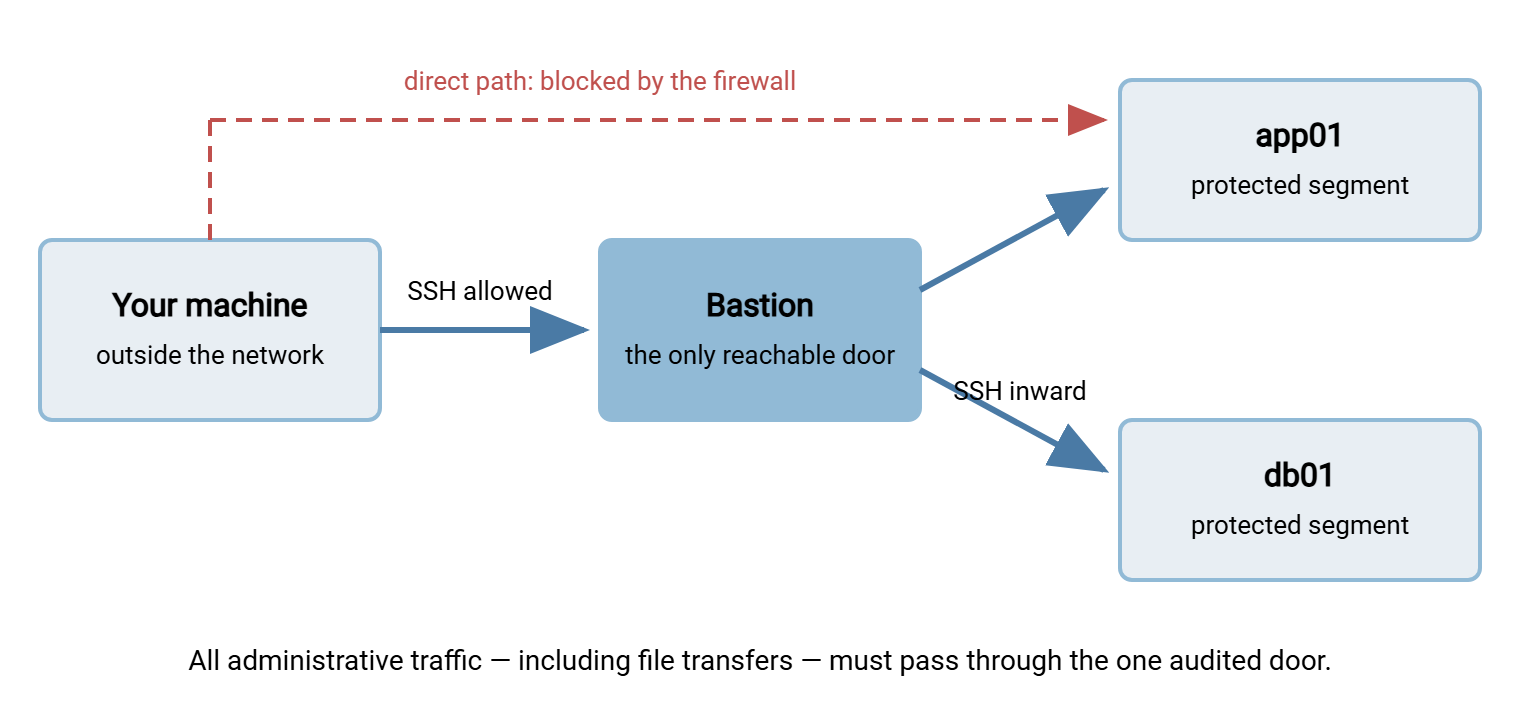
You will meet this shape everywhere once you can name it. Cloud environments build it explicitly — servers in private subnets with no public addresses, reachable only through one small instance kept for the purpose. Corporate networks build it as a hardened admin gateway behind the VPN. Even a modest two-firewall office network often has "the one box you SSH to first." The vocabulary differs; the transfer problem, and its solutions, do not.
Notice what the diagram does not say. It does not say files should ever be stored on the bastion, and it does not say your credentials should ever live there. Keeping both things true while still moving files is the whole craft of this article.
The Two Tempting Wrong Ways
Wrong way one: the two-stage copy
The approach everyone invents first, because it uses nothing but what you already know:
scp release.tgz alex@bastion:/tmp/          # hop 1: onto the bastion
ssh alex@bastion
scp /tmp/release.tgz app01:/opt/releases/   # hop 2: onward (run on the bastion)
rm /tmp/release.tgz                          # the step everyone forgets
It works, which is exactly the problem — it works well enough to become a habit with three costs. First, your data sits at rest, even briefly, on the most attacked machine in the company. The cleanup step gets forgotten often enough that bastion /tmp directories become accidental archives of things that should never rest there. Second, everything crosses the wire twice and consumes bastion disk, which for a small hardened box may be scarce. Third — and most corrosive — the second hop needs credentials on the bastion. You either copy a private key there (a real key, resting on the exposed machine, waiting to be stolen) or fall into the second wrong way.
Wrong way two: agent forwarding
To make the second hop authenticate without putting keys on the bastion, many people reach for agent forwarding (ssh -A). It deserves a careful, non-hysterical explanation, because it is genuinely convenient and genuinely risky.
Your SSH agent is a small process on your own machine that holds your unlocked private keys. It answers one kind of question: "sign this authentication challenge for me." Forwarding the agent means that while you are logged in to the bastion, a channel leads from the bastion back to your agent. So an scp you run on the bastion can authenticate onward to app01 using your key, which never leaves your laptop. Sounds ideal.
The catch is who else can use that channel. The forwarded agent appears on the bastion as a socket owned by your login. Anyone with administrative power on the bastion can use that socket too, for as long as you stay connected. They cannot read your key, but they do not need to. They can ask your agent to sign authentications and impersonate you on any system your key unlocks, silently, while your session lasts. On a machine whose defining property is "the one everybody can reach and attackers concentrate on," that is exactly the wrong place to extend that trust. This is why security guides keep repeating the same short rule: do not forward your agent to machines you do not fully trust. The bastion, by design, is a machine you should decline to fully trust.
The one-sentence version: agent forwarding lets the bastion borrow your identity while you are connected; ProxyJump lets the bastion carry your traffic without ever being able to speak as you. Prefer the second, always, and the need for the first evaporates.
ProxyJump: The Right Default
ProxyJump makes the bastion do the only job the security model actually wants it to do: relay bytes. With -J, your SSH client connects to the bastion and asks it to open a plain forwarded channel to the internal host. It then runs a complete SSH connection to the internal host inside that channel. Read that twice, because it is the whole trick. You authenticate to the bastion (proving you may use the door), and then you authenticate to app01 end to end from your own machine. The bastion sees ciphertext passing through. It holds no keys, borrows no identity, stores no files, and could not read the transfer if it wanted to.
Every tool in the SSH family takes the same flag:
ssh  -J alex@bastion.example.com alex@app01.internal            # log in through the door
scp  -J alex@bastion.example.com release.tgz alex@app01.internal:/opt/releases/
scp  -J alex@bastion.example.com alex@db01.internal:/backups/nightly.dump .
sftp -J alex@bastion.example.com alex@app01.internal            # browse, resume, manage
Chains work too — some networks nest doors — by listing hops in order: -J bastion1,bastion2. And where a tool or an older system lacks -J, the same behavior spells -o ProxyJump=alex@bastion. Its most portable ancient form is a ProxyCommand that runs ssh -W through the bastion. All three are the same idea wearing different syntax.
Typing the jump every time gets old, so promote it into ~/.ssh/config — the file every SSH tool reads, covered fully in SSH config as a transfer accelerator:
Host bastion
    HostName bastion.example.com
    User alex

Host app01 db01 *.internal
    ProxyJump bastion
    User alex
From then on, scp release.tgz app01:/opt/releases/ just works — the jump happens invisibly, for scp, sftp, ssh, and rsync alike. This is the single most civilizing change you can make to life behind a bastion.
Two operational notes keep expectations straight. ProxyJump requires the bastion's SSH daemon to permit forwarded channels (the AllowTcpForwarding setting). Locked-down bastions sometimes disable them, which is a policy conversation, not a technical workaround hunt — more on that below. And you will authenticate twice, once per machine, which is correct and expected: two doors, two proofs, both from your own keyboard. With keys and an agent running locally, both proofs happen without a single extra keystroke.
One refinement compounds beautifully with the jump: connection multiplexing. Repeated copies through a bastion pay the two-hop handshake every time — unless a warm master connection is being reused. In that case, follow-up transfers start in milliseconds despite the extra hop. The three config lines that enable it live in the SSH config article, and they apply to jumped connections exactly as to direct ones.
rsync and tar Through the Jump
Because rsync rides SSH, it inherits the same pattern. With the config block above in place, plain rsync -a build/ app01:/opt/app/ already goes through the bastion. Without config, pass the jump explicitly through rsync's transport option:
rsync -a -e "ssh -J alex@bastion.example.com" build/ alex@app01.internal:/opt/app/
Everything rsync is good at — delta transfer, resume, mirroring, covered in our rsync series — works unchanged through a jump, which makes it the tool of choice for repeated feeds into protected networks.
Then there is the power move: tar over SSH. The scenario that calls for it is a big tree of many files — a source checkout, a directory of thousands of images. Per-file transfer ceremony would crawl, and you want nothing, not even temporarily, landing on the bastion. The answer is to let tar pack the tree into one continuous stream on your side. Pipe that stream through ssh (jumping the bastion), and unpack it live on the far side:
# push a tree into the protected network, one stream, nothing stored en route
tar czf - website/ | ssh -J alex@bastion alex@app01.internal 'tar xzf - -C /var/www/'

# pull a tree out, same idea reversed
ssh -J alex@bastion alex@db01.internal 'tar czf - -C /var/backups nightly/' | tar xzf - -C ./restore/
Read the first one in words: create (c) a gzipped (z) archive to standard output (f -) from website/. Hand the stream to ssh, which carries it — encrypted, through the bastion — to app01. There, extract (x) from standard input into /var/www/. One connection, one stream, permissions and timestamps and symlinks preserved by tar itself, no intermediate file anywhere. On fast internal links, drop the z — compression can bottleneck a fast pipe; over a thin WAN, keep it.
The honest caveats: a tar stream is all-or-nothing (an interruption means rerunning; there is no resume). Quoting must be exact (the remote tar command line passes through the remote shell). And you should verify anything irreplaceable afterward. Verification runs through the jump like everything else — checksum on both sides and compare:
sha256sum website/index.html
ssh -J alex@bastion alex@app01.internal 'sha256sum /var/www/website/index.html'
For the recurring version of this job, rsync's re-runnability wins; the tar stream is the sprint, not the marathon.
When You Cannot Use -J: The Port-Forward Fallback
Sometimes the tool in your hand does not speak ProxyJump — a graphical SFTP client, say, that only knows host and port. The fallback is local port forwarding, which is ProxyJump assembled by hand. One command rents out a port on your own machine and connects it, through the bastion, to the internal host's SSH port:
ssh -N -L 2222:app01.internal:22 alex@bastion.example.com   # leave this running
scp -P 2222 release.tgz alex@localhost:/opt/releases/        # in another terminal
sftp -P 2222 alex@localhost                                  # or point a GUI client at localhost:2222
While the first command runs, localhost:2222 is app01:22 for every practical purpose. The connection you make to it is still end-to-end SSH — the bastion relays ciphertext exactly as with -J. The -N flag means "forward only, no remote shell," so that terminal just holds the tunnel open. Close it (or press Ctrl-C) and the rented port vanishes. Expect the host-key prompt to mention localhost:2222. Your client is recording the internal host's key under that name, a cosmetic oddity worth recognizing so it does not alarm you. The pattern generalizes to any inward service, which is why it is also the standard way to reach an internal SFTP server from a graphical client that has never heard of bastions.
And if the bastion forbids forwarding altogether? Then the organization has decided relaying is not allowed. The right move is to use whatever transfer path they built instead — often a managed drop zone or an approved transfer server. Use that path rather than engineering around policy. A locked door in a security model is an instruction, not a puzzle.
Keeping the Security Model Intact
The patterns above exist to preserve properties someone worked hard to establish. The checklist version, suitable for a team wiki:
- No private keys stored on the bastion. ProxyJump makes them unnecessary; their absence makes bastion compromise survivable.
- No agent forwarding by default. Reserve it for machines you administer and trust fully, if anywhere; the bastion is neither.
- No payload data at rest on the bastion. Jumped transfers and tar streams pass through memory only. If policy ever forces a staged copy, treat cleanup as part of the transfer, not an afterthought.
- Authenticate end to end. You prove yourself to the door and to the destination separately, from your own machine, and the door never gains the power to impersonate you.
- Let the bastion log. The model's payoff is one audited chokepoint. Jumped sessions still appear in its connection logs (as relays, contents encrypted), which is exactly the visibility the design intends.
- Give recurring transfers their own identity. A scheduled feed into the protected network deserves a dedicated, least-privilege account and key on the destination. It should not ride on a person's credentials and break the day that person leaves. Personal identities for personal work, named service identities for machinery.
None of this depends on what runs inside the protected segment. The destination might be a Linux fleet, or a Windows file server publishing an SFTP endpoint. For instance, Sysax Multi Server gives a Windows machine SFTP (SSH2) service with per-user accounts and activity logging. Behind a bastion, it is reached the same way as everything else: jump the door, authenticate end to end, transfer inside the tunnel.
Wrap-Up: The Door Is Not a Shelf
Everything in this tutorial compresses into one image. A bastion is a door, not a shelf: things pass through it, nothing rests on it, and it never holds the keys to what lies beyond. ProxyJump is that image as a flag; the config block makes it automatic. rsync and tar streams extend it to trees and bulk. The port-forward builds it by hand when tools are stubborn. Declining agent forwarding keeps the door from ever wearing your face.
To go deeper, SSH config as a transfer accelerator turns the jump into two permanent lines and adds multiplexing so repeated jumped copies fly. The article the scp command, mastered drills the flags used on every line of this page. And choosing your copy tool decides which vehicle should be driving through the door in the first place.
Frequently Asked Questions
Is a bastion host the same thing as a jump host?
Does the bastion need special software for ProxyJump to work?
Why exactly is agent forwarding risky?
Is copying through ProxyJump slower than copying directly?
Can sftp and rsync use a jump host too, or only scp?
What if I authenticate with passwords rather than keys?
From the Sysax team: we build secure file transfer software for Windows. Sysax Multi Server is an FTP, FTPS, SFTP, and HTTPS server. Sysax FTP Automation handles scheduled, scripted transfers. Free trials are on the download page.