
Proof-of-Delivery Patterns Outside AS2
You uploaded the file. The transfer finished without an error. So it was delivered — right? Maybe. "The upload completed" tells you the bytes left your side and the server accepted them. It does not tell you the partner's system picked the file up, read it intact, and did something with it. When a dispute starts with "we never got that file," a successful upload log on your end is surprisingly weak on its own. Plain file-transfer protocols were built to move bytes, not to hand back a receipt.
Some protocols do return receipts by design — the AS2 protocol used in business-to-business exchange is the famous example. But most of the transfers you run every day go over ordinary SFTP, FTPS, or HTTPS. None of those give you a "delivered and accepted" acknowledgment out of the box. This article shows how to build proof of delivery on exactly those plain channels. It uses three patterns: confirmation files, signed acknowledgments, and log correlation. It then covers honestly when the do-it-yourself approach is enough and when a receipt-carrying protocol like AS2 earns its keep. This is part of our Signatures & Receipts series.
What "Proof of Delivery" Actually Requires
Before the patterns, get precise about the goal. A useful proof of delivery answers three questions, and the weaker patterns answer fewer of them:
- Did the file arrive? The receiver got a complete copy, not a truncated one.
- Was it the right file, unchanged? The bytes the receiver holds match the bytes you sent — provable with a hash.
- Who acknowledged it, and when? A specific party confirmed receipt at a specific time, in a way they cannot easily disown.
This is the non-repudiation of receipt discussed in non-repudiation for business — proof pointed at the receiving end rather than the sender. The patterns below climb a ladder of strength. A confirmation file answers mostly the first question, a signed acknowledgment answers all three, and log correlation backs them up with independent records. The right choice depends on how likely a dispute is and how much it would cost.
The Delivery Handshake, in Pictures
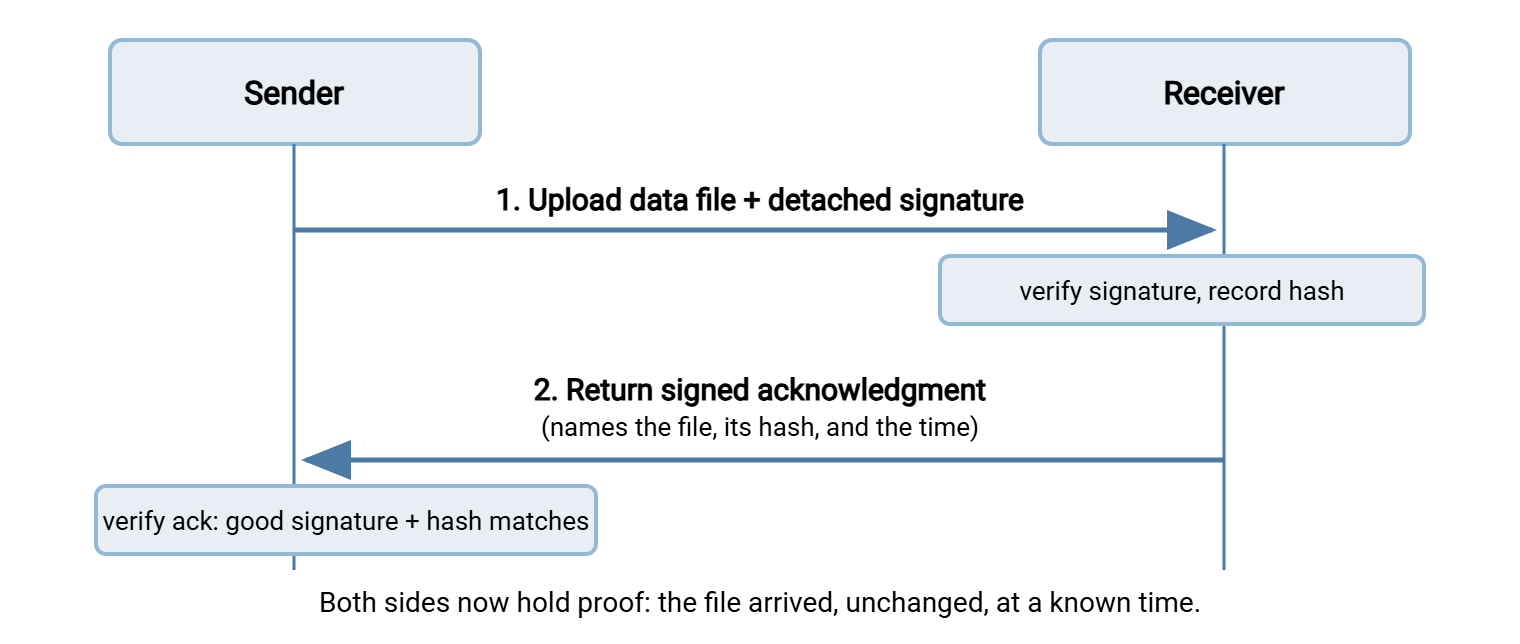
All three patterns share a shape: the file goes one way, and some form of acknowledgment comes back the other way. Afterward, both sides hold matching evidence. The diagram shows the strongest version. The sender delivers the file and its signature. The receiver verifies and records the hash, then returns a signed acknowledgment. The sender verifies that in turn.
Pattern 1: Confirmation Files
The simplest pattern uses the transfer channel itself. After the receiver successfully picks up a file, its system writes a small confirmation file that the sender can see. This is a marker such as the original name plus .done or .ack. Its presence means "I have the whole file."
Confirmation-file pattern (receiver writes a marker after a successful pickup)
------------------------------------------------------------------------------
nightly_invoices.csv          <- the data file the sender delivered
nightly_invoices.csv.done     <- written by the RECEIVER once it holds the
                                 complete file and has begun processing

Rules both sides agree on up front:
  * The receiver writes .done ONLY after a full, verified pickup
  * The sender does not delete the data file until the matching .done appears
  * A missing .done after an agreed wait time raises an alert on the sender
A common refinement removes a race condition worth knowing about. The sender writes the data file under a temporary name. Only once the upload is fully complete does it rename the file or drop a separate .ready flag. The receiver waits for the finished name or the ready flag before touching anything, so it never grabs a half-written file. Pair that with the receiver's .done marker and both sides have a simple, ordered handshake with no partial-file surprises.
Confirmation files are cheap and need no extra tooling — just a naming convention and a job on each side. They are genuinely useful for catching the everyday failure where a file simply never got collected. But be clear-eyed about their limits. A .done file is only as trustworthy as the party who wrote it and the folder it sits in. Anyone who can write to that directory could drop a fake marker, and the marker itself commits to nothing about which bytes were received. It proves "something happened," not "these exact bytes arrived, vouched for by you." For low-stakes internal flows that is often plenty; for a transfer someone might later dispute, climb one rung higher.
Pattern 2: Signed Acknowledgments
A signed acknowledgment is the confirmation file grown up. Instead of an empty marker, the receiver returns a short receipt. It names the file, states the hash of the bytes the receiver actually received, and records the time. The receiver then signs that receipt with its private key. Now the acknowledgment carries real weight: it cannot be forged without the receiver's key. It also commits to a specific hash. So it proves the receiver got that exact file, not merely a file.
Signed-acknowledgment pattern (a receipt the receiver signs and returns)
------------------------------------------------------------------------
# receipt.txt, written by the receiver, then detach-signed as receipt.txt.asc
file:         nightly_invoices.csv
sha256:       9f2b1c... (hash the receiver computed on the file it received)
received-by:  partner-intake
received-at:  YYYY-MM-DDThh:mm:ssZ   (UTC, from a synchronized clock)
status:       accepted

# The sender fetches receipt.txt AND receipt.txt.asc, then checks:
#   1. the signature is good and from the receiver's CONFIRMED key
#   2. the sha256 matches the hash of the file the sender actually sent
Walk through why this answers all three questions. The signature identifies who acknowledged it and proves they cannot later disown the receipt. The stated hash, when it matches your record of what you sent, proves the file arrived unchanged. The timestamp fixes the when, but it is trustworthy only if clocks are synchronized. That is why timestamps and evidence quality is its own article. Put a signed acknowledgment next to your own send log and retained file, and "we never received it" has almost nowhere left to stand.
One more habit makes signed acknowledgments pay off: store the receipt with the record of the file it acknowledges. A signed receipt sitting alone in a mailbox is easy to lose. File it next to your send log and your retained copy of the file, and it becomes part of a self-contained delivery record. You can produce that record months later without a scavenger hunt. The article on evidence packs builds directly on this habit.
Remember: a plain confirmation file is only as trustworthy as whoever can write to the folder. A signed acknowledgment is trustworthy because forging it requires the receiver's private key and it commits to a specific hash. Match the pattern to the stakes — markers for routine internal flows, signed receipts for anything a partner might dispute.
Pattern 3: Log Correlation
The third pattern needs no cooperation from the other side at all, which is its quiet strength. You build delivery evidence by lining up independent logs from both ends and showing they tell one story. Your server logs the upload — filename, byte count, hash, timestamp. The receiver's system logs the pickup or ingestion — often the same filename and size, at a slightly later time. Match those records and you have corroboration that no single party fabricated. Two separate systems, kept by two separate parties, agree.
Concretely, correlation is matching two lines. Your side logs an upload: filename nightly_invoices.csv, byte count 2,481,003, hash 9f2b1c..., completed at a recorded UTC time. The partner's ingestion log shows: picked up nightly_invoices.csv, byte count 2,481,003, at a UTC time a few minutes later. Same name, same byte count, the same hash if they record it, and times in the right order. Two records kept independently by two parties nonetheless agree. Neither side could have written the other's log, so their agreement is evidence in a way a single log never is.
Log correlation shines as a backstop behind the other patterns and as a first move when a partner cannot or will not return acknowledgments. Its weakness is that you may not control the far log, and logs can be incomplete or rotated away before you need them. That makes two habits essential. Log richly on your own side — filename, size, hash, and a synchronized timestamp on every transfer. And retain those logs long enough to outlast disputes. A server that keeps detailed activity logs, such as Sysax Multi Server, gives you the sender-side half of every correlation as a matter of course. Our pillar on transfer logging and audit trails covers making those logs complete and tamper-resistant.
Designing Receipts That Actually Hold Up
Whichever pattern you use, a receipt is only as good as what it commits to. A marker that says nothing but "done" is far weaker than one that pins down the specifics. When you design an acknowledgment with a partner, aim to capture:
- The file identity — its exact name, and ideally a batch or transfer identifier so there is no ambiguity about which delivery it refers to.
- The hash — of the bytes actually received, so the receipt proves content, not just arrival. This is the single most valuable field.
- The time — in a clear, unambiguous form. Record it in UTC from a synchronized clock, so receipts from different systems can be compared without timezone guesswork.
- The status — accepted, rejected, or accepted-with-warnings — so a receipt can also carry the news that a file arrived but failed validation.
- A signature — over all of the above, from a key whose fingerprint you have confirmed, turning the receipt from a claim into proof.
These fields are exactly what a scheduled-transfer tool can produce and check without a human in the loop. A client such as Sysax FTP Automation can write the acknowledgment when it finishes a pickup and verify inbound receipts on the sending side. So the handshake happens on every run rather than depending on someone remembering to send an email. Automating it is also what keeps the timestamps honest, because the machine records the moment of receipt rather than reconstructing it later.
Choosing the Return Channel for Acknowledgments
An acknowledgment has to travel back somehow, and the return path deserves as much thought as the forward one. Common choices, each with a wrinkle:
- A dedicated folder on the same transfer server. The receiver drops the receipt into an outbox the sender polls. Simple, and keeps everything on one audited channel — just set permissions so unrelated parties cannot write there.
- A pull from the partner's own endpoint. The sender fetches the receipt from a location the receiver controls. Good separation of the two sides, but now you depend on that endpoint's availability and access.
- Email. Convenient and human-readable, but email is a weak channel on its own. Lean entirely on the signature to carry the trust, never on the email path.
Whatever the path, the signature is what makes the receipt trustworthy, not the channel. That is the whole point of signing it: a signed acknowledgment can travel over a humble path and still be proof. Forging it needs the receiver's private key no matter how it reached you.
Handling the Unhappy Paths
Designing the happy path is easy; the value shows up in how you handle the rest. Decide these responses in advance:
- The acknowledgment never arrives. After an agreed wait, alert a human and treat the delivery as unconfirmed — not failed, not done. The file may have landed while the receipt got lost, so re-checking beats blindly resending, which can create duplicates.
- The hash in the receipt does not match. This is a real signal: the receiver holds different bytes than you sent. Hold the flow, compare against your retained copy, and resolve whether the difference is corruption, a wrong file, or tampering before anything downstream proceeds.
- The receipt says rejected. A good receipt can carry bad news — a file that arrived but failed validation. That is a feature: you learn immediately, with proof of what was rejected, instead of discovering it days later.
- A duplicate delivery. If a resend produces a second file, a transfer identifier in the receipt lets both sides recognize the duplicate rather than double-processing it.
None of these are exotic; they are the ordinary friction of real transfers. Writing down the response for each turns a proof-of-delivery scheme from a fair-weather convenience into something you can lean on when a night goes wrong.
When to Reach for AS2
Everything so far builds receipts by hand on plain channels, which is proportionate for most flows. There is a point, though, where a protocol that carries signed receipts as a standard part of every message is worth the added setup. AS2 is the common answer: it wraps each transfer in signing and encryption and returns a signed MDN (Message Disposition Notification) automatically. This is a standardized, cryptographic delivery receipt. Our Group I articles on the AS2 MDN as proof of delivery and AS2 versus SFTP go into the mechanics and the trade-offs.
Reach for AS2 when the signals point the same way. Perhaps a partner or industry mandates it. Perhaps you exchange high volumes where a standardized receipt beats a bespoke convention per partner. Or perhaps the value at risk justifies a protocol whose receipts are widely recognized. Stick with the do-it-yourself patterns when your flows are lower-stakes, your partners are few, or adding AS2 would be heavier than the risk deserves. The honest rule is to match the ceremony to the stakes. Do not run bare uploads for a transfer that could land in a legal dispute. And do not stand up AS2 for a nightly report nobody will ever argue about.
| Pattern | Proves content? | Hard to forge? | Best for |
|---|---|---|---|
| Confirmation file | No | No | Routine internal flows; catching uncollected files |
| Signed acknowledgment | Yes (commits to a hash) | Yes | Partner flows that could be disputed |
| Log correlation | Partly (if hashes logged) | Corroborating, not standalone | Backstop; partners who won't return receipts |
| AS2 with signed MDN | Yes | Yes (standardized) | Mandated or high-volume B2B exchange |
Putting It Together
Plain SFTP, FTPS, and HTTPS move bytes without handing you a receipt. But you are not stuck with "the upload finished" as your only evidence. Confirmation files catch the everyday miss cheaply. Signed acknowledgments answer all three delivery questions — arrived, unchanged, acknowledged by whom and when. They are the pattern to reach for whenever a transfer could be disputed. Log correlation quietly corroborates both by lining up independent records from each end. And when a partner or your volumes call for standardized receipts, AS2's signed MDN is the protocol built for exactly that. Match the pattern to the stakes, and design receipts that commit to a hash and a synchronized time. Automate the handshake so it happens every run.
From here, timestamps, clocks, and evidence quality makes the "when" in every receipt trustworthy. And building an evidence pack for a disputed transfer shows how receipts join logs, hashes, and signatures into a case that holds.
Frequently Asked Questions
Doesn't a successful upload already prove delivery?
Why is a signed acknowledgment better than a plain confirmation file?
What should a delivery receipt contain?
Can I prove delivery if my partner won't send receipts?
When is AS2 worth the extra setup?
Do these patterns need special software?
From the Sysax team: we build secure file transfer software for Windows. Sysax Multi Server is an FTP, FTPS, SFTP, and HTTPS server. Sysax FTP Automation handles scheduled, scripted transfers. Free trials are on the download page.