
Timestamps, Clocks, and Evidence Quality
Two servers logged the same file transfer. One says the upload finished at 10:00. The other says the pickup happened at 09:58 — two minutes before it was uploaded. Nobody time-traveled; one of the clocks is simply wrong. But now your evidence is worse than useless, because a timeline that runs backwards makes a skeptic doubt everything else you show them. The strongest signature and the most detailed log lose their force the moment their timestamps stop making sense together.
Time is the quiet backbone of every piece of transfer evidence. A dispute is almost always an argument about a sequence — what happened, and in what order. A sequence is only as trustworthy as the clocks that stamped it. This article explains why unsynchronized clocks poison evidence and how to keep your transfer infrastructure on reliable time without a science degree. It explains why your logs should speak UTC. It also explains what a trusted timestamp adds when "when did this exist?" must be provable to outsiders. This is part of our Signatures & Receipts series, and it makes the "when" in every other article's evidence actually hold.
Why Time Is Evidence
Look at what your evidence is made of and you will find a timestamp on nearly every piece. Log lines are timestamped. A signed acknowledgment states when the file was received. Even a digital signature can record when it was made. Each of those times is a claim, and a dispute stitches the claims into a story. The file was sent then, received then, processed then.
The story only holds if the times are comparable. When every clock agrees, timestamps from different systems line up into one clean narrative that corroborates itself. Your send log and the partner's pickup log agreeing on the order is powerful precisely because two independent systems tell the same time story. When clocks disagree, that same evidence turns into a contradiction you have to explain away. Every minute you spend explaining your own clocks is a minute the other side spends doubting your records. Good time discipline is not paperwork; it is what lets separate pieces of evidence reinforce instead of undermine each other.
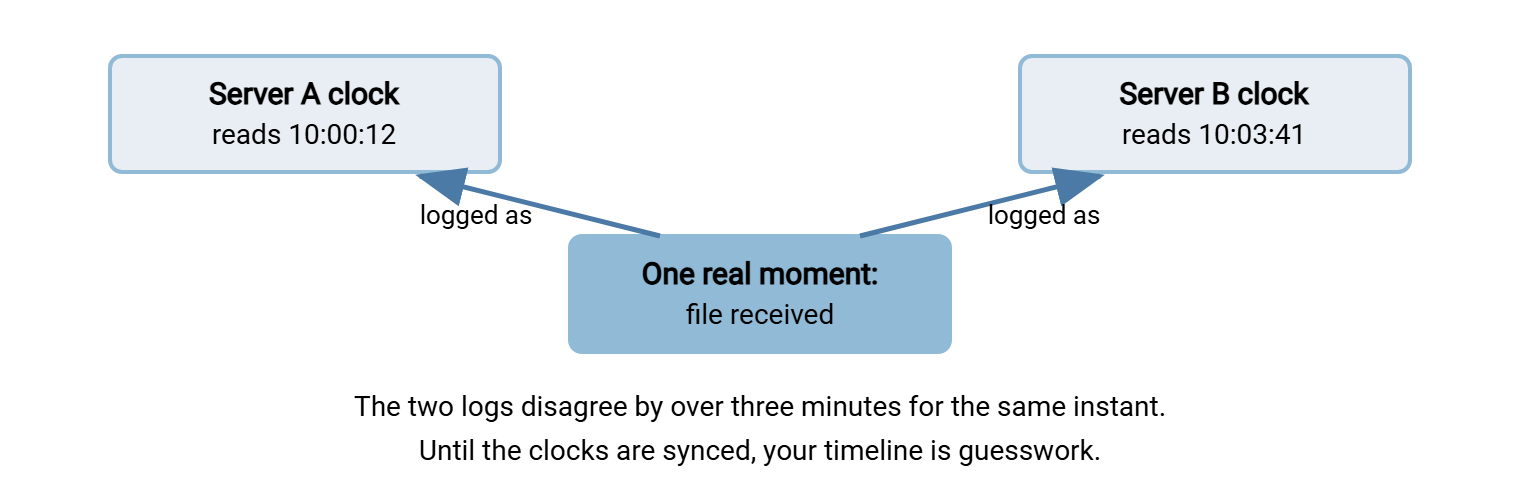
The diagram shows the core problem: a single real moment, recorded by two servers whose clocks disagree, produces two different times for the same event.
How Clocks Drift in the First Place
It is tempting to assume a computer just knows the time. It does not; it counts ticks from a small crystal oscillator, and those crystals are imperfect. Left alone, a machine's clock slowly wanders — a little fast here, a little slow there — until it is seconds, then minutes, off. That slow wander is called drift, and every unmanaged machine does it.
A few situations make drift worse or introduce sudden jumps:
- Virtual machines. A VM shares a physical clock with its host and its neighbors. Pausing, migrating, or overloading the host can make the guest's sense of time stutter or leap. Virtualized transfer servers are common offenders.
- Manual clock setting. Someone "fixes" a clock by hand and fat-fingers the minutes. Or they set it to local wall-clock time on a machine that should be tracking a shared standard.
- Hardware clock quirks. A dead battery on the real-time clock can throw a machine wildly off after a power event. So can a device that resets to a default time on reboot.
- Time-zone and daylight-saving confusion. Not drift exactly, but a machine logging in local time can appear to jump an hour twice a year. That is its own flavor of chaos in a timeline.
Drift is insidious precisely because a lone machine has no way to know it is wrong. Its clock is its only sense of time, so a server that runs three minutes fast feels perfectly correct to itself. The error becomes visible only when you set its timestamps beside another system's — which is exactly what evidence review does. That is why the problem so often surfaces at the worst possible moment: during a dispute. You finally compare two logs and discover they never agreed in the first place.
The point is that correct time is not the default state — it is a state you have to maintain. Which brings us to how.
Clock Synchronization in Plain Words
The fix for drift is to have machines continually check themselves against a reliable reference and nudge their clocks back into line. The near-universal way to do this is NTP — the Network Time Protocol. In plain terms, NTP lets a machine ask one or more trusted time sources "what time is it, really?" It accounts for the network delay in getting the answer and gently steers the machine's own clock toward the truth. It does this continuously and in small corrections, so clocks stay close to correct instead of sagging further and further off.
You do not need to understand NTP's internals to use it well. Three practical rules cover almost everything an admin needs:
- Sync everything that produces evidence. Every transfer server, every automation client, and every log collector should be running time synchronization. A single unsynced machine is the one whose timestamps will not line up when you need them.
- Point them at the same trustworthy sources. If different machines track different, unrelated clocks, they can each be "synced" and still disagree. Choosing a common, reliable set of time sources keeps your whole estate telling one time.
- Watch for machines that fall out of sync. Synchronization can silently stop — a blocked port, a misconfiguration, a dead source. Treat "this server hasn't synced in too long" as an alert, not a shrug.
How Much Skew Can You Tolerate?
"Synchronized" does not mean identical to the nanosecond, so a fair question is how close is close enough. The honest answer: skew must be small relative to the gaps you need to tell apart. Suppose the events in your evidence are naturally minutes apart — a file uploaded, then collected by a partner's hourly job. In that case, a few seconds of skew changes nothing. If you must order events that happen within the same second, you need much tighter sync. Otherwise, you simply cannot order them from timestamps alone.
For ordinary file transfer, keeping every clock within about a second of the reference is achievable with routine synchronization. It is also comfortably tighter than the gaps most disputes turn on. The mistake is not failing to chase nanoseconds; it is leaving a machine minutes off because "close enough" was never actually defined. Set an expectation, monitor against it, and you have turned a vague hope into a property you can check.
Remember: correct time is maintained, not automatic. Every machine that logs a transfer, writes a receipt, or makes a signature should track the same reliable time source. You should be told when one drifts away. The cheapest time to fix a clock problem is before the dispute that exposes it.
UTC, and Why Local Time Lies
Even perfectly synced clocks can produce a confusing record if each machine logs in its own local time. Local time is ambiguous in ways that wreck evidence. An event logged as "01:30" during a daylight-saving fall-back happens twice. A timeline spanning servers in different regions becomes a mental math exercise with a good chance of error.
UTC — Coordinated Universal Time, the single global reference that does not shift for time zones or daylight saving — removes that ambiguity. When every system records and stores timestamps in UTC, a time is a time. It is comparable across servers, unambiguous across the year, and free of "was that their time or ours?" A UTC timestamp like YYYY-MM-DDThh:mm:ssZ, where the trailing Z announces UTC, means the same instant no matter who reads it. Show local time in a dashboard for human convenience if you like, but let the underlying record be UTC. It is the difference between evidence that lines up on its own and evidence you have to keep translating.
Checking and Keeping Good Time
You can confirm a machine's time discipline in seconds, and it is worth doing on any server whose logs might become evidence. Use this checklist and the quick checks below as a baseline:
Time hygiene for evidence-grade logs
------------------------------------
[ ] Sync every transfer server, client, and log collector to reliable time
[ ] Point them all at the SAME trusted time source(s), not a random mix
[ ] Record and store timestamps in UTC, not local time
[ ] Put a timestamp on every log line, receipt, and signature
[ ] Monitor for drift and alert when a machine falls out of sync
[ ] Note the time source and sync method in your runbook

Quick checks:
  Windows:  w32tm /query /status      (shows the source and last sync time)
  Linux:    timedatectl               (shows whether the clock is synced)
The runbook note matters more than it looks. When someone questions your evidence a year from now, you can say "these servers were synchronized to this source, verified this way." Being able to say that turns "trust our clocks" into "here is how our clocks were kept honest." A transfer server that timestamps its activity logs, such as Sysax Multi Server, gives you the raw timestamped records. Keeping the machine synced and in UTC is what makes those records line up with everyone else's.
Time in Automated Transfers
Unattended jobs are where good time practice pays off most, because no human is present to notice a wrong clock at 2 a.m. A scheduled job stamps its actions with whatever time its host believes. So a drifted clock silently poisons every run until someone catches it. By then a month of evidence may already carry bad times. Two habits keep automation honest. Let the machine record the moment an action actually happens rather than reconstructing it afterward. Keep the job's host on the same synchronized, UTC-based time as everything else. A scheduled-transfer client such as Sysax FTP Automation timestamps each transfer it performs. So those records are only as trustworthy as the clock beneath them. That is one more reason clock synchronization belongs on the setup checklist for any machine that runs transfers on its own.
Ordinary Timestamps vs Trusted Timestamps
Everything so far makes your own timestamps trustworthy. But there is a stronger form of time evidence for the cases where your word about the clock is not enough. You may need to prove to an outside party that some data existed at a certain time. You may need to prove it in a way that does not rely on trusting your servers at all.
That is what a trusted timestamp provides. It works through a neutral third party called a timestamp authority. You compute the hash of your file and send just that hash — not the file — to the authority. The authority adds its own reliable time and signs the combination of your hash and that time. It hands back a signed timestamp token. Because the token is signed by the authority and commits to your file's hash, it later proves two things independently of you. The data existed at or before that moment, and it has not changed since. And because you only ever sent a hash, the authority never saw your file's contents.
Think of it as a notary for data. A notary does not read your document; they stamp it to attest it existed and was presented on a certain date. A trusted timestamp does the same for a file's fingerprint. You reach for one when the stakes are high enough that "our synchronized servers logged this time" needs backing. You need a time nobody can accuse you of setting yourself. That might be for a submission deadline, an intellectual-property record, or a milestone in a contentious contract.
One honest caveat keeps this in perspective: a trusted timestamp does not repair a wrong clock on your own server. It does not replace good synchronization. It adds an independent, signed record of time alongside your own well-kept clocks. The two work together — your synced UTC logs tell the everyday story, and a trusted timestamp anchors the moments that must survive an outsider's doubt.
What Good Time Practice Buys Your Evidence
Pull it together and the payoff is concrete. With synchronized clocks and UTC logging, your send log and a partner's pickup log line up into one timeline a skeptic cannot pull apart. A signed acknowledgment's "received-at" becomes a fact rather than a guess. Correlating two independent logs — the technique from proof-of-delivery patterns — actually works, because the times are on the same footing. And when a moment truly matters, a trusted timestamp raises it above any argument about your own infrastructure.
The reverse is just as concrete. Skip this, and the best signature in the world sits on a log whose times contradict each other. That hands the other side an easy way to wave the whole record off. Time discipline is cheap insurance on every other piece of evidence you collect. That is why it belongs in the same conversation as signatures and receipts rather than filed under general housekeeping.
A Timeline That Holds Up
Return to the two servers from the opening, but do it right this time. Both the sending server and the partner's receiving server synchronize to the same reliable time source and log in UTC. Overnight, your server records: uploaded nightly_invoices.csv, hash 9f2b1c..., at 02:14:07Z. The partner's ingestion log records: picked up nightly_invoices.csv, same hash, at 02:16:52Z. The signed acknowledgment they return states received-at 02:16:53Z.
Now the three times tell one coherent story: sent, then collected under three minutes later, then acknowledged a second after that. The sequence reads correctly and stays correct whether the reader sits in your time zone or theirs. When a dispute asks "when did you get it?", you are not defending your clocks. You are pointing at three independent records that agree to the second. That coherence is entirely the product of two unglamorous habits — a common time source and UTC logging — applied long before anyone needed them.
Putting It Together
Timestamps are the thread that ties transfer evidence into a story, and the story only holds if the clocks behind it are honest. Keep every evidence-producing machine synchronized to the same reliable time source. Record in UTC so times are comparable and unambiguous. Put a timestamp on every log line and receipt, and get alerted when a clock drifts. For the moments that must survive an outsider's doubt, add a trusted timestamp from a neutral authority. Do this, and "when did it happen?" stops being the weak link an opponent pulls on. It becomes one more thing your evidence answers cleanly.
From here, building an evidence pack for a disputed transfer shows how well-timed logs and receipts join signatures and hashes into a case. That case holds up months later. And our pillar on transfer logging and audit trails covers making the logs themselves complete and tamper-resistant.
Frequently Asked Questions
Why do unsynchronized clocks ruin transfer evidence?
What is NTP, and do I need to understand it deeply?
Should my logs use local time or UTC?
What is a trusted timestamp, and how is it different from a normal one?
Does a trusted timestamp fix a wrong clock on my server?
How would I even notice a clock had drifted?
From the Sysax team: we build secure file transfer software for Windows. Sysax Multi Server is an FTP, FTPS, SFTP, and HTTPS server. Sysax FTP Automation handles scheduled, scripted transfers. Free trials are on the download page.