
Getting Transfer Logs Off the Box
A log that lives only on the machine it describes is a witness locked inside the building it is meant to testify about. As long as the building stands, fine. But transfer servers are edge-facing, internet-exposed, and precisely the machines that get compromised, rebuilt, or lost. When one does, its local logs go with it, at the exact moment you need them most. The record of an attack, sitting on the box the attacker controls, is a record the attacker can erase.
The fix is old, well understood, and worth doing before almost anything else in your logging program. Send a copy of every log line somewhere else, as it is written. Send it to a machine the transfer server itself cannot reach into and rewrite. This is called centralizing your logs, and it converts your logs from a convenience into evidence. This article explains why local-only logging fails and how forwarding works in plain terms. It explains how a small team can build a durable central log store without buying anything exotic.
It builds on what a transfer service should log. You have to be logging the right events before it matters where they live. This article is the groundwork for making audit trails tamper-resistant. It is part of the Logging & Audit series.
Why Local-Only Logs Fail
Local logs fail in three ordinary ways, and you should assume every one of them will happen eventually.
They rotate away. Every server caps how much log it keeps on local disk — it has to, or the disk fills. Old logs get deleted to make room for new ones, a process called rotation. On a busy server, "old" can mean a few days. An incident discovered three weeks later finds that the relevant logs were rotated out of existence long ago. Nothing failed; the system worked as designed, and the evidence is simply gone.
They die with the box. A server suffers a disk failure, gets reimaged after a problem, is decommissioned, or is replaced during an upgrade. Whatever local logs it held vanish with it. The most important logs — the ones explaining why the machine had to be rebuilt — are the ones least likely to survive the rebuild.
The attacker deletes them. This is the one that matters most. Clearing or tampering with local logs is a standard step in an intrusion — often the first step after gaining control, precisely to erase the trail. If your only copy lives on the compromised machine, you are trusting the attacker to leave your evidence intact. They will not. A record that an intruder can rewrite is not a record; it is a suggestion.
The diagram below contrasts the two worlds: logs that live only on the transfer server, and logs that are copied off-box as they are written.
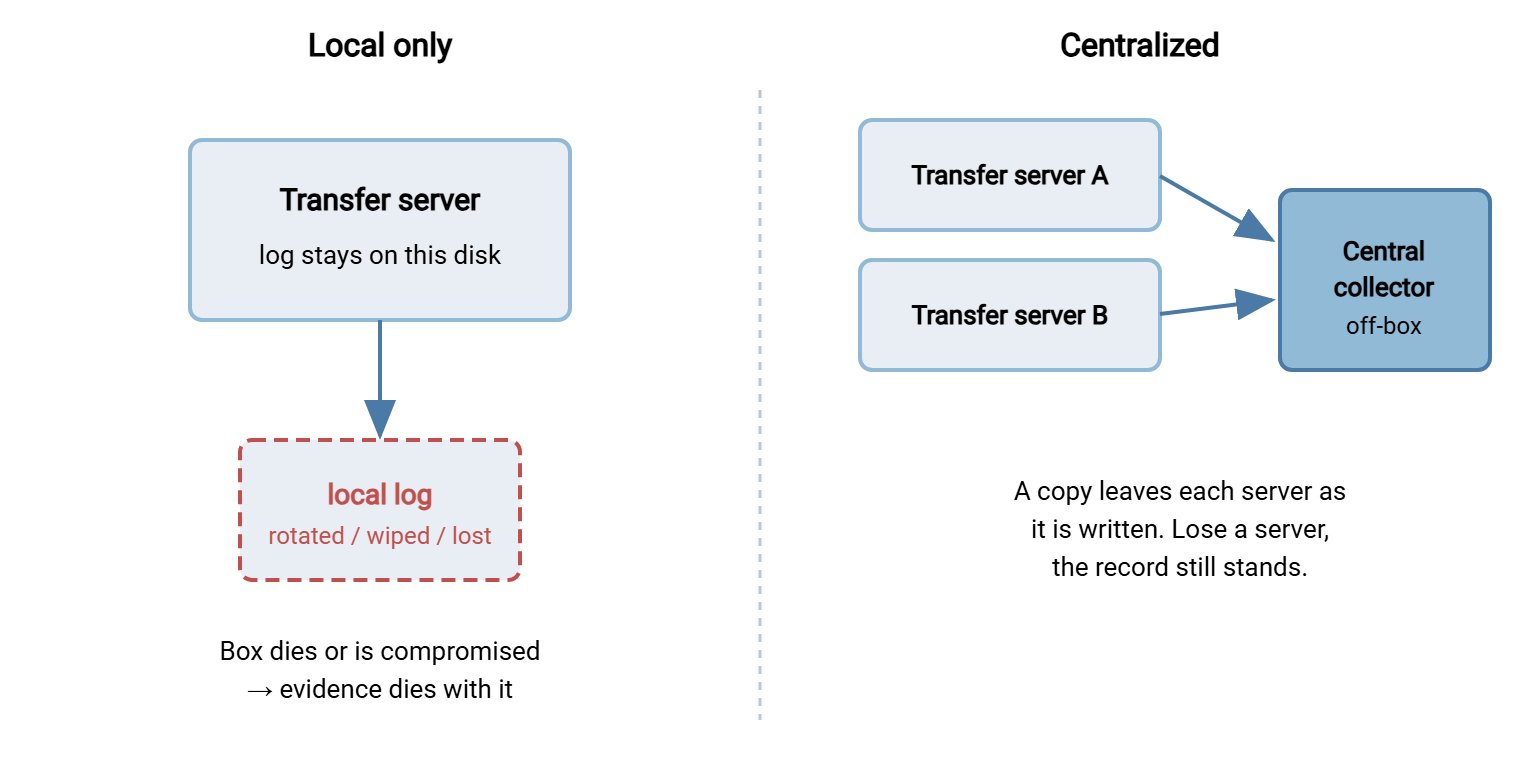
Remember: the goal is not a backup you copy once a night. It is a live, second copy that leaves the server the instant a line is written. That way, even a server compromised at noon has already sent the morning's evidence somewhere the attacker cannot reach. Backups protect files; forwarding protects the record.
What "Centralizing" Actually Means
Centralizing logs means every server keeps sending a copy of each new log line to one separate machine — the log collector. Its only job is to receive, store, index, and protect logs from everywhere. We will keep calling it "your collector" throughout. The concept is the same whether that is a modest virtual machine you run yourself or a large managed service. The design principles do not change with the price tag.
Three things make a collector valuable beyond mere survival. It is separate, so compromising a transfer server does not grant control of the logs. It is combined, so logs from every server — and ideally your firewall and authentication systems too — sit together and can be searched as one. That is exactly what made the cross-source correlation in reading transfer logs like a story possible. And it is controlled, so a small number of people can read it and an even smaller number can delete from it. That is the foundation of the tamper-resistance we build next.
How Forwarding Works, in Plain Terms
Getting a line from a transfer server to the collector is called forwarding, and there are two common shapes.
Syslog-style forwarding is the classic. Syslog is a long-established standard for shipping log messages over the network to a collector that listens for them. The server (or a small agent on it) sends each log line as a network message; the collector receives it and files it away. It is simple, universally supported, and the default vocabulary of centralized logging. On the wire you will hear about a listening port — the modern, encrypted variant listens on port 6514 over TLS. But the idea is just "log messages, sent as they happen, to a machine that collects them."
Agent-based forwarding is the other. A small program — an agent — runs on the transfer server and watches the log file (or the operating system's event channel). It ships new lines to the collector as they appear. Agents typically add useful features. They typically buffer to local disk if the collector is briefly unreachable so nothing is lost. They can add context like the hostname, and they can encrypt the connection. Windows servers, in particular, are often collected with an agent that reads the event log and forwards it.
Either way, the essential behavior is the same and worth stating plainly. Follow the log, and push each new line onward, in near-real-time, over an encrypted connection, with a buffer so a hiccup does not lose data. Push (the server sends) is more common than pull (the collector fetches). That is because pushing means the line has already left the building before anyone can tamper with it.
A Forwarding Config Sketch
Concrete products differ, but every forwarding setup has the same three parts. There is a source to read, a transport to ship it, and a destination that receives and keeps it. The sketch below is that shape in neutral terms — not any one product's syntax, but the decisions each product will ask you to make. Copy it and use it as a checklist when you configure the real thing.
# FORWARDING SKETCH -- the shape, not a specific product's syntax

# 1. SOURCE  (on each transfer server): what to read
source:
    path       = the transfer activity log file
                 (or the OS event channel on Windows)
    read_mode  = follow/tail -- pick up new lines as they appear

# 2. FORWARDER (on each transfer server): how to ship it
forward:
    destination = logs.collector.internal
    port        = 6514
    transport   = TLS          # encrypt logs in transit -- they
                               # contain accounts, IPs, filenames
    buffer      = on-disk queue if collector is unreachable,
                  then drain when it returns  # never drop lines
    identity    = this-hostname  # so the source is unambiguous

# 3. COLLECTOR (central, separate machine): receive + retain
collector:
    listen      = 6514 / TLS
    accept_from = [ transfer-server-A-ip, transfer-server-B-ip ]  # only
    store       = hot 30d (searchable)
               -> archive 12m (compressed, cheap)
               -> delete after the stated retention period
    access      = read: ops + security
                  delete: one restricted role, logged
A few of those lines are load-bearing. transport = TLS matters because your logs are full of accounts, IP addresses, and filenames — personal and sensitive data that should not cross the network in clear text. The buffer matters because networks blink; without it, a thirty-second outage silently loses the lines written during it. And accept_from restricted to known server IPs matters because a collector that accepts logs from anywhere can be flooded with forged noise. These are the same hardening instincts covered across the hardening transfer servers pillar, applied to the logging pipeline itself.
Retention Tiers in the Central Store
Once logs land in one place, you can be far smarter about how long to keep them than any single server's local disk allowed. The pattern is tiered retention: keep recent logs instantly searchable, roll older logs into cheap compressed storage, and delete on a stated schedule. Centralizing is what makes tiering practical, because the collector — not a production transfer server — carries the storage.
| Tier | Lives where | Used for | Speed |
|---|---|---|---|
| Hot | Collector's fast index | Alerting, live investigation, daily questions | Instant search |
| Warm / archive | Compressed storage, same or cheaper disk | Audits, late-discovered incidents, disputes | Slower, restore-to-search |
| Deleted | Nowhere, verifiably | Privacy hygiene — hold nothing past its date | — |
The exact horizons depend on your audit and contractual obligations, but the shape is nearly universal: recent weeks hot, the compliance tail in archive, then genuine deletion. The privacy discipline from what to log applies here too. A central store is a large, attractive pile of personal data, so its retention limit and its access controls are not optional.
A Small-Team Centralization Design
You do not need a security operations center to get this right. A small team can build something durable in an afternoon with the following shape:
- One dedicated collector. A single hardened virtual machine whose only role is to receive and store logs. It runs no transfer service, hosts no other application, and has a deliberately small set of people who can log into it. Its narrow purpose is its security.
- Everything forwards to it. Every transfer server — and, when you can, the firewall and the authentication system — sends its logs to the collector over an encrypted connection. Use the sketch above. One destination, many sources.
- Tiered retention configured once. Set hot, archive, and delete horizons on the collector to match your obligations, and let it enforce them automatically. Retention you have to remember to run is retention that will not happen.
- Tight access. Most people get read-only search. Deleting or altering stored logs is restricted to one role, and that action is itself logged. This separation is the seed of tamper-resistance.
- The collector is backed up. The place all your evidence now lives deserves its own backup, kept somewhere separate again. Centralizing removes single points of failure on the servers; do not accidentally create a new one at the collector.
Where you place the collector matters as much as how you build it. Put it on the interior of your network, not in the DMZ alongside the edge servers it collects from. The whole point is that a breach of an exposed transfer host must not reach the logs, and a collector sitting on the same exposed segment defeats that. Let the edge servers push outward to a collector the interior controls, and keep the reverse path — collector reaching into the edge — closed. The direction of trust should always run away from the risky machines, not toward them.
Edge deployments make the case even more sharply. A transfer host in a DMZ — an internet-facing buffer network — should be treated as if it will be breached. That means its logs must leave the box for the interior collector immediately, before an attacker who lands there can touch them. That assume-breach posture for edge logging is part of the broader DMZ and gateway architecture discussion, and centralizing is the mechanism that makes it real.
Protecting the Pipeline Itself
Centralizing solves the biggest problem but introduces a smaller one: the collector is now a high-value target, because it holds everything. Guard it deliberately. Encrypt logs in transit so they cannot be read or altered on the wire — the TLS in the sketch. Restrict who can delete from the collector, and log every deletion, so the record cannot be quietly pruned. Keep clocks synchronized across every server and the collector, because logs from different machines are only comparable if their timestamps agree. Unsynchronised clocks turn a clean timeline into an unusable jumble, a point the signatures and non-repudiation pillar returns to when evidence quality is on the line. And monitor the pipeline. A transfer server that suddenly stops forwarding may simply be off. Or an attacker may have cut the logging. Either way you want to know.
These protections are also the bridge to the next article. Getting logs off the box makes them survive; making them append-only and verifiable makes them trustworthy. Both together are what an auditor means by an audit trail.
Common Ways Forwarding Silently Breaks
The most dangerous forwarding failure is the quiet one. You believe you are centralizing, and everyone assumes the evidence is safe. Then during an actual investigation the collector turns out to hold nothing from the server that mattered. Forwarding that fails loudly is a minor annoyance; forwarding that fails silently is the exact failure you were trying to prevent, discovered at the worst possible time. Treat verification as part of the setup, not an afterthought.
Start by proving the path works the day you build it. Generate a known event on the transfer server — a test login, a small test upload. Confirm it appears on the collector within seconds, tagged with the right hostname. If it does not arrive, you have a configuration, firewall, or TLS problem to solve now. Solve it while it is a five-minute fix, rather than during an incident when it is a catastrophe. Do the same check after any change to the network between server and collector.
Then watch for the handful of ways an established pipeline goes dark, because every one of them is common and every one is silent:
- The forwarder did not restart after a server reboot, and no one noticed the server had gone quiet.
- A firewall rule between the server and the collector was tightened, and the log traffic was quietly dropped along with whatever it was meant to block.
- The collector's disk filled, and it began discarding incoming logs instead of storing them.
- A TLS certificate on the collector expired, and forwarders — correctly — refused to connect to it.
The defense against all four is the same: monitor for silence. The collector should be hearing from every server you expect, continuously. So a simple standing check — "which sources have not sent a line in the last few minutes?" — catches a dead forwarder before it costs you evidence. Some teams have each server emit a small heartbeat line every few minutes for exactly this reason: not because the heartbeat says anything, but because its absence does.
Where This Leaves You
Local-only logs are a witness that dies in the fire. Centralizing sends a live copy of every line to a separate, controlled collector — surviving disk failures, rebuilds, and, most importantly, attackers who clear their tracks. Forward each line in near-real-time over an encrypted connection with a buffer so nothing drops. Tier retention in the central store so recent logs are fast and old logs are cheap. Guard the collector as the valuable target it has become. A small team can stand this up quickly, and it is the highest-leverage move in the whole logging program.
Continue with making audit trails tamper-resistant, which builds directly on the controlled central store. Revisit reading transfer logs like a story to see why one searchable place makes correlation possible. Check what a transfer service should log to be sure the lines you are forwarding are worth keeping.
Frequently Asked Questions
Isn't a nightly backup of the log file good enough?
What is syslog, in one sentence?
Push or pull — should the server send logs or the collector fetch them?
Do I need an expensive log platform to centralize?
What happens to logs if the collector goes down?
Should firewall and login logs go to the same collector?
From the Sysax team: we build secure file transfer software for Windows. Sysax Multi Server is an FTP, FTPS, SFTP, and HTTPS server. Sysax FTP Automation handles scheduled, scripted transfers. Free trials are on the download page.