
What a Transfer Service Should Log (and What's Noise)
Every log you keep is a witness you are calling months in advance, before you know the question. A partner claims a file never arrived. An account is suddenly downloading everything it can reach. An auditor asks who touched a folder last quarter. In each case, the only honest answer comes from what your transfer service wrote down at the time. If it wrote down the wrong things — or everything, in an undifferentiated flood — you are left shrugging.
The two failure modes are equally common. Some servers are configured to log almost nothing, so an investigation dead-ends at "a transfer happened, we think." Others log at full debug verbosity forever, burying the three lines that matter under a million keepalive messages nobody will ever read. This article is about hitting the middle. That means recording the handful of event types and fields that let you reconstruct what happened. It means deliberately not recording the noise — and the secrets — that only create risk.
By the end you will have a concrete, copyable checklist of what to capture, grouped into the three families of events that matter. You will also have a clear-eyed view of retention and privacy. This is the foundation of the whole Logging & Audit series. Everything downstream — reading logs fluently, centralizing them, making them tamper-resistant, alerting, and reporting — assumes the right things were logged in the first place.
Why "Log Everything" Is the Wrong Instinct
"Log everything, just in case" feels safe, but it fails in practice for three reasons. First, volume drowns signal: a busy server at full verbosity can write gigabytes a day, and the one failed-login burst that mattered scrolls past unread. Second, cost and performance: verbose logging consumes disk, I/O, and money to store and search. If logging is slow, it becomes the thing you turn off under load, which is exactly when you need it. Third, and most important, some things must never be logged at all, because writing them down creates a new place for an attacker to steal them.
The better instinct is log for reconstruction. Picture the questions you will actually be asked — Who connected? From where? Did they succeed? What did they take or leave? Who changed the configuration? — and record precisely the events and fields that answer them. Everything else is noise, and noise is not free.
A quick test separates signal from noise: for any log line you are about to enable, ask "what question would this line ever answer?" If you can name a realistic investigation, dispute, or audit that needs it, keep it. If the honest answer is "none, but it felt thorough," you have found noise. Applied consistently, that one question shrinks a bloated log to the lines that earn their place. It makes the remaining lines far easier to read when it counts.
The Three Families of Events That Matter
Almost every question you will ever ask a transfer log falls into three buckets. If you capture these three families well, you can reconstruct nearly any incident. Everything else is detail.
1. Authentication events — who tried to get in, and did they succeed
Authentication events are the record of every attempt to log in, successful or not. This is the single most valuable family for security, because it is where attacks first become visible and where "who was it" gets its answer. Log both outcomes, and log the failures with a reason:
- Successful logins — record the account name, source IP, protocol (FTP, FTPS, SFTP, HTTPS), and authentication method (password, key, certificate). Record the session identifier that will tie the rest of the session together.
- Failed logins — the same fields, plus why it failed: wrong password, unknown username, disabled or expired account, key not accepted, source blocked by policy. The reason is what separates a fat-fingered partner from a password-guessing attack.
- Session start and end — when the connection opened and closed, and how it ended (clean logout, timeout, or dropped). The end time bounds everything the account could have done.
- Account lockouts and policy denials — when the server refused a connection because of a lockout, an allowlist, or a geo/IP rule. These are the events that prove your defenses are working — and the ones an attacker would love you not to notice.
Failed logins are the raw material for nearly every alert worth raising, from password-guessing storms to a partner whose credentials silently expired. Our sibling article on alerts worth raising is built almost entirely on this family. The wider defensive picture lives in the brute-force protection pillar.
2. File operations — what actually moved
File operations are the record of what each session did to your files: what came in, what went out, what was renamed or deleted. This is the family that answers "did the file arrive" and "what did that account take." Capture the verbs that change or reveal data:
- Uploads — the full path and filename written, the byte count, start and end time, and the outcome (complete, failed, or resumed). A partial upload logged as "complete" is how bad files sneak into pipelines.
- Downloads — path, filename, bytes sent, and outcome. This is the line that matters most in a data-theft investigation: it shows exactly what left.
- Deletes and renames — what was removed or moved, and from where to where. Deletions are irreversible and disputes love them; always log them.
- Directory changes — folders created and removed. Directory listings are lower value and higher volume — log them at a reduced level, or only for sensitive areas (more on that below).
Reading these operations back in order is a skill of its own. It is the art of turning a pile of lines into "this account connected, listed the outbox, and downloaded three files." That skill is covered in reading transfer logs like a story.
3. Administrative and configuration changes — who changed the rules
The third family is the one most services log worst, and it is the one auditors care about most: administrative changes. These are changes to the system itself rather than to files — and they are how an attacker turns a foothold into permanent access. Log every change to:
- Accounts — users created, modified, disabled, or deleted, and password or key resets. A new account appearing at 3 a.m. is a story all by itself.
- Permissions and access rules — changes to what an account can reach, allowlists, and IP restrictions. Tie this to your file server permissions work: a permission change is a blast-radius change.
- Service configuration — protocols enabled or disabled, TLS settings, port and passive-range changes, and the service itself being started, stopped, or restarted.
- The logging configuration itself — if someone turns logging off, lowers its verbosity, or changes where logs are sent, that action must be logged. Log it somewhere the same someone cannot quietly reach. This is the seam attackers aim for, and it is the reason to get logs off the box, covered in getting transfer logs off the box.
For every admin change, the golden fields are who made it, when, and what it changed from and to. "User alex modified" is nearly useless; "user alex granted partner-07 write access to /finance, previously read-only" is evidence.
The Anatomy of a Good Log Line
Knowing which events to log is half the job. The other half is capturing enough fields on each event that the line stands on its own. A good log line answers six questions without you needing another line to interpret it: when, who, from where, what, what happened, and how much.
The diagram below breaks a single upload event into those fields. Every family above should produce lines this self-contained.
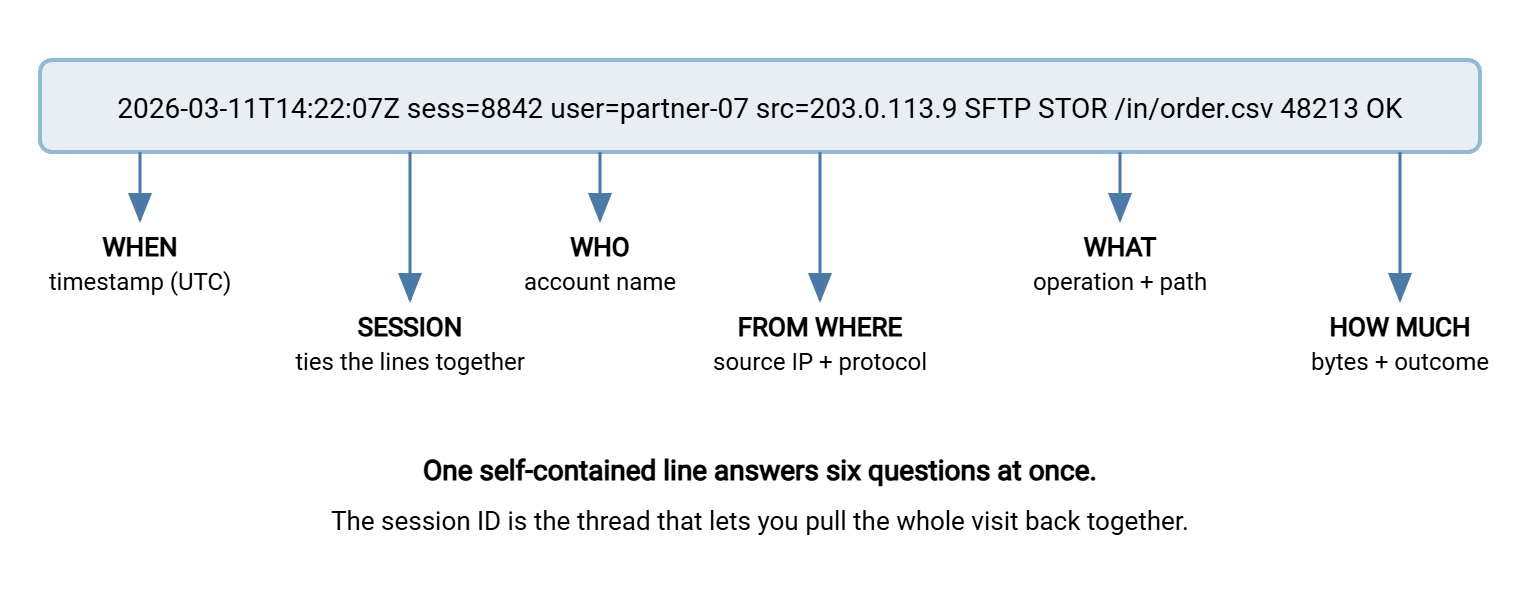
Two fields deserve special emphasis. The timestamp should be unambiguous — ideally in UTC or with an explicit timezone offset. Evidence made of times you cannot line up across machines is evidence you cannot use. The wider point about clocks and evidence lives in the signatures and non-repudiation pillar. And the session identifier is what turns scattered lines into a story. With it, you can pull every action a single connection took, in order, in one search. Without it, reconstructing a busy period is guesswork.
A Copyable What-to-Log Checklist
Here is the whole thing as one checklist. Copy it into your logging standard or your server build runbook, and check each server against it. The three families are grouped, with the fields every event in that family should carry.
TRANSFER LOGGING CHECKLIST
==========================

EVERY EVENT CARRIES THESE FIELDS
[ ] Timestamp in UTC or with explicit timezone offset
[ ] Session / connection ID (ties one visit's lines together)
[ ] Account name (the identity, not just the display name)
[ ] Source IP address (and source port if available)
[ ] Protocol (FTP / FTPS / SFTP / HTTPS)
[ ] Outcome: success or failure, with a reason code on failure

AUTHENTICATION EVENTS
[ ] Successful login      (+ auth method: password / key / cert)
[ ] Failed login          (+ reason: bad password / unknown user /
                             disabled / key rejected / blocked)
[ ] Logout / disconnect   (+ how it ended: clean / timeout / dropped)
[ ] Account lockout triggered
[ ] Connection denied by allowlist / IP / geo policy

FILE OPERATIONS
[ ] Upload    (path, filename, bytes, start+end, complete/partial)
[ ] Download  (path, filename, bytes sent, complete/partial)
[ ] Delete    (path, filename)
[ ] Rename / move (from-path -> to-path)
[ ] Directory create / remove
[ ] Directory listing (reduced level, or only for sensitive areas)

ADMINISTRATIVE / CONFIG CHANGES  (always: who, when, from -> to)
[ ] Account created / modified / disabled / deleted
[ ] Password or key reset
[ ] Permission / access-rule change
[ ] Allowlist / IP restriction change
[ ] Protocol or TLS setting change
[ ] Service start / stop / restart
[ ] Logging configuration change  (level, destination, retention)

NEVER LOG
[ ] Passwords, passphrases, private keys, session keys
[ ] Full file contents
[ ] Auth tokens, API keys, or secrets of any kind
[ ] More PII in the log than the investigation actually needs
Remember: the "Never Log" section is not optional housekeeping — it is a security control. A log file that contains passwords or keys is a credential store with none of a credential store's protections. If you would not email it in plaintext, do not write it to a log.
What Counts as Noise — and What's Actively Dangerous
Noise falls into two categories: the merely useless, and the genuinely harmful. Treat them differently. The merely useless wastes storage and attention; the harmful creates new exposure.
Merely useless — safe to drop or log at a reduced level:
- Keepalives and heartbeats. A long-lived idle connection sends periodic no-op traffic. Logging each one tells you nothing and hides everything.
- Per-packet and protocol-internal chatter. TLS handshake internals, window-size negotiations, and similar low-level detail belong in a debug session you turn on to chase a specific bug, then turn off. They do not belong in your standing production log.
- High-volume, low-value listings. Directory listings on a busy public download area can dwarf everything else. Log them at a reduced level, and reserve full listing logs for sensitive folders where "who looked" is itself a question worth answering.
- Successful routine health checks. A monitoring probe that connects and disconnects every thirty seconds does not need six log lines each time.
Genuinely dangerous — must never be written, at any level:
- Credentials of any kind. Passwords, passphrases, private keys, session keys, bearer tokens, API keys. It sounds obvious, yet verbose or debug modes on some tools will happily print an authentication exchange in full. Verify yours does not.
- File contents. Log that a file moved, its name, and its size — never its bytes. A log that quotes the file it transferred has copied sensitive data into a second, less-guarded location.
- More personal data than you need. Usernames, IP addresses, and file paths are often personal data under privacy law. Capturing them is legitimate and necessary. Capturing a customer's full name, account number, or the document's contents inside the log line is not. Log the pointer, not the payload.
Retention and the Privacy Balance
Logs are not write-once-keep-forever. The right retention answer is a balance between two opposing pressures, and getting it wrong in either direction has real costs.
On one side, keep them long enough to be useful. Many incidents are discovered weeks or months after they happen — the average time to notice a quiet intrusion is measured in weeks, not hours. Logs that rolled off after seven days cannot answer a question asked on day thirty. Auditors and contracts frequently set explicit minimums, and a dispute over a transfer can surface long after the file moved.
On the other side, do not keep them longer than you can justify. Every log line containing an IP address, a username, or a filename is a small pile of personal data. Under privacy regimes, data you hold is data you are responsible for — and data an attacker can steal. "We still have five years of everyone's transfer activity because nobody set a deletion date" is not diligence; it is a liability nobody chose.
The practical resolution is tiered retention. Keep recent logs hot and fully searchable for fast investigation. Roll older logs into cheaper compressed archive storage for the compliance tail. Set a genuine end date after which they are deleted. The mechanics of moving logs between tiers — and why the first tier should not live on the transfer server itself — are the subject of getting transfer logs off the box. The privacy discipline is simpler than it sounds. Decide the retention period on purpose, write it down, minimize what each line contains, and control who can read the archive.
| Tier | Typical horizon | Purpose | Access |
|---|---|---|---|
| Hot / searchable | Recent weeks | Live investigation, alerting, daily questions | Ops and security, read-only |
| Warm / archive | Months to a few years | Audits, late-discovered incidents, disputes | Restricted, request-based |
| Deleted | After the stated end date | Privacy hygiene — hold nothing you can't justify | Gone, verifiably |
Where Good Logs Come From
All of this assumes your transfer service actually emits these events with these fields. Not every server does by default. Part of choosing and configuring one is checking that the three families are covered and that the fields you need are present. A Windows server such as Sysax Multi Server writes activity logs covering connections, authentication, and file operations across FTP, FTPS, SFTP, and HTTPS. That gives you the raw material the rest of this series works with. Whatever product you run, verify against the checklist above rather than assuming — the time to discover a gap is during setup, not during an incident.
One more source-side habit: make sure the timestamps your service writes are trustworthy. Keep the server's clock synchronized, and prefer UTC or an explicit offset in the log format. It is a five-minute setting that quietly determines whether your evidence lines up later.
Putting It Together
Good transfer logging is not about volume; it is about answerability. Capture three families of events — authentication, file operations, and administrative changes — with six self-contained fields on each. Those fields are when, who, from where, what, what happened, and how much. Add a session identifier so scattered lines become stories. Refuse to log secrets and file contents, and set a retention period on purpose rather than by accident. Do that, and the logs will be waiting with an answer on the day you finally have the question.
From here, one natural next step in this series is reading transfer logs like a story, which turns these lines back into a narrative. Read getting transfer logs off the box, so the record survives the machine that made it. Read making audit trails tamper-resistant, so the record can be trusted. If you are choosing what to log as part of a broader build, the hardening transfer servers pillar puts logging in the context of the whole secure baseline.
Frequently Asked Questions
Should I log successful logins, or just the failures?
Won't logging file downloads slow the server down?
Is it ever okay to log a password, even a failed one?
How long should I keep transfer logs?
What's the single most useful field to add if my logs are sparse?
Do directory listings need to be logged?
From the Sysax team: we build secure file transfer software for Windows. Sysax Multi Server is an FTP, FTPS, SFTP, and HTTPS server. Sysax FTP Automation handles scheduled, scripted transfers. Free trials are on the download page.