
Why TCP Slows Down Over Distance: The Bandwidth-Delay Product Explained
Here is a mystery every administrator eventually meets. Your office uploads a nightly backup to a server across the ocean, and it crawls at 4 Mbps. The link is rated for 500 Mbps. So you open a ticket, the carrier confirms the line is clean, and management approves an upgrade to a full gigabit. The transfer runs again — at 4 Mbps. Nothing changed. Meanwhile the same file copies to a server in the next city at hundreds of megabits without any tuning at all.
This is not a broken link, a bad server, or a slow protocol implementation. It is a predictable consequence of how TCP behaves when the two ends are far apart. TCP is the transport layer under FTP, FTPS, SFTP, HTTP, and nearly every other transfer protocol. The behavior has a name: the bandwidth-delay product, usually shortened to BDP. Once you can do the BDP arithmetic, you can predict a link's real-world transfer speed before you ever run a test. The arithmetic takes about a minute. You will know exactly why "buy more bandwidth" so often fixes nothing.
This article works the math on realistic links and shows where the ceiling comes from. It is the foundation piece of our Accelerated Transfer series — every other article in the series builds on the ideas here.
Bandwidth and Latency Are Two Different Things
The confusion starts with the word "speed," which people use for two properties that have nothing to do with each other.
Bandwidth is how much data the link can carry per second — 100 Mbps, 500 Mbps, 1 Gbps. Think of it as the width of a highway: how many lanes of trucks can roll side by side.
Latency is how long one packet takes to get from your machine to the other end and back. It is measured as round-trip time, or RTT, in milliseconds, and the easiest way to see it is a plain ping. Latency is the length of the highway. A truck on a ten-lane road still takes hours to cross a continent, because width does not shorten distance.
Crucially, long-distance latency is mostly physics. Light in fiber travels at roughly two-thirds the speed of light in a vacuum, and the cable does not run in a straight line. A path between continents commonly shows a round-trip time of 100–200 ms, and no amount of money removes it. You can buy more bandwidth. You cannot buy a shorter ocean.
Adding bandwidth widens the road. It does nothing to the length of the road. Every long-distance transfer problem in this series comes from that one asymmetry.
How TCP Sends Data: A Window of Trust
To see why latency caps throughput, you need one piece of TCP's design. TCP promises reliable delivery: every byte arrives, in order, or the connection reports a failure. It keeps that promise with acknowledgments — the receiver continuously tells the sender "I have received everything up to byte so-and-so."
The sender will not fire data into the network without limit while it waits for those acknowledgments. It keeps a strict budget called the window: the maximum amount of sent-but-not-yet-acknowledged data allowed to exist at one time. The window is there for two good reasons. A fast sender cannot flood a slow receiver, and lost data can be retransmitted from a bounded buffer. When the sender has a full window of data outstanding, it stops and waits. It resumes only when acknowledgments come back and free up budget.
Here is the trap: acknowledgments cannot come back faster than the round-trip time. On a 150 ms path, every window's worth of data is followed, at best, by news that arrives 150 ms after that data was sent. So the sender's rhythm becomes: send one window, wait out the round trip, send the next window. The connection can never move more than one window of data per round trip, no matter how wide the pipe is.
That single sentence is the whole story. Everything else in this article is arithmetic on top of it.
The Bandwidth-Delay Product: How Much Data Fits in the Pipe
Picture the link itself as a long pipe. At any instant, some amount of data is physically "in flight." These are bits that have left your network card but have not yet arrived at the far end. The pipe's capacity is easy to compute: it is the bandwidth multiplied by the round-trip time. That number is the bandwidth-delay product: the amount of data that must be in flight, continuously, to keep the link completely full.
To fill the pipe, the sender's window must be at least as large as the BDP. If the window is smaller, the sender runs out of budget before the first acknowledgment returns. In that case, the pipe spends most of every round trip empty. Let us work the arithmetic on a realistic long-haul link. The only trap is units. Link speeds are quoted in bits per second, while windows and file sizes are in bytes. Divide by eight to convert.
Link: 500 Mbps bandwidth, 150 ms round-trip time (intercontinental path)

BDP = bandwidth x round-trip time
    = 500,000,000 bits/s x 0.150 s
    = 75,000,000 bits in flight to fill the pipe
    = 9,375,000 bytes            (divide by 8)
    = roughly 9.4 MB

Required window to use the full 500 Mbps: about 9.4 MB

Now the same link with a classic 64 KB window:
throughput ceiling = window / RTT
                   = 524,288 bits / 0.150 s     (64 KB = 65,536 bytes x 8)
                   = about 3.5 Mbps  -- on a 500 Mbps link

Second example: 1 Gbps, 80 ms RTT (cross-continent path)
BDP = 1,000,000,000 x 0.080 = 80,000,000 bits = 10 MB window needed
64 KB window ceiling = 524,288 / 0.080 = about 6.6 Mbps
Read that middle result again, because it explains the mystery from the introduction. Consider a connection whose window is 64 KB — a historically common default, and still a real-world limit in situations we will get to. It cannot exceed roughly 3.5 Mbps on a 150 ms path. Not because anything is broken. Because 64 KB per 150 ms is 3.5 Mbps. Upgrading the link from 500 Mbps to a gigabit changes neither number in that division, which is why the upgrade changed nothing.
The diagram below shows the situation inside the pipe. The link can hold about 9.4 MB in flight, and the window permits only 64 KB. So almost the entire pipe sits empty while the sender waits for acknowledgments to crawl back.
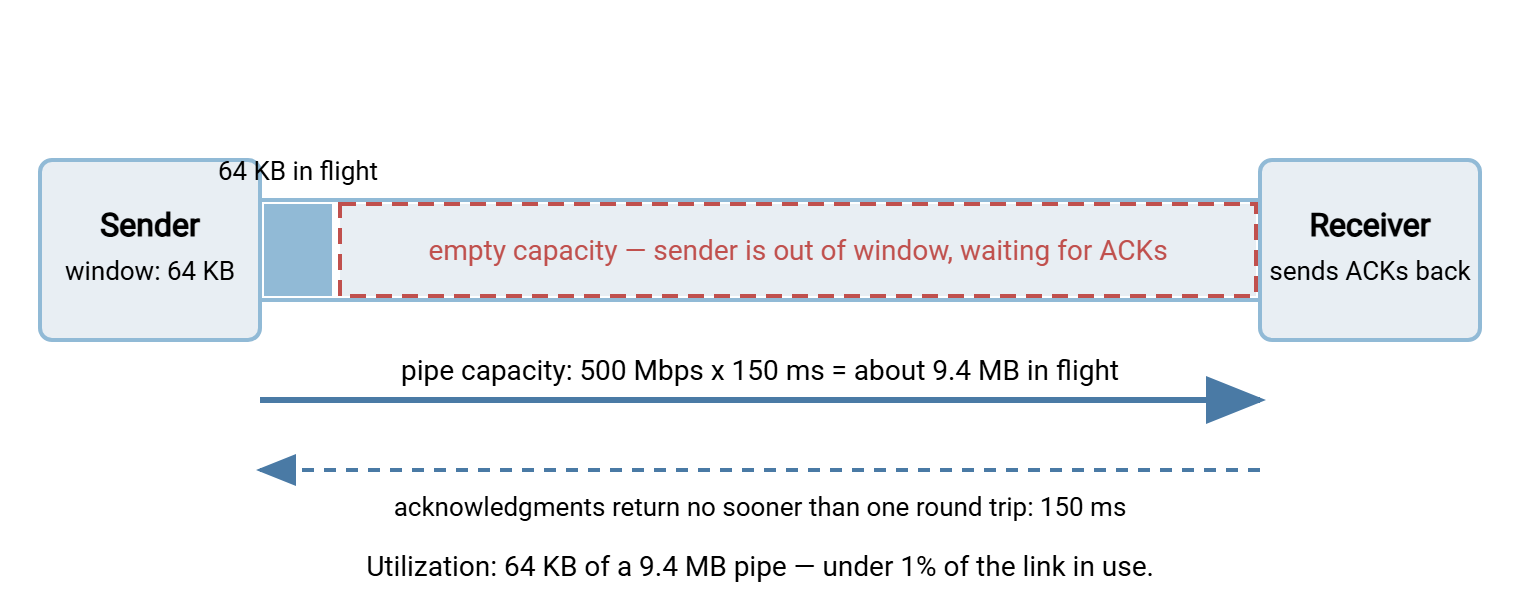
Under one percent utilization, from a healthy connection behaving exactly as designed. When people say "TCP is slow over distance," this picture is what they mean.
The Ceiling Formula, Applied to Real Links
The throughput ceiling is worth memorizing, because you will use it constantly: maximum throughput ≈ window ÷ round-trip time. The table below applies it to four typical paths, holding the window at the classic 64 KB so you can watch distance — and only distance — destroy throughput.
| Path | Bandwidth | RTT | BDP (window needed) | Ceiling with 64 KB window |
|---|---|---|---|---|
| Same building | 1 Gbps | 1 ms | 125 KB | ~524 Mbps |
| Same region | 100 Mbps | 20 ms | 250 KB | ~26 Mbps |
| Cross-continent | 1 Gbps | 80 ms | 10 MB | ~6.6 Mbps |
| Intercontinental | 500 Mbps | 150 ms | ~9.4 MB | ~3.5 Mbps |
Two things jump out. First, on the local link the 64 KB window is barely a limit at all. The round trip is so short that acknowledgments return almost instantly and the window refills hundreds of times per second. This is why the problem hides on the LAN and only appears when a workload moves far away. The server software, client, and file are the same, with a wildly different result. Second, the ceiling column ignores the bandwidth column completely. The cross-continent gigabit link and a 10 Mbps line would deliver nearly the same 6.6 Mbps to this connection.
Translate the ceiling into waiting time and the business impact is obvious. A 100 GB dataset is 800 gigabits. At 3.5 Mbps that is about 63 hours — two and a half days. At the link's actual 500 Mbps it would be under half an hour. The gap between those two numbers is what this entire series is about closing.
Remember: a TCP connection can move at most one window of data per round trip. Throughput ceiling ≈ window ÷ RTT, and the pipe is only full when the window ≥ bandwidth × RTT (the BDP). If a long-haul transfer is slow, do this division before you blame the link, the server, or the protocol.
"But Modern TCP Has Window Scaling" — Why the Ceiling Still Bites
A fair objection: the 64 KB window is a historical artifact. The original TCP header could not express a larger one, and an extension called window scaling fixed that long ago. With it, windows can grow to a gigabyte, and every modern operating system negotiates it by default. The operating system grows buffers automatically as a transfer runs (autotuning). So is the BDP a solved problem?
In practice, no. Administrators keep hitting window-shaped ceilings for reasons that are worth recognizing on sight:
- Operating-system buffer caps. Autotuning grows the window only up to a configured maximum, and defaults on many systems stop well short of a long fat pipe's BDP. A 4 MB cap on a 150 ms path is a ~213 Mbps ceiling (4 MB × 8 ÷ 0.150 s). That is better than 3.5 Mbps, still less than half of a 500 Mbps link.
- Applications that set their own buffers. A program can request a fixed socket buffer, and that request quietly disables autotuning for the connection. Transfer tools with modest hard-coded buffers reintroduce the old ceiling on their own. Some SSH-based implementations also carry an internal flow-control window of their own, independent of TCP's, which caps throughput the same way.
- Middleboxes and old equipment. Some firewalls and proxies have historically mangled the window-scaling negotiation, and one end silently falls back to tiny unscaled windows. The symptom is identical: healthy connection, absurdly low throughput, exactly at the window ÷ RTT line.
- The receiver matters too. The window in the formula is the smallest of the sender's buffer, the receiver's buffer, and the congestion window (next section). Tuning one machine is not enough.
The encouraging flip side: because these are configuration problems, they have configuration fixes, and they cost nothing. Raising buffer caps and letting autotuning breathe is usually the single highest-value change. We walk through it step by step — with a measure-before-and-after method — in free fixes first: tuning TCP for long-distance transfers.
Packet Loss: The Multiplier That Makes Distance Cruel
So far we have assumed a perfectly clean link. Real long paths lose packets — a fraction of a percent from a congested exchange point, a flaky segment, a shallow buffer somewhere in the middle. On a short path, loss is a minor tax. On a long path, loss and latency multiply each other's damage.
The reason is congestion control. TCP treats packet loss as a signal that the network is overloaded. Its classic response is to cut its sending window sharply — roughly in half. Then it grows the window back cautiously, one small increment per round trip. Both halves of that response hurt more when the RTT is long. The connection loses a bigger absolute amount of in-flight data when it cuts. The rebuild happens at the pace of 150 ms round trips instead of 1 ms ones. A well-known rule-of-thumb model captures the combined effect: sustained TCP throughput is proportional to packet size ÷ (RTT × √loss). You do not need the algebra — the shape is what matters. Throughput falls with the square root of loss, and falls linearly with RTT, and the two effects stack.
Worked numbers, standard 1,460-byte packets, single stream — treat these as order-of-magnitude estimates, not promises:
- RTT 150 ms, loss 0.1%: about 3 Mbps sustained. The loss alone imposes roughly the same ceiling as the 64 KB window did — even with perfect tuning.
- RTT 150 ms, loss 1%: under 1 Mbps. The link is 500 Mbps and effectively unusable for a single bulk stream.
- RTT 20 ms, same 0.1% loss: around 22 Mbps — the identical loss rate hurts an order of magnitude less nearby.
This is why "the carrier says the line tests clean" and "the transfer is slow" can both be true. A loss rate far too small to notice on a speed test inside one region quietly caps a single intercontinental TCP stream at single-digit megabits. It is also the honest core of the case for UDP-based acceleration. Those protocols exist precisely to replace back-off-by-half congestion behavior on long lossy paths. How they do it — and which of their claims are physics versus marketing — is the subject of how UDP-based accelerated protocols work.
What This Means for Your Transfers
A few practical conclusions fall straight out of the math.
The protocol on top mostly inherits the problem. FTP, FTPS, SFTP, HTTP — all ride on TCP, so all share the ceiling. Swapping one TCP protocol for another rarely rescues a long-haul transfer, and no server software can repeal the formula from its end alone. Transfers to any TCP-based server, our own Sysax Multi Server included, obey the same arithmetic. What changes the outcome is tuning the windows, running streams in parallel, shrinking the data, or changing the transport underneath.
Measure your two numbers first. Bandwidth you know from the contract; RTT is one ping away. Multiply them and you know the window you need. Divide your observed throughput into the link rate and you know how much headroom is on the table. A structured version of this measurement — including how to separate a window limit from a loss limit — is in do you actually need acceleration?.
Several cheap tools attack the same ceiling. Bigger windows raise the numerator. Parallel streams multiply it — several windows in flight at once — at the cost of some fairness questions. And moving fewer bytes sidesteps the formula entirely. Compression, and delta techniques that send only the changed parts of files, routinely beat raw transport speedups for repetitive transfers. Our rsync and delta transfer series covers that approach.
Only after those does paid UDP acceleration enter the conversation — and for many mid-size operations it never needs to.
The Version to Tell Your Team
TCP will not send more than one window of data per round trip. So throughput tops out at window ÷ RTT no matter how fat the link is. The pipe is only full when the window matches the bandwidth-delay product — bandwidth × RTT, about 9.4 MB on a 500 Mbps, 150 ms path. Default windows often stop far short of that. Packet loss makes it worse, because congestion control halves the window and rebuilds it one slow round trip at a time. That is the whole reason a gigabit upgrade can leave an overseas transfer exactly as slow as before. The bottleneck was never the width of the road; it was the length of it.
From here, read the free TCP tuning guide to raise the ceiling without spending money, and the measurement guide to find out how much of your link you are actually using.
Frequently Asked Questions
Will buying more bandwidth speed up my long-distance transfer?
How do I find the round-trip time of my link?
ping against the far-end host and read the average time in milliseconds. Do it during business hours and off-peak, since congestion adds latency. That one number, times your bandwidth, gives you the window size a single TCP connection needs to fill the link.Why is the same server fast locally but slow from another country?
Does SFTP suffer from the bandwidth-delay product too?
Is the BDP ever a problem on a local network?
What window size do I actually need?
From the Sysax team: we build secure file transfer software for Windows. Sysax Multi Server is an FTP, FTPS, SFTP, and HTTPS server. Sysax FTP Automation handles scheduled, scripted transfers. Free trials are on the download page.