
Parallel Streams: What Multi-Connection Transfer Fixes and What It Doesn't
Every seasoned administrator has seen the trick work. A download crawling at 20 Mbps gets handed to a client with a "use 8 connections" checkbox. Suddenly the same file from the same server arrives seven times faster. Download managers built businesses on this. Transfer clients expose it as a slider. And because it works with completely standard software on completely standard TCP, it is usually the first thing anyone tries when a long-distance transfer disappoints.
What is rarer is understanding why it works — and therefore when it will not. Parallel streams attack one specific bottleneck: the per-connection window limit that starves TCP on long paths. When that is your problem, parallelism is a legitimate, nearly free fix. When it is not, adding streams burns connections, irritates server operators, and muscles other traffic aside for little or no gain. This article gives you the mechanism, the honest limits, and the fairness argument your network team will raise. It gives you a simple method for picking a stream count with measurements instead of superstition.
It is part of our Accelerated Transfer series, and it stands on the foundation laid in why TCP slows down over distance.
The Problem One Stream Has
The thirty-second recap. A TCP connection may keep only one window of data in flight — sent but not yet acknowledged. Acknowledgments cannot return faster than the round-trip time (RTT). Throughput therefore tops out at window ÷ RTT. The pipe itself holds bandwidth × RTT worth of data — the bandwidth-delay product (BDP). If the window is smaller than the BDP, the pipe rides mostly empty. On a 500 Mbps link at 150 ms, the BDP is about 9.4 MB. A connection whose effective window is stuck at 2 MB can never exceed roughly 112 Mbps. One stuck at the classic 64 KB manages about 3.5 Mbps. The first fix is making the window bigger — that is the tuning article. Parallel streams are the second fix, and they come at the problem sideways.
What Parallelism Actually Does
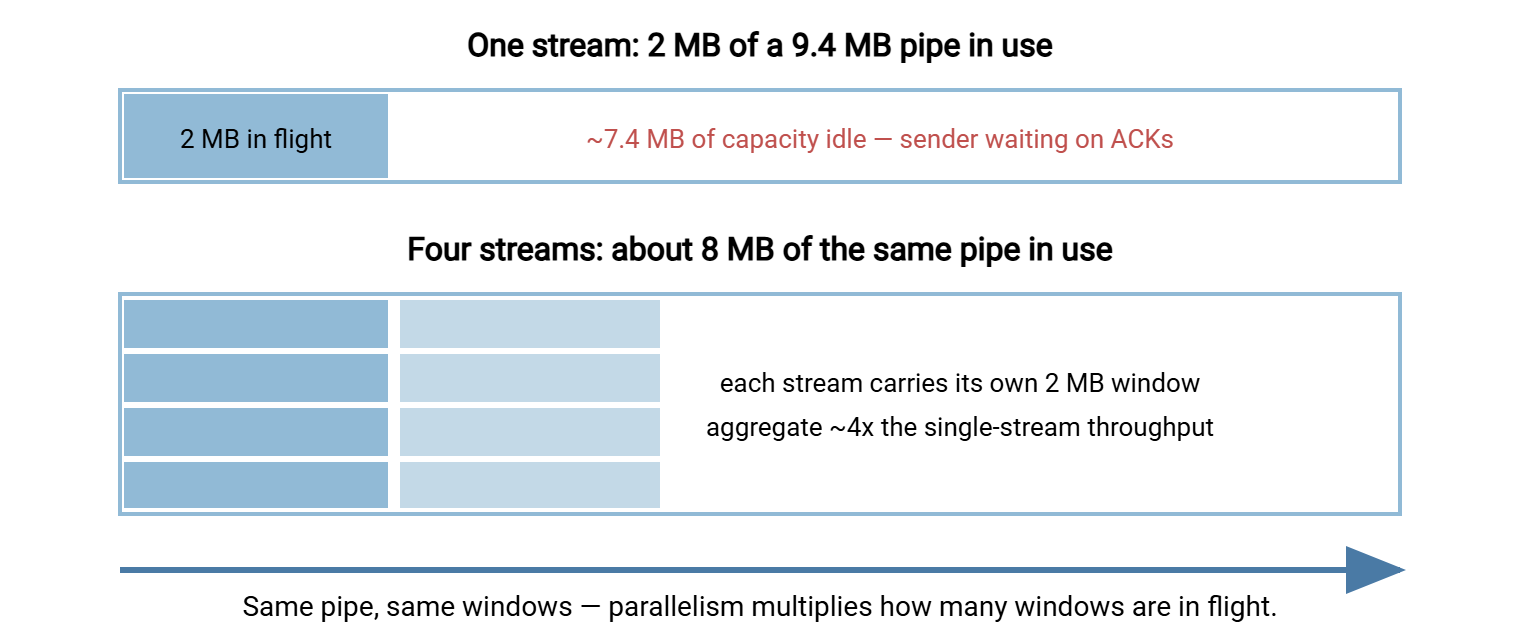
If one connection is allowed one window in flight, four connections are allowed four. Each stream brings its own window, its own acknowledgment clock, and its own slice of the transfer. So the aggregate in-flight data is (roughly) the sum of the windows. Four streams with 2 MB effective windows put about 8 MB into a 9.4 MB pipe — nearly full — where one stream filled a fifth of it. The diagram below shows exactly that comparison.
Parallelism also softens TCP's response to packet loss. When a lone stream loses a packet, congestion control cuts its window roughly in half. The whole transfer drops 50% and rebuilds at one increment per round trip. When one stream out of eight takes the same hit, the aggregate dips by about one-sixteenth. The other seven keep sending at full pace while the wounded one recovers. On paths with light, occasional loss, this smoothing is often worth as much as the extra windows.
Notice what parallelism does not do: it does not change the physics of any individual connection, and it does not create capacity. It is a way of presenting the network with more demand in flight. Incidentally, UDP-based accelerated protocols implement the same idea more elegantly with a single rate-controlled flow, as described in how acceleration works. Parallel TCP is the version you can deploy this afternoon with the tools you already own.
Two Ways to Parallelize
Many files at once. If your transfer is a batch of files, the easy form of parallelism is transferring several files concurrently. The batch might be a folder of exports or a set of media assets. Most graphical clients have a "simultaneous transfers" setting, and scripted jobs can simply run a few workers. No file gets split; each connection carries whole files off a shared queue. This form is simple, safe, and usually all a batch workload needs. Its weakness is the tail: when one giant file remains, you are back to a single stream for the remainder.
One file in segments. The second form splits a single large file into byte ranges and fetches the ranges over separate connections, reassembling on arrival. This needs protocol support for "start reading at offset X." HTTP has it natively via range requests (the mechanism behind download managers and resumable browser downloads — our HTTP file transfer series covers it). FTP has a restart mechanism many clients use for segmented downloads, and SFTP clients can read from an offset. Segmented transfer conquers the one-giant-file case, at the price of more moving parts. Those include reassembly, integrity checking of the joined result, and less sequential disk access at both ends.
A server-side note that catches people: every extra connection is a real session the far end must accept. Per-user and per-IP connection limits are common and sensible. So a client configured for 16 streams may find 10 of them refused — or find itself briefly banned as a suspected abuser. For FTP and FTPS there is a second ceiling: each concurrent data connection consumes a port from the server's passive range. So an undersized range quietly serializes your "parallel" transfer. (Our guide to configuring passive port ranges walks through sizing that correctly.) If you run the server side — for instance a Windows machine running Sysax Multi Server — check both dials before a partner's parallel client arrives. Those are allowed connections per user, and a passive range wide enough to carry them.
Where the Gains Stop: Diminishing Returns
Doubling streams doubles throughput only while the per-connection window is the binding constraint. Every parallel transfer eventually hands the bottleneck to something else, and the curve flattens — then, past a point, turns down. The usual suspects, in the order they typically appear:
- The link fills. The happy ending: aggregate reaches line rate (or your traffic-shaped allocation), and more streams just slice the same pie thinner.
- Disk stops streaming. Segmented reads and concurrent files turn tidy sequential I/O into scattered I/O; storage that served one stream at full speed may serve eight at a fraction each.
- CPU and encryption saturate. Each TLS or SSH connection pays its own handshake and its own encryption cycles. Many small, encrypted connections can pin a core that one fat connection barely warmed.
- The far end pushes back. Connection caps, per-IP limits, exhausted passive ports — the server defends itself, and refused connections add retries, not throughput.
- Self-inflicted congestion. Past saturation, your streams compete with each other, queue at the bottleneck, and induce the very loss that triggers backoffs across all of them.
The table shows the characteristic shape, with illustrative numbers from the kind of link this series keeps using — 500 Mbps at 150 ms, where a single untuned stream manages 22 Mbps:
| Streams | Aggregate throughput | Gain from doubling | What is happening |
|---|---|---|---|
| 1 | 22 Mbps | — | Window-limited baseline |
| 2 | ~44 Mbps | +100% | Perfect scaling — windows still the constraint |
| 8 | ~165 Mbps | +90% or so per doubling | Still scaling well |
| 16 | ~300 Mbps | +82% | Approaching other limits |
| 32 | ~380 Mbps | +27% | The knee — link and endpoints saturating |
| 64 | ~360 Mbps | negative | Overhead and self-congestion now cost more than the streams add |
The exact plateau varies by path; the shape is universal. Past the knee, more streams buy risk instead of speed. That leads to the practical rule: find your curve's knee by measurement, not by cranking the slider to maximum.
What the Whole Job Sees: Overhead and the Long Tail
Benchmarks measure steady-state flow; real jobs also pay entry and exit costs, and parallelism changes both. Every connection begins with a TCP handshake (one round trip) plus, for FTPS and SFTP, an encryption handshake (one to two more). At 150 ms per round trip, a connection costs roughly half a second before the first payload byte moves. For large files that toll vanishes into the noise; for a directory of 10 KB files it is the workload. That is why parallelizing thousands of tiny transfers mostly multiplies handshakes. It is why batching small files into one archive beats any stream count.
The exit cost is the long tail. A parallel batch finishes when its last file finishes, and file sizes are rarely tidy. Eight workers chew through the small files in minutes. Then seven sit idle while one drags the 40 GB database dump alone — a single window-limited stream again, exactly where you started. Two mitigations cover most cases. Have the queue hand out the largest files first, so the giant starts early and the small files fill in around it. Segment only the giants, using the range techniques above, so no single file ever rides one connection. A job that applies both routinely halves its wall-clock time with no change in stream count.
The Fairness Question Your Network Team Will Raise
Here is the part of the story that tends to surface in a slightly tense meeting. TCP's congestion control is not just a performance mechanism — it is a sharing mechanism. Competing flows through a congested link each back off when loss appears, and the arithmetic works out to a roughly equal share per flow. Open eight flows and you have politely awarded yourself eight shares. The video call sharing your office uplink has one.
Make the arithmetic concrete. Suppose a congested 100 Mbps office uplink is carrying your transfer plus nine other active flows — backups, browsing, a video call. As ten flows, everyone converges on roughly 10 Mbps apiece. Reconfigure your transfer to eight streams and the link now sees seventeen flows, eight of them yours. Your job climbs toward 47 Mbps while every other user's single flow is squeezed toward 6. Nobody changed a quality-of-service policy; you simply outvoted them. TCP's sharing is per connection, and parallelism is, bluntly, a way of stuffing the ballot box.
Whether that is a problem depends entirely on whose capacity you are consuming. On a dedicated point-to-point link carrying only your bulk transfer, take every share — there is no one to be unfair to except your own other traffic. On a shared corporate WAN, an eight-stream nightly job can visibly degrade interactive traffic for everyone. On links you do not own — a partner's server, a public service — aggressive parallelism is simply bad citizenship. That is why serious servers enforce those connection caps. The failure mode is real but manageable. Schedule bulk jobs off-peak and cap stream counts in the job configuration. Where the network supports it, ask for a quality-of-service class that lets bulk transfer yield to interactive traffic under contention.
Remember: parallel streams do not create bandwidth — they claim a larger share of whatever exists. That is exactly the accusation security and network teams level at uncapped UDP accelerators. So hold yourself to the standard you would hold a vendor to. Cap the streams, schedule the bulk, and be able to say precisely how much of the link your job may take.
When One Tuned Stream Wins
Parallelism is a workaround for windows that are too small. If you can fix the windows directly, a single stream can fill the same pipe with none of parallelism's baggage. Raise the OS buffer ceilings, clear the application-layer caps, and let autotuning grow the window past the BDP as shown in the tuning tutorial. The result is one connection to authenticate and log, sequential disk access at both ends, no reassembly, and no connection-cap diplomacy. It gives you the gentlest possible footprint on shared infrastructure. On clean links, tune first and parallelize only the remainder.
One tuned stream is also the right call when transfers are small (a connection that finishes in two round trips gains nothing from seven siblings). It is the right call when the far end strictly limits sessions, and when operational simplicity outweighs the last twenty percent of throughput. A debugging session with one connection in the logs is a different afternoon than one with sixteen. The honest hierarchy on a clean path is: tuning first, modest parallelism second. On a lossy long path, the ranking shifts. Parallelism's loss-smoothing becomes valuable precisely because tuning cannot help there. But that is also the territory where measurement may point past TCP entirely.
Picking a Stream Count by Measurement
Five minutes with iperf3 sketches your whole curve. Run a sweep, watch for the knee, and configure the job just below it:
# Far end:  iperf3 -s
# Near end - sweep the stream counts, 20 seconds each:
iperf3 -c far-end.example.com -t 20 -P 1
iperf3 -c far-end.example.com -t 20 -P 2
iperf3 -c far-end.example.com -t 20 -P 4
iperf3 -c far-end.example.com -t 20 -P 8
iperf3 -c far-end.example.com -t 20 -P 16

# Read the SUM line of each run. Stop increasing when a doubling
# of streams gains less than ~20%, and use the previous count.
# Re-check with your real tool: protocol overhead shifts the knee.
Then translate the number into your actual tooling. That means the simultaneous-transfer setting in a graphical client, the worker count in a script, or the segment count in a download tool. Write the chosen value and the date into the job's documentation next to the measurements that justified it. When someone doubles it "to be safe" a year from now, the log will show whether safe was slower.
The Version to Tell a Colleague
One TCP stream carries one window per round trip, so on long paths it uses a sliver of the link. Parallel streams multiply the windows in flight — four streams, four windows — and soften loss, since one stream's backoff only dents the aggregate. That much is physics and it works. The limits are equally real. Gains flatten once the link, disk, CPU, or far-end connection caps take over as the bottleneck. Every stream claims another share of a shared network, which is a fairness decision, not just a checkbox. Tune the windows first; add modest, measured parallelism for what remains. If even that leaves a lossy long link mostly idle, that is the signal to read about rate-based UDP acceleration — the engineered descendant of this same idea.
Frequently Asked Questions
Are more streams always faster?
Do parallel streams work with SFTP and FTPS?
Why does the server refuse some of my connections?
Is using parallel streams considered rude?
Do parallel streams help on links with packet loss?
How is this different from UDP acceleration?
From the Sysax team: we build secure file transfer software for Windows. Sysax Multi Server is an FTP, FTPS, SFTP, and HTTPS server. Sysax FTP Automation handles scheduled, scripted transfers. Free trials are on the download page.