
Running FTP Behind Load Balancers and Proxies Without Breaking It
An FTP server that has run reliably for years can start failing the week you put a load balancer in front of it. A load balancer is a device or software layer that accepts incoming connections on behalf of a group of servers. It spreads them across that group, so no single machine carries all the traffic and one can fail without an outage. Its cousin the reverse proxy accepts connections on behalf of a single server and forwards them inward, shielding the real machine. Most services sit behind either one without complaint. FTP does not: logins keep working, but transfers and directory listings start failing with timeouts and 425 Can't open data connection errors — intermittently, and differently for different customers.
The root cause is always the same. FTP is two network connections pretending to be one. There is a long-lived control connection that carries commands, and a fresh data connection for every transfer or directory listing. If that two-connection design is new to you, read active vs passive FTP explained first; every failure in this article traces back to it. This guide is the most advanced entry in our Active vs Passive FTP series, but it assumes no prior load-balancer experience — every term is defined on the way.
By the end you will know exactly why FTP resists load balancing and which architectures genuinely work. You will know how to build health checks that tell the truth, and when a balancer is simply the wrong answer. A copyable deployment checklist waits near the end.
Why FTP Is Uniquely Hard to Load-Balance
Start with the contrast. A plain web request is one self-contained connection — connect, ask, receive, done. So a balancer can hand each new connection to any healthy server and nothing breaks. Simple single-connection protocols are what load balancers were built for.
FTP violates that picture in two ways. First, its two connections belong together. Only the server holding your control session knows who you are and which transfer you just requested. And only that server has opened a listening port for your data. If the data connection lands on a different server, nothing there is listening on the promised port and nothing knows your session. The connection is refused or times out, and the client reports the classic 425.
Second, FTP announces addresses in mid-conversation. In passive mode — the default everywhere today — the client sends PASV and the server answers with a 227 reply. The reply is an IP address and port meaning "connect here for your data". It is decoded fully in our guide to PORT, PASV, EPRT and EPSV. Behind a balancer, that advertised endpoint must clear two hurdles at once. A client out on the internet must be able to reach it. And the connection must be delivered to the exact server that issued the reply. A balancer that knows nothing about FTP guarantees neither.
Two more terms before the fixes. The balancer answers the internet on a VIP — a virtual IP address, a public address that belongs to the balancer itself rather than to any single server. Your DNS name points at it. The real servers behind it are the backend nodes, each with a private address the outside world never sees. Balancing FTP is the craft of keeping that illusion intact for a protocol that blurts out addresses and ports mid-session.
Remember: every load-balanced FTP failure is one of two problems in disguise — the data connection reached the wrong backend node, or the advertised passive port was not reachable at all. Every technique below exists to prevent one of those two outcomes.
Session Affinity, Explained Simply
The first tool on every balancer is session affinity, also sold as persistence or "sticky sessions." Affinity is a promise: once a client has been sent to a node, keep sending it to the same node instead of choosing fresh for every connection. The balancer keeps an affinity table — a short-term memory of "this client belongs to node A" — and consults it before every balancing decision.
The workhorse is source-IP affinity, which keys that table on the client's IP address. It needs no understanding of FTP at all. The control connection from 198.51.100.7 goes to node A. A data connection arriving from the same address moments later matches the same entry and lands on node A too. Two connections, one node, no protocol intelligence required.
Its first limit is shared addresses. NAT — the address-sharing technique offices and carriers use — can put hundreds of real users behind one public IP. Affinity sees them as one client and pins them all to one node, so a "balanced" pair can run badly lopsided. A few networks are worse: their traffic exits through more than one public address. So one client's control and data connections can arrive from different IPs and land on different nodes. That is precisely the failure affinity was meant to prevent.
The second limit is time. Affinity entries expire after an idle period, often just minutes. FTP sessions can run for hours — a client window left open, a script working through a queue. When the entry expires mid-session, the next data connection is balanced fresh, perhaps onto the other node. Transfers that worked all morning fail after lunch. Set the affinity timeout comfortably longer than your longest real session, and write the number down.
What Source NAT Does to Logs and Access Rules
Most balancers and proxies also rewrite the traffic they forward using source NAT. Each connection reaches the backend node bearing the balancer's address instead of the real client's. There is a practical reason — it forces the server's replies to travel back through the balancer. But the side effects deserve a deliberate decision rather than a later surprise.
The first casualty is the server's log. Every session now appears to come from the balancer, so an investigation that begins "which address uploaded this file?" dead-ends instantly. IP-based access rules on the server die too: you cannot allow only a partner's address when every connection arrives from the same one. And automatic abuse handling that blocks an address after repeated failed logins will eventually block the balancer itself — which blocks everybody at once.
There are three honest ways to live with this. Transparent mode, where your balancer offers it, passes the real client address through unchanged. It requires the network to be arranged so replies still route back via the balancer. So treat it as a design choice, not a checkbox. Otherwise, move address-based work to the balancer. Keep allow-lists, blocking, and rate limits there, where real client addresses are still visible. In that case, treat the balancer's own connection log as your record of who connected from where. Finally, lean on per-user records at the server. A backend running Sysax Multi Server keeps an activity log of each account's logins, uploads, and downloads. So user-level auditing survives even when every session shows the balancer's address.
Passive-Range Strategies That Actually Work
Now the constructive part: three proven ways to make passive data connections land where they must, from simplest to most sophisticated. Unusually for architecture advice, the simpler ones are usually the better ones.
The baseline: one server, no balancing
The design everything else is measured against is not balancing at all. It is one server behind a port-forward — a firewall rule that sends traffic arriving on chosen public ports to one internal machine. Forward port 21 and the passive range. Have the server announce the public address in its 227 replies. The same-node rule is satisfied by construction, because there is only one node. Our walkthrough on configuring passive port ranges covers that setup end to end. Hold this baseline in mind — a later section argues that for many environments it is also the finish line.
Distinct passive ranges, one per node
The sturdiest balanced design gives each backend its own passive range: node A gets 50000–50099, node B gets 50100–50199. The balancer or firewall carries static rules forwarding each range only to the node that owns it, while port 21 is balanced across the pool with source-IP affinity. Every node is configured to announce the same shared public address — the VIP — in its replies.
Look at what this buys. When node A answers PASV, it advertises the VIP plus a port that only node A ever uses. So the incoming data connection is delivered to node A by the port mapping itself — not by luck, and not by any FTP intelligence in the balancer. A completely FTP-ignorant balancer works, because the routing decision now lives inside the port numbers. Both settings involved are ordinary per-server configuration in a Windows file transfer server like Sysax Multi Server. Give each node its own passive port range, and give both the same announced external IP.
The diagram below shows the whole pattern. A client on the internet reaches the VIP, and source-IP affinity pins that client's control and data connections to node A. Each node owns a distinct passive range that the balancer forwards only to it.
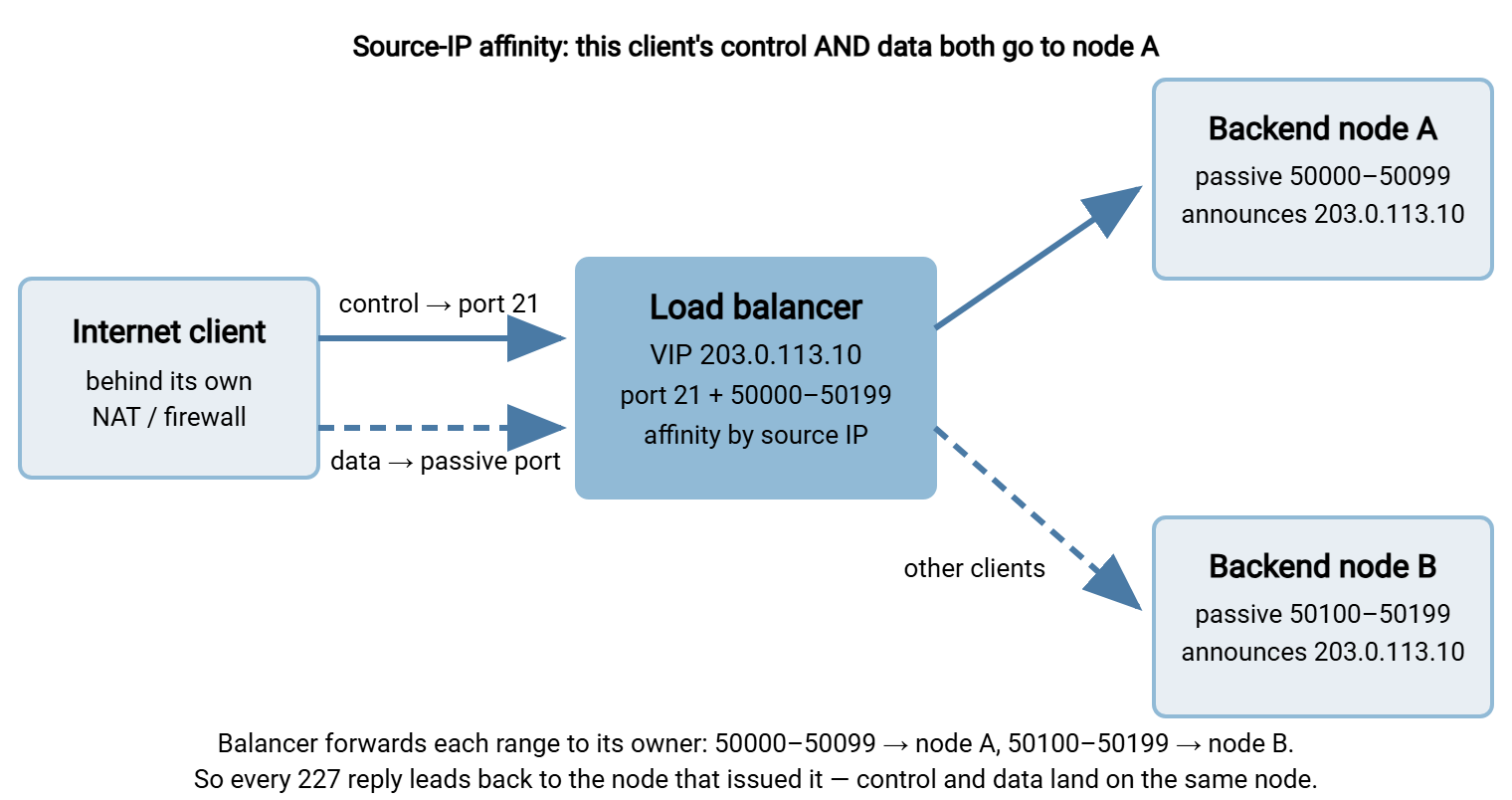
The cost is bookkeeping. Ranges must never overlap, each range caps how many simultaneous transfers its node can serve, and the firewall rules must stay in step with the server settings forever. That is exactly why the checklist at the end of this article exists.
FTP-aware balancers and proxies
Some balancer products offer an FTP-aware mode, sometimes called an FTP helper or application profile. FTP-aware means the balancer reads the control conversation as it relays it. It spots each 227 reply and rewrites the advertised address where needed. It installs a temporary internal rule so the data connection about to arrive is delivered to the node that issued that reply. Done well, this makes FTP balance almost like a single-connection protocol, with no per-node ranges to manage.
Two cautions. First, verify it with a real client — quality varies, and the feature name proves nothing about whether data connections truly follow their control connection. Second, encryption blinds it: FTPS wraps the control channel in TLS. The balancer can no longer read the 227 replies it needs to rewrite, and the awareness silently stops working. If you serve FTPS, plan on affinity plus distinct per-node ranges instead — no middlebox can rewrite what it cannot read. Our FTPS series covers that protocol's firewall story in full.
| Strategy | How data finds the right node | Watch out for |
|---|---|---|
| One server + port-forward | Only one node exists | Single point of failure; capacity of one machine |
| Distinct range per node | Static port-range forwarding per node | Ranges must not overlap; rules and server settings must stay in sync |
| FTP-aware balancer | Balancer reads and tracks 227 replies |
Blind on FTPS; verify with a real client before trusting |
Health Checks That Don't Lie
A health check is the periodic probe a balancer runs against each backend node to decide whether it should receive traffic. Fail enough checks and the node is pulled from rotation. Health checks are the balancer's eyes — and the default ones are nearly blind for FTP.
The usual default is a TCP connect to port 21: if something answers, the node is called healthy. But answering the greeting proves nothing about transfers. A node with a broken passive configuration, a missing firewall rule, or a full disk will pass that check indefinitely while failing every transfer it is given. Affinity makes the damage stranger still: the customers pinned to the sick node fail every single time, everyone else is fine, and the helpdesk fills with contradictory reports.
The honest alternative is a synthetic check — a scripted probe that performs a real login and requests a directory listing. A listing is the cheapest operation that forces a complete data connection. So it exercises the entire path a customer uses: PASV, the 227 reply, the second connection, the transfer. Give the probe its own account and a small directory, and require the full sequence to succeed:
Command:  USER healthcheck
Response: 331 Password required
Command:  PASS ********
Response: 230 Login successful
Command:  PASV
Response: 227 Entering Passive Mode (203,0,113,10,195,120)
Command:  LIST
Response: 150 Opening data connection
Response: 226 Transfer complete   <-- only now is the node truly healthy
Then tune the check so it cannot lie in the other direction. An aggressive check — a one-second timeout, removal after a single failure — makes nodes flap: drop out of rotation on a momentary blip, return seconds later, drop again. Every flap reshuffles clients between nodes and tears control-and-data pairs apart mid-session, producing exactly the intermittent 425 misery that makes these systems miserable to debug. Our guide to diagnosing FTP mode failures shows what it looks like from the client side. Probe every thirty to sixty seconds, allow a generous timeout, and remove a node only after two or three consecutive failures.
Gotcha: a check that only watches port 21 measures the greeting, not the service. If the probe does not complete a real directory listing, the balancer will keep sending customers to a node that cannot transfer a single file.
Publishing FTP from a DMZ, Simple to Complex
Whether or not a balancer is involved, an internet-facing FTP server should live in a DMZ — a "demilitarized zone." This is a small isolated network segment between the internet and your internal network. That way, a compromised server leaves the attacker standing in a sealed room rather than inside your LAN. Three publishing patterns cover almost every real deployment, in rising order of complexity.
Straight port-forward. The firewall forwards port 21 and the passive range from the public address to one server in the DMZ. This is the baseline design from earlier. Its great virtue is that one administrator can hold the entire thing in their head. There is one server, one rule set, one place to look when something breaks. The passive port range guide is the complete recipe.
A proxy or gateway in the DMZ. Here a reverse proxy or FTP gateway stands in the DMZ and terminates client connections. It opens its own connections onward to a file server on the internal network. So internet traffic never touches the machine that holds the data. Security teams like this pattern, with good reason. Just recognize the proxy for what it is: a middlebox in this article's full sense. It must solve the same-node and advertised-port problems, it applies source NAT unless configured otherwise, and its idle timeouts sit in the transfer path. Every section above applies to it.
A balanced pair behind a VIP. The full machinery — affinity, per-node ranges, synthetic checks — earns its cost when uptime truly requires a second node and you have the operational habits to run it: monitoring, documented mappings, rehearsed failover.
And the honest guidance for a typical small-to-mid environment: a single well-configured server behind a port-forward beats a misconfigured balanced pair, every time. A balancer does not remove failure modes; it trades rare hardware failure for common configuration failure, spread across twice as many moving parts. Remember too that FTP has no session handover. When a node dies, its in-flight sessions die with it. The balancer's real contribution is that new connections land on the survivor. Add the second node when you are ready to operate the second node, not before.
A Gallery of Classic Failures
Balanced FTP tends to fail in three recognizable shapes. Learn them, and you will diagnose in minutes what otherwise costs days.
- "It worked in testing, then failed under load." Testing used three clients; production brought three hundred, and two capacity limits surfaced. The affinity table filled, so the balancer began evicting older entries early — silently re-balancing established clients onto the other node mid-session. And the passive range ran short: each concurrent transfer occupies one port. Just-closed connections keep their ports briefly reserved before the operating system releases them. So a hundred-port range will not reliably carry a hundred simultaneous transfers. The signature is
425errors that appear at the busiest hour and vanish by evening. Size the affinity table and the ranges for peak concurrency, then add margin. - "Transfers fail — but only for certain customers." The usual cause is the interaction between that customer's NAT and your affinity. An office whose traffic exits through more than one public address defeats source-IP affinity. The control connection arrives from one address and is pinned to node A. The data connection arrives from a second address and is balanced to node B, which refuses it. Every other customer is fine, so suspicion tours the customer's network and your servers before anyone questions the affinity table. Confirm it at the balancer by comparing the source addresses of one failing customer's control and data connections.
- "Listings are fine, but long transfers die partway." During a large upload or download, all the activity moves to the data connection — the control connection goes completely silent. To a balancer enforcing an idle timeout, a connection that has said nothing for ten minutes looks abandoned, so it gets dropped, killing the session that owned the transfer. The tell is consistency: small files always succeed, large files die at nearly the same duration every time. Raise the balancer's idle timeout on
port 21beyond your longest transfer, and turn on keepalive settings where you can. Many clients can send harmlessNOOPcommands during a transfer. TCP-level keepalives do the same job one layer down.
Remember: transfers that die at a suspiciously consistent duration are a timeout signature, not a network mystery. Inventory every idle timer between client and server — balancer, firewall, proxy — and make each one outlive your longest legitimate transfer.
A Deployment Checklist for Balanced FTP
Work through this list in order when you stand the service up, and again whenever transfers start failing after a change. It is written to be copied into your runbook.
- Draw the topology first: the VIP, every backend node with its private address, and which device forwards what. If it cannot be drawn, it cannot be debugged.
- Assign each node a distinct passive range with no overlap — for example
50000–50099to node A and50100–50199to node B. Record the mapping where the on-call person will find it. - On each node, set that node's passive range and set the announced external address to the shared public VIP.
- On the balancer and firewall, forward
port 21to the pool and forward each passive range only to the node that owns it. - Enable source-IP affinity on
port 21, with a timeout longer than your longest realistic session — think in hours, not minutes. - Decide the source-NAT question deliberately: transparent mode if your product and network support it; otherwise move allow-lists, blocking, and address logging to the balancer.
- Replace the TCP-only health check with a synthetic login-plus-
LISTprobe against each node, removing a node only after two or three consecutive failures. - Raise every idle timeout on the path above the duration of your longest transfer, and enable client or TCP keepalives for long-running jobs.
- Test from outside, from at least two different networks: a listing, an upload, a download, and one file large enough to run longer than every timeout you set.
- Pull one node out on purpose. Confirm the checks remove it and new sessions land on the survivor. Accept that the pulled node's in-flight sessions fail, because FTP sessions do not migrate. Clients simply reconnect.
The Short Version
FTP resists load balancing because it is two connections pretending to be one. The data connection must land on the same backend node as the control connection. The port advertised in each 227 reply must actually lead there from the internet. Source-IP affinity keeps the pair together for most clients. Distinct per-node passive ranges make the advertised port route correctly even through a balancer that knows nothing about FTP. Synthetic health checks keep dead nodes away from live customers. And generous idle timeouts keep long transfers alive.
If this article leaves you suspecting you do not need a balancer at all, trust that instinct. A single server done well, following our passive port range walkthrough, is the strongest simple design there is. When failures do appear, work from the client's own evidence with the mode-failure diagnosis guide, and keep the two root causes in mind: wrong node, or unreachable port. Everything else is detail.
Frequently Asked Questions
Can I load-balance FTP with a balancer that knows nothing about FTP?
Why do logins work through my load balancer while transfers fail with 425 errors?
Does an FTP-aware load balancer work with FTPS?
Why does my FTP server's log show the load balancer's address for every client?
Do I actually need a load balancer for my FTP server?
From the Sysax team: we build secure file transfer software for Windows. Sysax Multi Server is an FTP, FTPS, SFTP, and HTTPS server. Sysax FTP Automation handles scheduled, scripted transfers. Free trials are on the download page.