
Certificate Lifecycles in AS2 Partnerships: Renewal Without the Outage
There is a specific Monday morning that every AS2 administrator eventually meets. Every message to your company's biggest trading partner has been failing since 2 a.m. Saturday. Orders are queuing, the business is asking pointed questions, and the cause turns out to be nothing exotic: a certificate quietly reached its expiry date over the weekend. Nobody attacked you. Nothing broke. A date arrived, exactly on schedule, and took the partnership down with it.
The expired-certificate outage is the most common serious failure in AS2 operations, and it is also the most preventable. Unlike hardware failures or network incidents, its exact date is printed inside the certificate from the day it is created. This article is the tutorial for beating it. It covers how certificates are exchanged with partners in the first place, and the two-sided renewal choreography that has to happen before every expiry. It gives you a copyable renewal calendar you can adopt today, and explains what to do when the outage happens anyway. It is part of our AS2 & B2B Exchange series and builds on the message mechanics covered in AS2 explained for admins.
Why AS2 Lives and Dies by Certificates
A quick recap of the arrangement, because the outage only makes sense once you see how tightly the two companies are bound together. AS2 (Applicability Statement 2, the business-to-business exchange specification) secures every message with public-key cryptography. Each company has a key pair — a private key it never shares and a public key wrapped in a certificate it gives away. During onboarding the companies perform a certificate exchange: each side loads the other's public certificate into its AS2 software. After that, four pieces are in play on every single message. Your private key signs what you send. Their certificate encrypts what you send to them. Their private key signs their receipts. Your certificate on their side encrypts what they send to you.
Here is the structural problem: certificates carry built-in expiry dates, and in AS2 they are pinned on both sides. Compare that to an ordinary website certificate. When a website renews, the server operator swaps the certificate and every browser on Earth adjusts automatically — the visitor's side needs no action. In AS2 there is no such automatic trust. Your partner's software holds a stored copy of your specific certificate and refuses anything else. When you renew, the new certificate is a stranger to them until a human on their side loads it. Renewal is therefore never a private act — it is a coordinated, two-party procedure. Every failure mode of the expired-cert outage traces back to one side acting (or a date arriving) before the other side was ready.
Remember: an AS2 partnership depends on four certificates and keys staying simultaneously valid — two per company. Any one of them expiring stops the entire document flow with that partner. Renewal is a choreography between two companies, never a solo task.
The Certificate Exchange at Onboarding
Lifecycle discipline starts on day one, when the certificates first change hands. The exchange itself is mundane. Public certificate files are small text or binary files, commonly with extensions like .cer or .pem. They are sent through the partner's connection portal or attached to onboarding email. Because only public certificates travel, interception is not the risk. Substitution is: you must be sure the file you load is genuinely the partner's. The standard defense is fingerprint verification. Every certificate has a fingerprint (also called a thumbprint), a short hash uniquely identifying it. Your AS2 software or any certificate viewer displays it. You read the fingerprint to your counterpart over a separate channel — a phone call, or the partner's portal showing it independently. Confirm it matches before trusting the file.
Three habits at exchange time prevent years of confusion later:
- Record the expiry date the day the certificate arrives. Not "sometime during onboarding." The moment a certificate enters your systems, its expiry enters your register and your reminder calendar (both below). This single habit is most of the cure.
- Label certificates precisely. A store full of files named
partner-cert-new-FINAL2.ceris a future outage. Adopt a naming pattern carrying partner, role (signing, encryption, or both), and expiry, and record the fingerprint alongside. - Capture the partner's certificate contact. The person or mailbox that handles certificate matters at the partner is rarely the salesperson who introduced you. When renewal time comes, you want that address on file, not a scramble.
Two configuration details from the connection form matter for lifecycles. First, check whether the partnership uses one certificate for both signing and encryption or separate ones for each. Separate certificates mean separate expiry dates to track. Second, check whether certificates are self-signed (vouched for by nobody — normal in AS2, since fingerprint verification establishes trust directly). Or are they issued by a certificate authority (CA — a third-party organization that signs certificates)? CA-issued certificates add a subtlety: they can be distrusted if the CA's own chain has problems. Their maximum lifetimes follow industry rules, which tends to mean more frequent renewals.
Anatomy of the Expired-Cert Outage
Knowing exactly how the villain behaves makes it recognizable in seconds instead of hours. The defining signature: everything with one partner fails at once, suddenly, while every other partner works fine. Network problems degrade; configuration mistakes follow changes; but a certificate expiry is a cliff. The last message before the stroke of expiry succeeds, and the next one fails. The timing (often an odd hour, because expiry timestamps are arbitrary) looks senseless until you check the dates.
Which cert expired determines the precise symptoms:
- Your signing certificate expired. Partners begin rejecting your messages. Their MDNs (Message Disposition Notifications, the signed receipts) come back with dispositions like
authentication-failed, or their station refuses the connection outright. Some station software refuses to sign with an expired certificate at all, so your sends may fail before leaving the building. - The partner's encryption certificate you hold expired. Your station refuses to encrypt to an expired certificate, and outbound messages to that partner pile up in the queue with errors. Nothing even reaches the wire.
- Your encryption certificate (held by the partner) expired. The mirror image: their sends to you stop. The first you hear of it may be the partner's escalation call — or the business noticing expected orders never arrived.
- The partner's signing certificate expired. Inbound messages arrive but fail signature verification, and your station rejects them with its own error dispositions.
Every case halts real business documents. Purchase orders stop flowing, shipping notices miss deadlines, and with large partners that can mean chargebacks — penalty fees for missed document timing. The outage's cost is measured in business terms, which is worth remembering when justifying the unglamorous prevention work below.
The Renewal Choreography, Step by Step
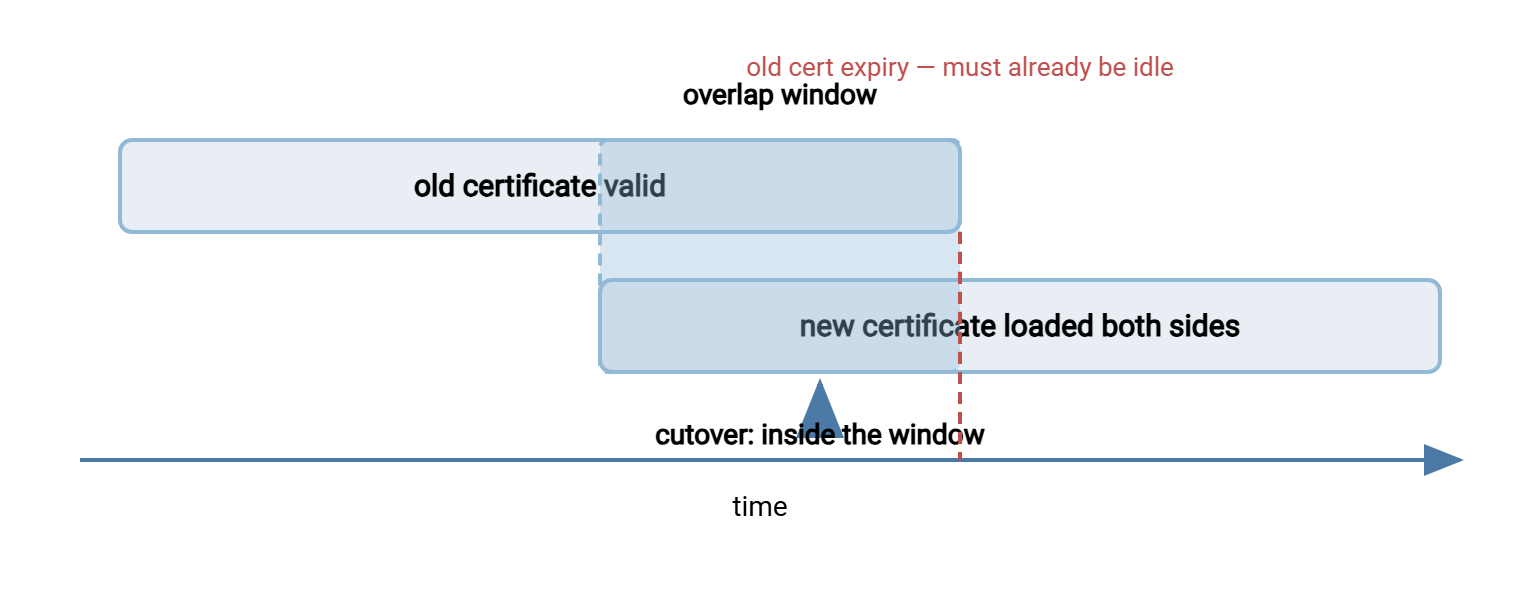
Here is the procedure that prevents all four cases, written from the side doing the renewing. When the partner renews, your duties are the mirror image. The central idea is the overlap window: a period when both old and new certificates are loaded and trusted. So the cutover moment cannot cause an outage no matter whose clock is slightly off.
- Generate the replacement early. Create the new key pair and certificate well before expiry — the calendar below says ninety days. The slack exists because the slowest step is never yours. Record the new expiry immediately.
- Notify every affected partner, with the essentials. Send the new public certificate file, its fingerprint, the date it becomes active, and the date the old one expires. Track each partner in its own ticket, because twenty partners will respond at twenty speeds.
- Partners load the new certificate alongside the old. AS2 station software commonly provides a second certificate slot for exactly this purpose. From this point the partner accepts messages secured with either certificate — the overlap window is open.
- Exchange test messages before cutover. With the new certificate loaded on both sides, send a test message signed with the new key and confirm a clean signed MDN. Do this in both directions if the partnership flows both ways. Testing during overlap is free; discovering a problem after expiry is an outage.
- Cut over your side. At the agreed point, your station starts signing with the new key and partners start encrypting to the new certificate. Because the overlap window is open, stragglers still on the old certificate keep working — nothing breaks at the moment of switch.
- Watch the first production cycle. The first real business day after cutover, review the MDN stream for that partner set. Failures now are configuration slips, cheap to fix because the old certificate still works as a fallback.
- Retire the old certificate deliberately. After every partner has confirmed and the expiry date passes, remove the old certificate from active use. Then archive it (you may need it to decrypt or verify archived messages) and close the tickets.
The diagram below shows the shape that makes this safe: two validity bars overlapping, with the cutover happening inside the overlap — never at its edge.
The Renewal Calendar
Choreography needs dates. The calendar below is the copyable centerpiece of this article. Adapt the lead times to your partner count (more partners need more runway). Paste the calendar into your team's task system for every certificate in your register, the day the certificate is created or received.
AS2 CERTIFICATE RENEWAL CALENDAR  (run once per certificate, per expiry)

90 days before expiry
    Generate the replacement key pair and certificate.
    Record the new expiry date in the certificate register.
    Open one renewal ticket per affected partner.

60 days before
    Send each partner the new public certificate + fingerprint,
    the activation plan, and the old cert's expiry date.

45 days before
    Confirm each partner has loaded the new certificate alongside
    the old (overlap window open). Chase every silent partner.

30 days before
    Exchange test messages secured with the new certificate.
    Verify clean signed MDNs in both directions.

14 days before
    Cut over production signing and encryption to the new
    certificate. Watch the first full business cycle's MDNs.

7 days before
    Escalate any partner still exchanging on the old certificate
    - phone, not email.

Expiry day
    Old certificate must already be idle. Remove from active use,
    archive it, close the tickets, and log lessons learned.
When the renewal is the partner's, the same calendar runs in mirror image. On notification you verify the fingerprint, load the new certificate alongside the old, participate in test exchanges, and confirm cutover. The most important mirrored duty is responsiveness — every day you sit on a partner's renewal notice, you consume the safety margin their calendar built.
The Certificate Register: Know What You Hold
The calendar assumes you know every certificate and every expiry date. That inventory is the certificate register — nothing fancier than a maintained table, one row per certificate, kept where the whole team can see it:
CERTIFICATE REGISTER - one row per certificate

Partner        Role              Ours/Theirs  Expiry     Fingerprint (last 8)  Owner   Partner contact
NORTHWIND      sign + encrypt    ours         [date]     ...3F9A21BC           JT      edi-certs@northwind.example
NORTHWIND      sign + encrypt    theirs       [date]     ...77D014E2           JT      edi-certs@northwind.example
ACME-CORP      signing           ours         [date]     ...0B44C9D1           MR      as2ops@acme.example
ACME-CORP      encryption        ours         [date]     ...5E12AA07           MR      as2ops@acme.example
TLS on AS2 URL (https endpoint)  ours         [date]     ...91C3F508           JT      n/a - internal
Note the last row: the TLS certificate (Transport Layer Security — the encryption on the HTTPS endpoint itself) is separate from the AS2 payload certificates. It expires on its own schedule and takes down inbound connections just as thoroughly when forgotten. Register it too. In fact, the register-and-calendar discipline pays off across your whole transfer estate. The server certificate on an FTPS server such as Sysax Multi Server carries an expiry date that deserves a row in the same register. So do the OpenPGP keys a tool like Sysax FTP Automation uses for file-level encryption. Certificates differ; the failure mode of forgetting them does not. (The FTPS side of that story lives in our FTPS series.)
Reminders and Automation Options
What can be automated, honestly: detection. What cannot: the choreography, because the counterparty must act by hand. Build your safety net accordingly:
- Calendar reminders from the register. Create reminders at the 90/60/45/30/14/7-day marks for every expiry, addressed to a team mailbox or shared task list — never to one person. The classic failure is reminders faithfully delivered to the inbox of an administrator who left the company.
- Turn on station expiry warnings. Most AS2 software can warn when any stored certificate approaches expiry. Enable it, set the threshold generously, and route the alerts somewhere humans actually look.
- Script an independent check. A small scheduled script can read the expiry dates of every certificate file and flag anything inside your warning threshold. It is an independent net under the station's own alerts. Ten lines of script, one avoided outage, permanent payback.
- Do not expect web-style auto-renewal. The automated certificate ecosystems that renew website TLS certificates without human hands do not translate to AS2 payload certificates. That is because the partner must manually load and trust each new certificate. Automation shortens your reaction time; it cannot replace the partner's action.
- Assign an owner per partnership. The deadliest certificate in any register is the one nobody owns. An owner column with a real name turns "someone should chase Northwind" into a task with a person attached.
When the Outage Happens Anyway
Someday, despite everything — an acquired company's undocumented partnership, a partner who ignored every notice — the cliff arrives. Damage control, in order:
- Recognize the signature. One partner, total failure, sudden onset at an odd timestamp, everyone else fine. Check the register and the station's error dispositions. The
decryption-failedandauthentication-failedcategories point at which of the four certificates died. The full symptom map is in troubleshooting AS2. - Get a human on the phone. Certificate emergencies resolve at the speed of the slower company's change process. A phone call with fingerprint verification can accomplish in an hour what ticket queues do in days.
- Exchange and load the replacement, then test one message. One clean signed MDN in each direction before reopening the floodgates.
- Drain the backlog deliberately. Your station has been queueing outbound failures — release them and confirm their MDNs. Ask the partner to re-drive anything inbound that failed on their side. Reconcile counts with the business so no document is silently lost.
- Feed the lesson back. Add the missing certificate to the register, add the reminders, and record why it was missing. An outage that improves the register is half-redeemed.
The Discipline in One Sentence
Every certificate in an AS2 estate is a scheduled outage with a published date. The whole craft of lifecycle management is making sure something else is scheduled first. Keep a register, run the calendar, renew with overlap, test inside the window, and retire the old certificate only when it is already idle. For how the certificates fit the larger message flow, revisit AS2 explained. For the receipts that prove your renewals worked, see MDNs and proof of delivery. For setting all of this up with a brand-new partner, use the trading partner onboarding checklist.
Frequently Asked Questions
How long should an AS2 certificate be valid?
Can we use one certificate for all trading partners?
What exactly is a certificate fingerprint or thumbprint?
What if a partner never responds to our renewal notices?
Is the HTTPS certificate on our AS2 URL the same as our AS2 certificate?
Do we still need the old certificate after cutover?
From the Sysax team: we build secure file transfer software for Windows. Sysax Multi Server is an FTP, FTPS, SFTP, and HTTPS server. Sysax FTP Automation handles scheduled, scripted transfers. Free trials are on the download page.