
Troubleshooting AS2: Decryption Failures, MIC Mismatches, and Missing MDNs
AS2 failures have a talent for looking terrifying. The error text speaks of failed decryption, integrity violations, and rejected signatures — vocabulary that suggests either an attack in progress or mathematics beyond an administrator's pay grade. It is neither. Nearly every AS2 failure belongs to one of five recurring families, each with a short list of mundane causes. The worst of them usually reduces to "somebody's stored certificate no longer matches somebody's key."
This article is the field guide to those families. You will learn the two questions that sort any AS2 incident before deep diagnosis starts, and how to read a station log layer by layer. You will learn what each failure family looks like and what actually causes it. Because half of every AS2 problem lives in another company's building, you also get a ready-to-use escalation script for the partner call. It is part of our AS2 & B2B Exchange series and leans on the message anatomy from AS2 explained for admins. AS2 (Applicability Statement 2) messages are fingerprinted with a MIC (message integrity check — a cryptographic hash), signed, and encrypted. They are sent over HTTP or HTTPS and answered with a signed receipt called an MDN (Message Disposition Notification).
First Moves: Sort the Incident, Then Read the Log
The two sorting questions
AS2 estates are unusually stable — the same messages, the same partners, the same schedule, every day. That stability is diagnostic gold, because it means failures almost never appear spontaneously. Ask two questions before touching anything:
- What changed? A certificate renewed (or silently expired), software upgraded, a firewall rule modified, a partner migrated their platform, a URL updated. In a system this static, the failure's cause is usually the most recent change on either side. And "either side" is the operative phrase, since the partner's Tuesday maintenance window is invisible to you until you ask.
- One partner or all partners? This single observation cuts the search space in half. All partners failing points squarely at your side: your station down, your endpoint unreachable, your disk full, the TLS (Transport Layer Security) certificate on your HTTPS endpoint expired. One partner failing while others hum along points at that pairing: the certificates the two of you exchanged, their endpoint, their changes, or the configuration specific to that profile.
One signature deserves instant recognition: a single partner, total failure, sudden onset at an arbitrary-looking timestamp, after months of stability. That is the classic expired-certificate outage, the recurring villain of this pillar. Confirm it by checking expiry dates in your certificate register before doing anything else. See certificate lifecycles in AS2 partnerships for both the emergency swap and the calendar that prevents the sequel.
Reading the log: find the deepest layer reached
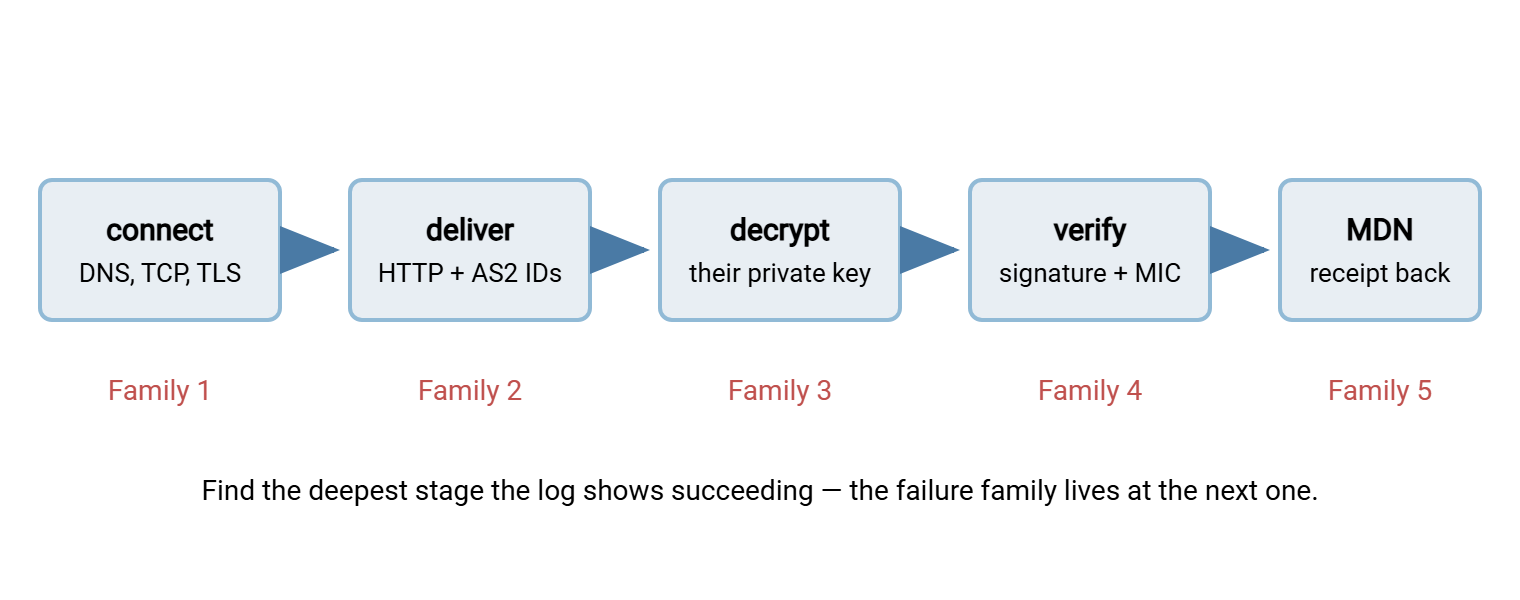
An AS2 exchange climbs a ladder of layers, and the log tells you which rung it fell from. From the bottom comes the connection layer (name resolution, TCP, TLS handshake). Next is the HTTP layer (request sent, status code returned). The status codes are the three-digit response codes where the 200-family means accepted, the 400-family means "your request was refused," and the 500-family means "the server itself broke." Next comes the cryptographic layer (decryption, signature verification, MIC computation). Finally comes the receipt layer (MDN returned, paired, and verified). A typical outbound failure record reads something like:
OUT  msg <f31c88a2-91d4-4c07@our-station>  partner=NORTHWIND
     connect as2.northwind.example:443 ... ok (TLS established)
     POST /as2/inbound ... HTTP 200
     MDN received (sync), signed, verified
     Disposition: automatic-action/MDN-sent-automatically;
                  processed/error: decryption-failed
     MIC comparison: n/a
Read it bottom-up and note the deepest success: the connection worked, HTTP worked, the message was delivered. The failure happened inside the partner's cryptographic processing, which they reported honestly in the MDN's disposition field. That is a Family 3 problem (below), and you have just skipped past three layers you no longer need to investigate. This habit — locate the deepest layer reached, then suspect the next one — is the entire method. Every family below is really just a name for "the exchange died at this layer."
The Message-ID is your cross-company correlation key. When the investigation reaches the partner, quoting the exact Message-ID lets their team pull the very same exchange from their logs. The two records read together show precisely where the stories diverge. Get in the habit of copying Message-IDs into tickets from the first minute.
The diagram below maps the five families onto the ladder, so a log line places you on the map immediately.
Family 1: Connection and Transport Failures
Nothing AS2-specific has happened yet — the message cannot reach the partner's doorstep. The log shows name-resolution errors, connection timeouts, refused connections, or TLS handshake failures, and no HTTP status at all. Causes are ordinary networking. They include DNS changes, firewall rules (yours outbound or theirs inbound), a moved or retired endpoint, or a proxy inserted by either security team. Another cause is the TLS certificate on the endpoint expiring. This is a different certificate from the AS2 signing and encryption pair. It fails at a different layer (a handshake error here, not a disposition error later).
Isolation is quick: can you reach the partner's URL from a different network path? Can they reach it themselves? Did your security team change egress rules? A connection-layer failure with a single partner whose endpoint answers others is nearly always an address or firewall detail one side changed without telling the other.
One quiet variant catches even careful teams: partners who restrict inbound connections to an allowlist of your source addresses. Your outbound traffic may start leaving through a different address — a new internet link, a proxy change, a datacenter move. When that happens, the partner's firewall silently drops you, and nothing in your own infrastructure looks wrong. If connections to one strict partner die right after any network change on your side, ask them to check what source address they are (not) seeing.
Family 2: Rejections on Arrival
The connection works, the HTTP request lands — and the partner's station slams the door. You get 400-family status codes, or an MDN carrying dispositions in the "we don't recognize you" vein. The causes are profile mismatches, and the first week of a new partnership is their natural habitat:
- AS2 identifier mismatch — the header your station sends does not exactly match the partner's stored profile, including case and spacing.
NorthWindis a stranger to a profile expectingNORTHWIND. - Wrong URL path or environment — production messages arriving at the test endpoint, or vice versa, after a migration or a copy-paste slip.
- Disabled or expired profile — partners suspend profiles during their own maintenance or when certificates lapse on their side.
The fix is comparison, not cleverness: read both sides' stored identifiers and URLs to each other, character by character, from the onboarding checklist both companies signed off.
Family 3: Decryption Failures
The message arrived but the receiver could not open it — disposition decryption-failed. Recall the mechanics: the sender encrypts with its stored copy of the receiver's public certificate, and the receiver decrypts with its private key. Those two must correspond. When decryption fails, the stored copy and the private key have fallen out of step. In practice that means one thing: a renewal happened and one side kept exchanging with the old certificate. Either the receiver renewed and the sender never loaded the new certificate, or the sender loaded the wrong file. Or a station is pointed at the wrong slot in a multi-certificate store.
The resolution is the fingerprint ritual. Each side reads out the fingerprint (the short identifying hash) of the certificate it holds for the encryption role. Each compares it with the fingerprint of the certificate the other side believes is current. The mismatch announces itself, the stale side loads the correct certificate, and a single test message confirms the repair. If you are the receiver and partners suddenly cannot send to you, the same logic mirrors. In that case, you probably renewed, and a partner missed the memo. Check who acknowledged your renewal notices.
Family 4: Signature and MIC Failures
The receiver decrypted the package but the verification stage balked. Two distinct problems share this stage, and telling them apart matters:
- Signature verification failure (dispositions like
authentication-failed): the signature does not verify against the sender's certificate the receiver holds. This is Family 3's mirror image — a stale signing certificate on the verifying side, again almost always a renewal that only half-propagated. Same fingerprint ritual, same fix. - MIC mismatch appears in integrity-flavored dispositions, or as your station flagging that the MDN's MIC does not equal the stored one. The fingerprint computed by the receiver differs from the one the sender computed. Something changed the bytes between the two calculations. Genuine transit corruption is vanishingly rare. One usual culprit is an intermediary that rewrites traffic (a security proxy or inspection device inserted into the path by either company). Another is the two stations disagreeing about exactly which bytes the fingerprint covers. That typically happens after a software upgrade or a change to compression or encoding settings on one side. The "what changed?" question earns its keep here: MIC mismatches that begin the week a new security appliance went inline are not a coincidence.
MIC mismatches are the rarest family and the most unsettling, because they impugn the integrity machinery itself. Approach them with the ladder. Confirm certificates match (fingerprints), and confirm software versions and settings changed or didn't (both sides). Then test with a tiny plain payload to rule content handling in or out. What the MIC actually covers and proves is laid out in MDNs and proof of delivery.
Family 5: Missing MDNs
The message went out; silence came back. The meaning depends entirely on the receipt mode the partnership uses. That is synchronous (receipt inside the HTTP response) or asynchronous (receipt delivered later, over a new connection to your return URL):
- Sync, no MDN: the connection timed out or dropped while the partner was still processing. Chronic sync timeouts on large payloads are a design smell — the fix is moving that partner to async receipts, not raising timeouts forever.
- Async, no MDN: the partner may have processed your message perfectly and be unable to deliver the receipt. That may be because your inbound endpoint is down, your firewall changed, or their station holds a wrong return URL. Before blaming the partner, verify your own receiving path: is your MDN URL reachable from outside right now? Partners' stations typically retry receipt delivery for a while, so a short outage self-heals; a long one leaves a queue of exchanged-but-unproven messages.
The trap in this family is the reflex resend. A missing MDN does not mean an undelivered message. Resending may hand the partner a duplicate purchase order. Cleanup of duplicated business documents is far more painful than a receipt chase. Confirm with the partner whether the original was processed (their logs, their portal) before re-driving anything; Message-IDs make the conversation precise.
Remember: change one thing at a time, and verify each change with a single test message before releasing the queue. AS2 problems involve two companies' configurations. When both sides change things simultaneously, you can pass through the fix and out the other side into a new failure without ever knowing what worked.
Your Side or Theirs? The Quick Map
| Symptom | Family | First suspect |
|---|---|---|
| Every partner failing at once | 1 | Your station, endpoint, or network |
| No HTTP status in the log | 1 | Network path or endpoint TLS between the pair |
| 400-family status or unknown-partner disposition | 2 | Identifier, URL, or profile mismatch |
| Disposition: decryption-failed | 3 | Stale encryption certificate after a renewal |
| Disposition: authentication-failed | 4 | Stale signing certificate on the verifying side |
| MIC mismatch | 4 | In-path rewriting device or software change |
| Sent fine, no receipt (async) | 5 | Your own inbound MDN path |
The Escalation Script for Partner Calls
Sooner or later the diagnosis crosses the property line, and you are on a call with the partner's technical team. These calls go well when they are structured and evidence-based, and badly when they are two teams saying "it's on your end" past each other. Keep this script with the partner runbook and run it verbatim:
AS2 PARTNER CALL - ESCALATION SCRIPT

BEFORE DIALING, HAVE OPEN:
  - Partner runbook + certificate register entries for this partner
  - Message-ID(s) of failing exchanges + first-failure timestamp
  - Your station's log lines for those messages
  - Timestamp of the last known-good exchange
  - Honest list of what changed on YOUR side since then

ON THE CALL:
  1. State the facts, no blame:
     "Since [time], messages from [our AS2 ID] to [your AS2 ID] are
      failing. Last clean exchange was [time]. Message-IDs to hand."
  2. Name the layer:
     "From our logs the exchange fails at the [connection / delivery /
      decryption / verification / receipt] stage. The disposition text
      reads: [read it exactly]."
  3. Ask the mirror questions:
     "Has anything changed on your side - certificates, software,
      URLs, firewall, maintenance windows?"
  4. Run the fingerprint ritual if any crypto stage is involved:
     "Please read the fingerprint of the certificate you hold for us;
      we'll read the one we hold for you."
  5. Agree ONE test: a single test message, both sides watching logs
     live, before any queue is released.
  6. Close with ownership: who changes what, by when, and the
     check-back time. One change at a time.

AFTER THE CALL:
  - Write cause and fix into the partner runbook.
  - If a certificate was involved: update the register and the
    renewal calendar so this family doesn't return.
Step 2 is the one that changes the call's temperature. "It doesn't work" invites deflection. "It fails at the decryption stage and here is your station's own disposition text" invites cooperation. That is because you have already done the isolation and handed them a specific place to look.
Prevention Is the Same Work, Earlier
Every family has a prevention that costs less than its cure. The certificate register and renewal calendar retire Families 3 and 4 almost entirely. The onboarding checklist with its test ladder strangles Family 2 at birth. Receipt monitoring with a sensible waiting window turns Family 5 from a partner escalation into a morning log note. A change-notification habit between partners defuses Family 1. The discipline is portable, too. The what-changed-first, one-change-at-a-time, evidence-before-blame method serves the scheduled SFTP (SSH File Transfer Protocol) legs of your estate. Those are the jobs a tool like Sysax FTP Automation runs, with its retry and error handling doing the first-line recovery. The method serves those jobs exactly as well as it serves AS2. Different transport, same craft: find the deepest layer that worked, suspect the next one, and change one thing at a time.
Frequently Asked Questions
Why do so many AS2 failures come down to certificates?
Should we automatically resend when an MDN doesn't arrive?
How can we test a fix without disturbing production?
The partner insists the problem is on our side. How do we move forward?
When should we involve our AS2 software vendor?
From the Sysax team: we build secure file transfer software for Windows. Sysax Multi Server is an FTP, FTPS, SFTP, and HTTPS server. Sysax FTP Automation handles scheduled, scripted transfers. Free trials are on the download page.