
AS2 Explained for Admins: Signing, Encryption, and Receipts End to End
It usually starts with an email from your company's biggest customer: "Please complete the attached AS2 connection form and return it with your certificate." Suddenly you — the administrator who was managing file servers and backup jobs yesterday — are responsible for something called AS2. The form is full of unfamiliar words: MIC algorithms, MDN delivery options, signing certificates, AS2 identifiers. None of it looks like the file transfer you know.
The good news is that AS2 is far less mysterious than its vocabulary suggests. It is a handful of well-understood ideas — hashing, signing, encrypting, and acknowledging — stacked in a fixed order on top of ordinary web traffic. This article walks one message through the entire journey. The journey starts the moment your side packages a file and ends the moment the partner's receipt lands back in your queue. By the end, every field on that connection form will map to something you understand. This is the foundation article of our AS2 & B2B Exchange series; the other articles build on the picture drawn here.
What AS2 Is, and Why Companies Insist on It
AS2 stands for Applicability Statement 2 — an unhelpful name for a very practical thing. AS2 is a specification for sending business documents between two companies over HTTP or HTTPS. This is the same transport that carries ordinary web traffic. HTTPS is HTTP wrapped in TLS, Transport Layer Security — the encryption layer behind the browser padlock. What AS2 adds on top of that transport is a strict packaging discipline: every message is integrity-checked, digitally signed, encrypted, and answered with a verifiable receipt.
The files inside AS2 messages are most often EDI documents — Electronic Data Interchange, the machine-readable formats companies use for purchase orders, invoices, and shipping notices. We unpack that world separately in EDI basics for admins; for now the key point is that AS2 does not care what it carries. The payload can be an EDI document, a spreadsheet, a PDF, or a photo of a cat. AS2 is the armored truck, not the cargo.
Why the armor? Because money moves on these files. A purchase order commits a company to buy; an invoice demands payment; a shipping notice triggers warehouse labor. When documents carry that weight, "the file showed up in a folder" is not good enough. Both companies need three assurances. Nobody else could read the document in transit. The receiver can prove who sent it and that it was not altered. The sender can prove the receiver got it. AS2 was designed to deliver exactly those three assurances, automatically, on every single message.
A useful analogy: sending a file over plain SFTP is like leaving a package in a locked drop box — secure in its way, but nobody signs for it. AS2 is registered mail with a tamper-evident envelope and a return receipt. It is sealed so only the addressee can open it, signed so the sender is provable, and acknowledged with a receipt the sender keeps on file.
The Certificates: Who Holds What
Everything in AS2 rests on public-key cryptography, so it is worth thirty seconds on the basics. Each party generates a key pair: a private key, which never leaves their own systems, and a public key, which is meant to be shared. The two keys are mathematical mirror images — what one locks, only the other unlocks. A certificate is simply a public key wrapped in an identity label, packaged in a standard file format so software on any platform can read it.
During onboarding, the two companies perform a certificate exchange: you send the partner your public certificate, and they send you theirs. Private keys never travel — not by email, not on the connection form, not ever. When the exchange is done, the arrangement looks like this:
- You hold: your own private key, plus the partner's public certificate.
- The partner holds: their own private key, plus your public certificate.
Those four pieces power the two cryptographic operations at the heart of every AS2 message:
- Encryption uses the receiver's certificate. When you send to a partner, you encrypt with their public certificate, and only their private key can decrypt it. Even if the message is intercepted in transit, it is unreadable.
- Signing uses the sender's private key. You sign outgoing messages with your private key, and the partner verifies the signature with your public certificate. A valid signature proves two things at once: the message really came from you, and not one byte changed after you signed it.
Many partnerships use a single certificate for both signing and encryption. Some use separate pairs for each role, which is why connection forms often have two certificate slots. One more practical point that surprises newcomers: AS2 partnerships very often use self-signed certificates. These are certificates not vouched for by a public certificate authority (CA). Certificate authorities are the third-party organizations that sign the certificates behind browser padlocks. Self-signed certificates are acceptable here because trust is established directly, person to person, during onboarding. You know the certificate is genuine because your counterpart handed it to you through an agreed channel. Some partners require CA-issued certificates as policy; the form will say so.
Remember: certificates expire, and an AS2 partnership depends on four keys and certificates staying valid — two per side. When any one of them lapses, every message between the two companies starts failing at once. This "expired partner certificate" outage is the single most common AS2 disaster, and it has a whole prevention playbook in certificate lifecycles in AS2 partnerships.
The Journey of One Message, End to End
Now walk a single invoice file from your systems to the partner's. Your AS2 station — the software that speaks AS2 on your behalf — performs the sending steps; theirs performs the receiving steps. The order matters, and it never varies.
- Pick up the payload. The invoice file lands in your station's outbound folder or queue, addressed to this partner.
- Compute the MIC. The station calculates a message integrity check — a cryptographic hash of the payload. A hash is a short fingerprint with a special property: change even one byte of the file and the fingerprint changes completely. Your station stores this MIC; it is the reference value for the receipt later.
- Sign. The station signs the payload with your private key, wrapping file and signature together using S/MIME (Secure/Multipurpose Internet Mail Extensions). This is a packaging format for signed and encrypted content, originally built for secure email and reused by AS2.
- Encrypt. The signed package is encrypted using the partner's public certificate. From this moment, only the partner's private key can read it.
- Send. The station makes an HTTP POST — the standard web request for submitting data — to the partner's AS2 URL. Its headers identify sender, receiver, and message. Most partnerships run this over HTTPS for an extra layer of transport encryption.
- Receive and identify. The partner's station reads the AS2 headers, matches them to its stored profile for your company, and knows which certificates apply.
- Decrypt and verify. It decrypts with its own private key, then verifies your signature using your public certificate. If the signature checks out, the message is authentic and untampered.
- Recompute the MIC. The partner's station independently calculates the same fingerprint over the payload it received.
- Return the receipt. It sends back an MDN — a Message Disposition Notification — containing the MIC it computed, signed with the partner's private key.
- Compare. Your station compares the MIC in the receipt against the one it stored in step 2. A match is mathematical proof that the exact bytes you sent arrived intact and were accepted.
The diagram below compresses the whole journey. Your station's packaging steps are on the left, and the partner's unpacking steps are on the right. The encrypted message travels one way, and the signed receipt travels back.
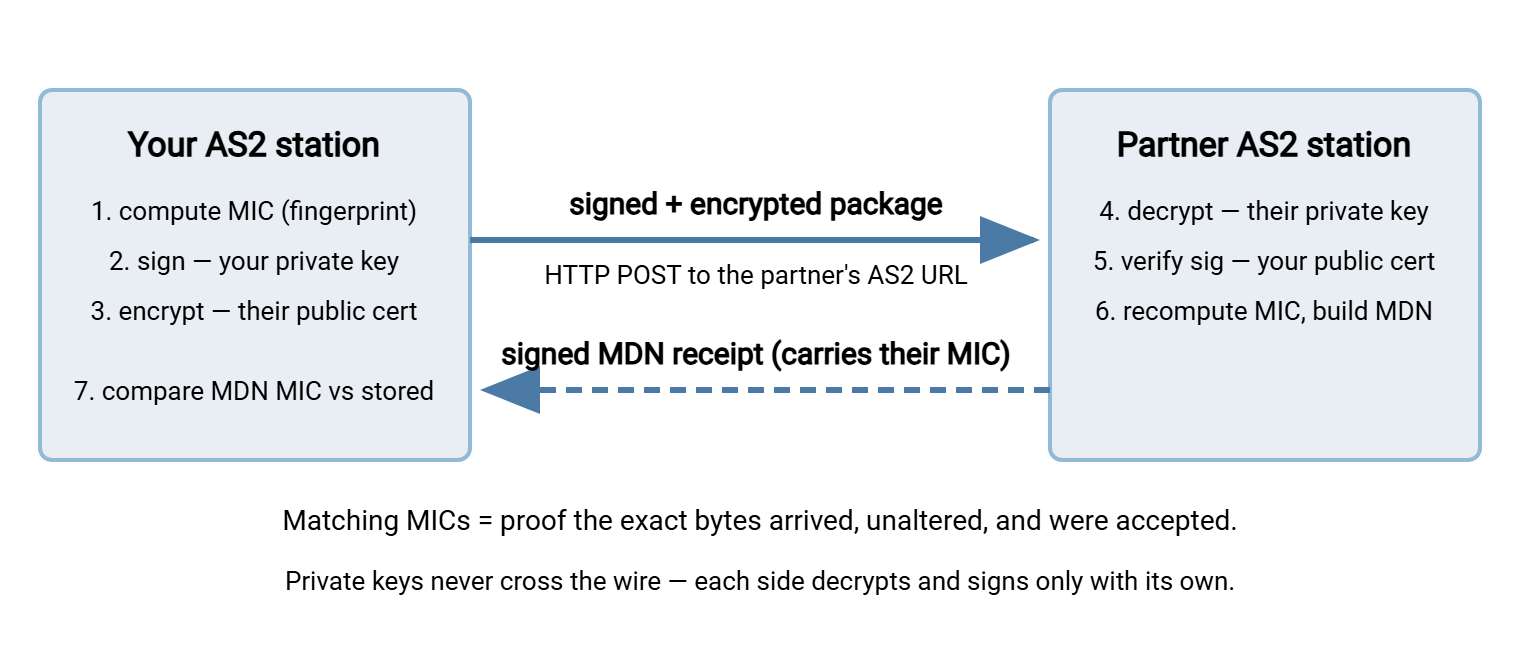
Notice how the certificate exchange from the previous section slots in: steps 3 and 4 use one key pair (theirs), steps 2 and 5 use the other (yours). Get either certificate wrong — expired, mismatched, or swapped — and the journey breaks at a predictable step. Experienced troubleshooters exploit that property to work backward from the failing step to the broken piece.
The Headers That Make It an AS2 Message
On the wire, an AS2 message is an ordinary HTTP request with a few extra headers. Being able to read them turns partner-call jargon into plain facts. A simplified outbound request looks like this:
POST /as2/inbound HTTP/1.1
Host: as2.partner.example
AS2-From: ACME-CORP
AS2-To: NORTHWIND
Message-ID: <a91f42c7-33d8-42be@your-as2-station>
Disposition-Notification-To: as2ops@acme.example
Disposition-Notification-Options: signed-receipt-protocol=required, pkcs7-signature;
    signed-receipt-micalg=required, sha-256
Content-Type: application/pkcs7-mime; smime-type=enveloped-data
Reading it line by line:
- AS2-From and AS2-To are the AS2 identifiers — short names each company chooses for itself during onboarding. They are matched exactly, including capitalization and spaces, against the receiver's partner profile. A one-character mismatch means the receiver treats the message as coming from a stranger and rejects it. This is one of the most common day-one onboarding failures.
- Message-ID uniquely tags this message, and the eventual MDN quotes it back. That is how your station pairs receipts with sent messages when hundreds are in flight.
- Disposition-Notification-To is the request for a receipt: "send me an MDN." Its presence is what obligates the partner to answer.
- Disposition-Notification-Options asks for the receipt to be signed and names the hash algorithm to use for the MIC, so both sides fingerprint the payload the same way.
- Content-Type declares the body is an encrypted S/MIME package — opaque to everything except the partner's private key.
- One header is meaningful by its absence here: Receipt-Delivery-Option. When present, it carries a return URL and means "deliver my MDN asynchronously, later, to this address." When absent, the MDN must come back synchronously in the response to this very request. That distinction gets a full article in MDNs and proof of delivery.
MDN Receipts: Proof, Not Politeness
The MDN deserves a closer look, because it is the feature that justifies AS2's whole existence. An MDN is a small, structured message from the receiver back to the sender containing three things. One is a disposition (a machine-readable verdict such as "processed" or "failed, and here is the error category"). The others are the MIC the receiver computed over the payload and the original Message-ID it refers to. Crucially, the MDN is itself signed — with the receiver's private key.
That signature changes the receipt's legal and practical weight. An unsigned "got it" would prove little. A signed MDN quoting the correct MIC is the partner cryptographically attesting: "we received exactly these bytes, from you, and accepted them." The partner cannot later claim the invoice never arrived, and you cannot doctor the receipt, because neither side can forge the other's signature. This property is called non-repudiation — neither party can walk back what the signatures prove. When a shipment is disputed six months later, the stored MDN settles the argument in minutes.
Two delivery styles exist. A synchronous MDN comes back on the same HTTP connection, inside the response — simple, immediate, and standard for small files. An asynchronous MDN arrives later over a fresh connection to your published return URL — necessary for large payloads whose processing outlasts a reasonable HTTP timeout. Each style has distinct failure modes, and treating receipts as evidence means storing them deliberately. Both subjects are covered in depth in the MDN article.
What AS2 Guarantees That Bare SFTP Doesn't
Administrators meeting AS2 for the first time reasonably ask: we already run SFTP — the SSH File Transfer Protocol. It encrypts everything in transit and authenticates both parties. So what does this complexity buy? The honest answer is that SFTP secures the pipe, while AS2 secures the package and adds a receipt. The distinction breaks down like this:
| Assurance | AS2 | Bare SFTP |
|---|---|---|
| Confidentiality in transit | Yes — payload encryption, usually plus TLS | Yes — the SSH channel is encrypted |
| File still encrypted after arrival | Yes, until the station decrypts it | No — lands in clear unless you add file-level encryption |
| Proof of who sent the file | Digital signature on every message | Login credentials only — an account, not a signature |
| Proof of delivery | Signed MDN with MIC — non-repudiation | None built in — your logs, their word |
None of this makes SFTP inadequate. For a great many partner relationships it is the right, simpler choice, and plenty of trading partners offer it as an alternative. When a partner does accept SFTP, the receiving side is ordinary server work. A Windows server product like Sysax Multi Server hosts partner-facing SFTP and FTPS endpoints with per-partner accounts and activity logging. No AS2 machinery is required. The full decision framework — when the receipts genuinely earn their operational cost and when they don't — is the subject of AS2 vs SFTP for partner exchange.
What AS2 Does Not Do
Knowing a technology's boundaries prevents expensive misunderstandings, so be clear about what AS2 leaves to you:
- It does not understand the documents. AS2 delivers bytes. Turning an EDI purchase order into rows in your order system is translation, a separate layer with its own software and its own failure modes. See EDI basics for how the layers stack.
- It does not manage certificates. The specification assumes valid certificates exist on both sides; keeping them valid is a human process of calendars, reminders, and coordinated swaps.
- It is point-to-point. Both stations must be online and reachable; there is no store-and-forward middleman. That middleman role belongs to a VAN — a value-added network, a third-party mailbox service that receives, stores, and forwards documents between partners for a fee. AS2 was largely popularized as the direct, per-message-cost-free alternative to VANs.
- It does not orchestrate your business flows. Your AS2 station queues, sends, and retries messages. But gathering files from internal systems before sending and routing them onward after receipt is ordinary scheduled-transfer plumbing that you own.
The Whole Picture in One Paragraph
Here is the version to keep: AS2 sends business files over web transport with a fixed cryptographic ritual. The sender fingerprints the file (MIC), signs it with its own private key, encrypts it with the receiver's public certificate, and POSTs it. The receiver decrypts with its private key and verifies the signature with the sender's certificate. It re-fingerprints the file and returns a signed receipt (MDN) carrying that fingerprint. Matching fingerprints prove — provably, storably, disputably-in-your-favor — that exactly the right bytes arrived. Everything else in this pillar is elaboration: receipts in depth, keeping the certificates alive, and the troubleshooting playbook for the day a step fails.
Frequently Asked Questions
Is AS2 the same thing as EDI?
Does AS2 require HTTPS?
Do I need to buy certificates from a certificate authority?
What happens if the MDN never comes back?
Can AS2 carry files that aren't EDI documents?
What exactly is an AS2 identifier?
From the Sysax team: we build secure file transfer software for Windows. Sysax Multi Server is an FTP, FTPS, SFTP, and HTTPS server. Sysax FTP Automation handles scheduled, scripted transfers. Free trials are on the download page.