
EDI Basics for the Admin Suddenly Responsible for It
Somewhere in your company there is a system everyone calls "the EDI stuff." It moves purchase orders and invoices between your company and its trading partners. It has run quietly for years, and the person who understood it just left. Now there is a partner call on your calendar. The meeting invite is full of sentences like "we're not seeing the 997 for Friday's 856" — which might as well be a foreign language.
This article is the crash course. It will not make you an EDI analyst, and it doesn't need to. What it will give you is the mental model — three distinct layers, each with its own software, failures, and owners. It will also give you enough vocabulary to follow any partner call and know which problems are actually yours. It is part of our AS2 & B2B Exchange series, and it pairs naturally with AS2 explained for admins, which covers the transport side in depth.
What EDI Actually Is
EDI stands for Electronic Data Interchange, and the name is honest. It is the exchange of business data between companies electronically, in structured formats that machines can read without a human interpreting them. Before EDI, a purchase order was a piece of paper — later a fax, later a PDF attached to an email. A person at the receiving company read it and retyped it into their own order system. EDI replaces that retyping. The purchase order travels as a rigidly formatted data file that the receiver's software parses directly into its systems, no human in the loop.
Three clarifications will save you from the most common misunderstandings:
- EDI is not a protocol. It says nothing about how files move between companies. It defines what the files contain. An EDI document can travel over AS2, over SFTP (the SSH File Transfer Protocol), through a third-party network, or on a USB stick — it is still EDI.
- EDI is not one product. It is a family of public document standards, implemented by many competing software packages. "Our EDI system" means your company's particular combination of translator software, maps, and transport connections.
- EDI is not modern-looking, and that is fine. The formats are terse and cryptic because they were designed when every byte cost money. They persist because tens of thousands of companies — including nearly every large retailer, manufacturer, logistics carrier, and healthcare payer — have them wired into core operations. When a large partner says "we require EDI," that is a condition of doing business, not an invitation to debate formats.
The two dominant standards families are X12 (prevalent in North America) and EDIFACT (prevalent internationally). They differ in syntax and naming but share the same anatomy. It is a library of document types, each with a code name, each defining exactly which fields appear in which order.
One more trait shapes your daily work: EDI is largely a batch world. Documents are gathered and exchanged on schedules — every fifteen minutes, hourly, or at agreed cutoff times. They are not fired off one by one the instant they are created. That rhythm is why so much of EDI administration is really schedule administration. A "missing" document is very often just a document that missed its batch window. The fix is knowing when the next pickup runs and whether the last one fired.
A Look Inside an EDI Document
You do not need to write EDI, but seeing a real fragment demystifies the whole subject. Here is a simplified X12-style purchase order — the document type partner calls refer to as an 850:
ST*850*0001~
BEG*00*NE*PO-4521~
N1*ST*Northwind Distribution Center~
PO1*1*48*EA*9.75**VN*WIDGET-0042~
PO1*2*12*CA*30.00**VN*GADGET-0117~
CTT*2~
SE*7*0001~
Reading it is easier than it looks. Each line is a segment — one record of related data — ending with the ~ terminator. Within a segment, the * character separates elements, the individual fields. The first element names the segment type. ST opens a transaction set (X12's word for one document) and declares its type, 850. BEG carries the purchase order number. N1 identifies a party (here, the ship-to location). Each PO1 is a line item — item 1 is 48 units, each, at 9.75, vendor part WIDGET-0042. CTT gives a line count as a self-check. And SE closes the set, stating how many segments it contained so the parser can verify nothing was truncated.
In production, this transaction set travels inside nested envelopes. These outer segments identify the sending and receiving companies and group documents into batches. The pattern is much like a letter traveling inside an addressed envelope inside a mail sack. EDIFACT documents look different in the details (segments like UNH, apostrophes as terminators) but follow the same envelope-segment-element logic.
The code names are the part worth memorizing, because partner calls use them constantly. A few appear in almost every retail or logistics relationship:
| X12 code | EDIFACT equivalent | What it is |
|---|---|---|
| 850 | ORDERS | Purchase order — "we want to buy this" |
| 855 | ORDRSP | PO acknowledgment — "we accept (or adjust) the order" |
| 856 | DESADV | Advance ship notice (ASN) — "the shipment is on its way, here is what's in it" |
| 810 | INVOIC | Invoice — "now pay us" |
| 997 | CONTRL | Functional acknowledgment — "your document arrived and parsed" |
So "we're not seeing the 997 for Friday's 856" translates to: "we sent you a shipping notice on Friday, and your systems never confirmed that it parsed." Already less foreign.
The Three Layers: Documents, Translation, Transport
Here is the mental model that organizes everything else. Every EDI operation, at every company, is three layers stacked on top of each other:
- The document layer — the standards themselves. This layer defines what an 850 must contain. It lives in specification documents and in each partner's implementation guide, the document that says exactly which optional fields that partner requires. Business analysts own this layer.
- The translation layer — the software that converts between EDI formats and whatever your internal systems speak. A translator (also called a mapper) takes an inbound 850 and produces a sales order in your ERP — enterprise resource planning system. That is the software that runs orders, inventory, and billing. Outbound, the translator does the reverse. The conversion rules for each document type and partner are called maps. EDI analysts own this layer.
- The transport layer — the machinery that physically moves the files between companies: AS2 stations, SFTP servers and clients, scheduled jobs, connections to third-party networks. This layer is yours. It is ordinary file transfer administration wearing a business suit: endpoints, credentials, certificates, firewalls, schedules, and monitoring.
The diagram below shows the three layers at two trading partners. Notice that the layers only touch their neighbors. The ERP never sees raw EDI, the translator never opens network connections, and the transport never looks inside the documents.
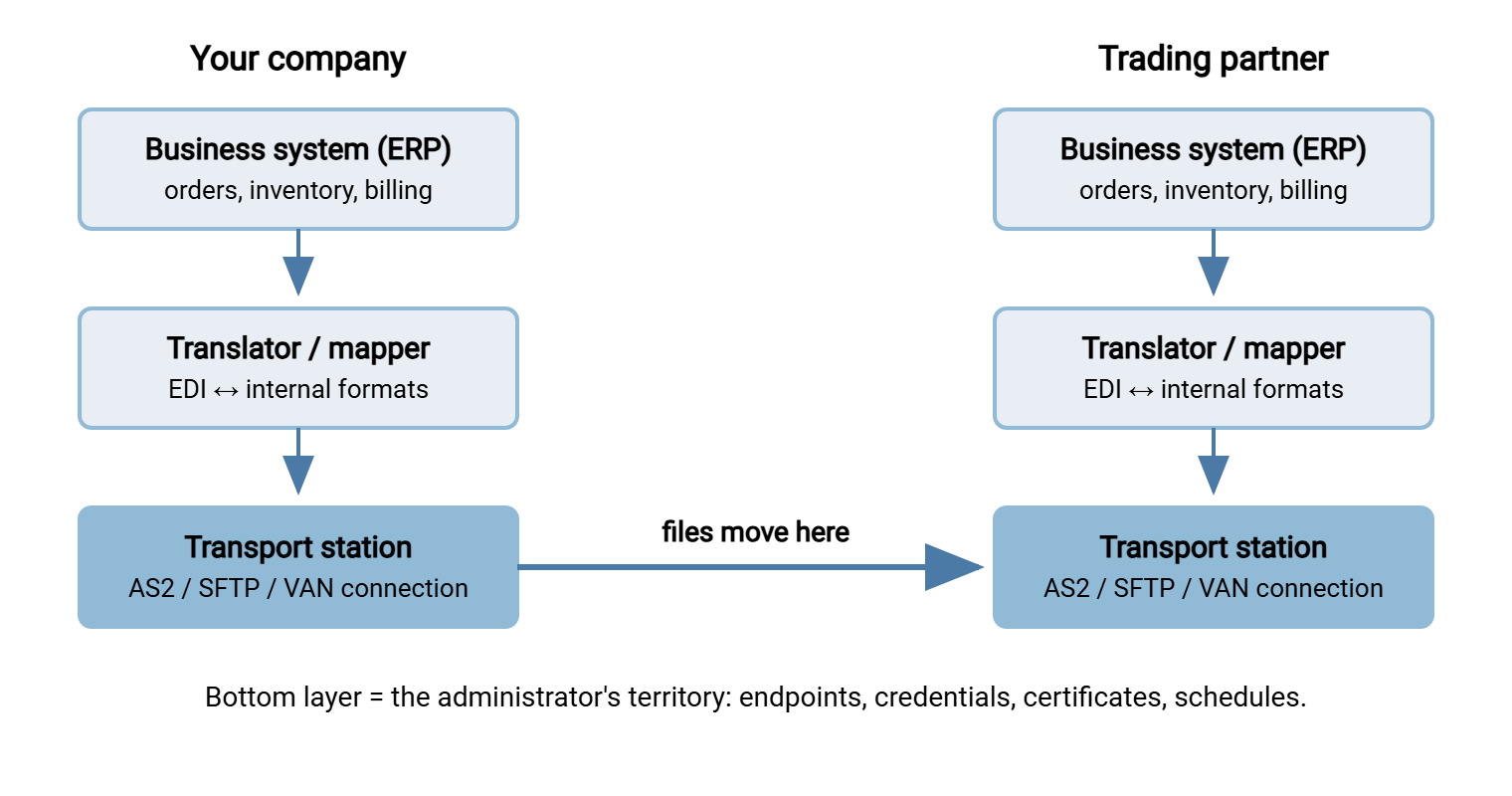
When something breaks, the first question is always "which layer?" — and the layer determines the owner, the tools, and the fix. Keep that question in your pocket; it reappears in the triage section below.
The Transport Layer: Your Corner of the Map
Since transport is the layer you administer, it deserves a closer tour. Files move between trading partners in three main ways:
- AS2 — Applicability Statement 2, the business-to-business push protocol. Documents travel as signed, encrypted packages over HTTP or HTTPS (web transport, plain or encrypted with TLS — Transport Layer Security). Every delivery is confirmed with a cryptographic receipt called an MDN (Message Disposition Notification). Large retailers standardized on this protocol, which is why it anchors this pillar. The full walkthrough is in AS2 explained.
- SFTP (and sometimes FTPS) — one partner hosts a server, the other's scheduled jobs push and pull files from agreed folders. Simpler than AS2, no built-in receipts, extremely common among small and mid-size partners. When your company is the host, the server itself is standard infrastructure. A Windows product like Sysax Multi Server serves SFTP and FTPS with per-partner accounts and activity logging. When your company is the connecting side, a scheduler such as Sysax FTP Automation runs the timed pickups and drops with retry handling.
- A VAN — a value-added network: a third-party mailbox service that receives your documents, stores them, and forwards them to each partner's mailbox, historically for a per-document fee. With a VAN you maintain one connection to the network instead of one per partner; the tradeoff is cost and an intermediary in every exchange. Many companies run hybrid estates — AS2 with the giant partners, VAN for the long tail, SFTP with the rest.
Whatever the mix, the admin duties are the same shape: keep endpoints reachable, credentials and certificates valid, schedules running, disk space available, and logs reviewable. If you can run a reliable SFTP operation, you already have most of the transport-layer skill set. The AS2-specific additions are certificates and receipts, covered across this series.
Acknowledgments at Two Levels (Read This Twice)
The single most confusing thing on partner calls is that "we got your file" happens at two completely different levels. They have different names, different machinery, and different owners:
- The transport receipt — proof the bytes arrived. In AS2 this is the MDN, generated within seconds by the receiving station, before anyone looks at the content. An MDN can be perfectly positive while the document inside is garbage — it attests to bytes, not meaning.
- The functional acknowledgment — proof the document parsed. This is the 997 (or EDIFACT CONTRL): a small EDI document generated by the receiver's translator, usually minutes to hours later. It says "your 856 conformed to the standard and we accepted it" — or lists the syntax errors that made it reject.
Beyond both sits the ordinary business reply — an 855 answering an 850, an 810 arriving to bill a shipment. So a document's life has three confirmations: arrived (transport receipt), parsed (functional acknowledgment), acted on (business response). When a partner says something is missing, your first clarifying question is now obvious: "missing at which level — the MDN, the 997, or the business document?" That one question routes the problem to the right layer and the right person. Asking it will instantly mark you as someone who understands the system.
Remember: a clean MDN does not mean the document was good, and a missing 997 does not mean the file never arrived. The transport layer confirms bytes; the translation layer confirms meaning. Most cross-company confusion on partner calls comes from mixing those two levels.
The Vocabulary to Survive a Partner Call
A compact glossary of the terms that come up constantly. Skim it now, keep it open during your first calls:
- Trading partner — any external company you exchange documents with. Often just "partner."
- Implementation guide (or spec) — a partner's document defining exactly how they use each transaction set: required fields, codes, and rules. Onboarding revolves around it.
- Map — the translator's conversion rules for one document type with one partner. "The map needs updating" = translation-layer work.
- Interchange — the outermost envelope of an EDI transmission; one interchange can carry many documents. Interchange control numbers increment per transmission and let both sides detect gaps and duplicates.
- AS2 identifier — the short name each company uses in AS2 message headers; both sides must match it exactly.
- MDN — the AS2 transport receipt, cryptographically signed by the receiver.
- 997 / functional acknowledgment — the translation-layer "your document parsed" response document.
- Production vs test — nearly every partner runs two parallel environments with separate endpoints, identifiers, and certificates. Sending test documents to production is a classic and embarrassing mistake; the qualifier flag inside the envelope marks which is which.
- Compliance — meeting a partner's EDI requirements (documents, timing, acknowledgment deadlines). Large partners score it, and some charge chargebacks — penalty fees — for misses like a late advance ship notice.
- Onboarding — the whole setup process with a new partner: specs, connectivity, certificates, testing, go-live. It has its own checklist article: onboarding a trading partner.
Where Things Break, and Whose Problem It Is
The three-layer model becomes genuinely useful the day something fails, because each layer fails differently and belongs to a different owner:
- Transport-layer failures — yours. Connections refused, TLS and certificate errors, authentication failures, missing MDNs, files stuck in outbound queues, full disks, jobs that didn't fire. Evidence lives in station and server logs. Fixes involve networks, credentials, certificates, schedules.
- Translation-layer failures — the EDI analyst's. Documents arrived but rejected: negative 997s, syntax errors, control-number sequence gaps, maps that broke when a partner added a field. Evidence lives in translator logs and acknowledgment reports.
- Business-content failures — the business teams'. Everything transferred and parsed, but the price is wrong, the item number is obsolete, or the quantity is absurd. No file transfer skill fixes these; your role is to prove the layers below worked, then hand off.
A worked example makes the triage concrete. The partner reports: "we never received Friday's invoices." Start at the bottom. Did your transport station attempt the send — is there an outbound record with a timestamp? If no record exists, the batch job upstream never delivered files to the station: a scheduling problem, yours. If the send failed with a connection or certificate error, that is transport, yours. If the send succeeded and a signed receipt came back, you have proof the bytes arrived. In that case, the question moves up a layer: did their translator reject the documents, and is there a negative acknowledgment saying why? Five minutes of bottom-up checking replaces an hour of cross-company speculation. It either hands you a specific fix or hands the partner specific evidence.
In a small shop you may wear all three hats. But even then, diagnosing layer by layer, bottom up, keeps you from debugging a map when the real problem is an expired certificate. For the transport failures that are squarely yours, troubleshooting AS2 walks the recurring families in detail.
Where to Go From Here
You now hold the model that organizes everything: EDI defines the documents, translators convert them, transport moves them — and transport is your layer. The code names (850, 856, 810, 997) are just labels for business paperwork, and "acknowledgment" always needs the follow-up question "at which level?" From here, read AS2 explained for the dominant transport's full mechanics. Read AS2 vs SFTP for the decision partners will eventually ask you to weigh in on. For grounding in the plain file transfer underneath it all, our file transfer fundamentals series starts from first principles.
Frequently Asked Questions
Is EDI a protocol like FTP or SFTP?
What is the difference between X12 and EDIFACT?
Do I need to learn to read raw EDI files?
What exactly is a 997?
What is a VAN and do we still need one?
Is EDI being replaced by modern APIs?
From the Sysax team: we build secure file transfer software for Windows. Sysax Multi Server is an FTP, FTPS, SFTP, and HTTPS server. Sysax FTP Automation handles scheduled, scripted transfers. Free trials are on the download page.