
Moving Up to Event-Driven Transfers
"Can't it just send the file when the file shows up?" The question arrives about a month after the scheduled job starts behaving, and it is a fair one. The partner drops files at unpredictable times, so the job polls hourly. That means the average file waits half an hour for no reason. Twenty-two runs a day wake up, find nothing, and go back to sleep. Watched closely enough, a well-run scheduled job starts to look slightly absurd. The honest answer to the question is yes. That is a different rung of the ladder, with real benefits and a real price. The price is the part nobody asks about.
That rung is event-driven transfer automation: flows that react to something happening — most often a file arriving — instead of running because a clock struck. This article explains what event-driven actually means, the building blocks in plain words (watch folders, triggers, queues), and the new failure modes you sign up for. Just as important, it explains the flows that should stay on a schedule forever and feel no shame about it. It is the fifth article in our Automation Ladder series, and it assumes you already have solid scheduled jobs of the kind built in from script to schedule. If you do not, climb that rung first; event-driven flows inherit every unattended-job discipline and add their own.
Clock-Driven vs Event-Driven: The Actual Difference
Every automated flow has a trigger — the thing that decides "now." On the scheduled rung, the trigger is time: 02:10 arrives, the job runs, whether or not there is anything to do. On the event-driven rung, the trigger is an event — a fact about the world changing. The most common event in transfer work is a file arrived in this folder. But the family includes an upload to the server completed, a job on another system finished, and another application asked for a transfer.
The distinction sounds philosophical and is intensely practical. A clock-driven flow answers "when does this run?" with a time, and its worst-case delay is the whole interval between runs. An event-driven flow answers with "whenever there is work," and its delay is seconds. Flip the same coin over: a clock-driven flow does a predictable amount of checking. An event-driven flow does work proportional to arrivals — nothing arrives, nothing runs.
The difference is only the trigger. Everything downstream — the transfer itself, the verification, the logging, the credentials — is identical to what you built on the lower rungs. That is why climbing in order matters: the event-driven rung replaces the clock, not the discipline.
What the Clock Costs You
Scheduled flows have two structural limits. Name them precisely, because they are the only good reasons to climb this rung.
Latency. If a job runs every hour, a file that arrives just after a run waits nearly the full hour. On average, files wait half the interval. For an overnight batch feed nobody reads until morning, that is irrelevant. For an order file feeding a same-day process, or a partner watching for your acknowledgment, half an hour of built-in delay can be a genuine business problem.
The polling squeeze. The instinctive fix is to shrink the interval — run every ten minutes, then every five, then every minute. Each step increases the number of empty runs (a five-minute job that gets six files a day does 282 empty runs). It multiplies noise in logs and schedulers, while the latency never actually reaches zero. Tightening a schedule until it approximates instant reaction is building an event-driven system the expensive way. When you catch yourself doing it, take the hint: the flow is asking for a different trigger. A shrinking interval is the flow raising its hand.
Be equally honest about what the clock is not costing you. The current interval may already meet the business need — the nightly report is ready by morning, nobody is waiting on minutes. In that case, latency is a solved problem, and climbing this rung buys complexity with no benefit. I have declined this rung more often than I have climbed it. Half the skill of this rung is declining it.
The Building Blocks, in Plain Words
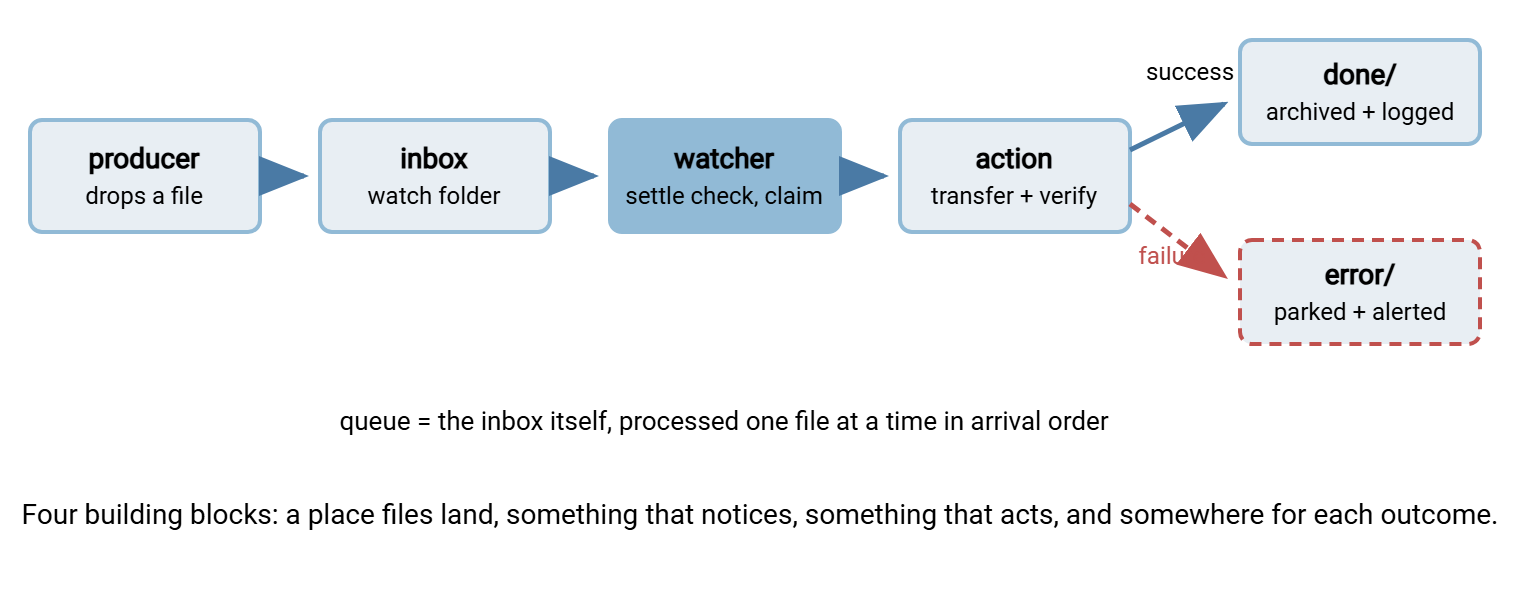
Event-driven transfer systems, from a fifty-line script to enterprise platforms, are assembled from four ideas. The diagram shows how they fit together; the subsections define each one.
The watch folder
A watch folder (also called a hot folder) is a directory with a job: anything placed here gets processed. The mature version is really four sibling folders. There is inbox/ where files land, and working/ where a claimed file moves while being processed. There is done/ (or an archive) for successes, and error/ for files that failed. Moving files between these folders is what makes the system inspectable: at any moment, a directory listing tells you exactly what state everything is in. The pattern has enough depth — layouts, naming, cleanup — that our watch folders series is devoted to it.
The watcher
The watcher is whatever notices arrivals, and there are exactly two honest mechanisms. Polling: check the folder every N seconds or minutes; simple, works everywhere including network shares, and its worst-case reaction time is the interval. Filesystem events: the operating system pushes a notification the instant a file appears. This is near-instant, but notifications can be missed during outages and behave unevenly on network shares. So serious designs pair them with an occasional sweep. For most transfer flows, polling every minute or two is entirely respectable. The point is that the system reacts to arrivals, not that the noticing mechanism is exotic. Nobody has ever been paged because a watcher was insufficiently exotic.
The trigger wiring
Between the watcher and the action sits plumbing you usually do not build yourself. Transfer-automation tools have folder monitoring built in. On Windows, Sysax FTP Automation can watch a folder and fire its transfer task when files appear. That turns the whole left half of the diagram into configuration. The server side can be event-driven too. A transfer server with event triggers, such as Sysax Multi Server, can kick off a follow-on action when an upload completes. It reacts at the moment of arrival on the receiving machine, with no polling anywhere.
The queue
A queue is just a waiting line. When ten files arrive in the same minute, they are processed one at a time, in order, instead of ten processes trampling each other. In large systems the queue is dedicated software. In a well-built watch folder flow, the inbox itself is the queue. Files wait as files, and the watcher claims them one by one, oldest first. You need to think about queues the moment bursts are possible, which for partner-facing folders is always. Partners send in bursts; it is the one habit they all share.
Folders are not the only event sources. Some flows are triggered by a webhook — one system calling a small web endpoint on another to say "your file is ready." Others are triggered by messages placed on a dedicated queue service. These patterns matter when the producer is an application rather than a person or a batch job. The concepts are identical (an event, a claim, an action, an outcome), the plumbing is just heavier. The folder-based version remains the right starting point for file work. The alternatives are surveyed in the watch-folder series once you need them.
The New Failure Modes You Just Signed Up For
Here is the complexity that event-driven flows must earn their keep against. None of these exist on the scheduled rung, and all of them have standard answers — but the answers are design work.
The half-written file. A watcher can react to a file the instant it begins to exist — which is before the sender has finished writing it. Process it immediately and you transfer a truncated file, with no error anywhere. One defense: senders write to a temporary name and rename when complete. The rename is effectively instantaneous, so the real name only ever appears fully formed. Or the watcher applies a settle check — confirm the file has stopped growing before touching it. This single race condition is the most common event-driven bug in the wild, and the whole partial-file safety series exists because of it.
The duplicate wake-up. Event mechanisms can fire twice for one file, and a file can be dropped, removed, and dropped again. If the flow's steps are not safe to repeat, doubled events mean doubled transfers. The claim-by-move pattern (the watcher moves a file into working/ before acting — a move only one process can win) removes most of the danger cheaply. I learned it after a doubled transfer, which is the usual tuition.
The poison file. One malformed file fails, stays in the inbox, and gets retried on every event or sweep. This goes on forever, at the front of the line, sometimes starving everything behind it. The error/ folder is the answer. After a failure (or a few attempts), the file is moved out of the flow, parked, and a human is alerted. Retry budgets and quarantine thinking are covered in the retry and error handling series.
Silence still needs watching. An event-driven flow that receives nothing does nothing — indistinguishable from a broken watcher or a partner who stopped sending. Failure alerts cannot fire when nothing ran. So the freshness discipline from the scheduled rung carries straight up: an independent check that expected files actually arrived by their deadlines, alerting on absence. Event-driven changes the trigger, not the need for monitoring.
Remember: the event-driven rung's real cost is not the watcher — it is designing for arrival races, duplicates, poison files, and silence. If a flow does not justify that design work with genuine latency or volume needs, a well-monitored schedule is the more professional choice, not the lazier one.
When Event-Driven Earns Its Complexity
The decision usually makes itself once you ask the right questions of the flow. The table gives the honest split.
| Choose event-driven when... | Stay scheduled when... |
|---|---|
| Minutes of latency have business value (orders, acknowledgments, same-day processing) | Nobody consumes the output until a known time (overnight reports, morning batches) |
| Arrivals are unpredictable — files can land any time, from many senders | The producer runs on a clock anyway — the file is ready at a known hour |
| You are shrinking a polling interval again and again to chase freshness | The current interval already meets the need with margin |
| Each file should be handled individually, as itself, on arrival | The job must gather everything from a period and process it as one batch |
| Volume is high enough that empty scheduled runs dominate the logs | A few files a day arrive, and daily handling is fine |
| The destination expects a prompt reaction (a partner awaiting a response file) | The destination throttles or batches anyway — instant delivery buys nothing |
Two notes on reading it. First, "stay scheduled" is a recommendation, not a consolation prize — the right-hand column describes most business flows, and a monitored schedule serves them perfectly. Second, the columns describe flows, not organizations. A healthy estate runs both kinds side by side, each flow on the trigger its needs dictate. That is exactly what the maturity stages article argues about rungs in general.
End-of-period consolidation flows should stay scheduled even at high volume. If the business rule is "send everything from today at close of business," the batch boundary is the point. In that case, reacting to each file individually would change the meaning of the flow, not just its timing. Event-driven is a tool for per-arrival semantics, not a universal upgrade. Delivering the wrong batch instantly is still the wrong batch.
A Gentle First Step: The Minimum Viable Watcher
You do not need new infrastructure to try this rung. A polling watcher launched by cron every couple of minutes, with a settle check and claim-by-move, is a legitimate event-driven flow — modest in mechanism, correct in behavior. Here is the skeleton:
#!/bin/bash
# sweep_inbox.sh - claim settled files from the inbox and process each.
# Run from cron every 2 minutes. Processing = transfer script from
# earlier in this series, taking the file path as its argument.
set -euo pipefail
INBOX="/data/partner/inbox"
WORK="/data/partner/working"
SETTLE_SECONDS=30

for f in "$INBOX"/*.csv; do
    [ -e "$f" ] || continue                # empty inbox: glob matched nothing
    size1=$(stat -c %s "$f")               # size in bytes, first sample
    sleep "$SETTLE_SECONDS"
    [ -e "$f" ] || continue                # sender may have removed it
    size2=$(stat -c %s "$f")               # second sample
    if [ "$size1" -eq "$size2" ]; then     # unchanged = settled
        mv "$f" "$WORK/"                   # claim: only one winner possible
        /usr/local/bin/process_file.sh "$WORK/$(basename "$f")"
    fi                                     # still growing: next sweep gets it
done
The load-bearing details: the [ -e "$f" ] || continue guard skips the loop cleanly when the folder is empty (an unmatched glob stays literal in bash). The command stat -c %s prints a file's size in bytes, and two samples separated by a pause implement the settle check. The mv into working/ is the claim. On the same filesystem a move is atomic, so even if two sweeps overlap, only one can win the file, and the loser fails harmlessly. Wire the failure path (nonzero exit from processing moves the file on to error/ and sends the alert) and you have every box from the diagram. From here, refinement is incremental: better arrival detection, marker-file conventions with the sender, smarter retries — the full progression is the watch folders series.
Two boundaries to respect from day one. Process files oldest first if order can matter (replace the glob loop with an ls -tr-style ordering when it does). And decide who is the mover: this pattern assumes the watcher owns the inbox and may move things. That is the normal arrangement when partners push files to you. If instead you fetch from a partner's server, the same settle-and-claim thinking applies on the remote side. The push vs pull distinction decides which side hosts the watcher at all.
Climbing With Eyes Open
To see the whole trade in one story: Meridian Parts ran an order-file flow that polled hourly. Partners complained about slow acknowledgments — orders sat forty minutes on average before processing even began. The flow was rebuilt as a watch folder with a two-minute sweep, settle checks, claim-by-move, an error folder, and a freshness alert for quiet mornings. The same flow now acknowledged within minutes. Its first stuck file was a zero-byte export left behind by a failed run on the sending side. It was parked in the error folder and alerted within two minutes instead of jamming the line for a morning. The transfer script at the center did not change at all. That is this rung in miniature: the trigger changed, the discipline traveled, and the design work around arrivals is what made it safe.
The event-driven rung is the top of the ladder for good reason. It delivers the lowest latency, the most natural handling of unpredictable arrivals, and flows that feel alive — files move within moments of existing. It also carries the ladder's highest design burden: arrival races, duplicate events, poison files, and monitoring for silence. Climb for the flows where the latency or volume case is real; decline, cheerfully and in writing, for the flows where the clock already serves. "Can't it just send it when it shows up?" Sometimes: it could, and it shouldn't.
Whichever trigger each flow ends up with, it becomes one more entry in your growing estate of automation — and estates need bookkeeping. The final article in this series, the automation inventory, deals with exactly that: keeping track of every scheduled and triggered job you now own. That way, the ladder you climbed stays something you command rather than something you excavate.
Frequently Asked Questions
Is a polling watcher "real" event-driven automation?
How do I stop my watcher from grabbing half-written files?
What happens when ten files arrive at once?
Do event-driven flows still need freshness monitoring?
Should I convert my working scheduled jobs to event-driven?
From the Sysax team: we build secure file transfer software for Windows. Sysax Multi Server is an FTP, FTPS, SFTP, and HTTPS server. Sysax FTP Automation handles scheduled, scripted transfers. Free trials are on the download page.