
The Stages of Transfer Automation Maturity
"Are the transfers automated?" "Yes." It is the most confident yes in the building, and it survives about a week of watching. One flow runs itself flawlessly. Another runs from a script that only works when one particular person launches it from one particular desktop. A third is "automated" except that somebody checks it by hand every morning because it fails so often. A fourth is pure muscle memory, and the muscle is on leave next week. These are not the same thing. They are different rungs of a ladder, and the word "yes" is doing a great deal of work to cover all four.
This article gives you that ladder explicitly: five stages of transfer automation maturity, from fully manual to event-driven and monitored. For each stage you will learn what it fixes, what new problems it quietly introduces, and how to recognize it in the wild. That includes the flows that claim a higher rung than they have earned. By the end you will be able to place every transfer you own on the ladder and know which one deserves the next climb. It is the map for the whole Automation Ladder series; the other articles in the series are the individual climbs.
The Ladder at a Glance
The five stages form a progression, and the order matters: each stage builds on an artifact the previous one created. You cannot script a procedure nobody has written down, and you should not schedule a script nobody has run by hand. The diagram below shows the climb, with the key artifact each stage produces.
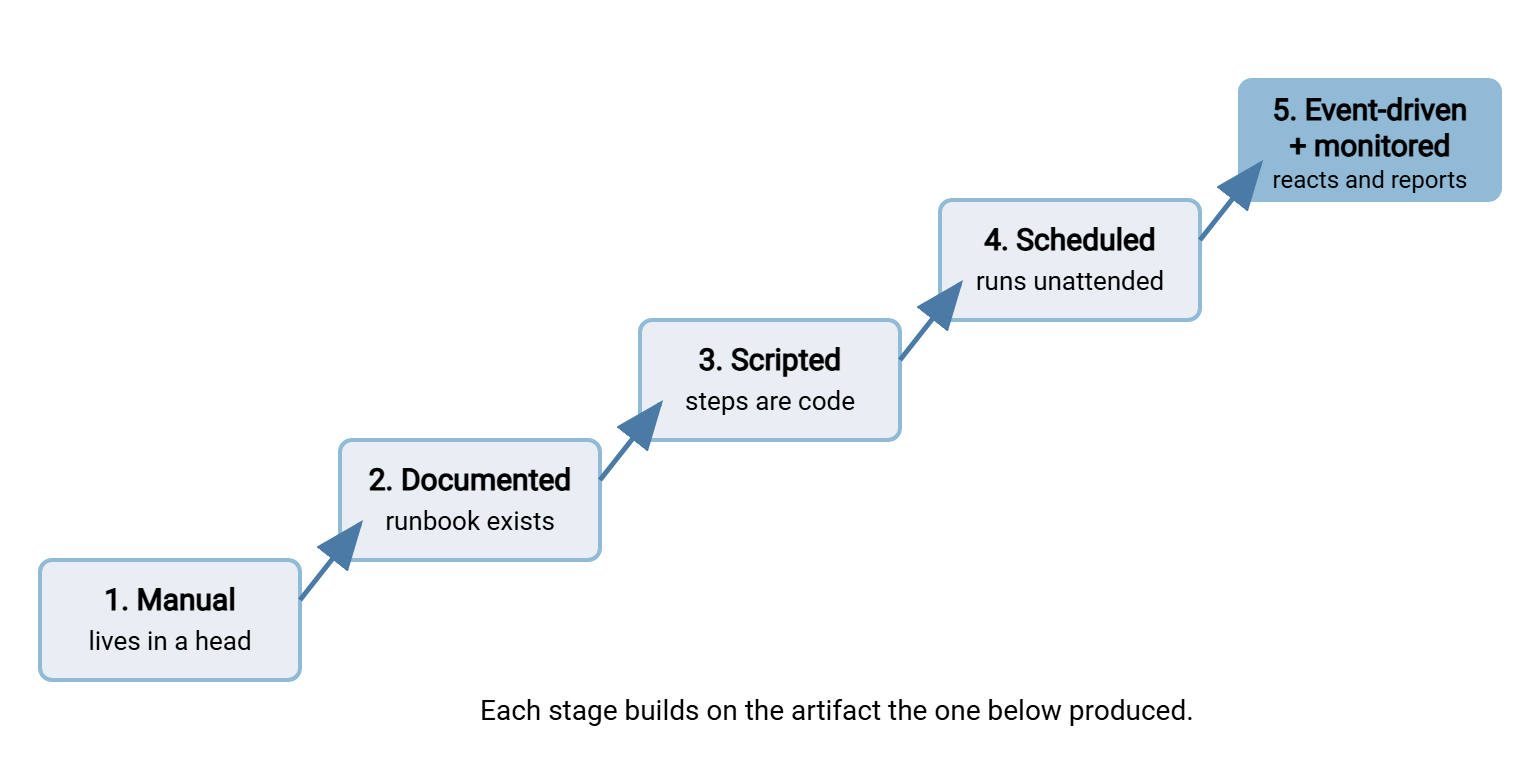
Two clarifications before the tour. First, the ladder describes a flow, not an organization — most estates have flows on every rung at once, and that is normal. Second, higher is not automatically better. Rung 5 is the right home for a high-volume partner feed; rung 2 is the right home for the once-a-year filing. Maturity means each flow sits on the rung its importance and frequency deserve, on purpose.
You will also meet flows stuck between rungs. There is the script that exists but that only its author dares run (a 2.5). Or there is the scheduled job someone checks by hand every morning (a 3.5 wearing a stage-four costume). Half-rungs are not failures; they are precise diagnoses. Each one tells you exactly what is missing: a handover in the first case, trustworthy alerting in the second. The 3.5 is the most crowded rung in the industry and the least admitted.
Stage 1: Manual — It Lives in Someone's Head
At stage one, a person performs the transfer from memory. There is no written procedure; the steps, the credentials, the "oh, and you have to rename it first" folklore all live in one or two heads.
What it fixes: nothing — it is the starting point. Its only virtues are zero setup cost and total flexibility. When the flow is brand new and still changing shape weekly, stage one is honestly where it belongs.
What it introduces: every risk at once. Slip errors (wrong file, wrong folder) happen at human rates. The transfer stops when the person is away — the classic bus factor problem. It is named for the grim question "what happens if they are hit by a bus?", which the hit-by-a-bus test turns into a procedure. There is no audit trail beyond what people remember, and no way to hand the task over without an apprenticeship. The apprenticeship has no syllabus and exactly one instructor.
You are here if: the honest answer to "how does that file get there?" is a person's name. If a two-week vacation would break the flow, it is stage one no matter what else is written down somewhere.
Stage 2: Documented — The Runbook Exists
Stage two changes nothing about who does the work and everything about who can do it. The procedure now exists as a runbook — a numbered, literal list of steps that a competent colleague could follow without calling anyone. It includes hostnames, folder paths, file naming patterns, the checks to perform, what "normal" looks like, and who to tell when it is not.
What it fixes: the bus factor and the folklore problem. Anyone can cover the task. Errors drop, because even the regular operator follows the list instead of memory on bad days. And crucially, the runbook is the raw material for every higher rung — a script is a runbook translated into code.
What it introduces: a document that can rot. A runbook that says /inbound/ after the partner moved to /inbound/invoices/ is worse than no runbook, because it carries false authority. Stage two flows need a review habit: the runbook gets corrected the moment reality changes, ideally by the person who noticed. Runbooks rot quietly, and a rotten runbook still looks authoritative.
You are here if: the transfer is still performed by hand, but you could hand the printed procedure to a new hire and expect success. Do not skip this rung to "save time" — scripting an undocumented procedure means discovering the hidden steps as production failures, one incident per forgotten step.
A practical tip for capturing the real procedure rather than the idealized one: write the runbook while performing the transfer, not from memory at a desk. Memory produces the happy path; every runbook I have written from memory has been a work of optimism. Live capture produces the truth. That includes the pause before step four, the second login that is sometimes needed, and the check that everyone does but nobody mentions. Those small honest details are exactly what the next rung will need.
Stage 3: Scripted — The Steps Are Code, the Trigger Is Human
At stage three, the runbook's mechanical steps become a script — a batch file driving sftp, a PowerShell or bash script, whatever fits your platform. A person still decides when to run it and watches it run, but the person no longer performs the steps.
What it fixes: slip errors, which is to say most errors. The script never picks the wrong file pattern, never skips the verification step, never forgets the log line. It also makes the procedure testable. You can run it against a test folder and prove it does what the runbook says. You could never quite prove that about a human.
What it introduces: the script itself as a thing to maintain, and three classic traps. Credentials get pasted into the script body "just for now" and stay for years. Paths get hard-coded to one machine, so the script only works where it was born. And there are edge cases the human handled by judgment — the file that is a bit small, the second file that sometimes appears. These get silently mishandled unless someone thinks about them. Doing this rung properly is a craft, and your first scripted transfer, done right walks through it end to end.
You are here if: a script exists and works, but a human launches it and eyeballs the result. That human attention is load-bearing: it is the error handling and the monitoring. This is why stage three is a fine resting rung. The script runs during working hours, and someone sees every failure immediately. It is also why the next climb is bigger than it looks.
Stage 4: Scheduled — Nobody Touches It
Stage four hands the trigger to a machine: cron on Unix-like systems, Task Scheduler on Windows, or the built-in scheduler of a transfer tool. The job now runs at 02:10 whether or not anyone remembers it exists. The scheduler remembers; it is frequently the only party that does.
What it fixes: timing and dependence on attention. Transfers happen in the windows the business actually needs — after the nightly batch, before the partner's morning run — with weekends and holidays covered. The human cost per run drops to zero.
What it introduces: silence. Every failure that a watching human would have caught now happens with nobody in the room. The script also loses the comfortable environment it grew up in. The scheduler runs it with a different user account, a stripped-down environment, and no terminal to prompt on. A script that worked perfectly by hand can fail in five new ways on its first unattended night. I have met all five, once on the same night. Logging stops being polite and becomes mandatory; so does some form of failure alerting, even if it is just an email. This climb has enough sharp edges that two whole resources cover it. There is from script to schedule in this series. The scheduled jobs done right series covers the scheduler mechanics themselves.
You are here if: the job runs unattended and you learn about failures from the job, not from downstream complaints. That second clause is the honest test, and many flows fail it — see "where a flow really sits" below.
Rungs three and four are where configuration-based tools can carry Windows flows without hand-written code. Sysax FTP Automation, for example, generates upload, download, mirror, and sync tasks from a wizard. It schedules them with built-in email notification. The wizard output is still a script under the hood, with a script editor and line-by-line debugging when a flow outgrows the wizard. The ladder is about the discipline, not about whether the code is typed or generated.
Stage 5: Event-Driven and Monitored — It Reacts and Reports
The top rung changes the trigger again. Instead of running at a fixed time, the flow reacts to an event. Most commonly, that is a file arriving in a watched folder. But it can also be an upload completing on a server, or a signal from another system. And because nobody is watching by definition, the top rung pairs the trigger with real monitoring. The flow reports its own health. Someone is alerted not only when a run fails but when an expected file never shows up at all.
What it fixes: latency and the polling compromise. A scheduled job that runs hourly delivers a file, on average, half an hour late; an event-driven flow delivers it in seconds. It also fixes the empty-run problem — no more jobs waking up at 02:10 to discover there is nothing to do. The empty run still writes a log line, mostly to itself.
What it introduces: genuine distributed-systems problems, in miniature. Is the arriving file fully written yet, or half of it? What happens when two files arrive in the same second? What happens to the one file that fails every time? These have well-known answers — settle checks, queues, error folders — but they are design work, not configuration. The building blocks are introduced in moving up to event-driven transfers and covered deeply in the watch folders series. On the Windows side, the pieces exist off the shelf. There is folder monitoring in Sysax FTP Automation on the client side. There are event triggers in Sysax Multi Server on the server side, where an upload's completion can kick off the next step.
You are here if: files flow within moments of becoming available, and failures page or email someone with enough context to act. And — the mark of real maturity — absence is detected. When the partner's daily file does not arrive by its deadline, an alert fires even though no job ever ran and no job ever failed.
How to Tell Where a Flow Really Sits
Flows exaggerate their maturity, usually innocently. The scheduled job that a senior admin checks every morning "just to be sure" is not a stage-four flow. It is a stage-three flow with a very expensive monitoring system made of a person. The five-question test below places a flow honestly. Ask it about one specific flow, not about your estate in general.
THE PLACEMENT TEST - answer for one specific flow
 1. If its usual operator left tomorrow, could a colleague run it
    from written material alone?          no = stage 1, yes = 2+
 2. Are the steps executed by code rather than by hand?
                                          no = stage 2, yes = 3+
 3. Does it start without a human deciding to start it?
                                          no = stage 3, yes = 4+
 4. When it fails, does the FLOW tell you - before any human or
    downstream system notices?            no = it is NOT really 4
 5. Does it react to files as they arrive, and alert when an
    expected file never comes?            yes to both = stage 5
Question 4 is the one that stings. A schedule without failure alerting is automation with its eyes shut, and it deserves the label "stage 3.5" at best. If several of your flows land there, the highest-value work in your estate is not climbing anything to rung five. It is giving your existing scheduled jobs a voice, which is the subject of the transfer job monitoring series.
Remember: a human who checks a job every morning is monitoring, but monitoring that costs twenty minutes of attention a day and stops working during vacations. The rung is not "scheduled"; it is "scheduled, with a person as the alarm system." Count it honestly.
What Each Stage Fixes and Costs
The table compresses the whole ladder into one honest reference. Read the right-hand column before any climb: it is the bill.
| Stage | What it fixes | What it introduces |
|---|---|---|
| 1. Manual | Nothing — maximum flexibility, zero setup | Human error rates, bus factor, no audit trail |
| 2. Documented | Bus factor; fewer slips; handover possible | A document that rots unless reviewed |
| 3. Scripted | Slip errors gone; procedure is testable | Code to maintain; credential and path traps |
| 4. Scheduled | Timing freedom; zero attention per run | Silent failure; logging and alerts now mandatory |
| 5. Event-driven + monitored | Latency; empty runs; absence is detected | Race conditions, settle checks, queue-and-error design |
Climbing: Which Rung Next, for Which Flow
With every flow placed, the climbing decisions become mechanical. Three rules cover almost every case.
Climb one rung at a time. Each stage's artifact is the foundation of the next, and skipped rungs reappear as incidents. The team that jumps from memory straight to a scheduled job has skipped documenting (so the script misses folklore steps). It has skipped attended scripting too (so the first unattended failure is also the first failure anyone has ever seen). The ladder is a sequence, not a menu.
Climb the flows that hurt, not the flows that are easy. Rank flows by pain: frequency times error cost times human minutes. A daily partner feed at stage one outranks a monthly internal report at stage three, every time. If you have never listed your flows at all, start there. The method in the file flow census exists for exactly this. The same list later becomes your automation inventory, the maintenance discipline covered in taming jobs nobody remembers.
Know where each flow should stop. Rung five is for flows where minutes of latency matter or volumes are high. Most business flows are perfectly served by rung four with honest monitoring. Low-stakes, rare flows can retire happily at rung two. Writing down the intended rung — "this flow is scheduled, deliberately, because the partner batches at fixed times anyway" — turns a limitation into a decision. Decisions are what auditors, successors, and future-you can work with. Future-you is tired and would like the reason written down.
Sometimes the right direction is down. A flow whose business purpose has faded does not deserve maintenance at rung four — it deserves demotion to a documented manual task, or outright retirement. Climbing down is cheap when the runbook still exists and terrifying when it does not. That is one more argument for never abandoning the artifacts of the lower rungs. Automation you no longer need is not an asset; it is debt that happens to still run.
Northgate Retail found the price of not climbing down during a routine review of scheduled tasks. A nightly job had been pushing a stock-level export to a regional distribution center for a year after that center closed and the flow was retired. The receiving server had been left running, and the credential had never expired. The job reported success every night to a mailbox nobody had opened since the handover. Nothing was lost, because the data went nowhere. But the job had held a live partner credential and an open firewall rule for twelve months in exchange for nothing. It was demoted to a runbook, and then the runbook was archived. The whole retirement took twenty minutes, once anyone knew it needed doing.
The ladder, honestly climbed, ends somewhere unglamorous. Every flow in the estate sits on a chosen rung, and every job has an owner and a log. Nothing depends on any one person's memory. That is what mature looks like. It is quieter than it sounds. Ask again whether the transfers are automated, and the answer is a list.
Frequently Asked Questions
Do all of our transfers need to reach the top stage?
Can I skip the documentation stage if I already know how to script?
Is a scheduled job without alerting really not stage four?
Where do wizard-built transfer tasks fit on the ladder?
How often should I reassess where our flows sit?
From the Sysax team: we build secure file transfer software for Windows. Sysax Multi Server is an FTP, FTPS, SFTP, and HTTPS server. Sysax FTP Automation handles scheduled, scripted transfers. Free trials are on the download page.