
Push vs Pull: Choosing the Right Direction for Every File Flow
"Can you just push it to us?" "Can't you just pull it from us?" Two organizations, one file, and a call now in its fortieth minute. Every recurring file flow has a direction decision baked into it. Does the side that has the file send it, or does the side that needs the file come and fetch it? Most flows never get this decision made deliberately; they inherit whatever direction was easiest on the day someone set them up. The consequences surface later, disguised as other problems. There is a firewall exception nobody can justify to an auditor, or a partner transfer that fails silently for a week. Or there is a retry storm at 2 a.m. hammering a server that was down for maintenance.
Push versus pull looks like a coin flip and is an architecture decision. It determines who must run a server, which network must accept inbound connections, who finds out when a transfer fails, and who owns the retry. This article works through each of those consequences. Then it assembles them into a decision framework you can apply to any flow, including the three worked scenarios at the end. It is part of our File Transfer Fundamentals series and builds directly on how a file transfer actually works. Forty minutes in, nobody on that call has asked who notices when it breaks.
Initiation Is the Real Question
First, precise definitions, because the words get used loosely:
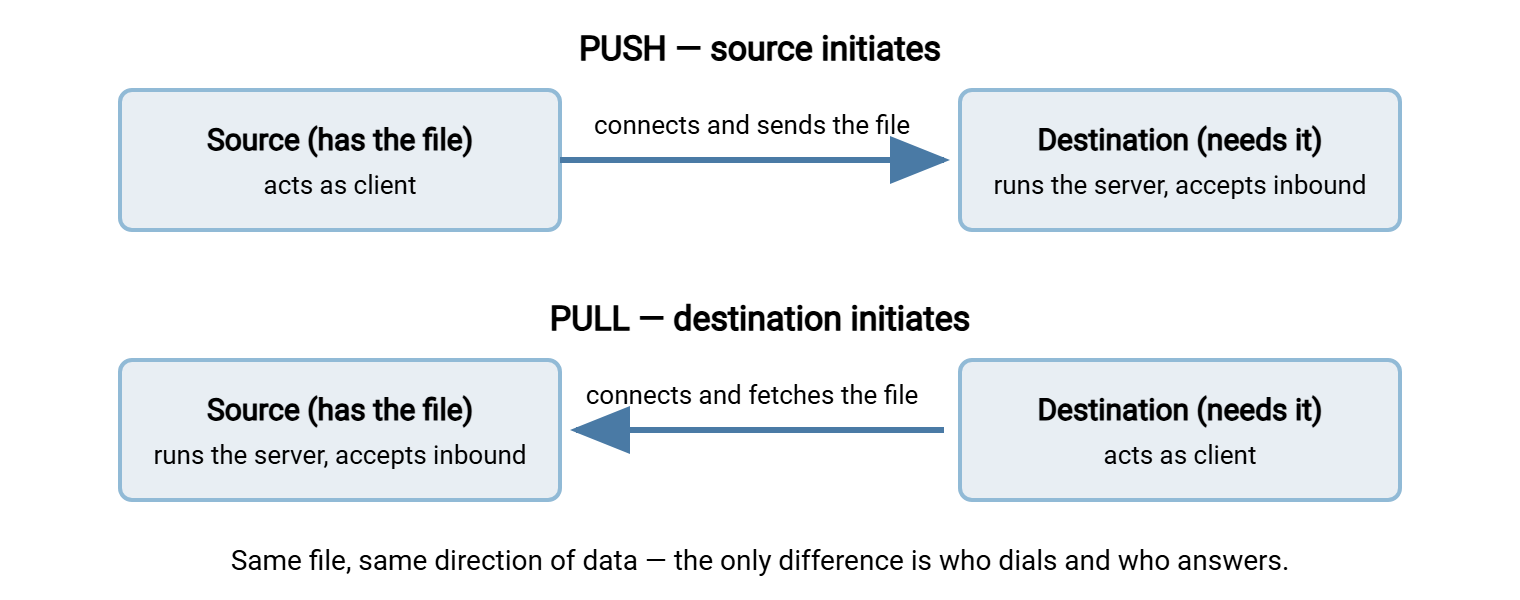
- Push: the system that has the file initiates the transfer and sends it to the destination. The source acts as the client; the destination runs the server.
- Pull: the system that needs the file initiates the transfer and fetches it from the source. The destination acts as the client; the source runs the server.
Notice what the two definitions share: in both, the file moves from source to destination. The data direction is identical. What flips is the connection direction — which side dials, and which side answers. That is the entire distinction, and it is why push vs pull is a different question from upload vs download. Upload and download describe which way data moves relative to the client; push and pull describe which end of the flow the client lives on.
The diagram below shows the same file moving the same way in both models — only the initiating side changes.
One structural consequence follows immediately, and everything else in this article flows from it: the side that does not initiate must run a server. Running a server means having software listening on a port, accepting inbound connections, managing accounts, and being reachable through a firewall. The initiating side needs none of that — just an outbound connection and credentials. Deciding the direction of a flow is really deciding which party carries the server burden. It is also deciding who gets the patch calendar.
Trust Boundaries: Who Should Knock on Whose Door
A trust boundary is any line between networks that trust each other differently. Examples are the lines between your LAN and the internet, between you and a partner company, between a locked-down production zone and everything else. File flows constantly cross these lines, and direction determines which way the knocking travels.
The general security instinct is: let the more-trusted network initiate outward, and avoid letting the less-trusted side initiate inward. An outbound connection from your secure zone is a controlled, deliberate act by a system you manage. An inbound connection from outside means a listening service exposed to that outside, with all the account management, patching, and monitoring duty that implies.
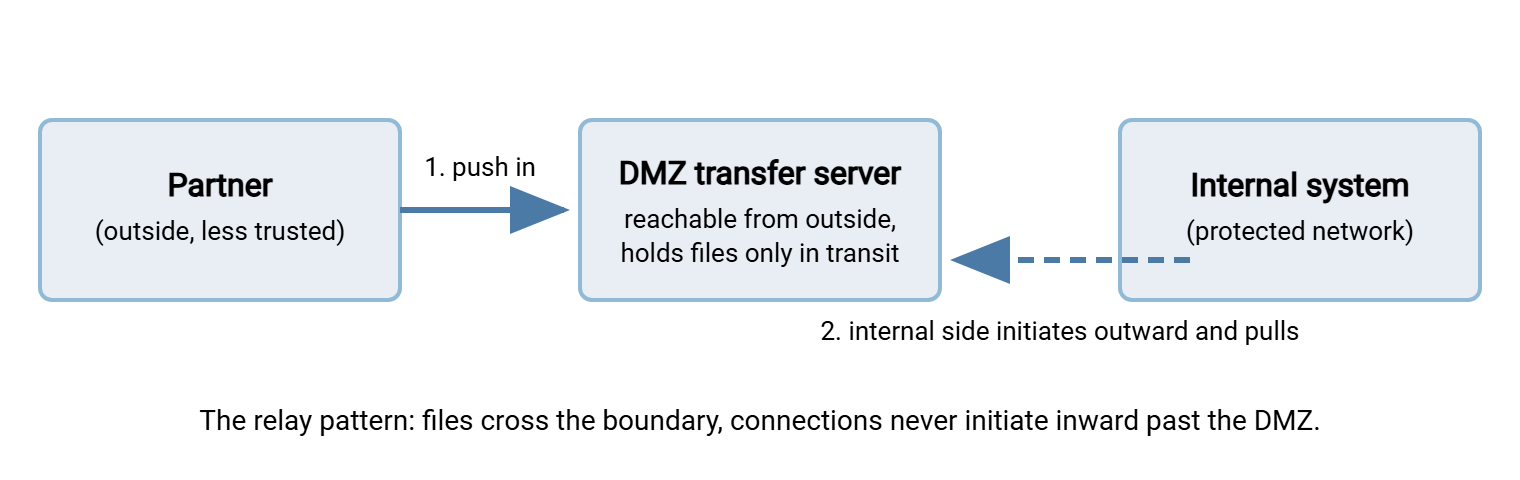
This is why organizations that exchange files with partners so often host the meeting point in a DMZ. This is a small buffer network, wedged between the internet and the internal network, designed to be reachable from outside while holding nothing sensitive. The pattern that results is worth naming because you will see it everywhere:
The partner pushes into a server in your DMZ. Then an internal system pulls from the DMZ into the protected network. There are two flows, and both knocks travel in an acceptable direction. The partner initiates into the sacrificial zone only. The second connection is initiated outward from the trusted network into the DMZ. Nothing ever initiates from outside directly into the inside.
Hosting that DMZ meeting point is a classic role for a hardened Windows transfer server such as Sysax Multi Server. It is one machine, listening on well-defined ports, with its own accounts and activity log. That way, the partner-facing surface stays small and auditable while the internal side stays unreachable from outside.
What Each Direction Asks of the Firewall
Translate the trust discussion into firewall terms and the asymmetry becomes concrete. An outbound connection usually costs nothing: most networks allow outbound traffic broadly, and the initiating side needs no rule changes at all. An inbound connection costs real things: a permanent allow rule, a public or NAT-published address, and a listening service to patch and monitor. It also costs a line item in every security review from now on. Inbound rules are quick to add and almost never removed.
So each direction sends the bill to a different party:
- Push sends the bill to the destination — they must run the reachable server and accept your connections.
- Pull sends the bill to the source — they must expose the files on a server you can reach.
In partner negotiations this is often what actually decides the direction, whatever the whiteboard says. The party with a transfer server already running, published, and approved will host, and the other party will initiate. There is nothing wrong with that: server hosting is expensive in operational terms, and concentrating it where it already exists is rational. The whiteboard rarely wins an argument with a server that already exists.
One caution for FTP specifically: FTP's two-connection design means even the "simple" outbound side can trip over firewalls. The data connection may travel opposite to the control connection depending on mode. If a flow you are designing will use FTP, read why firewalls block active FTP before you promise anyone it will just work. In that case, also read why file transfer fights firewalls for the wider quarrel. Single-connection protocols like SFTP keep the firewall conversation mercifully short.
Failure Ownership: Who Notices When It Breaks
Here is the consideration most setups ignore, and the one that causes the quietest damage. When a transfer fails, the initiating side finds out. It got a connection error, a timeout, a rejected login — an event it can log, alert on, and retry. The other side experiences nothing at all. And "nothing" is the most dangerous signal in operations, because nothing is also what success looks like to the non-initiating side until someone checks. I have watched a team enjoy a quiet week that was a broken push.
Follow that through both directions:
- In a push, the sender owns failure. If the destination is down, the sender's job errors and can retry, alert, and escalate. The destination just sees no file arrive. So if the receiver is the party that cares about the file, a failed push is invisible to the party that cares. The receiver needs a separate check: "expected file absent by 6 a.m. — alarm."
- In a pull, the receiver owns failure. If the fetch fails, the party that needs the file knows immediately and can retry on its own schedule. This is the great advantage of pull: failure detection lives with the party that has the motivation to act on it. The residual trap is the empty-handed success — the pull connects fine but finds no file because the source never produced it. A well-built pull treats "no file by the expected time" as an error, not a quiet no-op.
Kestrel Payroll pulled a daily exchange-rate file from Bluewater Bank every morning at six. One spring the bank reorganized its outbound folders and the file began landing one directory over. Kestrel's pull job connected, listed an empty folder, and reported success, which it did for eleven working days in a row. A payroll analyst noticed that the rates had not moved in two weeks, which is not how currencies behave. The misplaced file was found before any payment used the stale numbers. The job now treats "connected, found nothing" as a failure. The alert goes to the person who reads the rates rather than the person who wrote the script.
Retry behavior deserves the same scrutiny. The initiating side owns the retry loop, so ask: what does its retry policy do to the other end? A push job may retry every ten seconds against a server that is down for maintenance. That is a small denial-of-service attack run by your own scheduler. Sensible retry policies back off — retry after one minute, then five, then fifteen — and give up into a human alert rather than hammering forever. Scheduling tools with built-in retry and error handling include Sysax FTP Automation. Such a tool lets you set that policy per job instead of hand-rolling it in scripts.
Remember: whichever side initiates is the side that knows about failures. The other side must either trust it to alert, or independently monitor for the file it expects. The worst incidents in file transfer are not failed transfers — they are failed transfers nobody noticed for days. Decide at design time who notices.
Polling vs Event-Driven: When Does a Pull Happen?
Push has a natural trigger: the file is ready, so send it. Pull has a timing problem: the receiver does not know when the file appears. There are two answers.
Polling means checking on a schedule — connect every 15 minutes and look. It is simple and robust, but it trades three things against each other. Check too often and you generate load and log noise on the source. Check too rarely and files sit undelivered (your average delay is half the polling interval). And every poll that finds nothing is wasted work. Polling is the right default for flows measured in hours, and perfectly fine for many measured in minutes. Fifteen minutes is the interval most people pick and few can explain.
Event-driven means reacting to the file's appearance instead of checking for it. The commonest form on Windows is folder monitoring: a watcher notices a new file in a directory and fires the transfer immediately. This converts a pull-shaped problem into a push at the source — the moment the export lands in the outbox folder, it gets sent. Folder monitoring is a core feature of Sysax FTP Automation, and it pairs with one subtlety worth knowing. The watcher must wait until the file is finished being written before grabbing it, or it will transfer a half-written file. Good tools wait for the file to stop growing; good flow designs make it unambiguous with the temp-name pattern described in our reliability article.
Choose polling when the source cannot run anything (you were given read-only credentials and nothing more), when latency barely matters, or when simplicity wins. Choose event-driven when minutes matter and you control the source side. Control of the source side is rarer than the design meeting assumes.
Patterns That Work — and Their Anti-Pattern Twins
A few shapes recur so often they are worth having names for, along with the misshapen versions of themselves:
- Pattern: push to the edge, pull to the core. The DMZ relay drawn earlier. External parties push into a boundary server; internal jobs reach out and pull inward. Anti-pattern twin: letting an external party push directly into an internal file server "because it was quicker to set up." That is an inbound path across your whole trust boundary, and it will haunt every audit.
- Pattern: the source publishes, consumers pull. When one system produces files that many parties need on their own schedules, host them once and let each consumer fetch. One server, one place to secure and log. Anti-pattern twin: the source pushing to ten destinations — ten credentials to hold, ten retry loops, ten places to break when one consumer changes something.
- Pattern: one flow, one initiator. Every flow has exactly one side that dials, and that side owns retries and failure alerts, documented. Anti-pattern twin: "whoever notices first" — both sides have credentials to each other's systems. Scripts on both sides sometimes move the file, and after a failure two retries collide and deliver duplicates.
- Pattern: pull with an absence alarm. Every scheduled pull knows what it expects and alerts when the expectation fails — including the connects-fine-but-empty case. Anti-pattern twin: the silent pull that has been finding nothing for three weeks because the partner renamed the folder, and succeeded every time.
The Decision Framework
With the consequences on the table, the decision compresses into five questions, asked in order. The first question that produces a firm answer usually settles the direction; the rest confirm it.
- Where is the trust boundary, and which way may connections cross it? If policy forbids inbound connections to one side, the other side hosts, and the direction is decided. This question outranks all others.
- Who can realistically run a server? A listening service needs a stable address, firewall rules, accounts, patching, and logs. If only one party has that (or has it already), the other party initiates.
- Who cares most when the transfer fails? Prefer the direction that makes the caring party the initiator, because the initiator gets the errors. If the receiver's payroll run depends on the file, a receiver-initiated pull puts detection where the motivation is.
- Who knows when the file is ready? The source always knows; the receiver has to poll or be told. If timeliness matters and the source can act, push (or source-side folder monitoring) wins.
- How many parties are on each end? One-to-many favors publish-and-pull; many-to-one favors push into a single collection point.
For design documents and runbooks, the framework condenses into a worksheet you can paste and fill per flow:
FLOW: ______________________  (source -> destination, what data)
1. Trust boundary: which side is permitted to accept inbound?  ______
2. Server burden: who can run and operate the listener?        ______
3. Failure stakes: who suffers when this flow breaks?          ______
4. Readiness: who knows the moment the file is ready?          ______
5. Fan-out: one-to-many or many-to-one?                        ______
DIRECTION: push / pull        INITIATOR: ______________
RETRY POLICY (backoff, max attempts, then alert): ____________
ABSENCE ALARM (owner + deadline): ____________________________
The same logic as a quick-reference table:
| Situation | Lean toward | Because |
|---|---|---|
| Receiver's network forbids inbound connections | Pull (receiver initiates) | Outbound-only from the strict network |
| Sender's network forbids inbound connections | Push (sender initiates) | Same rule, other side |
| File must arrive within minutes of creation | Push / event-driven send | Only the source knows the moment it is ready |
| Receiver depends on the file; sender is indifferent | Pull, with an absence alarm | Failure detection lands on the motivated party |
| Many consumers need the same output | Publish once, consumers pull | One server beats ten push jobs |
| Many senders feed one process | All push to one collection server | One inbox beats polling ten sources |
Three Worked Scenarios
Scenario 1: nightly payroll file to an external provider. The provider processes files from hundreds of customers. So they already run a hardened, published SFTP service and hand every customer credentials. Question 2 answers immediately: they host, you initiate. Your side schedules a push after the payroll export completes, with backoff retries and an alert to your team on final failure. Because your company is the party that suffers if payroll is late, sender-owned failure detection lands in the right place too. This is the standard shape for most partner submissions.
Scenario 2: fetching a daily report from a vendor. The vendor drops reports on their server and will not run push jobs to customers — publish-and-pull, question 5. Your side schedules a pull, polling from mid-morning at modest intervals until the file appears. One design detail separates a good implementation from a fragile one: the job alarms if the report has not appeared by a deadline. That way, a vendor-side failure becomes your alert instead of your surprise.
Scenario 3: branch offices sending daily takings to head office. Many senders, one receiver — question 5 says collect, not distribute. Head office runs one transfer server as the collection point. Every branch pushes into its own folder there, each with its own account so the activity log attributes every file. Head office pairs the collection point with an absence check per branch. The alternative (head office pulling from a server in every branch) would mean running and securing dozens of small servers in places with no IT staff. It collapses under its own weight. A transfer server behind the stockroom door is not a transfer server for long.
Direction Is a Design Decision — Make It On Purpose
Here is the compact version to carry with you. Pushing and pulling move the file the same way but put the client and the server on opposite ends. The initiator needs only outbound access and credentials; the other side must run a reachable, secured, monitored server. The initiator also owns failure detection and retries, so put initiation where the motivation and the operational capability live. Never let a flow's direction be decided by which side happened to have a script lying around. Forty minutes is plenty of time to ask who notices when it breaks.
From here, two siblings in this series continue the thread. The article on transfer vs sync vs share examines the delivery model on top of the direction. And the transfer census shows how to inventory the flows you already have — including recording each one's direction and initiator. That is exactly where this article's framework gets applied in bulk.
Frequently Asked Questions
Is push the same as upload and pull the same as download?
Which is more secure, push or pull?
How often should a pull job poll?
Who should handle retries when a transfer fails?
Can one flow use both push and pull?
From the Sysax team: we build secure file transfer software for Windows. Sysax Multi Server is an FTP, FTPS, SFTP, and HTTPS server. Sysax FTP Automation handles scheduled, scripted transfers. Free trials are on the download page.