
The Journey of an Attachment: Servers, Scanners, and Rewrites
"I sent it an hour ago. Did you get it?" "Nothing here." Every organization runs on this exchange, and every administrator eventually has to referee it. The sender is certain the file left. The recipient is certain nothing arrived. Both are telling the truth. Between one Send button and one inbox lies a pipeline of servers, scanners, and policies that neither of them can see. The pipeline does not return calls.
The pipeline is not mysterious once you have walked it. An email message travels by a series of hops. At each hop it can be delayed, inspected, held, rewritten, or refused, usually for defensible reasons. Occasionally there is no notification to anyone. Attachments get the roughest ride of all, because attachments are precisely what the security machinery along the path exists to worry about. A message that is only words gets a glance; a message carrying a file gets searched.
This article, part of our Email Attachments series, follows one attachment through every stop on its route. By the end, "did you get it?" tickets stop being mysteries and become lookups. You will know the stations on the line and what each one can do to a message. You will know exactly where to check when a file arrives late, altered, or not at all. The answer is often "it is in a waiting room," and the trick is knowing which one.
Email Is Store and Forward, Not a Phone Call
The single fact that explains everything else: email is a store and forward system. No connection is ever opened between the sender and the recipient. Instead, the sender's client hands the complete message to a nearby server, which stores it. That server then passes a copy onward to the next server, which stores it. This continues until a final server holds the message where the recipient's client can collect it. Each hop is a separate conversation between two adjacent machines; nothing spans the route end to end. The message is not delivered so much as passed along, carefully, by strangers.
Contrast that with a direct file transfer — the model our file transfer fundamentals series describes. One system connects to another and moves the data. Both sides know immediately whether it worked. Email deliberately gave up that immediacy to gain resilience: if the next server is down, the current one keeps the message and retries later. That is a wonderful property for messages and an awkward one for files. It means delivery time is unbounded by design. And "sent successfully" means only one thing: the first hop accepted the message. Everything after that happens on other people's machines, on their schedule, under their policies. Your urgency does not travel with the message.
There is no end-to-end delivery confirmation in ordinary email. Read receipts are optional, widely disabled, and prove little. When the sender's client says "sent," the message may still be sitting in a queue three hops away. Or it may be in a quarantine, or in pieces on a scanner's table.
The Full Route at a Glance
Here is the route a typical inter-company attachment travels. The diagram below shows the hops from the sender's client across to the recipient's mailbox. First comes submission to the sender's mail server, then a pass through the sender's security gateway. Next is the crossing to the recipient's gateway (found by a public directory lookup), then the recipient's mail server and finally the mailbox. The quarantine siding hangs under the gateway, where messages can be diverted and held.
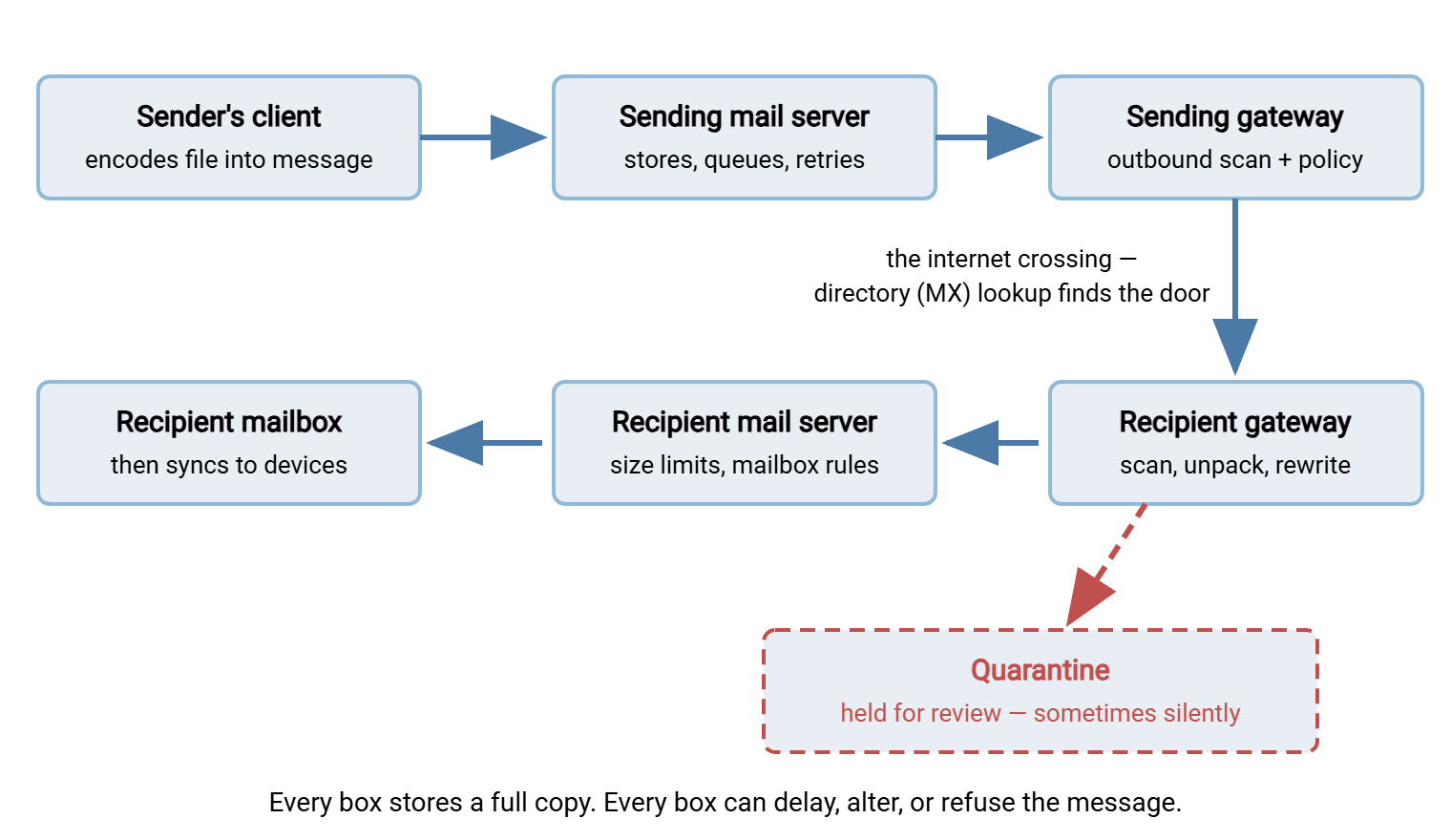
Three of those stations deserve a closer look. The sending mail server is where queueing lives. If anything downstream is unreachable, the message waits here and retries on a schedule. That is how a file can arrive hours after it was "sent" with nothing wrong anywhere. The internet crossing begins with an MX lookup. The sending side consults the public DNS directory to ask "which machine accepts mail for this domain?" The answer is very often a security gateway rather than the recipient's actual mail server. And at the far end, delivery to the mailbox is still not the finish line the user perceives. The message must then sync to the recipient's devices, which is one more place for lag. "Delivered" is a status the recipient's phone has not necessarily heard about.
Both organizations may also run more than one relay — an outbound filter here, an archiving service there. So real routes are sometimes longer than the diagram. They are rarely shorter.
The Security Gateway: Where Your Attachment Gets Opened
The gateway deserves its own section, because it is the stop where attachments receive the most attention and lose the most time. A mail security gateway is a server that stands in front of a mail system and inspects everything passing through. For attachments the inspection is genuinely thorough:
- Malware scanning. The attachment is decoded back into a file and checked against known-bad signatures and suspicious patterns. Archives are opened and their contents scanned individually — including archives inside archives, down to a configured depth.
- File-type policy. Gateways enforce lists of forbidden types — executable programs and script files being the classic examples. Good ones identify a file by its actual contents, not just its name. So renaming
tool.exetotool.txtchanges nothing. Our attachment security article covers why those lists exist. - Sandbox detonation. Suspicious files may be opened inside a sandbox — a disposable virtual machine. There, the gateway literally runs or renders the file and watches what it tries to do. Detonation catches threats that signatures miss, and it takes real time: this single feature explains most "the email took twenty minutes" tickets. Delay here is not a malfunction; it is the service working.
- Size and policy limits. The gateway enforces its own message ceiling, along with content rules. Everything we covered in attachment size limits applies at this gate too.
One consequence to internalize: a gateway can only scan what it can open. A password-protected archive is unscannable by design, and gateways respond according to policy — some quarantine it, some strip it, some let it through flagged. Attackers know encrypted archives blind the scanner, which is exactly why so many organizations treat them harshly. If a partner's encrypted zip "never arrives," this is the first suspect.
Rewrites: When What Arrives Is Not What You Sent
Scanning at least leaves the message intact. The next category of gateway behavior does not: modern mail security rewrites messages, and the recipient receives something measurably different from what the sender wrote.
- Link rewriting. Gateways commonly replace every web link in a message with a link that points back to the gateway's own checking service. That way, the destination can be re-examined at the moment of the click. The visible symptom: URLs in the received message are long, strange, and route through a scanning domain. Users notice and worry; the behavior is deliberate protection.
- Attachment stripping. A file that violates policy may be removed entirely, with the message delivered minus its payload. Ideally a notice is inserted ("an attachment was removed from this message"), but sometimes there is nothing at all. The email arrives, the file does not, and the sender never learns.
- Attachment replacement. Some systems detach the file, store it, and substitute a download link. That quietly converts the attachment into the link-based transfer it arguably should have been all along.
- Added disclaimers and banners. Legal footers and "this message came from outside the organization" banners are appended in transit — small changes, but changes.
- Format repackaging. Here is a classic of the genre: one widely deployed mail client family can send messages in a proprietary package format. Such a message may reach a recipient whose software does not speak that format. In that case, everything arrives bundled as a single unreadable file called
winmail.dat. The sender sent a normal document; the recipient got a mystery blob. The fix is a sender-side setting (send plain or standard formats to external addresses), but the ticket lands on whoever the recipient complains to.
Rewriting has a quiet casualty: digitally signed messages. A digital signature proves a message was not altered in transit. So when a gateway appends even a one-line banner, the signature correctly reports the message as modified. Recipients then see a scary validity warning on perfectly legitimate mail. If your users report "signature invalid" errors on external mail, look at what the gateways are appending before suspecting anything darker. The banner warning that the message came from outside is, quite often, the alteration.
Remember: the message that arrives is a reconstruction, not a photograph. Between encoding, scanning, stripping, link rewriting, and appended banners, "what the recipient received" and "what the sender sent" are related documents — not the same document. When two users argue about what was sent, both can be right.
Quarantine: The Waiting Room
Between "delivered" and "refused" lies the third outcome users never imagine: held. A quarantine is a holding area where a gateway parks messages it distrusts but will not outright reject. Reasons include suspicious attachment types, failed scans, spam-scored content, encrypted archives, and policy edge cases. The message exists, intact, on the recipient's side; it is not in the mailbox, and it is in no hurry to be.
Three properties of quarantines generate most of the confusion. First, notification is a setting, not a guarantee. Some deployments email users a digest of held messages, others notify only administrators, and some hold silently. Second, release requires action: someone with access must find the message and click release. Until they do, the sender believes it was delivered (no bounce came back) while the recipient believes it was never sent. Third, quarantines expire — held messages are deleted after a retention window, at which point the file is gone, still without anyone being told.
For the administrator, the operational lesson is to make quarantine checks a reflex step in any missing-attachment ticket. Check both quarantines, because the sender's outbound gateway can hold mail too. I check them before I open a single log, and about half the time that is where the ticket ends. For the sender of a genuinely important file, the lesson is harsher. A channel can silently park your delivery in a waiting room, then shred it on a timer. That is not a delivery channel you build deadlines on.
Northgate Retail lost most of a week to the waiting room once. A supplier sent the seasonal price list as a password-protected zip, which Northgate's gateway held as unscannable and, per its settings, mentioned to nobody. The buyer chased the supplier, the supplier resent the same zip, and the gateway held that one too, with the same silence. A help desk analyst found both copies in the quarantine on day eight, a day before the first one was due to expire. Northgate turned on quarantine digests for users and added a line about encrypted archives to its partner onboarding notes. It moved the price list to a transfer folder with a login, where nobody needs a password on a zip.
The Recipient's Last Mile
Suppose the attachment survives every scanner and no quarantine claims it. The last mile still offers several ways to lose a file that has technically arrived:
- The junk folder. Spam scoring happens per message, and a large or unusual attachment from an unfamiliar sender nudges the score upward. The message is "delivered" in every log — to a folder nobody reads.
- Mailbox rules. Recipients forget their own automation. A rule filed the message under a project folder, or forwarded it, or deleted it. Rules run silently and are checked rarely.
- Quota. A full mailbox refuses new mail; the sender eventually gets a delayed bounce after retries expire — often hours later.
- Sync lag. The message may be in the mailbox but the phone has not synced it. Or the client shows the message body before the attachment finishes downloading. "It's not there" sometimes means "it's not there yet, on this device."
- Client-side blocking. Mail clients maintain their own lists of attachment types they refuse to open or even show, independent of everything the gateways decided.
Late, Altered, or Missing: The Triage Table
Everything above compresses into a lookup table. When the ticket arrives, match the symptom, check the likely causes in order, and you will find most missing attachments inside ten minutes:
| Symptom | Most likely causes, in order | Where to look |
|---|---|---|
| Arrived, but late | Sandbox detonation; queue retries after a temporary failure; greylisting-style first-contact delays | Gateway logs (scan duration), sending server queue history |
| Arrived, but altered | Attachment stripped or replaced by policy; links rewritten; banners added; winmail.dat repackaging |
Gateway policy logs; inserted notices in the message; sender's format settings |
| Never arrived, no bounce | Quarantine (either side); junk folder; mailbox rule; still queued | Both quarantines, recipient junk folder and rules, message trace |
| Never arrived, bounce received | Size limit at some gate; forbidden file type; full mailbox | The bounce text itself — reply code and which server refused |
And here is the same knowledge as a checklist you can paste into your help desk runbook:
MISSING ATTACHMENT TRIAGE
 1. Get facts from the sender: exact send time, recipient address,
    file name, and total size of all attachments on the message.
 2. Any bounce message back?  Read it: which server refused, what code.
    (Check the sender's junk folder -- bounces get filtered too.)
 3. Sender side: is the message still sitting in Outbox or the queue?
 4. Search the sending gateway's log/quarantine for the message.
 5. Recipient: check junk folder, then mailbox rules, then other devices.
 6. Recipient admin: run a message trace; check gateway quarantine.
 7. If delivered but altered: read the gateway policy log to see
    which rule fired (stripped type, encrypted archive, size).
 8. Deadline at risk?  Stop debugging the pipeline: put the file on
    the transfer server and send the download link instead.
What This Means for Files That Matter
Step back from the pipeline and judge it as a file delivery system. Delivery time is unbounded. Intermediate systems may alter the payload. Two separate organizations' policies can each silently divert it. Confirmation of arrival does not exist. None of this is a scandal — every stage exists to protect mail systems and the people using them. But stacked together they explain the pattern every admin knows: attachments usually arrive, and "usually" is doing heavy lifting.
For some files, "usually" is not good enough — the contract due today, the payroll export, the weekly data feed a partner's process depends on. For those files, the fix is to change vehicles, not to push harder on email. A direct transfer over HTTPS or SFTP connects, moves the file, verifies completion, and writes a log line, all in one observable step. Our SFTP series covers the protocol side. In practice that means a file transfer server you control. With a product like Sysax Multi Server, the recipient clicks an HTTPS link and downloads in a browser. The activity log answers "did they get it?" with a timestamp instead of a shrug. The recurring cases include the report that goes out as an attachment every Monday. Those belong in a scheduled transfer job with retries and error handling, which is what Sysax FTP Automation does for a living. The change-management path from here to there is mapped in weaning users off attachments.
The Whole Journey in One Paragraph
An attachment's journey is a relay race with no baton-passing rules you can enforce. It goes from client to server to gateway, then a public directory lookup, a stranger's gateway, a stranger's server, a mailbox, and a sync. Full copies are stored at every leg. Scanners open the payload along the way, rewrites amend the message, and quarantines stand ready to park it silently on either side. Late means scanning or retries. Altered means policy did its job, agreeably or not. Missing without a bounce means a waiting room or a junk folder. Once you can name the stations, the tickets lose their mystery. The files that genuinely matter earn a vehicle built for delivery, not for correspondence. The pipeline still does not return calls; you just stop needing it to.
To go deeper in this series, the size gates along this route have their own article in attachment size limits. What the scanners are actually defending against is the subject of attachment security.
Frequently Asked Questions
Why did an email with an attachment take twenty minutes to arrive?
The email arrived but the attachment is gone. Who removed it?
What is a winmail.dat file and why did I receive one?
If no bounce came back, doesn't that mean the message was delivered?
Why do links in received emails look long and strange?
How should we send files that absolutely must arrive on time?
From the Sysax team: we build secure file transfer software for Windows. Sysax Multi Server is an FTP, FTPS, SFTP, and HTTPS server. Sysax FTP Automation handles scheduled, scripted transfers. Free trials are on the download page.