
Why Email Is a Terrible File Transfer System — and Why Everyone Uses It Anyway
"Please find attached." A paperclip, a spreadsheet for the accountant, one click. Somewhere in your organization that click is happening right now. A contract is on its way to a customer. A zipped folder of photos is on its way to the marketing agency. A payroll summary is on its way to whichever Sarah the autocomplete picked. Multiply it by every organization on earth and you reach an awkward truth. Email is the most widely used file transfer system ever built, and it is one of the worst tools ever pressed into the job.
None of that is because users are careless or lazy. People attach files for excellent reasons, and any administrator who wants to change the habit has to start by respecting those reasons. Email reaches everyone, needs no setup, and works. Its problems only begin after the Send button, in places users never look, which is exactly where a problem can grow undisturbed for years.
This article, part of our Email Attachments series, follows a file through what email does to it. It explains how copies multiply across mailboxes and backups, and why a sent file can never be taken back. It covers why nobody can say who has the file, and why the size ceiling keeps biting. By the end you will be able to explain the problem to users and leadership without a trace of blame. You will know what a better default looks like. The short version is that email was built to carry short notes, and we asked it to carry the database.
Why Everyone Reaches for Email First
Before criticizing the habit, be honest about why it exists. Email has properties that almost no other transfer mechanism matches:
- Universal reach. Every business contact on earth has an email address. There is no other identifier you can rely on so completely.
- Zero setup for the recipient. No account to create, no password to invent, no software to install, no firewall exception to request. The file just appears.
- It carries its own context. The file arrives inside the conversation that explains it. Six months later, searching the thread finds both the discussion and the document.
- It is asynchronous. The recipient does not need to be online, ready, or even awake. The mail system holds the message until they collect it.
- It never says no. Nobody was ever refused permission to send an email. There is no request form, no ticket, no waiting.
Now look at what email often competes against inside an organization. There is a portal that requires a new account, and a shared drive the external partner cannot reach. There is a transfer tool that needs a client installed and a firewall rule approved. If the sanctioned path takes nine steps and email takes two, users are not misbehaving when they choose email. They are optimizing, exactly the way you would. That insight matters so much that we devote a whole article to it. Our article on weaning users off attachments is about making the secure path the easy path, because nothing else works.
So the case against attachments cannot be "users should try harder." It has to rest on what email actually does to a file. Which brings us to the mechanics.
One Click of Send, a Dozen Durable Copies
Email moves messages by a method called store and forward. Each mail server in the path receives the complete message, writes it down, and then passes a copy to the next server. Nothing "travels through" a mail system the way water travels through a pipe. The message — attachment included — is duplicated, whole, at every stop. Email does not carry a file so much as photocopy it in passing.
Follow one file through a perfectly ordinary send. You attach a 5 MB report and address it to one colleague, with two more people on CC. Count what exists within twenty-four hours:
- Your Sent folder keeps a full copy, and tonight your mailbox backup preserves it again.
- Your mail server held a copy in its queue, and depending on retention settings may keep it longer.
- Each of the three recipients gets a copy in their mailbox — three more.
- Each device that syncs those mailboxes — a laptop, a phone, maybe a tablet each — caches its own copy. Call it two devices per person: six more.
- Each recipient's mailbox backup captures the message tonight: three more.
- Either organization may use journaling — a compliance feature that archives a copy of every message passing through the mail system. If so, add another permanent copy or two in an archive designed never to forget.
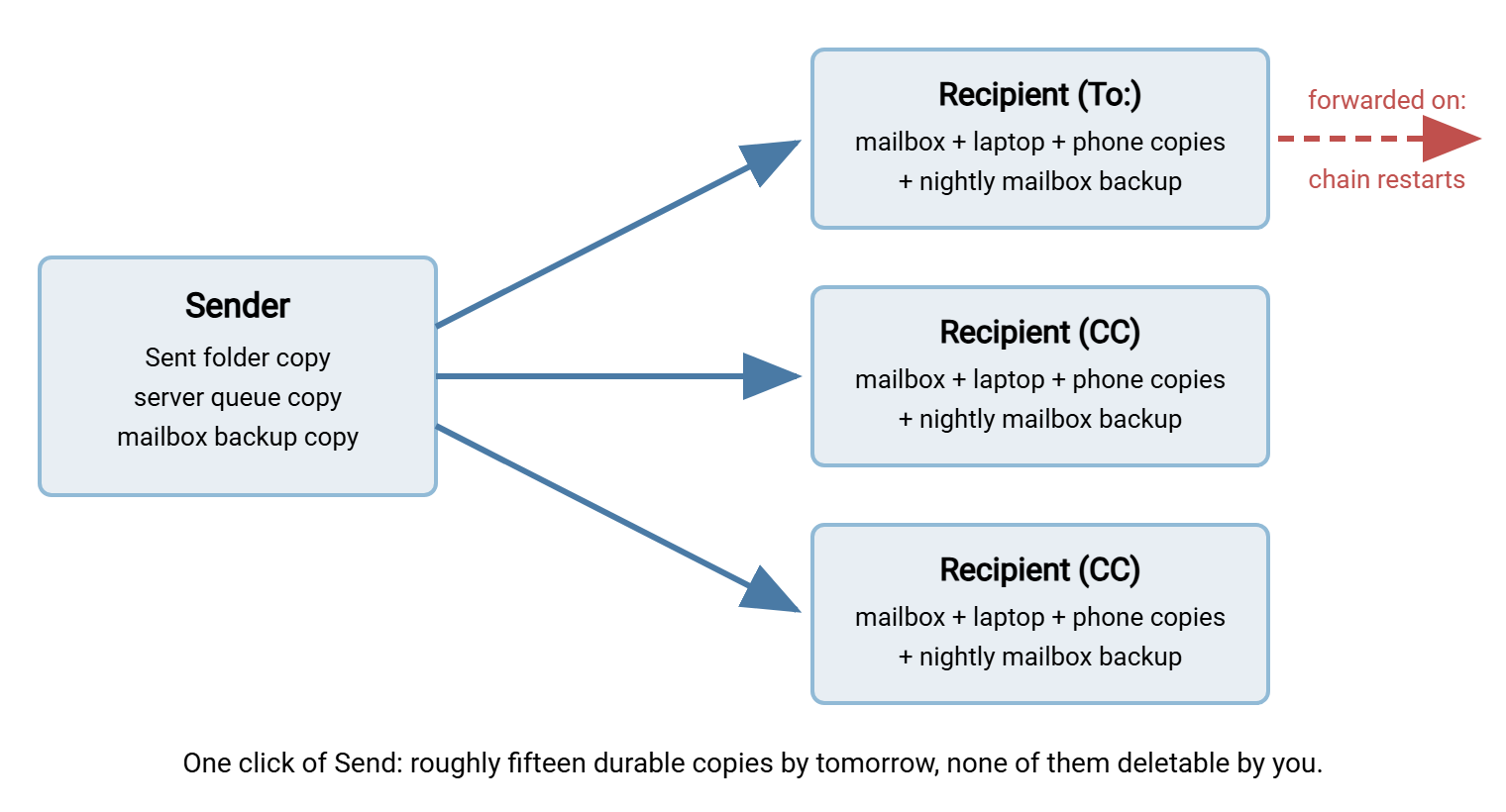
That is somewhere around fifteen durable copies of the file, created automatically, in under a day, from one click. Nobody decided to make fifteen copies. Nobody will ever decide to delete them. And if any recipient forwards the message, the entire multiplication starts again from their mailbox — invisibly to you. The diagram below shows the same story in one picture. A single send fans out into copies on the sender's side, in every recipient's mailbox and devices, and in every backup behind them.
Compare that with what the word "transfer" is supposed to mean. One copy leaves a system you control and arrives in a system the recipient controls, on purpose, once. That deliberate, countable movement of data is the subject of our file transfer fundamentals series. An attachment is not a transfer in that sense at all. It is closer to publication.
Remember: attaching a file does not send it somewhere — it duplicates it everywhere. Every mailbox, synced device, backup, and archive along the path keeps its own long-lived copy, and no one is in charge of them all.
There Is No Unsend
Every mail client eventually grew a "recall" or "undo send" feature, and every administrator eventually explains why it did not work. I have given that explanation more often than any other in my career. The honest version: undo send is usually just a short delay before the message really leaves, so it only works within that window. Recall features generally work only when both mailboxes live in the same mail system and the recipient has not opened the message. Across organizational boundaries — exactly where sensitive mistakes matter most — recall does nothing. The copy in the recipient's mailbox belongs to the recipient's mail system, and yours has no authority over it. The Recall button stays on the toolbar anyway, which I think is unkind.
Picture the classic accident. A user types a first name, and autocomplete offers two Sarahs. The payroll summary goes to the wrong one — a supplier contact instead of the HR manager. With a link-based system, this is an incident with a fix. Disable the link, and the file behind it becomes unreachable before most people's coffee cools. With an attachment, the file itself crossed the boundary at the moment of delivery. There is nothing left to disable. You can ask nicely for deletion, and you may even get it. But you can never verify it — not in the mailbox, not on the phone that synced it, not in the backup that ran overnight.
The difference is structural, not cosmetic. Link-based sharing keeps the file on a server you control and hands out only a pointer. Revocation is built into the shape of the thing. Attachments hand out the payload itself; revocation is impossible in principle. No amount of policy or apology changes which shape you chose at the moment of sending.
No Audit Trail: Who Has This File Now?
Ask a simple question about any file that left by email six months ago: who has it today? With attachments, the honest answer is always the same — nobody knows, and nobody can find out.
Mail systems keep delivery logs: server A accepted message such-and-such and handed it to server B at a certain time. That is genuinely useful for troubleshooting, but it records the movement of messages, not the fate of files. Delivery logs cannot tell you whether the attachment was ever opened or whether it was saved to a laptop. They cannot tell you whether it was forwarded to a personal address, or how many of those fifteen copies have since become fifty. Forwarding is the killer: every recipient is a potential new sender, and their sends do not appear in any log you can see. The file has a social life now, and you are not invited.
Now put that answer in front of an auditor. Compliance regimes that deal in personal data, health records, or financial information tend to ask exactly this class of question. Who accessed this data, when, and from where? A file distributed by attachment makes the question unanswerable. A file distributed from a managed transfer server makes it a report. This is one of the quiet, decisive advantages of running file distribution through a server you administer. A product like Sysax Multi Server, for example, writes an activity log of every login and every download. So "who retrieved this file" has an answer with timestamps on it. Email cannot offer that, because email was never designed to. It was designed to say hello.
Bluewater Bank found out how that question sounds in a routine audit. The auditor asked where customer statements had been sent over the past several years. The trail led to a shared mailbox in the lending team. Every statement ever emailed to a customer still sat there as an attachment, along with the replies and the forwards. Nobody had decided to keep them; nobody had decided anything, which is how mailboxes fill. The bank moved statement delivery to a logged transfer server with a retention policy. It archived the mailbox and set a retention rule on the replacement. The next audit question took ten minutes instead of a week.
The Size Ceiling — and the Invisible Growth
Even users who cheerfully accept all of the above eventually collide with the limit. Mail systems cap message sizes, commonly somewhere around the tens of megabytes. The cap that matters is whichever is smallest along the whole path. Your client, your server, any security gateway, and the recipient's system each enforce their own. You can see your own limits; you cannot see theirs (and theirs are the ones that bounce). The full story of stacked limits lives in our companion article on attachment size limits.
The file also grows in transit, which surprises nearly everyone. Email was designed to carry text, so binary files are translated into text for the journey using an encoding called base64. Every three bytes of the real file become four characters of mail-safe text. The translation is perfectly reversible, but it makes the emailed form of a file roughly a third larger than the file itself. A 21 MB attachment becomes a 28 MB message. Users experience this as pure mystery: "the file is under the limit and it still bounced." It did not bounce at its size; it bounced at its size plus one third.
The workarounds users invent — zipping, splitting archives into parts, resending to one recipient at a time — each generate their own support tickets. Compression barely helps with the most common large files, because photos, videos, and modern office documents are already compressed. Zipping a photo mostly produces a photo with a new extension. The ceiling is not a nuisance to be dodged; it is email politely telling everyone that it was built for messages, not payloads.
Version Chaos: Ten Copies, No Truth
There is a subtler cost that never produces a bounce message. The moment a document is attached and sent, it forks. Each recipient now holds an independent copy, and each copy begins its own life. One person edits and sends back. Another edits a stale copy and sends that back. A third forwards the original onward. Within a week the thread contains Budget_FINAL.xlsx, Budget_FINAL_v2.xlsx, and Budget_FINAL_v2_JMedits_USE_THIS.xlsx. Somebody is manually merging changes by eye on a Friday evening. I have been that somebody, and the file was not FINAL.
None of this is user error. It is the inevitable behavior of a system whose only operation is "make another copy." A file that lives in one shared, authoritative place has a current version by definition. A file distributed by attachment has as many current versions as it has recipients. When people complain about attachment culture, half the pain they are describing is really this. Email cannot represent the idea of the document, only a copy of it.
The Costs You Only See at Scale
Individual users meet these problems one at a time; administrators meet them multiplied. The aggregate costs deserve names, because they justify the effort of changing the default:
- Storage multiplication. The same presentation stored in forty mailboxes, each backed up on its own schedule, is storage bought forty times over. Mailbox storage is among the most expensive kinds to expand and the slowest to migrate.
- Legal discovery. A dispute may require producing every copy of a document. In that case, "it went out by email" turns a search of one server into a search of every mailbox, archive, and backup in scope.
- Scanning load. Every attachment is unpacked and inspected by security gateways on both sides. That work grows with every megabyte, and is one reason large messages crawl. Our article on an attachment's journey follows that path hop by hop.
- Help desk volume. Bounces, missing attachments, quarantine releases, "can you resend as a zip" — a steady tax on support time that never appears under a single budget line.
What Better Looks Like (Without Making Life Harder)
The alternative to attachments is not a lecture; it is a mechanism that wins the convenience contest. From everything above, the requirements write themselves. A replacement must be as easy as attaching. It must work for external recipients with nothing to install and no account ceremony. It must keep one copy of the file on a system you control, so revocation and versioning are real. It must log access, so audit questions have answers. And it must shrug at file size.
Here is the comparison in one table — useful verbatim when you need to make the case to leadership:
| Question | Email attachment | Link to a managed server |
|---|---|---|
| Copies created | One per mailbox, device, and backup — uncounted | One on the server; downloads are known and logged |
| Can you take it back? | No — delivery is permanent | Yes — disable the link or the account |
| Who accessed it? | Unknowable | In the activity log, with timestamps |
| Size ceiling | Commonly tens of megabytes, minus encoding growth | Effectively none for everyday work |
| Current version | As many as there are recipients | One, on the server |
| Recipient effort | None | Click a link in a browser — must be kept this low |
The last row is the one that decides adoption. The mechanism most external recipients accept without friction is a plain HTTPS link. It uses the same secure web connection they use for banking, opened in the browser they already have. That is why HTTPS-based file transfer is the natural landing place for former attachment traffic. It is covered in depth in our HTTP and HTTPS file transfer series. A file transfer server with a web interface, such as Sysax Multi Server, lets a recipient click a link and authenticate. The recipient can download over HTTPS with no client software installed, while the file itself stays in one logged, revocable place.
Getting people to actually make that switch is a change-management craft of its own — pilot groups, honest friction-counting, empathy for holdouts. It has its own article: weaning users off attachments.
The Bottom Line
If a colleague asks for the one-minute version, it is this. Email is a superb messaging system and a terrible file transfer system, and the difference is structural. Sending an attachment duplicates the file into every mailbox, device, and backup along the way. It can never be recalled. No log anywhere records who has it. The whole arrangement fails outright somewhere around tens of megabytes. People use it anyway because it is universal and effortless, and they are right about that. So the fix is never to scold users, but to offer a path that is just as easy and structurally sound. That means one copy, on a managed server, behind a revocable, logged HTTPS link. Email goes back to carrying the note that says where the file is.
To keep going in this series, follow a file through the pipeline in the journey of an attachment. Or jump straight to the honest counterpoint — when attachments are perfectly fine. A policy that pretends email is never the right tool will be ignored, and will deserve it.
Frequently Asked Questions
Can I recall an email attachment after sending it?
Are email attachments encrypted while they travel?
Why did a file bounce when it was under the size limit?
Is it wrong to email small files?
What replacement will users actually accept?
Does zipping a file solve the size problem?
From the Sysax team: we build secure file transfer software for Windows. Sysax Multi Server is an FTP, FTPS, SFTP, and HTTPS server. Sysax FTP Automation handles scheduled, scripted transfers. Free trials are on the download page.