
Encryption at Rest vs in Transit: Two Different Jobs
Somewhere in your organization, someone has asked "is that file transfer encrypted?" and someone else has answered "yes." Both walked away satisfied — and they may have been talking about completely different things. The person asking probably meant "is the file safe?" The person answering probably meant "we use SFTP." Those are not the same statement, and the gap between them is where real data exposure lives.
Encryption comes in two fundamentally different flavors. Encryption in transit protects data while it moves across a network. Encryption at rest protects data while it sits on a disk. They defend against different attackers, fail in different ways, and neither one substitutes for the other. A transfer can be perfectly encrypted on the wire and still leave plaintext copies sitting on three servers for years.
This article gives you the mental model to keep the two straight for good. By the end, you will be able to trace any file transfer in your environment. You will be able to point at exactly where each kind of encryption protects it, and where each is blind. You will be able to explain the difference to an auditor or a manager in plain words. It is the foundation article of our PGP and at-rest encryption series, and everything else in the series builds on the distinction made here.
One File, Two Exposure Windows
Think about what actually happens to a file during a transfer. It does not spend its life in motion. In fact, motion is the brief part. A payroll file gets created on a finance server and sits there. At some point a transfer job picks it up and pushes it across the network to a transfer server. That trip might take four seconds. Then the file sits on the transfer server until the payroll provider's system pulls it down — that wait might be four hours. Then it sits on the provider's systems for however long their retention policy allows, which might be four years.
So the file's life has two kinds of exposure window:
- The in-transit window: this is the seconds or minutes the file spends traveling on a network. Anyone positioned along the path — on the office network, at an ISP, on shared infrastructure — could capture the traffic as it passes.
- The at-rest window: this is the hours, days, or years the file spends written to storage on each system it touches. Anyone who gains access to that system can simply read it. That includes an attacker with a stolen password, a curious insider, or someone who buys a decommissioned disk.
Here is the observation that reframes most people's thinking: measured in time, the at-rest windows are almost the entire life of the file. The in-transit window gets most of the security attention, but the file spends nearly all of its existence resting on somebody's disk. An attacker does not need a difficult live interception of a four-second transfer when a copy sits quietly in a folder for months.
The diagram below traces a file's journey from source system to partner and marks the two kinds of exposure window along the way. There are short transit windows on the wire, and long rest windows on every disk the file touches.
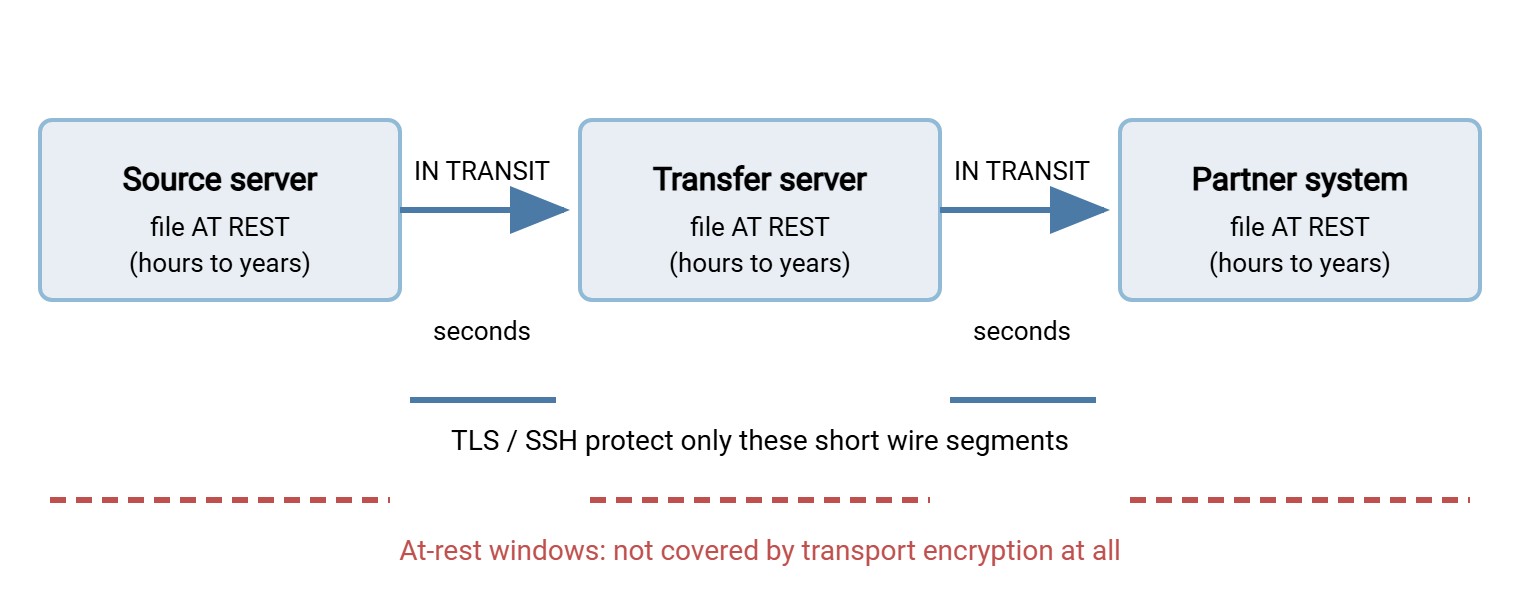
Keep that picture in mind for the rest of this article. Every claim about "encryption" belongs to one of those windows. The first question to ask about any encryption claim is simply: which window is it covering?
What Encryption in Transit Actually Covers
Encryption in transit means the network conversation between two systems is wrapped in an encrypted channel. So anyone capturing the traffic in between sees only scrambled bytes. In file transfer, this is delivered by two well-established technologies. One is TLS (Transport Layer Security, the encryption layer behind HTTPS and FTPS). The other is SSH (Secure Shell, the layer underneath SFTP). When your transfer runs over SFTP, FTPS, or HTTPS, the wire segment is protected.
What that protection buys you is real and important:
- Confidentiality on the path. A network eavesdropper cannot read the file contents or the credentials used to log in. That holds on the office Wi-Fi, at a compromised router, anywhere between the endpoints.
- Integrity on the path. The channel detects tampering, so an attacker cannot silently modify bytes mid-flight.
- Server authentication. The client can verify it is talking to the genuine server rather than an impostor, through certificates (TLS) or host keys (SSH).
These properties matter, and getting them right has its own craft — cipher choices, certificate handling, spotting the legacy jobs still running in cleartext. That side of the story has a full series of its own: encryption in transit. On the server side, this is also the most settled part of the problem. A modern file transfer server such as Sysax Multi Server speaks FTPS, SFTP, and HTTPS out of the box. So offering an encrypted channel to every client is a configuration choice rather than a project.
Now the honest part — what encryption in transit does not cover. The encrypted channel exists only between two endpoints, and it protects only the bytes currently inside it. The moment the file arrives, the channel's job is done. The receiving server decrypts the traffic as part of receiving it and writes the file to disk in whatever form the application produces. Unless something else intervenes, that is plaintext. Transport encryption is like an armored truck: the cargo is untouchable during the drive. The truck's armor means nothing once the boxes are stacked on the loading dock.
This has a consequence that surprises people. In a relay arrangement — source, transfer server in the middle, then the partner — "encrypted in transit" means encrypted on each hop separately. The middle server sees the file in plaintext, holds it in plaintext, and re-encrypts it only for the next wire segment. Every hop is an endpoint, and every endpoint is a place where the file exists unprotected.
What Encryption at Rest Means — the Three Layers
Encryption at rest means the data is stored in encrypted form on the disk. So reading the raw storage yields ciphertext instead of file contents. But "encrypted at rest" is an umbrella covering several distinct techniques, and they protect against very different things. It helps to sort them into three layers.
Layer 1: Full-disk and volume encryption
Full-disk encryption (and its close sibling, volume encryption) encrypts an entire drive or storage volume beneath the filesystem. The operating system unlocks the volume at boot or mount time — with a key, a passphrase, or a hardware security chip. From that moment on, everything written is encrypted transparently and everything read is decrypted transparently. Applications never know it is happening.
What it protects against is physical loss of the storage. That might be a stolen laptop or a server disk pulled from a rack. It might be a drive that leaves the building for warranty replacement, or a decommissioned machine sold with its disks still in it. In all of those cases, the person holding the hardware finds ciphertext.
What it is blind to is everything that happens while the system is running. Once the volume is unlocked — which for a server means essentially always — every process and every logged-in account sees plaintext. Transparent decryption is the entire point of the design. An attacker who compromises an account on the server reads files exactly as easily as a legitimate user does. Full-disk encryption on a running server protects against a burglar with a screwdriver, not an attacker with a password.
Layer 2: Filesystem and application-level encryption
Between whole-disk and single-file sits a middle layer: encrypted folders, encrypted database columns, per-user encrypted stores. These narrow the exposure — the data is ciphertext except when a specific application or user context has it unlocked. They are common inside applications and databases, rarer in transfer workflows. They share the same fundamental property as layer 1: the protection lives on one system. It vanishes the moment the data is read and sent somewhere else.
Layer 3: File-level encryption
File-level encryption seals the individual file itself. The file becomes a ciphertext object — commonly using OpenPGP, the long-standing open standard for exactly this job. It stays sealed no matter where it is copied. Move it to another server, back it up to tape, upload it to a partner, forward it by mistake to the wrong mailbox. It remains ciphertext everywhere, openable only by whoever holds the matching private key.
This is the property none of the other layers have: the protection travels with the file. Disk encryption protects one machine's storage. Transport encryption protects one network hop. A PGP-encrypted file is protected on every disk and every hop, including systems you do not control. The encryption is part of the file rather than part of the infrastructure. The next article in this series covers how that works under the hood — public keys, private keys, and the hybrid trick that makes it fast. It is how PGP file encryption actually works.
Where Each Kind of Encryption Is Blind
The clearest way to see that these are different jobs is to line up the common threats and ask which protection actually answers each one. The table below does exactly that for the three protections you will meet most often.
| Threat scenario | In transit (TLS/SSH) | Disk/volume encryption | File-level (PGP) |
|---|---|---|---|
| Eavesdropper captures network traffic | Protected | Blind | Protected (contents) |
| Disk stolen or improperly decommissioned | Blind | Protected | Protected |
| Attacker logs into the running server | Blind | Blind (volume is unlocked) | Protected (no private key there) |
| Curious insider browses the transfer folders | Blind | Blind | Protected |
| Intermediate/relay server is compromised | Blind (hop endpoint sees plaintext) | Blind | Protected |
| Backup tape or backup account exposed | Blind | Depends on backup encryption | Protected (file is still sealed) |
| Recipient's own system compromised after decryption | Blind | Blind | Blind (plaintext exists again) |
Two things jump out of that table. First, no single row is covered by everything — each protection has scenarios it simply does not address. That is why "we use SFTP" and "the disks are encrypted" are both true statements that can coexist with a wide-open exposure. Second, file-level encryption covers the most rows, because it is the only protection attached to the data rather than to a location. But even it goes blind at the moment of legitimate decryption. Once any protection is unlocked for use, what protects the plaintext is ordinary access control, and that is a different discipline.
Remember: encryption in transit protects the pipe. Encryption at rest protects the parking spots. Neither protects the other's territory, and neither protects data that a legitimately logged-in process has already decrypted. When someone says "it's encrypted," always ask: in which window, against which attacker?
Why "It's Encrypted" Usually Means "Only in Transit"
In file transfer conversations, the unqualified phrase "it's encrypted" almost always turns out to mean "the protocol is SFTP or FTPS." That is worth saying plainly because of what it implies about everything the phrase does not cover. Walk the path of a typical partner exchange and count the plaintext copies that transport encryption leaves behind:
- The export folder on the application server where the file is generated — plaintext, often world-readable to the operations team, often never cleaned up.
- The transfer server's landing folder — plaintext from the moment of arrival until the moment of deletion, which in many organizations is a moment that never comes.
- The backups of both servers, which faithfully copy every plaintext file into yet another storage system with its own access list and its own retention.
- The partner's side, where the same pattern repeats on infrastructure you have never seen and will never audit.
None of this means transport encryption is inadequate — for many flows it is exactly the right amount of protection. The final article in this series, when file-level encryption is worth the overhead, helps you make that judgment honestly. It means the claim must be stated precisely. "Encrypted in transit, plaintext at rest on two servers with 90-day retention" is a real security posture that can be evaluated. "It's encrypted" is a feeling.
The quiet accumulation in step 2 deserves special attention, because transfer servers are where old files go to be forgotten. Every file that lands and is never purged extends the at-rest exposure window indefinitely. That topic is important enough to get its own article, protecting files at rest on the transfer server.
How the Layers Combine in Practice
Because each layer answers a different threat, the layers are not competitors — a sound design stacks them, spending effort where the data justifies it. A sensible default stack for a transfer environment looks like this:
- Encrypted transport everywhere, always. Use SFTP, FTPS, or HTTPS for every flow, no exceptions. The cost is near zero. Encrypted transport removes the entire network-eavesdropping class of threat plus credential theft. This is the floor, not the ceiling.
- Disk or volume encryption on every server and laptop that stores files. Also near-free on modern systems, and it converts every future stolen-hardware and disposed-drive incident from a breach into a non-event. Just stay honest about its limits on a running server.
- File-level (PGP) encryption for the flows that carry genuinely sensitive payloads — payroll, health records, financial data, anything a partner or regulator requires it for. This is the layer that costs real operational effort (keys, workflow changes, partner coordination), so it is applied selectively rather than universally.
Watch how the combination plays out for one concrete flow. A payroll file is generated, immediately PGP-encrypted for the payroll bureau, and only then dropped into the outbound folder. The transfer job pushes it over SFTP. It rests on the transfer server, then on the bureau's gateway, until the bureau's private key finally opens it. On the wire it was double-wrapped; on every intermediate disk it rested as ciphertext, so the retention habits of every middle system stopped mattering. Plaintext existed in exactly two places: where the file was born and where it was meant to be used. That end-to-end shape is what file-level encryption uniquely provides.
The encrypt-first step is also where automation earns its keep. A step a human must remember is a step that gets skipped on a busy Friday. Workflow tools handle this by building encryption into the transfer job itself. Sysax FTP Automation, for example, includes OpenPGP encryption and decryption in its automation engine. So a scheduled job can encrypt with the partner's public key and send in one motion. Designing that pipeline properly — folder layout, naming, and error handling that fails loudly — is covered in encrypt-before-send workflows.
Map Your Own Exposure Windows: a 30-Minute Audit
The distinction in this article becomes useful the moment you apply it to a real flow. Pick one transfer — ideally the one carrying your most sensitive data — and fill in this worksheet. It is deliberately plain text so you can paste it into a ticket or a wiki page and complete it as you trace the flow.
EXPOSURE WINDOW AUDIT — one worksheet per transfer flow

Flow name:            ____________________________________
Data sensitivity:     public / internal / confidential / regulated

1. LIST EVERY REST STOP (every disk the file touches)
   [ ] Source system folder:        ________________  retention: ______
   [ ] Transfer/staging server:     ________________  retention: ______
   [ ] Destination system:          ________________  retention: ______
   [ ] Backups of each of the above included? yes / no
   [ ] Any other copies (temp folders, archives)? ________________

2. FOR EACH WIRE SEGMENT between rest stops:
   Protocol used:  ____________   Encrypted channel? yes / no
   (plain FTP or HTTP anywhere = an in-transit gap)

3. FOR EACH REST STOP:
   Disk/volume encryption on that system?        yes / no / unknown
   Is the file itself encrypted (PGP) there?     yes / no
   Who can read the folder? (list accounts):     ________________
   Is there a purge job? When did it last run?   ________________

4. VERDICT
   In-transit windows covered:   all / some / none
   At-rest windows covered:      all / some / none
   Longest unprotected rest:     ____ days on ____________________
Most first-time audits produce the same finding: transit fully covered, rest stops wide open, and at least one "unknown" against disk encryption. That result is not a failure — it is the honest baseline that lets you decide the fix, flow by flow. The fix could be shorter retention, tighter permissions, disk encryption, file-level encryption, or some of each.
Two Jobs, One Plan
The summary fits in four sentences. Encryption in transit protects the short windows when a file is moving on a network; TLS and SSH do this well, and every flow should have it. Encryption at rest protects the long windows when the file sits on storage: disk encryption covers lost and stolen hardware, while file-level encryption with PGP seals the file itself everywhere it goes, including on systems you do not control. No layer covers another layer's window, so a security claim is only meaningful when it names the window. And because the at-rest windows are where a file spends nearly its whole life, they deserve at least the scrutiny the network gets.
From here, the natural next step is how PGP file encryption actually works. It covers public keys, private keys, and the hybrid design, all in plain words. If your immediate concern is the pile of old files on your transfer server, go straight to protecting files at rest on the transfer server. And for the wire-side half of the story, the encryption in transit series is the companion to this one.
Frequently Asked Questions
If we use SFTP, is our data encrypted at rest?
Does full-disk encryption protect files from hackers?
Is file-level PGP encryption a replacement for SFTP or FTPS?
Which matters more, encryption at rest or in transit?
Where does the file finally get decrypted in an end-to-end setup?
Do backups count as data at rest?
From the Sysax team: we build secure file transfer software for Windows. Sysax Multi Server is an FTP, FTPS, SFTP, and HTTPS server. Sysax FTP Automation handles scheduled, scripted transfers. Free trials are on the download page.