
Man-in-the-Middle Attacks and Trust Failures, Explained
Modern encryption is, for practical purposes, unbreakable by brute force. No attacker is going to sit and crack a properly negotiated TLS or SSH session; the mathematics is simply too strong. So attackers do not attack the math. They attack the trust — the step where your software decides whether the machine on the other end is really who it claims to be. They may slip into the middle of a connection and get you to accept their identity instead of the server's. If they can, they never need to break any encryption. They just read everything as it passes, in the clear, because you handed them the key.
That is a man-in-the-middle attack (MITM), and it is the single most important attack for a file-transfer administrator to understand. Every defense in the previous articles of this series ultimately exists to stop it. This article explains conceptually how interception works and why it depends on a trust failure rather than a cryptographic one. It explains why the warnings meant to stop it get clicked through so reliably. And — most importantly — it explains the concrete habits that catch the attack instead of waving it past. The orientation throughout is defensive: we describe what the attack does and how to defeat it, not how to perform it.
This is part of our Encryption in Transit series, and it is where the series pays off. If the TLS article and the SSH article explained how trust is established, this one explains what happens when that trust is misplaced.
What "In the Middle" Really Means
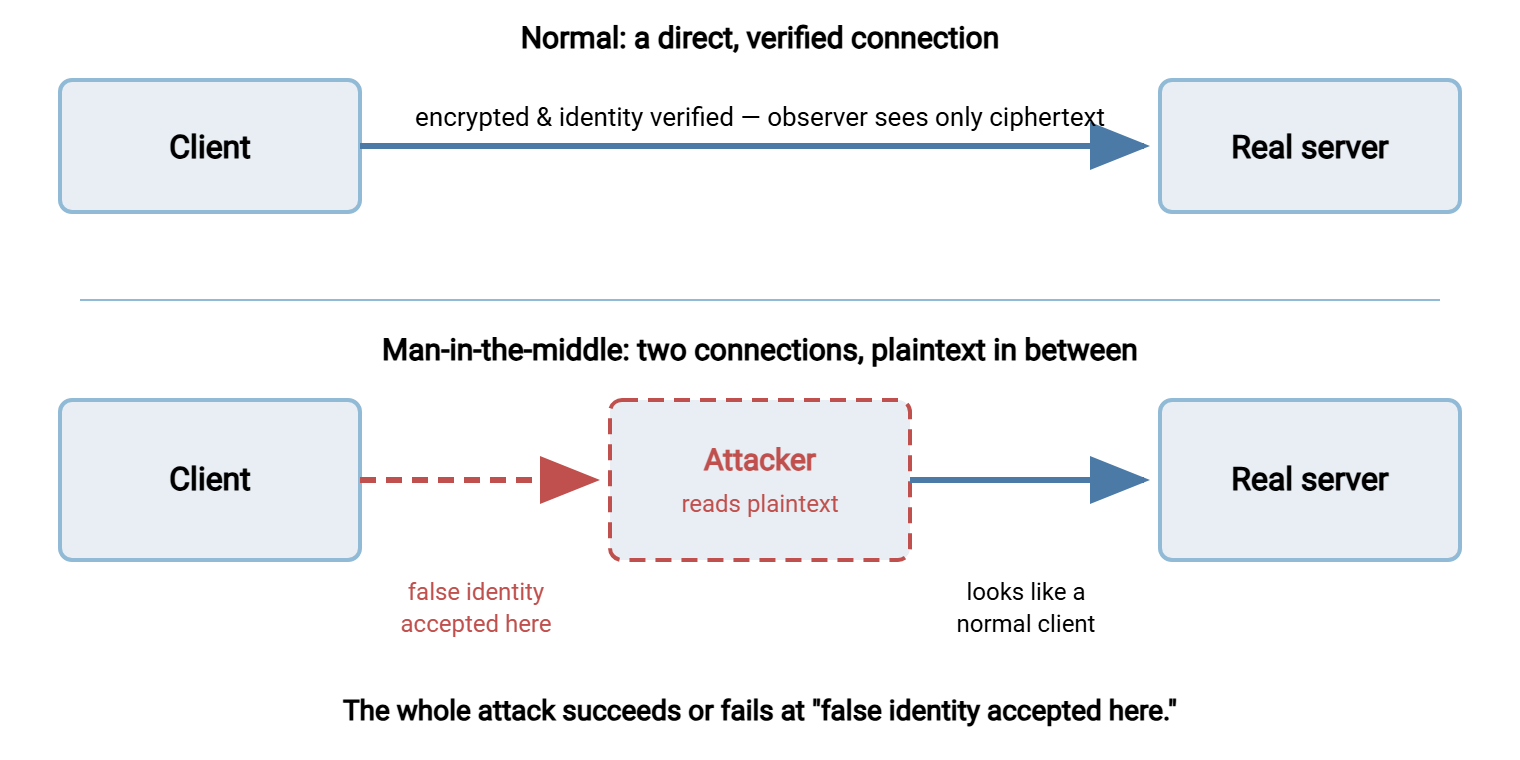
Normally your client and the server share a direct conversation: a request goes out, a response comes back. While an observer on the path can see the encrypted traffic, they cannot read it or change it. A man-in-the-middle changes the shape of the conversation. The attacker positions themselves on the path so that traffic flows through them. Instead of merely watching, they run two separate connections. One is to you, pretending to be the server, and one is to the server, pretending to be you. To each side, everything looks normal. In the gap between the two, the attacker sees plaintext.
The crucial word is relay. The attacker is not guessing your password or decrypting your files. They are terminating your "secure" connection at their own machine, reading it, and forwarding it on so the transfer still appears to work. Nothing breaks. The file arrives, the job succeeds, the logs look ordinary — and a copy of everything, credentials included, now sits with the attacker. An attack that leaves no obvious symptom is far more dangerous than one that breaks the transfer, because nobody goes looking.
The diagram below contrasts the two situations. On top, the normal direct connection. On the bottom, the attacker interposed — the red, dashed elements mark where the trust failure lets them read what should have been sealed.
Why Encryption Alone Doesn't Stop It
Here is the point that surprises people: the man-in-the-middle's two connections can both be perfectly, genuinely encrypted. Your connection to the attacker uses real TLS or SSH. The attacker's connection to the server uses real TLS or SSH. Confidentiality and integrity — two of encryption's three promises — are fully intact on each leg. What has failed is the third promise, authenticity: you are encrypting flawlessly to the wrong party.
This is why the whole series has insisted that encryption without identity is worthless. The maths that hides your data from an eavesdropper does nothing, by itself, to guarantee who is on the other end. That guarantee comes entirely from the trust step — the certificate check in TLS, the host-key check in SSH. A man-in-the-middle attack is, at its core, a scheme to defeat that one step. Break the trust check and the strongest cipher in the world is just a well-locked box you handed to a stranger.
Which leads to the good news hiding inside the bad: the attack has a single, well-defended chokepoint. To interpose successfully, the attacker must present a false identity to your client. That is a certificate that is not really the server's, or a host key that is not really the server's. And your software is built to detect exactly that. A certificate that fails its checks throws a warning. A host key that does not match the stored one throws a warning. The entire attack, no matter how the attacker got onto the path, funnels through the moment your client evaluates identity. That is the red junction in the diagram. Defended properly, that moment stops the attack cold. Which raises the real question of this article: if the warning is so reliable, why does the attack still work?
The Human Chokepoint: Why Warnings Get Clicked Through
The uncomfortable answer is that the technical defense is excellent and the human defense has been quietly worn down. The warning fires exactly as designed — and the person receiving it clicks "continue anyway." Years of experience have trained them to treat that dialog as noise. This is not stupidity; it is a rational response to a badly-shaped signal. Understanding why is the key to fixing it.
- Real warnings almost always turn out to be harmless. An expired internal certificate. A self-signed test server. A hostname mismatch on a legitimate site. When the alarm cries wolf ninety-nine times, the hundredth — the actual attack — is met with the same reflexive click. Frequent false alarms are how a good detector becomes decoration.
- The warning appears at the worst possible moment. It interrupts someone mid-task, trying to get a file moved, with a wall of security text between them and their goal. The path of least resistance is "accept," and the interface often makes accepting the easy button.
- The consequences are invisible. Click through a real attack and nothing bad appears to happen — the transfer completes, the file arrives. The damage (your credentials and data, copied) is silent and offstage. People learn from visible feedback, and this attack gives none.
- The message is written for engineers, not the interrupted human. "The certificate is not trusted" does not convey "someone may be reading this connection right now." The gap between the technical wording and the real stakes gets filled with a shrug.
The two warnings a transfer administrator must re-sensitize themselves to are worth naming precisely, because they are the literal sound of an interception attempt:
The TLS certificate warning — some version of "the certificate is not trusted," "the name does not match," or "the certificate has expired." In FTPS and HTTPS, this fires when the certificate the server (or a would-be middleman) presented fails one of the checks from the TLS article. The name-mismatch case especially deserves a hard stop. A valid certificate for the wrong name is exactly what an attacker who controls some certificate would present.
The SSH host-key warning says "the authenticity of host cannot be established" on a first connection. On a later one, it says the far louder "remote host identification has changed." That second message is SSH telling you the server's key does not match what you stored last time. There are innocent explanations — a rebuilt server, a deliberate rotation — but the warning cannot tell those apart from an interception. That is precisely why it must be treated as a stop until confirmed, as the SSH article stressed.
Keep this triage table where your team can reach it. Then the response to a warning is a lookup rather than a judgment call under time pressure:
| Warning you see | What it could mean | What to do — every time |
|---|---|---|
| Certificate not trusted / unknown issuer | Self-signed or internal cert without proper trust — or a false cert from a middleman | Stop. Confirm the certificate details against your records or the server owner before proceeding |
| Certificate name does not match host | Misconfigured cert — or a valid cert for the wrong name, which is what an attacker would present | Stop. A name mismatch is a hard stop; verify you reached the intended host |
| Certificate expired | Usually a missed renewal; occasionally masks a stale or forged identity | Do not click through. Get it renewed on the server; treat routine expiry as a fault to fix |
| Host authenticity can't be established (first connect) | Normal first contact — nobody has vouched for the key yet | Verify the fingerprint out-of-band before accepting; then it is stored for good |
| Remote host identification has changed | Rebuilt server or deliberate rotation — or an interception attempt | Stop. Confirm with the server's owner through a known-good channel; never just delete the stored key |
Remember: a security warning during connection is not the system malfunctioning — it is the system working, catching exactly the thing it was built to catch. The reflex to click "continue" to get on with your day is the single most valuable behavior an attacker can rely on. Treat every unexpected certificate or host-key warning as a possible interception until you have confirmed otherwise through a separate channel.
The Habits That Catch the Attack
Because the attack funnels through the identity check, defending it is mostly about protecting the integrity of that check. It also means never, ever training people to bypass it. The habits below are ordinary and cheap; their power is that they attack the chokepoint the attacker depends on.
1. Verify identity out-of-band, once, properly
The strongest defense is to know the correct identity before you rely on it, obtained through a channel the attacker does not control. Get an SSH server's host-key fingerprint from the administrator who built it — read over a call, sent through your ticket system. Compare it on first connection. Confirm a partner's certificate details through your established relationship, not through the connection you are trying to verify. This is what makes the first connection trustworthy, and every connection after inherits that verified baseline. The circular trap to avoid: never verify an identity using only information delivered by the very connection you are checking.
2. Treat every warning as a stop event
Adopt one rule and hold it: an unexpected certificate or host-key warning means stop and confirm, never click and continue. Confirm through a second channel — call the server's administrator, check your documented fingerprints, verify the certificate details against your records. Most of the time you will find a boring explanation, and that is fine. The discipline of always checking is what preserves the warning's meaning for the day it is real. The moment "just click through it" becomes normal, the defense is gone.
3. Keep the legitimate warnings rare
Half of the click-through problem is self-inflicted, and the server-side fix is squarely in your hands. Every expired certificate, every self-signed server users must accept, every unnecessary host-key change is a false alarm that erodes everyone's alertness. So: keep certificates current with real expiry monitoring (our certificate management series is built around this). Use certificates that properly chain to a trusted authority so no override is needed. Distribute internal trust deliberately rather than teaching people to accept unknown certificates. Preserve host keys across server rebuilds so clients are not showered with change warnings. A warning that fires only when something is genuinely wrong is a warning people will actually heed.
4. Remove the human from the loop where you can
The most reliable way to prevent a bad click is to design so no click is offered. In automation especially, configure jobs to verify strictly and fail closed: pin the expected certificate or host key. Make the job stop with an error on any mismatch rather than prompting or — worst of all — silently accepting. A failed nightly transfer is a recoverable annoyance; an unattended job that hands credentials to whatever machine answers is a breach with no witness. In a scheduling tool such as Sysax FTP Automation, the connection profile is where you record the verified identity once. Then every unattended run holds the server to it and no 2 a.m. prompt is ever answered by a machine on autopilot. The general principle is that verification disabled "to make it work" is the automation version of clicking through the warning. It is covered from the endpoint side in hardening transfer servers.
5. Reduce the opportunity to be on the path
Defense in depth helps even though verification is the core control. The harder it is for an attacker to sit on your traffic's path in the first place, the fewer chances the identity check has to be tested. Keeping sensitive transfers on trusted network segments shrinks the attacker's opportunity. So do sound network hygiene and the architectural separation covered in our DMZ and gateway architecture series. And closing every cleartext channel matters doubly here: a plain-FTP flow needs no false certificate and triggers no warning at all. Interception is simply reading, with nothing to click through and nothing to catch it. Finding and killing those is cleartext discovery.
Trust Failures That Aren't Attacks (But Look Identical)
An honest article has to say this plainly: most warnings you encounter will not be attacks. They will be operational messes — and that is exactly what makes the real attack so dangerous. It wears the same clothes as the everyday noise. The common innocent causes:
- Expired certificates nobody renewed in time — the outage everyone has once.
- Self-signed certificates on internal or test systems that were never given proper trust.
- Server rebuilds and migrations that regenerated a host key without anyone announcing it.
- Deliberate key or certificate rotations that were not communicated to the people who connect.
- Name mismatches from a certificate that does not cover the exact hostname a client used.
The lesson is not "so warnings don't matter" — it is the reverse. Because a real attack is indistinguishable from these at the moment it appears, you cannot judge by feel. You confirm through a second channel every time. And you drive down the innocent causes with operational discipline, so the warnings that remain are rare enough to take seriously. The two efforts reinforce each other: fewer false alarms make the stop-and-confirm rule sustainable. The stop-and-confirm rule is what catches the one warning that was never innocent.
The Version to Tell a Colleague
A man-in-the-middle attack does not break encryption — it defeats trust. The attacker gets onto the network path, presents a false identity to your client, and relays the connection. Everything still works while they read the plaintext in between. Both halves of their relay can be genuinely encrypted; what fails is authenticity, the promise that you are talking to the real server. Your software is built to catch exactly this, at the certificate check and the host-key check. But the defense is undone when people click through the warning out of habit — a habit built by years of harmless false alarms. So the defense is two-sided: re-sensitize humans to treat every warning as a stop event and verify identity out-of-band. As an administrator, drive the false alarms toward zero with current certificates, preserved host keys, and automation that fails closed. Catch the attack at the one place it must pass through, and no amount of network position helps the attacker.
This closes the Encryption in Transit series. For the identity plumbing whose health keeps warnings meaningful, continue into certificate management for transfer endpoints and SSH key management for file transfers. For the wider view of what attackers pursue and how to prioritize defenses, our file transfer threat modeling series puts this attack in context alongside the others.
Frequently Asked Questions
If my connection is encrypted, how can anyone read it?
Does a man-in-the-middle attack break the encryption?
Is it safe to click through a certificate or host-key warning?
Why do I get a warning that the SSH host key changed?
How do I protect automated transfer jobs from this attack?
Does using a strong cipher policy prevent man-in-the-middle attacks?
From the Sysax team: we build secure file transfer software for Windows. Sysax Multi Server is an FTP, FTPS, SFTP, and HTTPS server. Sysax FTP Automation handles scheduled, scripted transfers. Free trials are on the download page.