
How TLS Actually Protects a File Transfer
Every administrator ships files over "secure" connections — FTPS instead of FTP, HTTPS instead of HTTP. Most of us trust the S in those names without ever looking inside it. That S is TLS (Transport Layer Security), and it is doing three distinct jobs at once. It proves you connected to the right server and builds a secret key that no eavesdropper can learn. Then it encrypts every byte of the transfer with that key. When any one of those jobs fails, the other two stop mattering — which is why understanding all three is worth twenty minutes of your time.
This article walks through the TLS handshake in plain words, with every term defined as it appears. By the end you will know what a certificate actually asserts. You will know how two machines can agree on a secret while an attacker listens to every word. You will know why the bulk of the session uses a completely different kind of encryption than the handshake. And — just as important — you will know what TLS deliberately leaves visible. No cryptography background is assumed.
This is part of our Encryption in Transit series. It pairs with the SSH companion article, which covers the other big encryption family in file transfer. The two together are the foundation for everything else in the series.
The Three Promises the S Makes
Before the mechanics, it helps to name what TLS is promising: three separate guarantees, worth keeping separate in your head.
- Confidentiality — nobody positioned between the two machines can read the traffic. Your password, the file contents, the directory listings: all of it travels as ciphertext, which looks like random noise to an observer.
- Integrity — nobody can tamper with the traffic undetected. If a single bit is flipped in transit, the receiving side notices and rejects the data. Think of it as a tamper-evident seal on every packet, not just a lock.
- Authenticity — you are talking to the server you meant to talk to, not an impostor answering in its place. This is the promise people forget, and it is the one that makes the other two meaningful. Encrypting your password beautifully and delivering it to an attacker is not security.
Notice that the third promise is a different kind of thing from the first two. Confidentiality and integrity are math problems, and the math is excellent. Authenticity is a trust problem — a question of who vouches for whom — and it is where nearly every real-world TLS failure lives. Hold that thought; we will come back to it.
The Vocabulary You Need First
Four terms carry the whole explanation, so let's define them once, properly.
Symmetric encryption uses one shared key: the same key locks and unlocks the data. It is extremely fast — fast enough to encrypt files at line speed — but it has an obvious chicken-and-egg problem. Both sides need the key before they can talk privately, and they cannot just send it to each other in the open.
Public-key cryptography (also called asymmetric encryption) solves that problem with a key pair. A public key can be handed to anyone. A private key never leaves its owner. The two are mathematically linked. A useful picture is a padlock and its only key: the server can hand out open padlocks (the public key) freely. Only the server holds the key that opens them. Anything locked with the padlock can be read only by the private-key holder. Asymmetric operations are slow, so TLS uses them sparingly — just enough to solve the chicken-and-egg problem. Then it switches to fast symmetric encryption for the actual data.
A certificate is a small document that binds a public key to a name. It says, in effect: "the server answering to transfer.example.com owns this public key." It carries a signature from a certificate authority (CA). That is an organization whose job is to check that claim before signing it. Your operating system and browser ship with a list of CAs they trust, called the trust store. That pre-installed list is the root of the whole trust system. A certificate is believed because it is signed by someone on the list, directly or through a chain of intermediate signers.
With those four ideas — symmetric keys, key pairs, certificates, and CAs — the handshake is easy to follow.
The Handshake, Step by Step
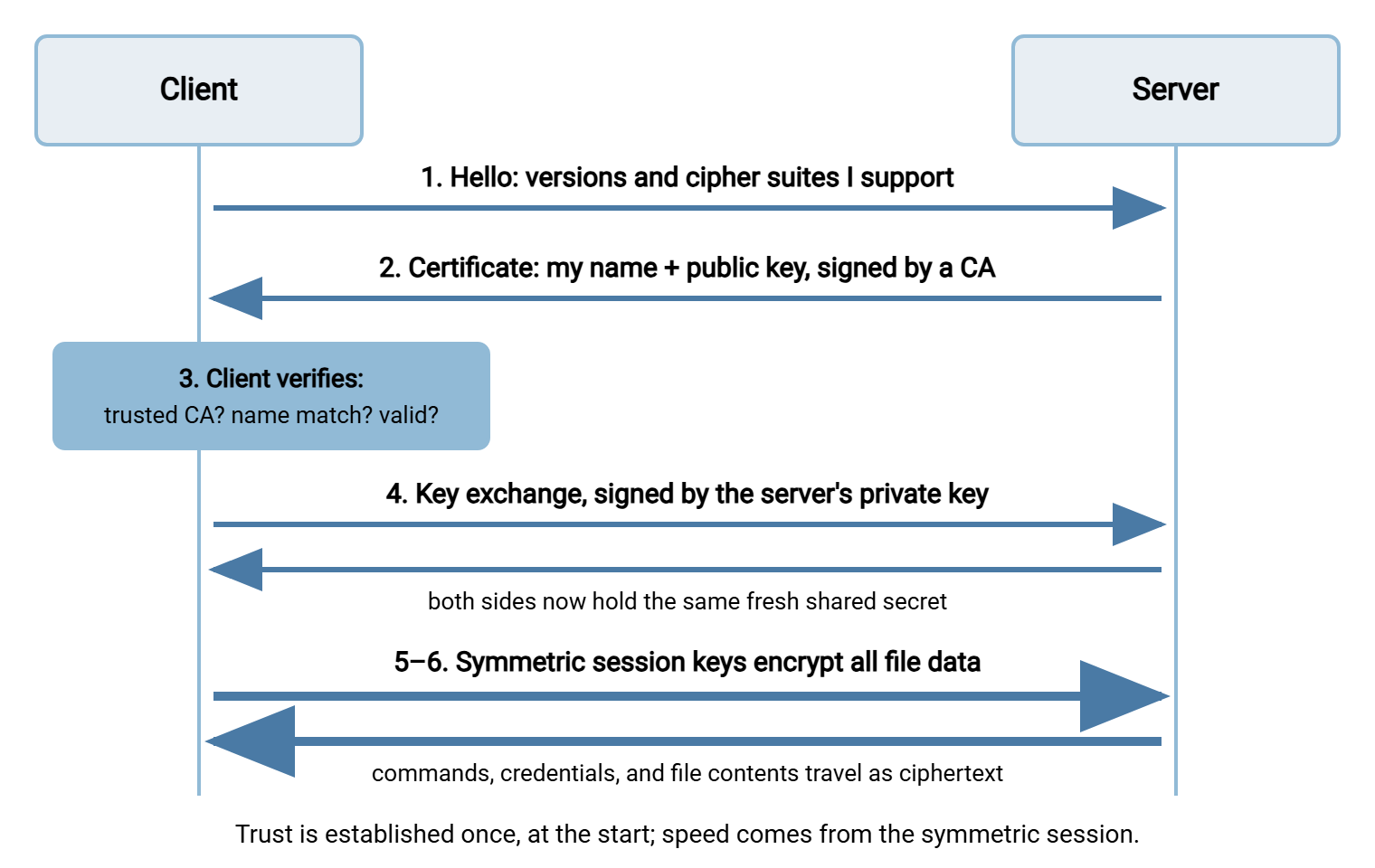
The handshake is the short negotiation that happens at the start of every TLS connection, before any file data moves. It typically takes a few round trips and a fraction of a second. Here is the sequence in plain words:
- Hello. The client opens the connection and announces what it can do. It lists which protocol versions it speaks and which cipher suites (combinations of encryption algorithms) it supports. The server picks the strongest option they have in common and answers.
- Certificate. The server presents its certificate — its public key, its name, and the CA signature vouching for the binding between them.
- Verification. The client checks the certificate: is it signed by a CA in my trust store (following the chain if needed)? Does the name in it match the hostname I asked for? Is it within its validity window, and not revoked? Only if every check passes does the handshake continue silently. Any failure produces the certificate warning you have seen in browsers and FTPS clients.
- Key exchange. The two sides run a short mathematical exchange that ends with both holding the same fresh secret value. They do so even though anyone recording the conversation saw everything they sent each other. The server signs its part of this exchange with its private key. That is the moment it proves it really owns the certificate it showed. (How a secret can be built in public is genuinely surprising; the next-but-one section unpacks it.)
- Switch to symmetric. Both sides derive matching session keys from that shared secret and confirm to each other that everything from here on is encrypted. The slow public-key math is now done for the whole connection.
- Application data. The actual protocol — the FTPS commands, the HTTPS upload, the file bytes — flows inside the encrypted channel. It is protected by fast symmetric encryption with an integrity check on every record.
The diagram below shows the same sequence as a flow. It shows the open negotiation at the top, the trust checkpoint in the middle, and the encrypted session that everything else rides inside.
Certificates: Who Vouches for the Server
Step 3 deserves a closer look, because it is where TLS's trust model lives — and where it breaks in practice.
A certificate on its own proves nothing; anyone can generate one that claims any name. What makes a certificate meaningful is the chain of signatures behind it. The server's certificate is signed by an intermediate CA. The intermediate is signed by a root CA, and that root sits in the trust store your operating system shipped with. Your FTPS client walks that chain link by link, and if it ends at a trusted root, the name-to-key binding is believed. It is the same structure as a notarized document: you trust the notary's stamp, not the document's author.
Three checks happen in that instant, and each one exists to stop a specific impersonation trick:
- The signature check stops an attacker from inventing a certificate — they cannot forge a CA's signature.
- The name check stops an attacker from presenting a perfectly valid certificate for a different server they legitimately control. A real certificate for the wrong name is still a failed check.
- The validity check (dates and revocation status) limits the damage window if a private key is ever stolen: certificates expire, and compromised ones can be revoked.
Now the honest part. When any check fails, the client does not refuse outright — it asks the human, and the human very often clicks "accept anyway." Years of expired internal certificates and self-signed test servers have trained users to treat the one alarm TLS has as a nuisance dialog. A clicked-through warning quietly cancels the authenticity promise while leaving the padlock icon feeling intact. The connection is still encrypted, but possibly to the wrong machine. That failure mode is serious enough that we gave it a full article — man-in-the-middle attacks and trust failures. The operational side of keeping certificates healthy so warnings stay rare and meaningful is its own series: certificate management for transfer endpoints.
Remember: encryption without identity is worthless — an attacker who can answer in the server's place is delighted to speak flawless TLS with you. The certificate check is not bureaucratic decoration; it is the step that makes the encryption point at the right machine. Every certificate warning is that check failing.
Key Exchange: Agreeing on a Secret in Public
Step 4 sounds impossible: two machines that have never met talk over a wire an attacker may be recording. They end up sharing a secret the attacker does not know. No secret was ever transmitted — it was constructed, separately but identically, at both ends.
The classic analogy is mixing paint. Both sides publicly agree on a common starting color. Each side privately picks a secret color of its own, mixes it into the common color, and sends the mixture across the wire. Now each side takes the mixture it received and stirs in its own secret color again. Both arrive at the same three-part blend — common + mine + yours. But an eavesdropper who saw only the two mixtures cannot practically un-mix paint to recover anyone's secret. Real key exchange does this with mathematics whose "un-mixing" is computationally infeasible, but the shape of the trick is exactly that.
One property of modern key exchange is worth knowing by name, because it shows up in configuration screens: forward secrecy. The secret colors are freshly generated for each connection and thrown away afterward — they are ephemeral. The result: even if the server's long-term private key is stolen at some point, recorded traffic from earlier sessions still cannot be decrypted. Each session's keys never depended on that long-term key alone and no longer exist anywhere. An attacker who tapes your transfers hoping to unlock them later gets nothing. When you set cipher policy, preferring ephemeral key exchange is one of the few decisions that genuinely matters. Our cipher policy guide covers how to make it without a cryptography degree.
Note what the server's private key is actually for in all this: not encrypting your files, but signing the key exchange. This proves that the party building this secret with you is the same party the CA vouched for. Trust from step 3 and secrecy from step 4 snap together at that moment.
The Session: Symmetric Encryption Does the Heavy Lifting
Everything after the handshake is refreshingly simple. Both sides feed the shared secret through a key-derivation step and come out with matching session keys. These are symmetric keys used only for this connection. From then on, data is chopped into records, and each record is encrypted and stamped with an integrity code before it leaves. The receiving side checks the stamp before accepting a single byte. A modified or corrupted record is detected and the connection is torn down rather than silently accepting damaged data.
Why the switch to symmetric encryption? Speed. Symmetric ciphers are orders of magnitude faster than public-key operations and are often accelerated in hardware by the CPU itself. This is why TLS overhead on a large file transfer is usually a rounding error. The expensive asymmetric work happens once, in the handshake, and the gigabytes that follow ride the cheap fast path. If a "secure transfer is slow" complaint lands on your desk, the handshake is almost never the culprit. Look at the network and the disks first.
Here is what the whole story looks like from an FTPS client's session log — the one place most admins actually meet the handshake. This is explicit FTPS, where the client connects on the normal FTP port and upgrades the connection before logging in:
Status:   Connecting to transfer.example.com:21
Response: 220 Server ready
Command:  AUTH TLS
Response: 234 Proceed with negotiation
Status:   Performing TLS handshake...
Status:   Verifying certificate for transfer.example.com — OK
Status:   TLS handshake successful. Connection is now encrypted.
Command:  USER alex            <-- from here on, everything is inside TLS
Response: 331 Password required
Command:  PASS ********
Response: 230 Login successful
Command:  PROT P
Response: 200 Data connections will also be protected
Two lines matter most. The AUTH TLS exchange happens before USER — the credentials never exist on the wire outside the encrypted channel. And PROT P extends protection to the separate data connections that FTP uses for file contents and listings. Without it, some configurations encrypt your login and then ship the files themselves in the clear. That FTPS-specific wrinkle — two channels, separately wrapped — is exactly the subject of our companion article how TLS wraps FTP.
What Stays Visible Anyway
TLS encrypts the contents of the conversation. It does not — and cannot — hide the fact that the conversation is happening. An observer on the network path who cannot read a single payload byte still sees:
- Addresses and ports. Which machine connected to which server, on which port. "Something at your office talked to this partner's transfer server" is plainly visible.
- The server name being requested. In common configurations, the hostname the client asks for travels in the clear during the hello. So an observer learns which named service you wanted even on shared infrastructure.
- Timing and volume. When connections happen, how long they last, and roughly how many bytes move. A nightly surge of traffic to a payroll provider tells a story without a single decrypted packet.
- The certificate conversation. Certificates are public documents; observing one reveals the server's asserted identity.
This visible residue is called metadata. Encrypted transfers are not invisible transfers; they are sealed, not secret. TLS also does nothing about what happens before transmission and after arrival. The file sitting readable on both endpoints' disks is outside its job description entirely. The full honest list of what in-transit encryption leaves open is in what encryption in transit doesn't protect. That article also covers how other layers close each gap.
| Protected by TLS | Still visible or out of scope |
|---|---|
| Usernames and passwords in transit | Which client talked to which server, and when |
| File contents and directory listings on the wire | Traffic volume and timing patterns |
| Commands and responses between client and server | The requested server name, in common setups |
| Tampering with any of the above (detected and rejected) | Files at rest on either endpoint, before and after transfer |
Where You Meet TLS in File Transfer
The same handshake serves several transfer protocols, which is good news: understand it once and you understand them all.
- FTPS — classic FTP wrapped in TLS, in either explicit or implicit form (the difference is when the handshake happens; see explicit vs implicit FTPS). Its two-connection design means both the control and data channels need protecting.
- HTTPS — web-based uploads, downloads, and REST transfers all ride a single TLS-protected connection; the comparison with SSH-based transfer lives in HTTPS vs SFTP.
- WebDAV over HTTPS and AS2 — both are HTTP underneath, so both inherit the same TLS protections and the same certificate trust model.
On the server side, all of these converge on one operational task. Install a certificate, keep it current, and present it on every TLS endpoint you run. A server product such as Sysax Multi Server puts FTPS and HTTPS endpoints behind one configuration surface on Windows. So the certificate you set up serves the browser-upload users and the FTPS automation alike — one identity, however the files arrive.
What TLS does not cover is SFTP. Despite the similar name, SFTP contains no TLS at all — it rides SSH, a different protocol with a genuinely different trust model. There are no certificates and no CAs. A first-connection decision puts the verification burden on you. The differences are worth understanding before you operate either one, and that is the subject of the next article in this series.
The Version to Tell a Colleague
TLS protects a file transfer in three moves. First, the server presents a certificate — its public key bound to its name, vouched for by an authority your machine already trusts. The client checks it, which is what makes the encryption point at the right machine. Second, the two sides run a key exchange that builds a shared secret in full view of any eavesdropper, freshly, for this connection only. Third, they derive fast symmetric session keys from that secret and encrypt everything that follows, with a tamper-evident seal on every record. What survives on the outside is metadata: who talked to whom, when, and how much. And the whole structure has one human-shaped weak point — the certificate warning that users click through. That quietly trades away the only promise that made the rest worth having.
From here, read how SSH encryption protects SFTP and SCP for the other half of the encrypted-transfer world. Read what encryption in transit doesn't protect for the honest gap list. Read cipher policy without a cryptography degree when you are ready to tune the knobs on your own endpoints.
Frequently Asked Questions
Is TLS the same thing as SSL?
Does TLS slow down large file transfers?
Does TLS hide file names and file sizes?
What actually happens when a certificate is expired?
If someone records my encrypted transfer, can they decrypt it later?
Is SFTP just FTP over TLS?
From the Sysax team: we build secure file transfer software for Windows. Sysax Multi Server is an FTP, FTPS, SFTP, and HTTPS server. Sysax FTP Automation handles scheduled, scripted transfers. Free trials are on the download page.