
How SSH Encryption Protects SFTP and SCP
A connection to a new server may stop you with the question "The authenticity of host ... can't be established. Are you sure you want to continue connecting?" If you have seen it, congratulations, you have met the SSH trust model face to face. Most people type yes without reading it. That prompt is not boilerplate: it is the single moment where the security of every future SFTP and SCP session to that server is decided. It is asking you to do a job that, in the TLS world, a certificate authority would have done for you.
This article explains how SSH (Secure Shell) — the protocol underneath SFTP, SCP, and remote terminal sessions — actually protects a file transfer. We will walk the connection step by step: how the two machines build a shared secret, and how the server proves its identity with a host key. We will cover why your password never touches the wire in readable form, and what that first-connection question really commits you to. Along the way we will compare SSH's trust model honestly with the certificate model TLS uses. The difference changes how you should operate day to day.
This is part of our Encryption in Transit series, and it is the mirror of how TLS actually protects a file transfer. Between the two articles you will have covered the encryption behind effectively every secure transfer protocol in common use.
What SSH Is, and Why File Transfers Ride It
SSH began as a secure replacement for remote terminal access, but it was designed from the start as a general-purpose secure channel. That is an encrypted, authenticated pipe between two machines that other services can run through. File transfer is simply one of its passengers. SFTP (SSH File Transfer Protocol) is a full file-management protocol that runs as an SSH subsystem. SCP is an older, simpler copy mechanism over the same channel. Neither has any encryption of its own; they inherit everything from the SSH layer beneath them.
That layered design is worth one paragraph, because it explains where each protection comes from. SSH is built as three layers stacked on one TCP connection, normally to port 22:
- The transport layer does the cryptography: it negotiates algorithms and builds the shared session keys. It verifies the server's identity via its host key, and encrypts and integrity-protects everything above it.
- The user authentication layer runs inside that protected transport and establishes who you are — by password, by public key, or by other methods.
- The connection layer multiplexes one or more channels over the encrypted pipe; your SFTP session is a channel that requested the
sftpsubsystem.
So when someone asks "is SFTP encrypted?", the precise answer is: SFTP itself does no encryption, and it never needs to. By the time an SFTP request exists, it is already traveling inside a fully encrypted, authenticated SSH transport. The architecture story, including subsystems and why "FTP over SSH" is the wrong mental model, is told in how SFTP actually works. The SCP side lives in how SCP works. Here we care about the security layer they both stand on.
The Connection, Step by Step
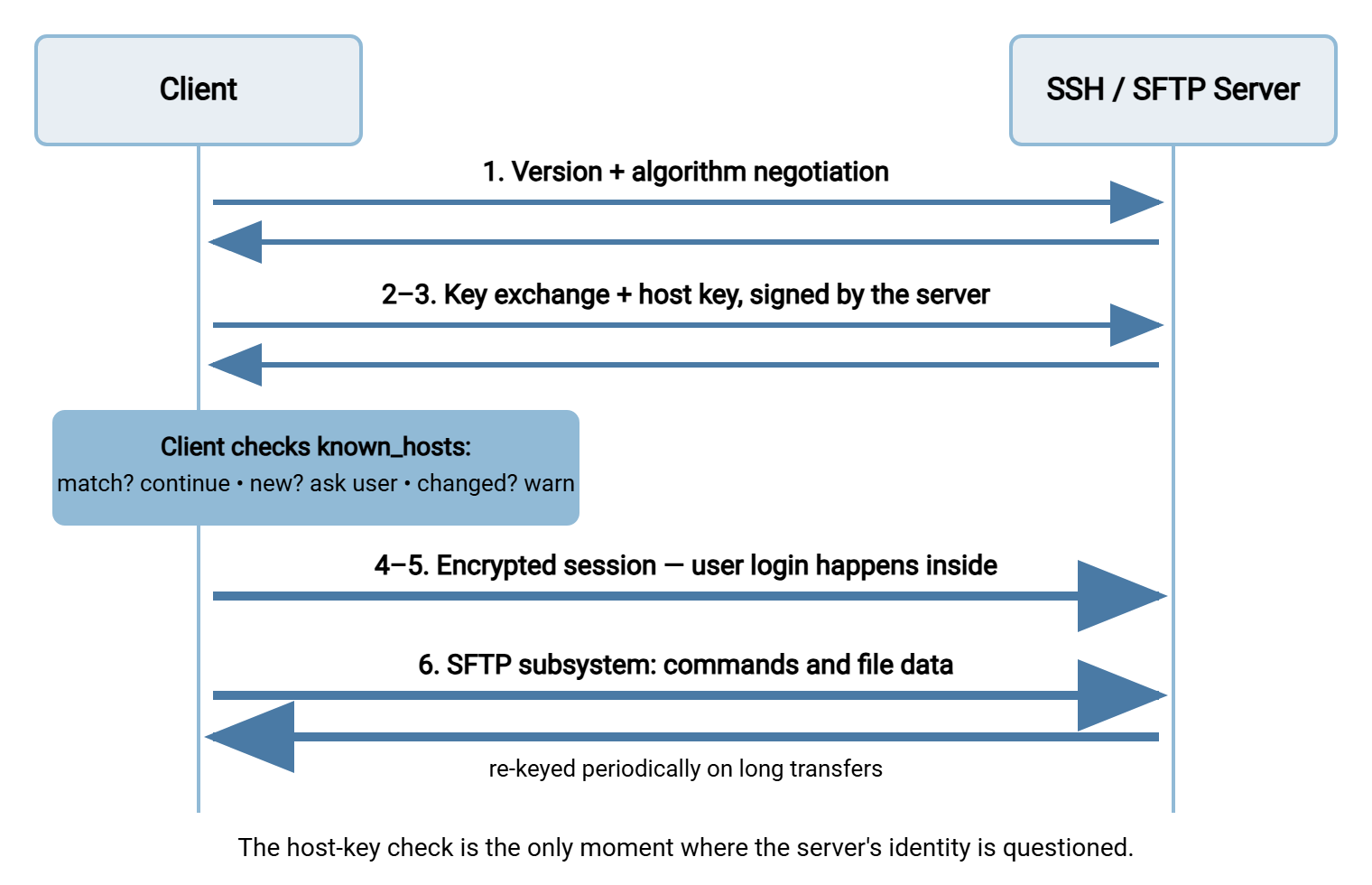
Here is what happens in the second or so between typing sftp alex@transfer.example.com and seeing a password prompt:
- Contact and version exchange. The client connects to
port 22. Both sides announce the protocol version they speak and lists of the cryptographic algorithms they support — key exchange methods, ciphers, integrity codes. Each category is settled by taking the first mutually supported choice. - Key exchange. The two machines run a short mathematical exchange that ends with both holding the same fresh shared secret. They do so even though an eavesdropper saw every message. (The trick — building a secret in public from ephemeral values — is the same one TLS uses. It is unpacked with a paint-mixing analogy in the TLS article.)
- The server proves its identity. During the exchange, the server signs the session data with its private host key and sends its public host key along. The signature proves the server holds the private half. Now the client faces the central question of this article: is this host key the right one for this server? It checks its local records — and if it has no record, it asks you.
- Encryption switches on. Both sides derive symmetric session keys from the shared secret. From this point, every packet is encrypted and carries an integrity check; tampering is detected and kills the connection.
- User authentication. Only now, inside the encrypted transport, does the client authenticate the user — sending a password or proving ownership of an SSH user key. Credentials never exist on the wire outside the tunnel.
- The session opens. A channel is opened, the SFTP subsystem starts (or the SCP command runs), and file data flows through the encrypted pipe. On long transfers, the two sides quietly repeat the key exchange periodically — re-keying — so no single session key protects too much data.
The diagram below shows the flow, with the identity checkpoint — the step this article turns on — highlighted in the middle.
Host Keys: Identity Without Certificates
A host key is a public/private key pair that belongs to the server itself. It belongs not to any user, not to any administrator, but to the machine's SSH service. The private half sits in a protected file on the server and never leaves. The public half is shown to every client that connects. When the server signs the key exchange with the private half, it proves "I am the holder of this key" beyond doubt.
Notice what is missing compared to TLS: nobody vouches for the key. A TLS certificate arrives with a chain of signatures leading back to a certificate authority your operating system already trusts. So your client can conclude "this key belongs to transfer.example.com" without your help. An SSH host key arrives naked. It proves the server holds a particular key. But whether that key is the right key for the server you intended is a question the protocol cannot answer by itself. Someone has to make the association between "this hostname" and "this key" for the first time. In SSH, that someone is you.
Because comparing long keys by eye is hopeless, SSH gives you the fingerprint: a short digest of the public key, printed as a compact string. Two keys match if and only if their fingerprints match, so verifying a fingerprint is verifying the key. Fingerprints are what you read over the phone, paste into documentation, and compare in prompts.
Trust On First Use, Honestly
SSH's answer to the who-vouches problem is a model called trust on first use (TOFU). It works like this. The first time your client contacts a server, it has no record of that server's key. So it shows you the fingerprint and asks whether to trust it. If you say yes, the client writes the hostname and key into a local file. That is known_hosts in OpenSSH, a host-key cache in graphical clients. The stored copy then becomes the standard this server is held to forever. Every later connection compares the key the server presents against the stored one. Match: connect silently. Mismatch: a loud warning that the remote host identification has changed, and in most clients an outright refusal until a human intervenes.
Here is the classic first-connection prompt, worth learning to read properly:
$ sftp alex@transfer.example.com
The authenticity of host 'transfer.example.com (203.0.113.10)' can't be established.
ED25519 key fingerprint is SHA256:Yr1nPh8kLmQv2c9tXWbGf4Ue0aJd7sHqTz5RiVoBkE3.
This key is not known by any other names.
Are you sure you want to continue connecting (yes/no/[fingerprint])?
Read as plain English, it says: "I have encryption ready to go, but I have no idea whether this key belongs to the machine you think you are talking to. You decide." The model's strength is that it needs no infrastructure — no CAs, no certificate purchases, no expiry calendar. Its weakness is equally plain: the first connection is unverified unless you verify it, and every connection after inherits whatever you decided in that moment. Type yes to the wrong key — say, to a machine impersonating your server — and you have not merely accepted a risk. You have pinned the impostor as the genuine article. Your client will now warn you about the real server.
Verifying properly is not hard; it just has to happen over a different channel than the connection you are trying to verify. A procedure worth copying into your runbook:
- Obtain the server's fingerprint out-of-band. It can come from the administrator who built the server (read over a call or sent through your internal ticket system). It can come from the hosting provider's console, or from your own documentation if you recorded it at build time.
- Make the first connection from your client and compare the displayed fingerprint against the one you obtained, character for character. Or paste the expected fingerprint at the prompt, which modern clients accept and check for you.
- Accept only on an exact match. On any mismatch, stop and contact the server's owner through a known-good channel.
- Record the fingerprint in your team documentation so the next person has something to check against.
- For unattended jobs, skip the prompt entirely. Pre-load the verified host key into the automation account's
known_hosts(or the transfer tool's host-key store) before the first run. Configure the job to refuse unknown keys.
If you administer the server side, make this easy: publish your host-key fingerprints where users and partners can find them. Treat the host key as part of the server's identity. An SFTP server such as Sysax Multi Server presents its host key to every connecting client. Include that key in your backups and carry it across rebuilds and migrations. That way, a hardware refresh does not shower every client with change warnings and erode their alertness.
Remember: a "remote host identification has changed" warning is a stop event, not an inconvenience. Legitimate causes exist — a rebuilt server, a deliberate key rotation — but the warning cannot tell you whether this is maintenance or an interception attempt. Confirm with the server's owner before connecting, and never "fix" it by deleting the known_hosts line and trying again.
How SSH's Trust Model Differs from TLS
Both protocols encrypt superbly; they differ in who does the vouching. The comparison matters because it changes where the operational burden lands in your week.
| Question | TLS (FTPS, HTTPS) | SSH (SFTP, SCP) |
|---|---|---|
| Who vouches for the server's key? | A certificate authority, checked automatically | You, at first connection |
| First contact with a new server | Silent, if the certificate checks out | A fingerprint prompt you must answer |
| Does identity expire? | Yes — certificates have validity windows and must be renewed | No — host keys live until deliberately rotated |
| Undoing trust in a bad key | Revocation handled through the CA system | Manual — remove it from every client that stored it |
| Typical failure in practice | Expired or mismatched certificates; users click through warnings | Unverified first accepts; changed-key warnings overridden |
| Infrastructure required | Certificates issued, installed, chained, renewed | None — but fingerprint distribution is on you |
Neither column wins outright. TLS scales beautifully — a thousand strangers can verify your FTPS server today with zero effort from you. But it drags in the whole certificate lifecycle: issuance, chains, renewal, and the expiry outages everyone has once. (Our certificate management series exists for exactly that.) SSH costs nothing to set up and never expires on a holiday weekend, but it pushes verification onto each client. Its guarantee is only as good as the sloppiest first accept. Understand which burden you are carrying for each endpoint, and both models serve you well.
Inside the Tunnel: Session Encryption and User Login
Once the host-key checkpoint passes, the cryptography looks much like the TLS session you may already know. The shared secret from the key exchange is expanded into separate symmetric keys for each direction, plus keys for integrity codes. Every packet is encrypted and sealed; a tampered packet fails its check and ends the connection. The key exchange uses fresh, throwaway values each session, so SSH has forward secrecy. Traffic recorded today cannot be unlocked by stealing the server's host key tomorrow. The session keys were never derivable from the host key alone and no longer exist.
User authentication deserves a spotlight, because it is where SSH quietly fixes the ugliest habit of the cleartext era. With plain FTP, your password crosses the network in readable form on every login. The demonstration in finding cleartext transfers on your network makes that uncomfortably concrete. With SSH, the entire authentication conversation happens inside the already-encrypted transport: a password is encrypted like any other payload. Better still, public-key user authentication never sends a secret at all. The client proves it holds a private key by signing a challenge, and nothing reusable crosses the wire.
Keep the two key roles straight, because the words collide. The host key authenticates the server to you; a user key authenticates you to the server. They are different keys in different files answering different questions, and mixing them up is the most common SSH confusion there is. Choosing and managing user authentication is its own subject. SFTP authentication covers the choice, and our SSH key management series covers the lifecycle.
What This Means Day to Day
The mechanics above compress into a short list of habits that cost minutes and close the model's real-world gaps:
- Verify first connections, every time it matters. For any server that will carry credentials or business data, get the fingerprint out-of-band before the first
yes. Reserve casual acceptance for throwaway lab machines. - Treat changed-key warnings as incidents until explained. Most turn out to be rebuilds and migrations nobody announced. Confirm that through a second channel — then update the stored key deliberately.
- Never let automation auto-accept. A scheduled job that accepts any host key will accept an impostor at 2 a.m. without a human anywhere near it. Pin verified keys before the first run and configure jobs to fail loudly on mismatch. In a scheduling tool such as Sysax FTP Automation, the moment to do that verification is when you create the connection profile. Once the verified key is stored, every unattended run holds the server to it.
- Server owners: publish fingerprints and preserve keys. Put fingerprints in your onboarding documentation for partners, and keep host keys in backups. Rotate them deliberately with an announcement — not accidentally with a rebuild.
Every one of these habits exists because the encryption is not the weak point. Nobody breaks the ciphers; they talk you into accepting the wrong key, or count on you overriding the warning. The attack that exploits exactly that is the subject of man-in-the-middle attacks and trust failures. That article also covers the fuller set of habits that defeat it.
The Version to Tell a Colleague
SFTP and SCP are passengers on SSH, and SSH protects them in two moves. First, a key exchange builds a fresh shared secret in public. Symmetric session keys derived from it encrypt and integrity-protect everything — including your login. That is why SSH never exposes a password to the network. Second, the server proves its identity with its host key — but unlike TLS, nobody vouches for that key. The first time you connect, you are the certificate authority. Verify the fingerprint out-of-band and answer the prompt honestly. Then your client holds the server to that identity forever after. Blind first accepts and overridden change warnings are the model's only real holes, and both are habits, not protocol flaws.
Next in the series: what encryption in transit doesn't protect draws the honest boundary around everything TLS and SSH deliver. And cipher policy without a cryptography degree shows how to keep the algorithm negotiation on the strong side — for SSH endpoints as much as TLS ones.
Frequently Asked Questions
Why does SSH ask "are you sure you want to continue connecting"?
Is SFTP's encryption stronger or weaker than FTPS's?
What is the difference between a host key and my SSH key?
My client warns that the host key has changed. Have I been hacked?
Should my automated transfer jobs auto-accept host keys?
Do SCP and SFTP have the same security?
From the Sysax team: we build secure file transfer software for Windows. Sysax Multi Server is an FTP, FTPS, SFTP, and HTTPS server. Sysax FTP Automation handles scheduled, scripted transfers. Free trials are on the download page.