
Permission Inheritance and umask Gotchas in Uploads
You designed the directory tree correctly. You applied least privilege to every account. Then a partner uploads a file and one of two annoying things happens. The pickup process that is supposed to collect it reports "permission denied" and cannot read the file at all. Or the file lands readable and writable by everyone on the box. Nothing about the account changed. The folder looks right. So why does the file that appears inside it have the wrong permissions?
The answer is that a newly created file does not copy the folder's permissions. It gets a permission of its own, decided at the moment of creation. The rules are ones most administrators never had to think about until an upload broke: the umask on Unix systems, and ACL inheritance on Windows. These rules are the single most common reason uploads arrive unreadable or wide-open, and they are entirely fixable once you can see them working.
This article explains both mechanisms and shows the fix on each platform, with before-and-after output you can match against your own server. It is part of our Permissions series and picks up where directory design and least privilege leave off. The folders are right; now we make sure what lands in them is right too.
The Two Failure Modes
Every upload-permission problem is one of two opposite failures, and it helps to name which one you have before reaching for a fix:
- Too closed — the unreadable upload. The file arrives owned by the uploader and readable only by them. Your pickup process, running as a different identity, cannot read it, so the file sits in the inbox forever and the automation silently stalls. This is the more common and more confusing one, because everything "looks fine" until you check as the pickup account.
- Too open — the wide-open upload. The file arrives readable, or even writable, by accounts that should never touch it — sometimes by everyone on the server. Nothing breaks, which is exactly why this one is dangerous: it is a quiet disclosure that no error message will ever announce.
Both come from the same root cause — the permission a file is born with — and both are governed by the inheritance rules of the platform. Get those rules right and every upload lands with predictable, correct permissions without anyone touching it by hand.
Of the two, the wide-open upload deserves the greater fear, precisely because it is painless. The unreadable upload announces itself: automation stalls, a file sits untouched, someone files a ticket, and you fix it that afternoon. The wide-open upload just sits there being readable — or writable — by the wrong accounts, patient and silent. That lasts until a permission audit or an incident finally finds it. That asymmetry is why the fixes in this article always end with a positive test that checks both directions. The right identity can read an upload, and the wrong ones cannot.
The Linux Side: umask
When a program on a Unix system creates a file, it asks for a set of permissions. Conventionally, it asks for 666 (read and write for everyone) for a data file, or 777 for a directory. The system does not grant that request as-is. It first removes the bits named by the umask, a per-process mask of permissions to withhold. The final permission is the requested mode with the umask bits stripped out.
So the umask is a subtraction. A umask of 027 means "withhold write from group, and withhold everything from other." Applied to a new file's base of 666, it produces 640: owner read-write, group read, other nothing. The diagram below shows the arithmetic for both a file and a directory under the same 027 umask.
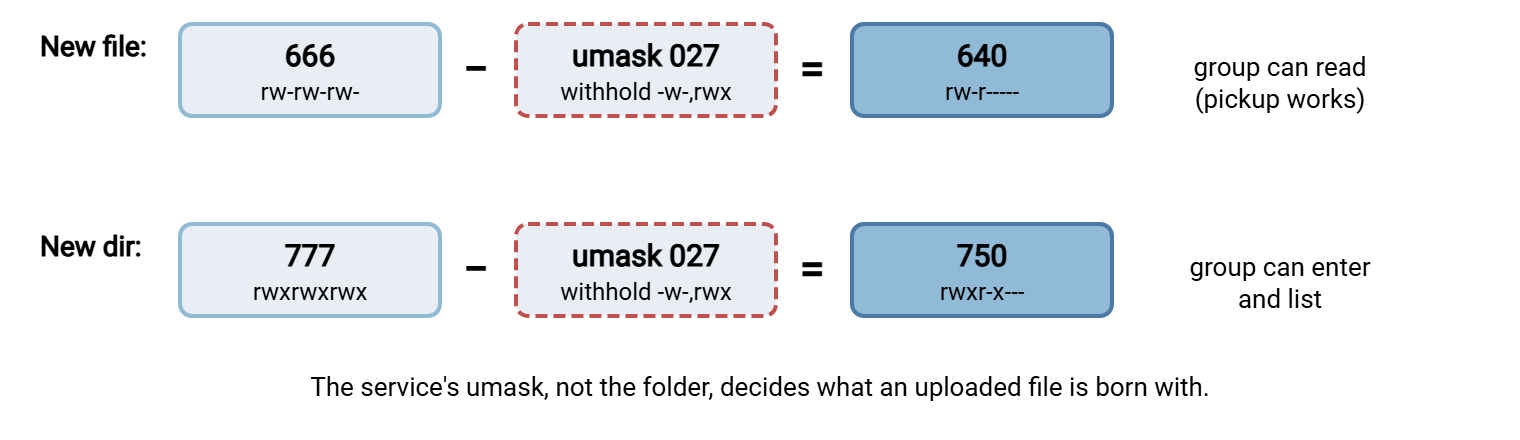
Now the two failure modes have names. A service running with umask 077 strips all group and other bits, so uploads are born 600 — owner-only, unreadable to your pickup group. That is the unreadable upload. A service running with umask 000 or 002 strips little or nothing, so uploads are born 666 or 664 — group- or world-writable. That is the wide-open upload. The umask that lands most uploads in the right place for a pickup-by-group workflow is 027: group can read, nobody else gets anything.
Fixing the unreadable upload on Linux
Here is the classic broken state — a transfer service left at umask 077, so the pickup account (in group fileadmin) cannot read what the partner drops:
    # BEFORE: service umask 077 -> upload born 600, unreadable to the pickup group
$ ls -l /srv/sftp/partnera/in
-rw------- 1 partnera partnera 5120 export.csv
                                       ^ group fileadmin has no read -> pickup stalls
The fix has three parts that reinforce each other. Set the service's umask so group read survives. Make the inbox setgid so new files carry the pickup group rather than the uploader's. As a belt-and-braces guarantee, add a POSIX default ACL, which is inheritance for ACLs. It stamps a predictable entry onto every new file regardless of the umask in play. For an SSH-based server the umask goes on the SFTP subsystem line. The full sshd side is covered in SFTP server configuration:
    # 1) set the SFTP subsystem umask in /etc/ssh/sshd_config, then reload sshd
Subsystem sftp internal-sftp -u 0027

    # 2) setgid on the inbox so new files inherit the fileadmin group
$ sudo chown partnera:fileadmin /srv/sftp/partnera/in
$ sudo chmod 2770               /srv/sftp/partnera/in

    # 3) default ACL: guarantee the pickup group read+traverse on new files
$ sudo setfacl -d -m g:fileadmin:r-x /srv/sftp/partnera/in

    # AFTER: a new upload is born readable by the pickup group
$ ls -l /srv/sftp/partnera/in
-rw-r----- 1 partnera fileadmin 5120 export2.csv
                                       ^ group fileadmin can read -> pickup works
The wide-open version is fixed by the same umask lever pulled the other way. If uploads are arriving 664 or 666, the service is running at umask 002 or 000. In that case, moving it to 027 (or 077 if not even the group should read) closes the exposure. The single most useful habit is to know your service's umask on purpose rather than inherit whatever the init system happened to hand it.
Where a service's umask actually comes from
Here is the trap that sends administrators in circles: a background service does not use your login shell's umask. When you type umask at a prompt, the value you see comes from your shell's startup files. But a daemon inherits its umask from whatever launched it. That is the init system, not /etc/profile and not anyone's .bashrc. So the umask you carefully tested at an interactive prompt can be completely different from the one your transfer service is actually running with. "But I set the umask" is one of the most common dead ends in this whole topic, and this is why.
Set it where the service can genuinely see it. For OpenSSH, the SFTP subsystem -u option shown above is the cleanest lever because it lives with the transfer service itself. For a service managed by systemd, the unit file can carry a UMask= directive, and that is the value the daemon will use. Non-SSH servers — most FTP and FTPS daemons — usually expose their own "upload file permissions" or umask setting in their configuration. That is precisely because they run under a service account whose umask you would otherwise never see. Whichever lever applies to your server, set it deliberately and confirm it with a real upload.
It is worth looking at the default ACL you added, because it is easy to confuse with the folder's own permissions. Default entries are stored separately and marked default:; they are the template stamped onto new children, not rules for the folder itself:
$ getfacl /srv/sftp/partnera/in
# file: srv/sftp/partnera/in
# owner: partnera
# group: fileadmin
# flags: -s-                     <- the s is the setgid bit
user::rwx
group::rwx
other::---
default:user::rwx
default:group:fileadmin:r-x      <- every new file grants pickup read
default:mask::r-x
default:other::---
The plain entries govern the inbox; the default: entries are the template applied to whatever is created inside it. Between the setgid bit, the service umask, and this default ACL, a new upload now has three independent reasons to be readable by your pickup group. For something that must never silently break an automated pipeline, that redundancy is a feature, not overkill.
The Windows Side: ACL Inheritance
Windows has no umask. Its equivalent mechanism is ACL inheritance: a new file's permissions come from the inheritable entries on the folder that contains it. When you grant an ACE on a folder, its inheritance flags decide whether it flows to new children. The flag (OI) object inherit passes it to new files. The flag (CI) container inherit passes it to new subfolders. The flag (IO) inherit-only means the entry applies to children but not the folder itself. A newly uploaded file silently receives every inheritable ACE from its parent, and that set of inherited entries is its entire permission.
This produces the exact same two failures, by a different route. The upload folder may have no inheritable entry for your pickup service — or inheritance may have been switched off so nothing flows down. In either case, a new upload carries only the creator's access, and your pickup account cannot read it: the unreadable upload. If the folder carries a broad inheritable entry such as "Everyone: Modify" or "Users: Full Control," every upload inherits it and lands wide-open. The cause is always the inheritable entries on the inbox, so that is where you look and where you fix.
Remember: a folder's own permissions and the permissions it hands to new files are two different things. On Linux the handoff is the umask (plus setgid and default ACLs); on Windows it is the folder's inheritable ACEs. Fixing the folder you can see does nothing for uploads unless you fix the inheritance rule that stamps the files you cannot see yet.
Fixing the unreadable upload on Windows
The repair is to set the inbox's inheritable entries deliberately. Give the pickup service an object-inherit read entry so every future upload grants it read. Remove any broad entry that would fling files open, and then reset existing files so they pick up the corrected inheritance. The (OI) flag on the pickup grant is the crucial piece — it is what makes the fix apply to files that do not exist yet:
    # start from a clean, non-inherited ACL on the inbox
C:\> icacls D:\ftproot\partnera\in /inheritance:r

    # admins + pickup service get inheritable rights; (OI) reaches new files
C:\> icacls D:\ftproot\partnera\in /grant Administrators:(OI)(CI)(F)
C:\> icacls D:\ftproot\partnera\in /grant FILESRV\svc-transfer:(OI)(CI)(M)

    # the partner may add files but not read or delete them
C:\> icacls D:\ftproot\partnera\in /grant FILESRV\partnera:(WD,AD,X)

    # strip any broad entry that would make uploads world-open
C:\> icacls D:\ftproot\partnera\in /remove:g "Everyone" "BUILTIN\Users"

    # repair files already sitting there: re-inherit from the fixed parent
C:\> icacls D:\ftproot\partnera\in /reset /T
After this, upload a test file and dump its ACL with icacls D:\ftproot\partnera\in\test.csv. The output should show the pickup service's inherited read entry (marked with an (I) for inherited) and no sign of Everyone or Users. That inherited entry is the Windows counterpart to the Linux setgid-plus-umask fix. Both make "the pickup identity can read this" a property every new upload is born with. On a Windows transfer server this inheritance is set on each confined upload folder. Because Sysax Multi Server boxes each account into its own directory, the inbox you apply these inheritable entries to is exactly the one that account can reach, and nothing else.
The (I) marker is also your diagnostic for the unreadable case. Run icacls on a stalled upload: if none of its entries carry an (I), the file inherited nothing. That means inheritance was blocked on the parent (an ACL someone marked "protected"). In that case, the file is carrying only the creator's own access. That is the signature of a broken-inheritance inbox, and the /inheritance:r followed by explicit inheritable grants above is what repairs it. The /reset /T then pushes the corrected inheritance down onto the files that were already stranded.
Set Inheritance on Purpose, Then Test It
The through-line for both platforms is the same: do not accept whatever permission an upload happens to be born with. Decide it, set it, and confirm it. The confirmation step is the one that separates a real fix from a hopeful one, because inheritance rules are invisible in a casual folder listing. The only honest test is to create a file the way a partner does and inspect what appears.
    # Linux: upload as the partner, then check the file as the pickup account
$ sudo -u partnera sh -c 'echo test > /srv/sftp/partnera/in/probe.csv'
$ sudo -u fileadmin cat /srv/sftp/partnera/in/probe.csv    # must succeed

    # Windows: after an upload, inspect the born-with ACL
C:\> icacls D:\ftproot\partnera\in\probe.csv               # expect pickup (I) read, no Everyone
One wrinkle the probe should cover is subfolders. Many upload tools create directories to preserve a folder structure. A new directory that does not carry the inheritance rule will hand the wrong permissions to files uploaded inside it. On Linux the setgid bit propagates to new subdirectories automatically. A default ACL is inherited as the new directory's own default ACL. So both keep working all the way down. On Windows, the container-inherit (CI) flag on your grants is what carries the rule into new subfolders. So upload one level deep as part of the test, not just into the top of the inbox. A fix that works at the top and fails a folder down is worse than no fix, because it looks solved.
Run that probe after any change to a service's umask, an inbox's group, or a folder's inheritance. Run it as part of onboarding every new partner. The auditing article folds this exact check into a recurring review. That is because upload permissions are a classic source of the slow drift that audits exist to catch.
Symptom, Cause, and Fix
| Symptom | Platform | Cause | Fix |
|---|---|---|---|
| Pickup cannot read uploads | Linux | Service umask too tight (077); wrong group | umask 027 + setgid + default ACL |
| Pickup cannot read uploads | Windows | No inheritable entry for the pickup service | Add (OI)(CI) read for pickup; reset files |
| Uploads land world-readable/writable | Linux | Service umask too loose (000 / 002) | Tighten umask to 027 (or 077) |
| Uploads land world-open | Windows | Broad inheritable ACE (Everyone / Users) | Remove it; set specific inheritable entries |
Where This Leaves You
Uploaded files do not inherit a folder's permissions. They are born with permissions of their own, decided by the umask on Linux and by ACL inheritance on Windows. Almost every "unreadable upload" or "wide-open upload" is one of those rules set wrong or left to chance. Fix it by deciding what a new upload should be born with. Set the umask, setgid, and default ACLs (or the inheritable ACEs on Windows) to produce exactly that. Then prove it with a test upload rather than trusting the folder to speak for the files.
The lasting fix is to bake these settings into the template you use for every partner root. That way, a new inbox is born with the right umask behavior, setgid, and inheritable entries. It does not acquire them after the first upload breaks. Inheritance rewards you for deciding once and applying everywhere. The same three commands that fix one inbox, folded into onboarding, mean the problem simply never recurs. The failure only comes back when a folder is created by hand, outside the template. That is one more reason the regular, boring structure from the directory-design article pays off here.
From here, auditing who can touch what turns the test-upload probe into a scheduled review. If you are tightening the server more broadly, the same "set it on purpose" discipline runs through our hardening transfer servers series. If your uploads travel over Windows file sharing rather than a transfer protocol, inherited share and folder permissions behave the same way. See securing SMB.
Frequently Asked Questions
What is a umask in plain terms?
Why does my pickup process get "permission denied" on uploaded files?
How do I set the umask for an SFTP server?
Subsystem sftp internal-sftp -u 0027, then reload the service. Other transfer servers expose an upload-permission or umask setting in their own configuration. Whichever you use, set it deliberately and confirm it with a test upload.What is the Windows equivalent of umask?
(OI) for object inherit. To control what uploads are born with, set the inbox's inheritable entries. Grant the pickup service an inherited read, and remove any broad Everyone or Users entry that would leave files wide-open.Why do uploaded files ignore the permissions I set on the folder?
What does the setgid bit do for uploads?
From the Sysax team: we build secure file transfer software for Windows. Sysax Multi Server is an FTP, FTPS, SFTP, and HTTPS server. Sysax FTP Automation handles scheduled, scripted transfers. Free trials are on the download page.