
Designing Directory Trees for Isolation
Most transfer servers do not serve one partner — they serve a dozen, or a hundred, all landing on the same box. The moment more than one outside party shares a server, a new question appears that no single-user setup ever asks. Can Partner A see, list, or touch anything belonging to Partner B? If the answer is anything other than a flat "no, by construction," you do not have isolation. You have a shared drive with extra steps and a false sense of safety.
The good news is that isolation is mostly a matter of layout. Consider where you put each partner's files, who owns the folders above them, and which small set of permissions you apply. Get those right and the server enforces mutual invisibility on every request, without you trusting anyone to behave. Get them wrong and no amount of strong passwords will stop one partner from reading another's data.
This article shows how to design a directory tree that isolates partners cleanly, with the exact creation commands on both Linux and Windows. It is part of our Permissions series and builds directly on the permission models — bits, ACLs, and virtual users. If those terms are hazy, start there and come back.
Layout Is a Security Control
Administrators tend to treat folder structure as housekeeping — a tidiness preference, not a defense. On a multi-partner transfer server that instinct is exactly backwards. The shape of the tree is the access-control policy. Two design choices carry almost all of the weight:
- Where the boundary sits. Each partner needs a dedicated root — a top folder that is theirs and only theirs. There must be no shared writable space above it that another partner could list. The boundary is a folder, and its ownership and permissions are what make it real.
- What lives inside that root. Use a small, predictable convention — a folder they upload to, a folder they download from. The convention turns "give this partner the right access" from a judgment call into a template you apply identically every time.
Consistency here is itself a security property. When every partner root has the same shape, a wrong permission stands out and an audit is a diff instead of an investigation. In that case, onboarding the hundredth partner is the same three commands as the first. Irregular trees, by contrast, hide their mistakes.
A predictable shape also survives scale. A server with two partners and a server with two hundred use the identical pattern. The only thing that grows is the number of roots beneath the unlistable parent. If the count climbs high enough that even administrators find one flat parent unwieldy, you can group roots a level deeper. You can group them by region, business unit, or onboarding cohort. But the rule never bends: partners still land in their own root and never gain access to any grouping folder above it. The structure scales; the isolation guarantee does not weaken as you add parties.
The Per-Partner Root
The unit of isolation is one root directory per partner, and each root is a jail. This is a subtree the partner's login is confined to and literally cannot name a path outside of. On SSH-based servers this is a chroot (change-root); on a Windows transfer service it is the account's assigned home directory with confinement enabled. Either way, the effect is the same: when the partner logs in, the top of the world they can see is their own root. Paths above it do not exist as far as their session is concerned.
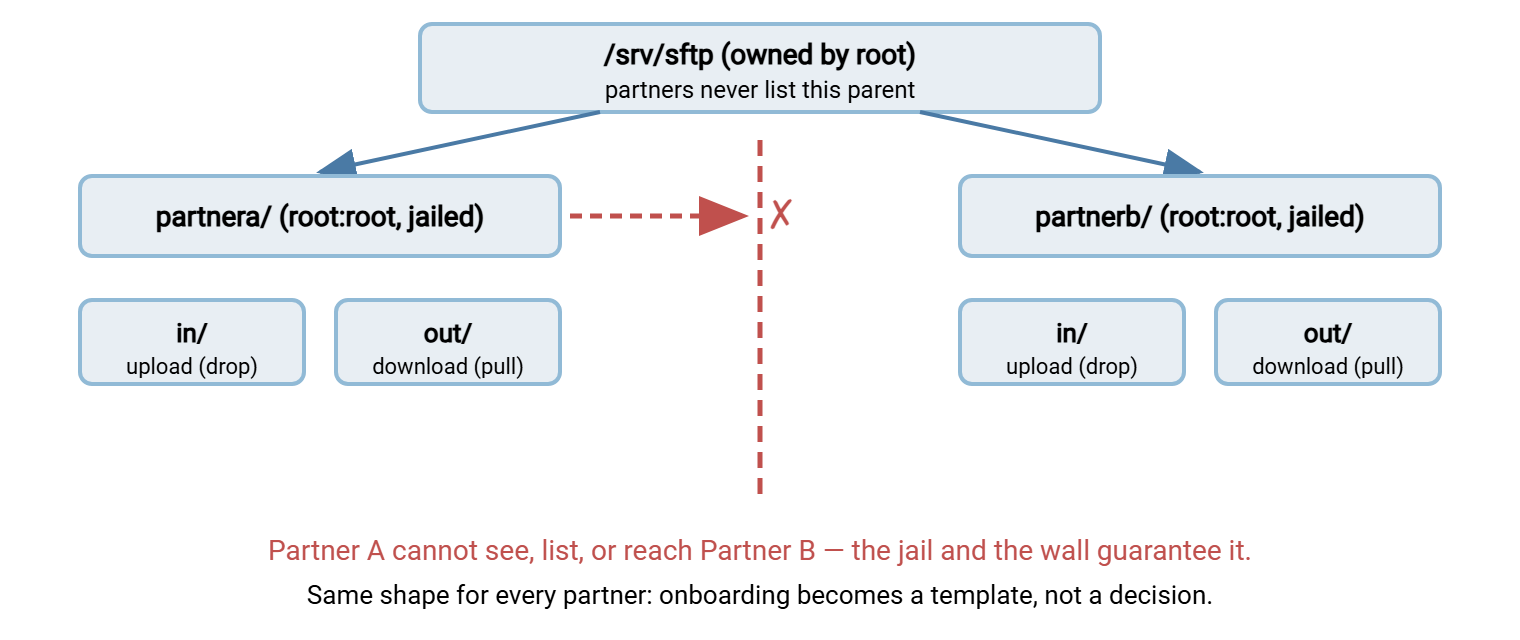
Jailing gives you the first half of mutual invisibility: a partner cannot walk up and over into a sibling's folder, because "up" ends at their jail. The second half comes from the folder above all the roots — the parent that holds every partner's directory. That parent must never be listable or traversable by partners. If it were, a partner could enumerate the names of every other partner's folder, which is an information leak even before anyone opens a file. The fix is simply that partners have no access to the parent at all. The service drops them straight into their own root, and the parent is owned and readable only by administrative accounts.
Remember: isolation needs both halves. Jailing stops a partner reaching out of their own root; keeping the shared parent unlistable by partners stops them enumerating who else is on the server. Miss either and "isolated" is only half true.
Chroot carries one strict rule that trips up nearly everyone the first time, and it is a permissions rule. The jail root — and every directory above it — must be owned by root and must not be writable by anyone else. An SSH server will flat-out refuse the session with a "bad ownership or modes" error if the jail directory is group- or world-writable. That is not a bug; it is the safety check that stops a writable jail root from being abused to escape the jail. The practical consequence is that the partner's root is not where they upload. It is a read-only anchor, and the writable folders live one level inside it. The full mechanics live in our SFTP server configuration guide.
A Convention Inside Each Root: In and Out
Inside every partner root, use the same two-folder convention so the direction of travel is obvious and the permissions write themselves:
in/— the inbox, a write destination. The partner uploads here; a pickup process on your side collects what lands. From the partner's side this is a drop: they add files, they do not manage what is already there.out/— the outbox, a read source. You publish files here for the partner to download; the partner reads and pulls, never writes. This is your read-only distribution channel to that partner.
Many shops add a third, archive/, where the pickup process moves collected uploads. That way, the inbox stays empty and the record of what arrived is kept out of the partner's reach entirely. The naming is a convention, not a rule — upload/download works as well — but pick one naming scheme and use it for every partner, forever. The direction discipline is what matters: the partner writes to exactly one place and reads from exactly one place, and those are different places. Assigning the actual rights to each folder — and the honest limits of "write-only" — is the subject of the least-privilege article. Here we care about the shape.
The diagram below shows the whole design. There is a shared parent that partners cannot list, with two jailed roots side by side, each with its own in and out. There is a wall that guarantees one partner can never reach the other.
Building It on Linux
Here is the whole tree for one partner, created and locked down. The comments call out the two permission facts that make it work. The jail root is owned by root and not writable (so the chroot is accepted). The writable folders sit one level inside it. This example uses a file-administration account, fileadmin, as the pickup-and-publish identity, and a group named for the partner:
$ sudo mkdir -p /srv/sftp/partnera/in /srv/sftp/partnera/out

# --- the jail root: owned by root, not writable by anyone else ---
$ sudo chown root:root /srv/sftp /srv/sftp/partnera
$ sudo chmod 755       /srv/sftp /srv/sftp/partnera

# --- inbox: partner uploads; fileadmin (group) collects. setgid keeps
#     new files in the fileadmin group so pickup can always read them ---
$ sudo chown partnera:fileadmin /srv/sftp/partnera/in
$ sudo chmod 2770               /srv/sftp/partnera/in

# --- outbox: fileadmin publishes; partner (group) reads only ---
$ sudo chown fileadmin:partnera /srv/sftp/partnera/out
$ sudo chmod 2750               /srv/sftp/partnera/out

$ ls -l /srv/sftp/partnera
drwxrws--- 2 partnera  fileadmin 4096 in
drwxr-s--- 2 fileadmin partnera  4096 out
Read the result back and every design decision is visible. The partner root shows root root ownership so the chroot is legal. in/ is owned by the partner (they can write) with group fileadmin (your pickup can read). The s in the group field is the setgid bit doing its inheritance job. out/ flips it: fileadmin owns and writes, the partner's group reads. Neither folder grants "other" anything, so nobody outside these two identities has any path in. To add a second partner you re-run the same block with partnerb — the shape never changes.
One more directory-level fact deserves emphasis because it governs uploads landing safely. Whether a freshly uploaded file is readable by your pickup process depends on the service's umask and on that setgid bit, not on the folder alone. That interaction is the entire subject of the inheritance and umask article; the setgid bit above is the first half of the fix.
Building It on Windows
Windows has no chroot, but a transfer service confines each account to its home directory, and the ACL work is what enforces isolation between partners. The critical move is to break inheritance at each partner root so nothing broad flows down from a parent, then grant only that partner explicitly. If you skip the inheritance step, a permissive ACE on D:\ftproot — an inherited "Users: Read," say — silently reaches into every partner folder. It quietly ruins the isolation you thought you had.
C:\> mkdir D:\ftproot\partnera\in
C:\> mkdir D:\ftproot\partnera\out

REM stop inheritance so no broad parent ACE leaks in
C:\> icacls D:\ftproot\partnera /inheritance:r

REM admins + the pickup service get inheritable control; the partner
REM may traverse the root but not write at the top of the jail
C:\> icacls D:\ftproot\partnera /grant Administrators:(OI)(CI)(F)
C:\> icacls D:\ftproot\partnera /grant FILESRV\svc-transfer:(OI)(CI)(M)
C:\> icacls D:\ftproot\partnera /grant FILESRV\partnera:(RX)

REM inbox: partner may add files but not read the folder; outbox: read only
C:\> icacls D:\ftproot\partnera\in  /grant FILESRV\partnera:(WD,AD,X)
C:\> icacls D:\ftproot\partnera\out /grant FILESRV\partnera:(OI)(CI)(RX)
The isolation guarantee on Windows is this: partnerb is never granted an ACE anywhere under D:\ftproot\partnera, and inheritance from the parent is severed. So partnerb has no rights there — cannot open it, cannot list it, cannot learn it exists through the filesystem. Just as important, D:\ftproot itself grants partners nothing, so no one can enumerate the set of partner folders. The parent is administrators-only; each partner sees a world that begins at their own root. On Windows this per-account confinement plus per-user authentication is exactly what a server product supplies out of the box. Sysax Multi Server boxes each account into its own directory rather than exposing the wider disk. This is the Windows counterpart to the Linux chroot above.
The Pitfalls of Shared Areas
Sooner or later someone asks for a shared folder — a "common" or "public" area two or more partners can both reach. Usually, the request is to hand a file from one to another or to publish something to everybody. Treat that request as a design smell. A shared writable area is precisely the place isolation breaks, and it fails in more ways than people expect:
- Filenames leak. A folder both partners can list reveals the other's filenames — which often encode customer names, order numbers, dates, or project codes. That is a disclosure even when nobody opens a single file.
- Cross-tampering. If both can write, either can overwrite or delete the other's files, whether by malice, a scripting bug, or a colliding filename. One partner's mistake becomes another partner's incident.
- It becomes a dumping ground. Shared areas accumulate files nobody owns, nobody cleans up, and nobody can safely delete because it is unclear who still needs them. The permissions rot along with the contents.
- Anonymous drop abuse. A world-writable shared folder is a magnet for misuse as a staging spot for other people's files. The failure modes are covered in our anonymous and guest access series.
The fix is almost always to replace the shared area with directed copies. If Partner A must hand a file to Partner B, your pickup process takes it from A's in/ and places a copy into B's out/. Each partner still touches only their own root. The crossing happens under your control, logged, in the middle — never by giving two outside parties a room they both stand in. If you genuinely need many-to-one collection (several partners feeding one internal team), that is not a shared partner area at all. It is each partner's private inbox plus one internal process that reads them all. The partners never share a folder — your side does the fan-in.
Prove the Isolation Holds
A design is only as trustworthy as the test that confirms it. Isolation is the one property you must never take on faith from a configuration screen. Prove it the way an outsider would probe it: act as one partner and try to reach another. Every attempt should fail cleanly, and the partner's own session should begin at their own root and nowhere higher.
    # Linux: act as partnerb and try to reach partnera's tree
$ sudo -u partnerb ls /srv/sftp/partnera     # expect: Permission denied
$ sudo -u partnerb ls /srv/sftp              # expect: Permission denied
$ sudo -u partnerb cat /srv/sftp/partnera/out/pricelist.csv   # denied

    # Windows: confirm partnerb has no ACE anywhere under partnera
C:\> icacls D:\ftproot\partnera              REM no FILESRV\partnerb line
    # then use the file's Security tab -> Advanced -> Effective Access,
    # pick partnerb, and confirm every box is empty for partnera's tree
Two outcomes matter, and you should see both. First, a cross-partner read is refused at the filesystem, not merely hidden by the application. That is the guarantee that survives even if the transfer service is misconfigured. Second, when the partner connects over the transfer protocol itself, the top of the world they can list is their own root. That root contains only in/ and out/. Fold this pair of checks into onboarding so no partner ever goes live unverified. Revisit it in the auditing article, which turns the spot check into a scheduled review that catches drift over time.
A Reference Layout
Pulling it together, here is the standard shape and who holds which rights. This table is the template to copy for every partner. If a folder on your server does not match one of these rows, that is the folder to look at first.
| Folder | Purpose | Partner can | Your side can |
|---|---|---|---|
partnera/ (root) |
Jail anchor; nothing lives here | Traverse only | Own it (root/admin), full control |
in/ |
Partner uploads land here | Write / add files | Read and collect |
out/ |
You publish for partner to pull | Read only | Write and manage |
archive/ (optional) |
Collected uploads, kept for record | No access | Write and read |
Two habits keep the reference layout honest over time. Never reuse a partner root for a different partner — retire it, and create a fresh one. A recycled folder can carry stale files or leftover ACEs from the previous occupant, and that is a disclosure waiting to happen. And when a partner relationship ends, remove the whole root and the account together rather than merely disabling the login. A jailed root with no live account is exactly the kind of orphan the auditing article hunts for. Every folder you leave behind is one more thing a single stolen credential might reach, as the blast-radius article spells out.
Where This Leaves You
A directory tree designed for isolation is not clever — it is boringly regular, and that is the point. One jailed root per partner, an unlistable parent above them, the same in-and-out convention inside each, and directed copies instead of shared rooms. Applied consistently, the structure makes mutual invisibility a property of the server rather than a promise you have to trust anyone to keep. It also makes the next partner an identical template instead of a fresh judgment call.
From here, the natural next step is least privilege in practice. It decides the exact rights each of these folders grants and makes the honest case about write-only drops and delete permission. If your partners reach files over Windows file sharing rather than a transfer protocol, the same isolation thinking applies to shares. See securing SMB. The chroot mechanics behind the Linux examples are in SFTP server configuration.
Frequently Asked Questions
Why must the chroot jail root be owned by root and not writable?
How do I guarantee one partner cannot see another's folder?
What is the point of separate in and out folders?
in/ and reads from out/, and those are different folders with different rights. That separation prevents a partner from reading files they should only be dropping, or overwriting files they should only be pulling. That separation makes your pickup and publish processes trivial to point at the right place.Is a shared folder between two partners ever okay?
Does this work the same on Windows as on Linux?
From the Sysax team: we build secure file transfer software for Windows. Sysax Multi Server is an FTP, FTPS, SFTP, and HTTPS server. Sysax FTP Automation handles scheduled, scripted transfers. Free trials are on the download page.