
The SFTP Server's Control Panel: Subsystem, Chroot, and Cipher Configuration
Running an SFTP server looks deceptively finished out of the box: install an SSH server, create an account, and transfers work. The gap between "works" and "safe to give a partner" is configuration. A surprisingly small set of directives decides who can log in and what they can see. They decide whether users get a shell they should never have, and which cryptography protects the session. Small set, high stakes: one wrong ownership bit on a jailed directory locks every user out with a baffling error. One careless copy-pasted "hardening" list can cut off a partner's aging client at 2 a.m.
This tutorial walks the control panel in the order you should touch it. It starts with the subsystem directive that turns an SSH server into an SFTP server, then per-group overrides with Match blocks. Next comes the chroot jail that confines users to their own folder (including the ownership trap that catches nearly everyone once). Then comes a cipher and key-exchange policy chosen with reasoning rather than superstition, and a test sequence that proves the lockdown actually locks. Examples use OpenSSH's sshd_config because it is the lingua franca every administrator eventually reads. But every concept maps directly onto GUI-configured servers, including on Windows, as the final section shows. This is part of our SFTP In Depth series; the architecture behind these knobs is explained in how SFTP actually works.
Where SFTP Configuration Lives
An SFTP service is a feature of an SSH server, so its configuration lives in the SSH server's config — on OpenSSH, the file sshd_config. Two directives there define the SFTP side of life.
The Subsystem line tells the server what to do when a client requests the "sftp" subsystem. There are two classic values:
# Option A: launch a separate helper program per session
Subsystem sftp /usr/lib/openssh/sftp-server

# Option B: serve SFTP from inside the SSH daemon itself (preferred)
Subsystem sftp internal-sftp
Functionally they speak the same protocol. The practical difference: internal-sftp runs inside the SSH daemon, needs no helper binary to exist inside a jail, and accepts useful options such as a per-user umask. The moment you plan chroot jails, internal-sftp stops being a preference and becomes the only sane choice. A jailed user has no access to /usr/lib/anything, so an external helper simply cannot start.
Match blocks are the other half of the control panel. A Match line starts a conditional section applying only to certain users, groups, or source addresses. Everything after it (until the next Match) overrides the global settings for that population. This is how one server serves two worlds: administrators with shells and keys, and transfer-only accounts locked in jails. Almost every serious SFTP configuration is a short global section plus one Match Group section.
The Directives That Matter
Before the worked example, the short list worth knowing on sight — the vocabulary of nearly every SFTP lockdown discussion:
| Directive | What it controls | Sensible posture for transfer accounts |
|---|---|---|
Subsystem sftp |
How SFTP requests are served | internal-sftp |
ChrootDirectory |
The directory the user sees as "/" | A per-user or per-partner jail (rules below) |
ForceCommand internal-sftp |
Ignores whatever the client asked for and serves only SFTP | Always, inside the transfer Match block — this is the "no shell, ever" switch |
AllowTcpForwarding, X11Forwarding, PermitTTY |
SSH extras: tunnels, graphical forwarding, terminals | no — a transfer account needs none of them |
AllowGroups |
Which accounts may authenticate at all | An explicit allow-list; membership is deliberate |
PasswordAuthentication, AuthenticationMethods |
How users prove identity | Keys for automation; combinations per policy — see the authentication guide |
Ciphers, MACs, KexAlgorithms |
The cryptography menu offered to clients | Modern defaults, trimmed deliberately (reasoning below) |
LogLevel |
How much the server records | At least INFO; VERBOSE while commissioning |
Jailing Users: ChrootDirectory Done Right
A chroot jail changes what a user perceives as the root of the filesystem. Jailed to /srv/sftp/acme, the partner account sees that folder as /. No path trick — no cd .., no absolute path — leads above it, because from inside the jail there is no "above." For multi-partner servers this is the difference between isolation and an honor system. Without a jail, any authenticated account can wander the entire directory tree reading whatever the permission bits happen to allow.
Here is the standard pattern — a dedicated group, a Match block, and one jail per partner:
# --- sshd_config ---
Subsystem sftp internal-sftp

Match Group sftponly
    ChrootDirectory /srv/sftp/%u        # %u = the username
    ForceCommand internal-sftp -u 0027  # sftp only; umask sets group-readable files
    AllowTcpForwarding no
    X11Forwarding no
    PermitTTY no

# --- shell commands: create the jail for user "acme" ---
groupadd sftponly
useradd -g sftponly -s /usr/sbin/nologin acme

mkdir -p /srv/sftp/acme/incoming
chown root:root /srv/sftp/acme          # jail root: owned by ROOT
chmod 755 /srv/sftp/acme                # and not writable by anyone else
chown acme:sftponly /srv/sftp/acme/incoming   # the writable folder INSIDE
chmod 750 /srv/sftp/acme/incoming
And here is the trap that generates more confused tickets than any other line in this article. Every directory in the chroot path — the jail itself and every parent above it — must be owned by root and writable by no one else. The SSH server checks this before entering the jail, and if any component fails the check, it refuses to proceed. In that case, the user authenticates successfully and is then disconnected instantly. The client-side message is as unhelpful as "Connection closed" or "broken pipe." Nothing in that message says "your chroot ownership is wrong," which is why administrators lose afternoons to it.
The rule exists for a solid reason. If a user could write to the jail's root directory, they could manipulate its contents to break confinement or escalate privileges. The classic tricks involve hard links and swapped directories. The server refuses to gamble. But the rule collides with the obvious need for users to upload. Hence the two-level pattern above uses a root-owned, non-writable jail, containing a user-owned subdirectory (incoming/) where writing happens. Users land in /, see incoming/, and work there.
The diagram shows the mapping — what the administrator maintains versus what the jailed user experiences.
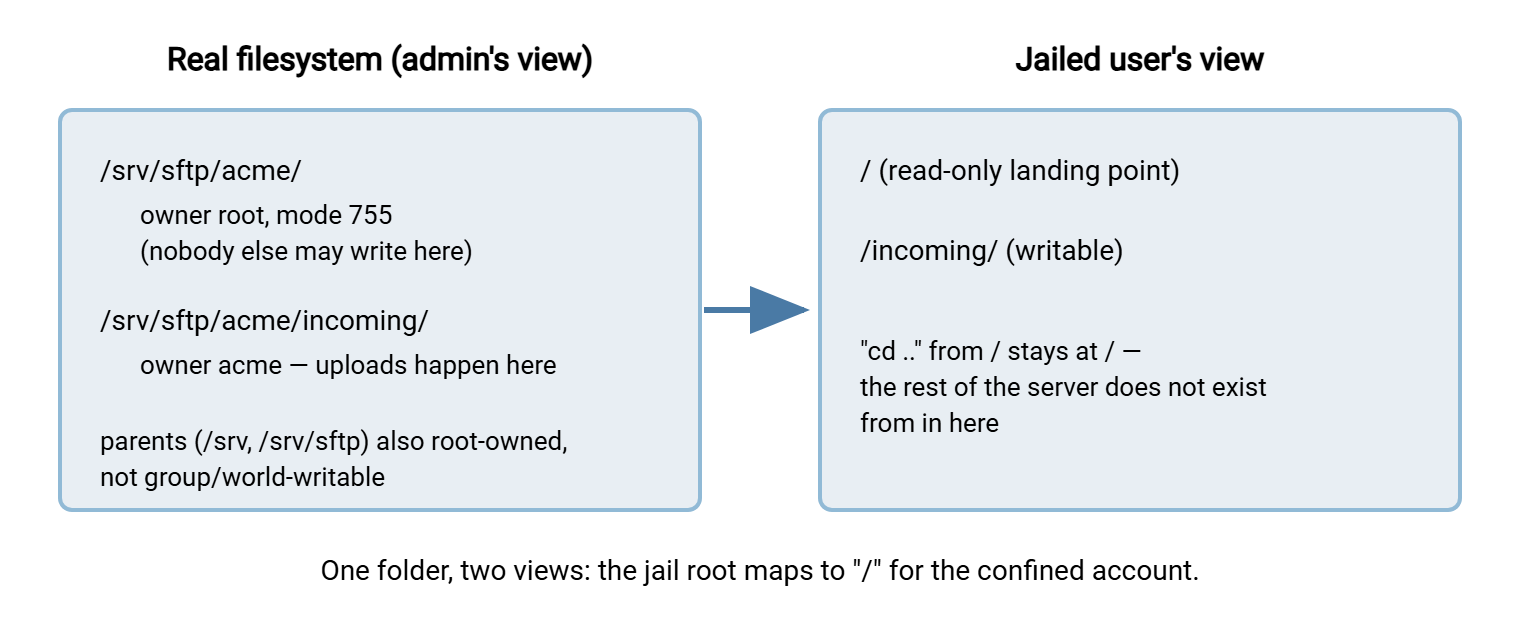
The jail's internal layout is a design choice, and directory permissions are the vocabulary. Three shapes cover most needs. One is a drop-box (partner uploads to incoming/, your process collects and removes — the shape shown above). Another is a pick-up window (you publish into an outgoing/ folder owned by your process, readable but not writable by the partner). The third is a two-way exchange containing both. Since a jailed account can only work where the directory permissions allow, "upload-only" and "download-only" fall out of ownership and mode bits rather than special server features. Sketch the shape before creating accounts — retrofitting a jail layout after a partner has hard-coded paths into their automation is a diplomatic exercise you can avoid.
Remember the ownership trap: if a jailed user is disconnected immediately after a successful login, check the chroot path first. The jail directory and every parent must be owned by root and writable only by root. Give users a writable subdirectory inside the jail — never the jail root itself.
Ciphers and Key Exchange: Policy With Reasoning
Every session negotiates four algorithm choices. There is a key exchange method (how both sides derive session keys), and a host key algorithm (how the server proves identity). There is a cipher (how traffic is encrypted), and a MAC (how traffic is integrity-checked). The server offers a menu; the client picks the first mutual match. Your policy is the menu, and two principles produce a good one.
Principle one: a maintained implementation's defaults are already good. Modern SSH server defaults lead with well-regarded choices — ChaCha20-Poly1305 and AES-GCM ciphers. Both are AEAD designs, meaning encryption and integrity in one construction, removing the separate-MAC pitfalls. The defaults also lead with elliptic-curve key exchange. You are rarely improving on the defaults; you are mostly trimming the backward-compatibility tail.
Principle two: trim deliberately, with a name and a reason. Here are the entries worth removing, and why. They include CBC-mode ciphers (the older cipher construction with a history of padding-oracle weaknesses — AEAD replaced them for a reason). They include MACs based on the retired SHA-1 hash. They also include legacy small-group key exchange (the "group1" style methods whose fixed groups are within reach of well-resourced attackers). What you should not do is paste an internet "hardening" list unread. Overly aggressive lists strip algorithms that older partner clients and appliances still need. The resulting failure — "no matching cipher found," or just a partner's job silently dying — arrives at the worst hour. Check what your server supports (ssh -Q cipher, ssh -Q kex, ssh -Q mac list the names). Check your server's negotiated sessions in the logs to learn what clients actually use, then trim.
# A defensible, compatibility-aware policy: modern first, no CBC, no SHA-1 MACs
Ciphers chacha20-poly1305@openssh.com,aes256-gcm@openssh.com,aes128-gcm@openssh.com,aes256-ctr,aes128-ctr
KexAlgorithms curve25519-sha256,curve25519-sha256@libssh.org,diffie-hellman-group16-sha512,diffie-hellman-group-exchange-sha256
MACs hmac-sha2-512-etm@openssh.com,hmac-sha2-256-etm@openssh.com,hmac-sha2-512,hmac-sha2-256

# Host keys: offer a modern key plus RSA for older clients
HostKey /etc/ssh/ssh_host_ed25519_key
HostKey /etc/ssh/ssh_host_rsa_key
Host keys deserve their own minute. Generate both an Ed25519 and an RSA host key so old and new clients can each verify you. Guard the private halves like the credentials they are, and publish your fingerprints where partners can check them. If a host key must ever change, announce it ahead of time — every correctly configured client will otherwise refuse to connect, loudly, exactly as designed.
Testing Your Lockdown
Configuration is a claim; testing is the proof. Six checks, in order, turn "should be locked down" into "verified":
# 1. Syntax-check before reloading — a typo can lock YOU out too
sshd -t

# 2. Print the effective config for a jailed user (Match results included)
sshd -T -C user=acme,addr=203.0.113.20 | grep -Ei 'chroot|forcecommand|tcpforward'

# 3. Shell must be refused...
ssh acme@files.example.com
#    expect: "This service allows sftp connections only." (or disconnect)

# 4. ...while SFTP works, lands in the jail, and cannot climb out
sftp acme@files.example.com
sftp> pwd            # expect: /
sftp> cd ..          # expect: still /
sftp> put test.txt   # at jail root: permission denied (root-owned, by design)
sftp> cd incoming
sftp> put test.txt   # expect: success

# 5. Confirm the negotiated crypto is from your approved list
ssh -vv acme@files.example.com 2>&1 | grep -i 'kex: server->client'

# 6. Read the server's own log for the session — auth method, chroot, transfers
Two habits complete the discipline. Re-run the sequence after every configuration change, not just the first time — regressions in access control are silent until someone hostile finds them. And test from the outside world (a partner-like network position), because a firewall or address-based Match rule can make the same server behave differently per source. When a partner integration is involved, have the partner run steps 3 and 4 too; their client, their network path, their algorithms.
Logging: The Cheap Directive Everyone Skips
A transfer server without useful logs is unauditable, and SFTP needs one extra step here that surprises people. The SSH server's normal log records sessions — who connected, how they authenticated, when they left — but not file activity. To see opens, reads, writes, renames, and deletions, the SFTP subsystem itself must log, which internal-sftp does when given a level:
Match Group sftponly
    ChrootDirectory /srv/sftp/%u
    ForceCommand internal-sftp -u 0027 -l INFO
    # -l INFO records file operations per session:
    #   "open /incoming/orders.csv flags WRITE,CREATE mode 0640"
    #   "close /incoming/orders.csv bytes read 0 written 8442112"
Set it, and questions that were previously unanswerable — did the partner's upload complete? who deleted that file? what time did the feed actually arrive? — become one grep. Three habits make the logs earn their disk space. Raise the level to VERBOSE while commissioning a new partner (then drop back to INFO once stable). Retain long enough to cover your slowest-noticed incident class (a quarter is a common floor). Skim the authentication log's failure noise periodically — a spike of failures against a service account is your earliest sign that someone is probing it. GUI servers make the same point differently: activity logging is a first-class feature in Sysax Multi Server. That is precisely because "prove what happened" is half of what a transfer server is for.
The Same Concepts, Windows Edition
Everything above is concept-portable, and Windows administrators have two routes to it. The first is OpenSSH on Windows, which brings the same sshd_config grammar with wrinkles. The config lives under ProgramData, and accounts are Windows accounts. The chroot pattern and ownership semantics differ because NTFS ACLs are not POSIX modes. Administrator-group users read keys from a special shared file. This route is workable, but the sharp edges are real. The POSIX-to-Windows translation quirks described in SFTP's file operations apply in full.
The second route is a native Windows SFTP server configured through a GUI. Sysax Multi Server is built for exactly this: SSH2/SFTP support alongside FTP, FTPS, and HTTPS. Accounts, folder access, encryption settings, and activity logging are managed from the server's configuration interface instead of a config file. The concepts you have just learned are the same decisions under different labels. Restricting an account to its own folder is the jail; choosing encryption settings is the cipher policy. The activity log is your step-6 verification. So the mental model transfers intact even though no sshd_config exists. Whichever route you choose, run the same lockdown tests; the protocol does not care how the server was configured, and neither does an attacker.
The Version to Tell a Colleague
An SFTP server's control panel is small. It includes a Subsystem line (use internal-sftp), a Match block for the transfer group, and a chroot jail per user or partner. It also includes SSH extras switched off with ForceCommand and friends, and an algorithm menu trimmed with reasons. The jail has one famous trap. Root must own the jail directory and every parent, writable by no one else, with a user-owned subdirectory inside for uploads. The trap's symptom is "logs in, instantly disconnected." Cipher policy is mostly trusting modern defaults and deliberately removing CBC, SHA-1 MACs, and legacy key exchange after checking what your clients actually use. Then prove all of it with a six-step test, and re-prove it after every change.
Natural next steps: set up the accounts' credentials properly in SFTP authentication, and make the jobs that will use this server run cleanly unattended in non-interactive SFTP.
Frequently Asked Questions
How do I set up an SFTP server on Windows Server?
My jailed user logs in and is instantly disconnected — why?
What is the difference between internal-sftp and sftp-server?
Why can't my user upload to the top level of their jail?
Which ciphers should I disable on an SFTP server?
Do configuration changes take effect immediately?
Can I do all of this on Windows without editing config files?
From the Sysax team: we build secure file transfer software for Windows. Sysax Multi Server is an FTP, FTPS, SFTP, and HTTPS server. Sysax FTP Automation handles scheduled, scripted transfers. Free trials are on the download page.