
FTP Account Models: Anonymous, Real Users, Virtual Users, and Isolation
A surprising number of FTP mysteries have nothing to do with the network. The upload "vanished" but really landed in another folder. The login fails even though the Windows password is definitely right. The partner can suddenly browse directories they were never meant to see. These are all account model problems. How a server decides who you are, and what the filesystem looks like once you are in, varies more between FTP setups than almost anything else about them.
There are three classic models: anonymous access, real system accounts, and virtual users. There is also one cross-cutting discipline, isolation, that determines whether users are sealed inside their own folders or free to wander. This article explains how each model actually works and why virtual users became the standard for serious deployments. It explains how to verify isolation with your own hands. It also explains how to migrate from one model to another without breaking the partners and devices that depend on you. It is part of our The FTP Protocol series. It assumes nothing beyond a working idea of what an FTP server is. If you want that refresher first, our blog post What is an FTP server? covers it.
What an FTP Account Actually Decides
Strip away the vendor differences and every FTP account is the server's answer to four questions:
- Identity: who is this, and does the offered password prove it? (Checked against some user store — which store is exactly what the three models differ on.)
- Root: when this user asks for
/, which real folder do they get? FTP paths are always relative to a root the server chooses per account — "/" is a decision, not a fact. - Rights: what may they do there — list, download, upload, delete, rename, create folders?
- Limits: how much — disk quota, concurrent connections, bandwidth?
Keep those four in mind and the models sort themselves out: they are just different places to store the answers. Keep them in mind during incidents, too. The failure modes field guide is full of tickets (mysterious 530s, uploads landing "nowhere," 550 permission surprises) that are really questions two and three misunderstood.
Anonymous FTP: The Public Reading Room
Anonymous FTP is the guest entrance. By a convention honored by servers for decades, a user named anonymous (or the shorter ftp) may log in without a real password. Courtesy tradition asks the visitor to offer their email address as the password; servers rarely verify it, and most accept anything. What the visitor gets is whatever the administrator granted the guest account — classically, read-only access to a public distribution area.
On the wire, the guest entrance looks like any other login — which is worth seeing once, because it demystifies the whole convention:
USER anonymous
331 Guest login ok, send your email address as password.
PASS alex@example.com                    # courtesy only — rarely checked
230 Guest login ok, access restrictions apply.
Note that final phrase: access restrictions apply. Anonymous is not a security hole by definition — it is an account like any other, with whatever root, rights, and limits the administrator gave it. The model built the download culture of the early internet. Universities and vendors ran vast anonymous archives, and "get it from our FTP site" was how software moved. The pattern survives today in narrower niches — public mirrors, internal distribution points for firmware and installers, drop zones for lab equipment. It fits anywhere the content is genuinely public (at least within the network) and identity genuinely does not matter.
Anonymous FTP has one famous failure pattern: the writable guest directory. Some sites paired the read-only archive with an incoming folder where anyone could upload. Every administrator who ran one learned the same lesson. An anonymous, writable, internet-reachable folder becomes a swap meet for strangers' files, storage abuse, and worse. If you run anonymous access today, the rules are short. Keep it read-only, always; isolated to its own folder tree; with nothing sensitive within reach. Keep logging on, so you know what is being fetched and how often.
Real System Accounts: Logging In as Yourself
The second model is the oldest: the FTP server checks credentials against the operating system's own user store. The logged-in session wears that OS identity. On Windows that means Windows accounts (local or domain); on Unix-family systems, the system password database. The user typically lands in their OS home directory with their OS permissions.
The appeal is real: no second user store to maintain, central password policy applies automatically, and file ownership on disk maps to actual people. For a small internal server where the users are employees who already have accounts, it is the low-friction option. Plenty of such servers run happily this way.
The flavor differs by platform. Unix-family FTP servers traditionally consult the system password database directly, which historically produced its own genre of surprises. Accounts intended only for services could suddenly transfer files. Administrators learned to maintain explicit deny lists of system accounts that must never log in over FTP. On Windows, a server using real accounts authenticates against local or domain users. That means domain password policy, lockout rules, and group memberships all silently apply to FTP sessions. It is convenient and centralized right up until a partner's misbehaving script locks out a domain account that something else depended on.
The costs surface as soon as the server faces anything less trusted than your own staff:
- The password crossing the wire is an OS password. Plain FTP sends credentials as readable text, so what a capture exposes is not "an FTP password." It is a real login to your operating system, possibly a domain. That single fact should disqualify plain-FTP-with-system-accounts from crossing any untrusted network. If the model must stay, the transport should move to encrypted FTPS or SFTP. Those have their own series at FTPS in depth and SFTP in depth.
- The account can do more than FTP. An OS account often carries other doors — interactive login, remote desktop, network shares. Granting a file-transfer partner an OS account grants a bundle, and every bundle is a bigger prize.
- Offboarding gets entangled. Disable the account and their FTP dies with everything else; keep it for FTP and you are maintaining a live OS credential for an outsider.
If you use system accounts deliberately, use dedicated ones: purpose-created accounts with no interactive rights, membership in nothing, and access to exactly one folder tree. Which is — as you are about to see — most of the way to reinventing the third model.
Virtual Users: Accounts That Exist Only Inside the Server
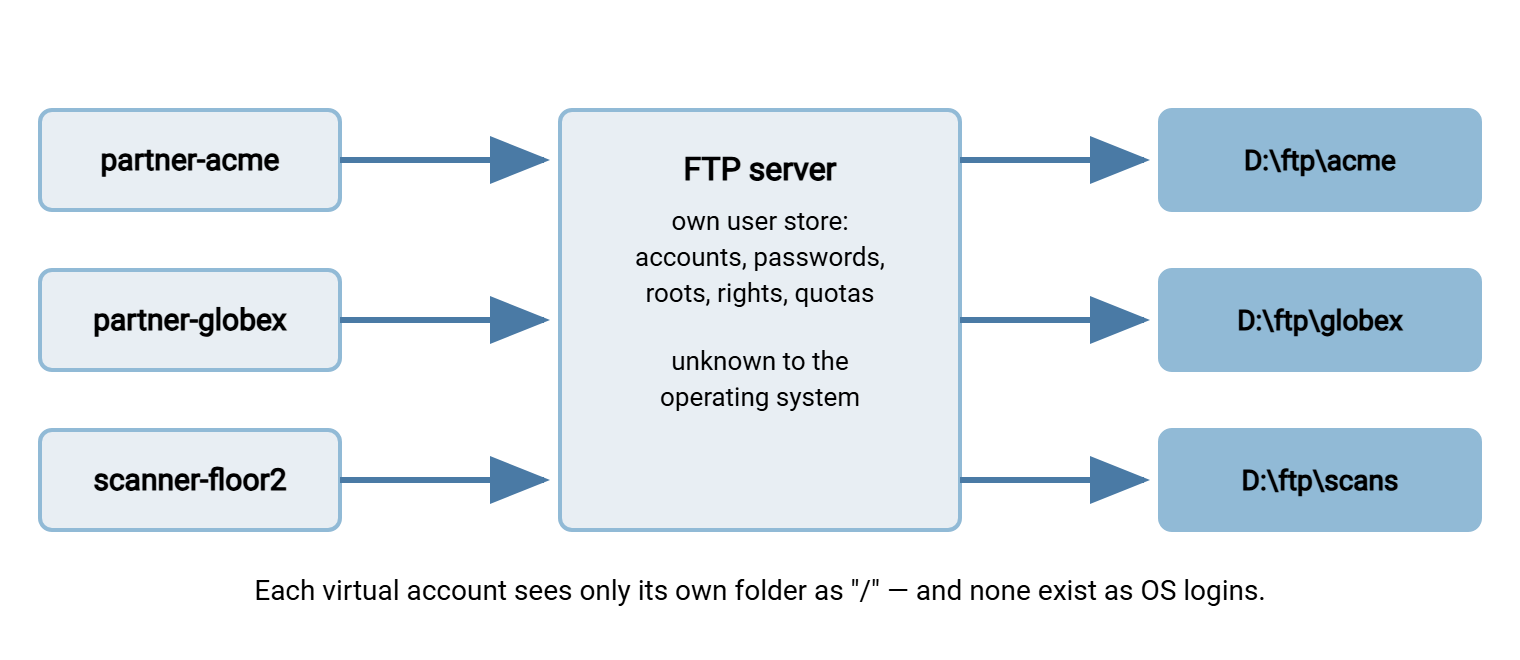
A virtual user is an account defined in the FTP server's own configuration or database rather than in the operating system. To the OS, the person does not exist. The server authenticates them against its private user store, then performs their file operations through a service identity of its own. Each virtual user carries their own answers to the four questions: their own password, their own root folder, their own rights and limits.
This model won, and deserves to have won, for reasons that map straight onto the weaknesses above:
- Contained blast radius. A leaked virtual-user password opens one folder on one service — not a machine, not a domain. The credential is worthless anywhere but the FTP server.
- Provisioning is trivial and safe. Onboarding a new partner is a row in the server's user store and a folder. It is not a new OS principal with group memberships to argue about. Deprovisioning is deleting the row, with no collateral damage.
- Per-partner everything. There is one account per partner, each sealed in its own folder, each with its own quota and rights. That is the natural shape for a server that faces many outside parties.
- Clean audit. The server's activity log shows meaningful names doing exactly the things file-transfer accounts do, with no OS noise mixed in.
Virtual users are not only for humans and partners. The same logic applies to unattended clients: the scan-to-FTP copier, the camera exporting footage, and every scheduled transfer job deserve their own accounts too. One account per device or job means one credential to rotate when a device is replaced and one row to disable when a job retires. It means a log that says which machine did what. On the client side of that equation, a scheduling tool such as Sysax FTP Automation stores connection settings per job. That pairs naturally with a per-job virtual account: the job's identity, credentials, and folder scope all travel together.
On Windows, the virtual model is what a dedicated server product gives you out of the box. In Sysax Multi Server, accounts are created in the server's configuration with their own credentials and folder access. So a transfer login never has to be a Windows login. The diagram below shows the structure that results.
Isolation: Making "/" Mean "Your Folder and Nothing Else"
Whichever model authenticates the user, a second decision determines what they can see. Is the account jailed to its own folder tree, or can it roam? Jailing is historically called a chroot on Unix-family systems. In Windows server products it is usually a per-account root or home folder setting. It means the server presents the account's assigned folder as the root of the visible world. To the jailed user, / is their folder; parent directories are not hidden so much as nonexistent.
The case for jailing everyone is easy to make. An unjailed account can browse whatever the underlying permissions allow. On servers configured in a hurry, that has historically meant other users' files and even system directories. Every one of those exposures becomes impossible when the account's world simply ends at its own root. Jail by default; unjail only named internal accounts with a written reason.
Never assume isolation — verify it, from a real client, with the account in question. The test takes thirty seconds and is worth running after every account change:
ftp> pwd
257 "/" is the current directory.        # the account's root looks like "/"
ftp> cd ..
250 CWD command successful.              # some servers accept the command...
ftp> pwd
257 "/" is the current directory.        # ...but the jail held: still "/"
ftp> cd /etc
550 Failed to change directory.          # the outside world does not exist
ftp> put probe.txt
226 Transfer complete.                   # can write where intended...
ftp> delete probe.txt
250 Delete operation successful.         # ...and clean up. Rights are as designed.
If step three ever shows a directory above the account's root, stop and fix the account before anything else you had planned that day.
Isolation combines with rights to produce useful specialty shapes. The most valuable is the write-only drop folder: an inbound account that may upload but not download or list. A partner can therefore deliver files without ever being able to read — or even enumerate — what anyone else delivered. The mirror image, a read-only pickup folder, suits distribution. Both patterns fall straight out of the four questions: same jail machinery, different rights column. When you design a partner account, decide the direction of the flow first and grant only the verbs that direction needs.
Remember: a partner-facing transfer account should never be an operating-system login, and never see more than its own folder. Virtual user plus jail is the combination that makes a leaked password a small incident instead of a breach.
Choosing a Model: The Decision Table
| Question | Anonymous | Real system accounts | Virtual users |
|---|---|---|---|
| Identity store | None (guest convention) | Operating system / domain | The server's own config or database |
| Best for | Public or internal read-only distribution | Small trusted internal user groups | Partners, devices, automation — most servers |
| If the password leaks | Nothing to leak | A real OS/domain credential is exposed | One folder on one service is exposed |
| Provisioning effort | One-time setup | OS account creation, groups, policy | A row in the server's user store |
| Default isolation stance | Jail, read-only, always | Jail unless there is a written reason | Jail, per account, by design |
Migrating Between Models
Most migrations run in one direction: away from shared or system accounts, toward per-user virtual accounts. The work is not technically hard; it is an exercise in not breaking the quiet dependencies. Those are the scheduled scripts and scan-to-FTP devices that log in unattended and cannot read your announcement email. (Finding those is a discipline of its own, covered in reading the FTP automation you inherited.)
The migration checklist, in the order that avoids surprises:
- Inventory real usage. Pull the server's activity log for a full business cycle — month-end jobs only show up at month end. List every account that actually logged in, from where, doing what.
- Record each account's current world. Its effective root folder, its rights, and the paths its sessions actually touched. This is the contract your new accounts must honor.
- Create virtual twins. One virtual user per human, device, or job — splitting any shared account into one account per consumer while you are at it. Same folder view, least-privilege rights, jail on.
- Test the twins with the real workflows. Not just an interactive login: run the actual script, trigger the actual device. Unattended clients are where migrations fail.
- Cut over one account at a time. Distribute new credentials securely, switch the consumer, and watch the first real session in the log before moving to the next.
- Close the old doors. Disable FTP access for the OS accounts (or the old shared account), leaving their other functions untouched.
- Watch for stragglers. Failed-login attempts against retired accounts over the following weeks are your map of the dependencies you missed.
Migrating off anonymous access follows the same rhythm. Enumerate the consumers, issue each a virtual account, and run both doors in parallel while consumers move. Then close the guest entrance and watch the log.
The Short Version
An FTP account is four decisions — identity, root, rights, limits. The three models are just different places to keep those decisions: nowhere (anonymous), in the OS (real accounts), or in the server itself (virtual users). Virtual users plus per-account jails won because they make the everyday operations — onboarding, offboarding, and surviving a leaked password — small instead of dangerous. Verify isolation with your own client, migrate account by account with the log open, and most of this article becomes routine.
To keep building: the failure modes field guide shows how account misconfigurations look from the outside when they break. The FTP lab guide gives you a disposable server where you can build all three models and test every jail without a change ticket.
Frequently Asked Questions
What password do I use for anonymous FTP?
What is the difference between a virtual user and a Windows user?
How do I stop FTP users from seeing each other's files?
Can one server mix anonymous, real, and virtual accounts?
Is a shared FTP account for all our partners really a problem?
Should devices like scanners get their own FTP accounts?
From the Sysax team: we build secure file transfer software for Windows. Sysax Multi Server is an FTP, FTPS, SFTP, and HTTPS server. Sysax FTP Automation handles scheduled, scripted transfers. Free trials are on the download page.