
Account Isolation and Jails on Transfer Servers
Two transfer servers can run the same software, the same patches, and the same firewall rules — and still differ enormously in what one stolen password costs. On the first server, a leaked credential exposes one partner's folder and nothing else. On the second, the same leak exposes every file for every partner, plus a decade of archived exchanges nobody remembered was there. The difference is not a product or a patch. It is account design.
This article is about that design: giving every person, partner, and automated job its own identity. It covers locking each identity into its own corner of the filesystem with a jail. And it covers reasoning about every decision in terms of blast radius instead of convenience. These ideas are cross-protocol — they apply whether your users arrive over SFTP, FTPS, plain FTP, or a browser. They are arguably the highest-value layer in our Server Hardening series. That is because getting them right cannot cause an outage and getting them wrong turns small incidents into breaches.
By the end you will know why shared accounts are the most expensive shortcut in file transfer. You will know how jails actually work in each protocol family. You will know the one famous configuration trap that bites almost everyone who sets up SFTP jails. And you will know a provisioning checklist that makes every new account isolated by default.
Blast Radius: The Question That Designs This Layer
Blast radius is the security term for "how much is damaged when one thing fails." Applied here: what if this one credential leaked tonight? It could be phished from a partner's employee, harvested by malware on someone's laptop, or guessed from a reused password. What exactly could the person holding it see, change, or delete?
The mindset matters because credentials do leak. Not necessarily yours, and not necessarily through any failure of your own: partners get phished, contractors reuse passwords, laptops get stolen. A hardening program that depends on no password ever leaking is a program that depends on other companies' laptop hygiene. Account isolation is the alternative: accept that a leak will eventually happen somewhere. Design so that when it does, the answer to "what could they reach?" is one small folder.
A hotel makes a good mental model. Every guest's keycard opens their own room, and only their own room. A lost keycard is a nuisance: re-code one lock, done. Now imagine a hotel that hands every guest a master key because it is easier to manage. Nothing bad happens for months — until one key is lost, and suddenly every room is presumed entered. Same hotel, same locks, same guests; the policy alone decides whether a lost key is a Tuesday or a disaster.
The Shared-Account Anti-Pattern
Every veteran of file transfer has met the account. It is usually called ftpuser or transfer or the company's own name. It was created for the first partner years ago. The second partner got the same login because it was quicker. By now, eleven partners, four internal scripts, and one former employee's home automation all authenticate as the same identity. The password is in everyone's inbox. Nobody decided this. It accreted.
What the shared account actually costs, listed honestly:
- Attribution is gone. Your logs faithfully record that
ftpuserdeleted three hundred files at 02:14 — and can never tell you who that was. When something goes wrong, the log that should answer the question can only restate it. Per-identity accounts are what make the practices in our transfer logging and audit series mean anything. - Revocation breaks everyone. A partner relationship ends, or one holder of the password leaves their company. You should rotate the credential — but rotating it breaks ten other integrations the same night. So nobody rotates it, and the departed keep access. Shared accounts are why "we can't change that password" sentences get said out loud in serious meetings.
- Visibility is mutual. Everyone using the account sees everyone else's files. Partner A browsing Partner B's invoices is a confidentiality incident you configured on purpose, even if nobody has exploited it yet.
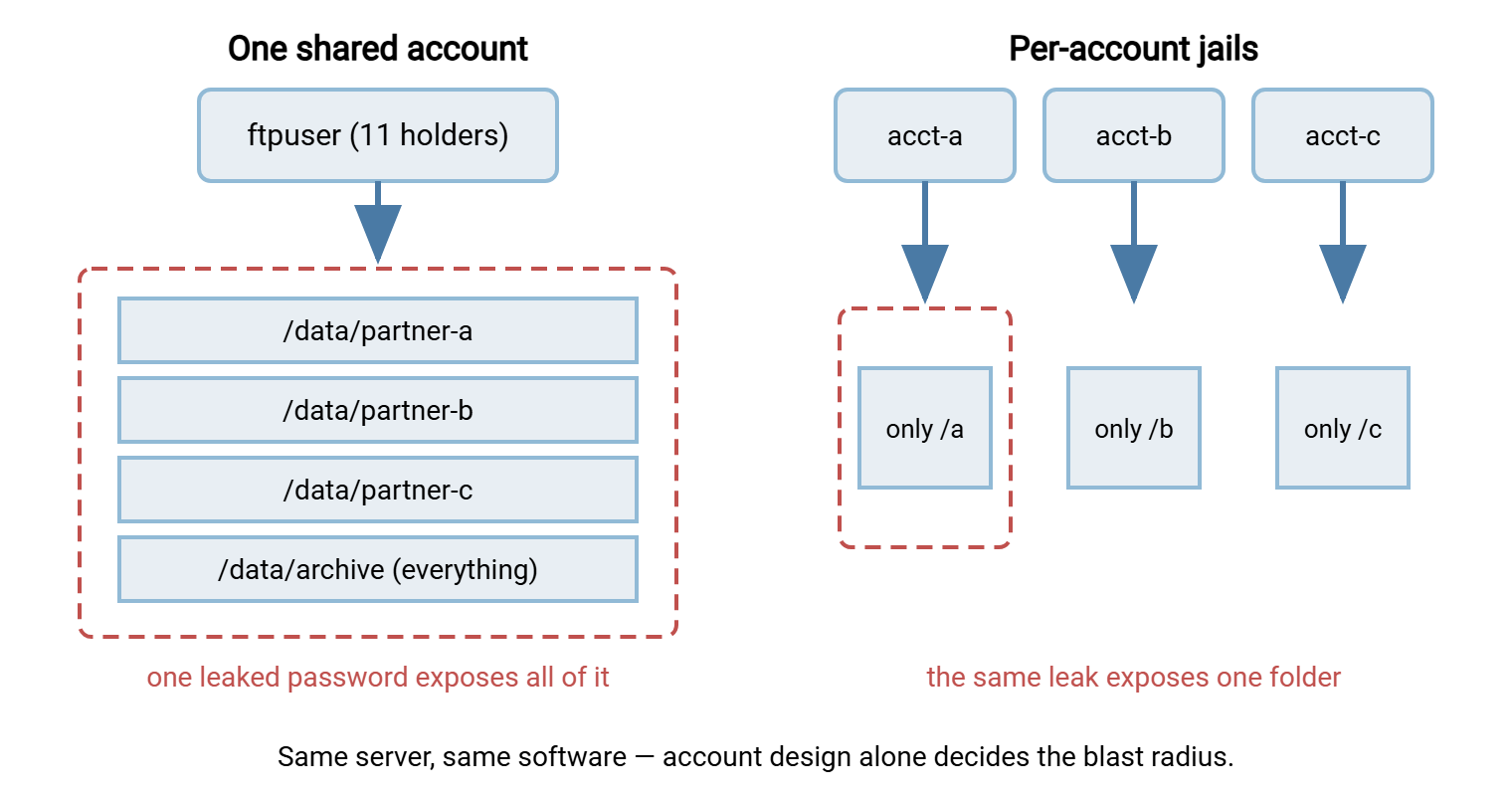
- The blast radius is total. One leak — any of the many hands that hold the credential — exposes the entire tree the account can reach.
The replacement rule is short: one identity per human, per partner, per automated job. Accounts are free; incidents are not. If two things need different revocation dates, different folder access, or different owners, they need different accounts. That single test resolves almost every "can they just share?" question.
The diagram below shows the difference as blast radius. On the left, one shared account fans out to the whole data tree, so one leaked password exposes everything. On the right, each account is jailed to its own folder, so the same leak exposes exactly one corner.
What a Jail Is (and Isn't)
A jail is often called a chroot, after the Unix mechanism ("change root") that popularized the idea. With a jail, the server presents one folder to a logged-in user as if it were the whole filesystem. Inside the session, that folder is /. The user cannot browse upward to see other partners' folders, the OS layout, or anything else, because from where they stand there is no upward. It is the software equivalent of a hotel corridor where your keycard makes every other door invisible, not merely locked.
Every protocol family in common use can do this, with different machinery under the hood:
- SFTP: the SSH server confines the session — in OpenSSH, the
ChrootDirectorysetting. Commercial Windows servers expose the same idea as a per-user root or home folder that the account cannot leave. - FTP and FTPS: virtually every server has a "lock user to home folder" behavior, enforced by the server process itself. Same concept, same result.
- HTTPS portals: web-based transfer interfaces show each login a virtual folder tree; the jail is simply what the application chooses to render and authorize.
Just as important is what a jail is not. It is not a general-purpose sandbox: it confines what the user sees through the transfer service, not what code can do on the machine. And it is enforced by the service the user came through. The same account might also log in by another door — an interactive SSH shell, a network share, remote desktop. If so, the jail does not follow it there. This is why transfer accounts should be transfer-only: no login shell on Linux, denied interactive logon on Windows, no share access. Close the other doors, or the jail is a turnstile in an open field.
The Ownership Trap
Now the trap, because nearly everyone building their first SFTP jail falls into it. OpenSSH refuses to chroot a user into a directory unless the jail directory is owned by root and writable by nobody else. Every directory above it in the path must meet that rule too. The rule exists to stop a jailed user from rearranging their own jail walls, and it produces a rite-of-passage failure. You create /srv/transfer/partner-a and make it owned by the partner's account so they can upload. Suddenly the account cannot log in at all. The connection drops immediately after authentication, with a "bad ownership or modes" complaint buried in the server log.
The resolution is a pattern worth adopting everywhere, on every protocol and platform. The jail root belongs to the system and is read-only to the user. A subfolder inside it belongs to the user and is writable. So /srv/transfer/partner-a is root-owned, and /srv/transfer/partner-a/inbound is where the partner actually lands files. The full OpenSSH walkthrough — directives, permissions, and testing — is in our SFTP server configuration guide.
Windows-based FTP/FTPS/SFTP servers generally do not enforce the ownership rule — their jails live in the server process, not the OS. But the read-only-root pattern is still the right design there. It stops users from deleting or renaming the very folder structure your automation depends on. And it gives every account an identical, predictable landing zone.
Remember: if an SFTP user is disconnected the instant after a successful login, suspect jail ownership before anything else. The jail root must be system-owned and user-read-only; give the user a writable subfolder inside it.
Designing the Tree for Isolation
Jails work best on top of a directory tree that was designed for them. The pattern that has aged well:
/srv/transfer/partners/            (Windows: D:\TransferData\Partners\)
  partner-a/            <- jail root: system-owned, user read-only
    inbound/            <- partner drops files here (writable)
    outbound/           <- you publish files here (partner read-only)
  partner-b/
    inbound/
    outbound/
  ...
Three properties do the quiet work. Every partner's world looks identical, so automation and troubleshooting never need per-partner lore. The inbound/outbound split lets permissions say what each side may do. The partner writes into inbound and reads from outbound, while your internal jobs do the reverse. So a compromised partner credential cannot tamper with what you publish. And there is no shared scratch area: any folder two partners can both reach is a data-leak waiting for a misdelivered file. If a genuine three-way exchange exists, model it as its own jailed account with its own folder, not as an exception to everyone's walls.
Deeper permission craft — inheritance, group strategy, auditing what actually got granted — is its own subject, covered in our file server permissions series. For this article's purpose, the tree above plus jails delivers the isolation.
Real Accounts vs Virtual Accounts
One more design choice shrinks blast radius further. A real account is an operating-system login — it exists in Windows or Linux itself, and the transfer service simply accepts it. A virtual account exists only inside the transfer server's own user store: valid for FTP/FTPS/SFTP sessions, meaningless to the OS. The distinction matters because a real account is a bigger key than a transfer partner needs. Depending on settings it may also open shells, remote desktop, or shares. Its blast radius includes whatever the OS grants it.
For partner-facing accounts, virtual users are usually the better default. A leaked virtual credential can only talk to the transfer service, lands inside a jail, and grants nothing at the OS layer at all. Real accounts remain sensible for administrators and for internal processes already managed in your directory. The full comparison — including anonymous access and how to migrate between models — is in our FTP account models guide. It applies far beyond plain FTP. On Windows, a server such as Sysax Multi Server pairs its user authentication with per-session activity logging. That is exactly the combination this layer needs: every identity separate, every action attributed.
Whichever store the accounts live in, surrounding identity practices remain: password policy, credential handoff to partners, rotation, and multi-factor options. Those are the subject of our transfer authentication series. Account isolation is the floor those practices stand on.
Automation Needs Identities Too
The rule "one identity per job" is the part of this layer teams skip first, because scripts don't complain. The overnight ERP export, the backup sweep, and the partner-sync job all quietly reuse one credential — often a human's. Then the human leaves, their account is disabled, and three integrations die at midnight. Or a script's credential leaks and the log cannot say which system the attacker impersonated. Give each automated flow its own jailed account, named for the job (job-erp-export). Have a documented team own it. Give the account access to exactly the folders that flow touches. Service-account hygiene has its own patterns — inventory, rotation, break-glass — described in the transfer authentication series.
The Provisioning Checklist
Isolation survives when it is the default path, not an act of discipline. Run this checklist for every new account — partner, human, or job — and the server stays isolated without anyone remembering to be careful:
NEW TRANSFER ACCOUNT — name: ________  owner: ________  review date: ________

[ ] 1. Identity: dedicated account for this one person/partner/job
       (never reused, never shared; virtual user unless OS login required)
[ ] 2. Folder: jail root created from the standard template
       (system-owned root, read-only; writable inbound/ subfolder)
[ ] 3. Permissions: inbound writable, outbound read-only for the account;
       no access outside the jail root
[ ] 4. Other doors closed: no login shell / interactive logon denied;
       no share or RDP access for this account
[ ] 5. Jail test: log in as the account; try to list "/" and "..";
       confirm only the jail contents are visible
[ ] 6. Cross-partner test: attempt to read another partner's path;
       confirm failure
[ ] 7. Write test: upload to inbound/ succeeds; write to jail root fails
[ ] 8. Attribution test: find the test session in the activity log
       under this account's name
[ ] 9. Document: owner, purpose, folders, and review date recorded
       in the baseline; credential delivered by an agreed secure channel
Steps 5 through 8 are the ones that separate a checklist from a hope. You are logging in as the new account and trying to break your own walls while it is cheap to fix them. The same four tests, re-run on a sample of accounts each quarter, become part of the verification habit described in verifying your hardening actually holds.
Migrating Off a Shared Account Without Breaking Partners
If you inherited the ftpuser monster, do not kill it in one night — its users include automation you cannot see. The safe sequence is parallel-run: create proper per-partner jailed accounts alongside the shared one. Contact each partner with their new credential and a switch-by date. Watch the logs to see who has moved (per-account logins appearing, shared-account logins thinning). Chase the stragglers the log identifies. Then disable — not delete — the shared account. Wait through one full business cycle, including month-end, for anything that only runs occasionally. Only then remove it. The log-watching step is the heart of it: the shared account's own session log is your migration tracker. It tells you exactly which addresses still authenticate the old way.
Expect the migration to take weeks, and expect one partner to need three reminders. That is normal, and it is still vastly cheaper than the alternative — explaining after an incident why eleven companies shared one password to everything.
The Short Version
Design accounts as if the credential will leak, because someday, somewhere, one will. One identity per person, partner, and job. Every identity jailed to its own folder, with a read-only jail root and a writable subfolder — remembering the ownership trap on OpenSSH. No shared accounts, no shared folders, no second doors. Test the walls at provisioning time, and let the logs prove who did what. With this layer in place, move down the stack to the OS under the service. Or move forward to what your server reveals before anyone logs in — because folder names and listings are part of the blast radius too.
Frequently Asked Questions
What is the difference between a jail and file permissions?
Why does my SFTP user get disconnected immediately after logging in?
Two of our partners genuinely exchange files with each other through us. Can they share one folder?
Are virtual users less secure because they are not "real" OS accounts?
Doesn't one account per partner become unmanageable with fifty partners?
From the Sysax team: we build secure file transfer software for Windows. Sysax Multi Server is an FTP, FTPS, SFTP, and HTTPS server. Sysax FTP Automation handles scheduled, scripted transfers. Free trials are on the download page.