
Large Files Over HTTP: Resumable and Chunked Upload Strategies
HTTP moves small files so effortlessly that it is easy to assume big ones are just more of the same. Then someone tries to push a 40 GB virtual machine image through an upload endpoint. The connection hiccups at hour two, and the transfer restarts from byte zero — for the third time today. The default shape of HTTP is all-or-nothing: one request, one body, and any interruption anywhere along the way throws away everything already sent.
This article is about defeating that default. You will learn the mechanism that makes downloads resumable (Range requests). You will learn why uploads never got an equivalent standard and what the working strategies are instead (chunking). You will learn how to prove the bytes arrived intact (checksums). You will learn the timeout and proxy hazards that kill long transfers in ways that look like random bad luck. The goal is a mental toolkit for designing — or debugging — any large transfer that has to survive a real network.
This is part of our HTTP/HTTPS File Transfer series. It builds directly on how web upload works, which covers what a single upload request looks like on the wire.
Why Big Transfers Fail More Often
The problem is arithmetic before it is technology. A transfer that takes thirty seconds only has to survive thirty seconds of network weather. A transfer that takes three hours must survive three hours of it. That includes every Wi-Fi renegotiation, every VPN rekey, every load balancer draining connections for a deploy, and every laptop lid closed at the wrong moment. The longer the window, the more certain an interruption becomes. With a single-request transfer, an interruption at 99% costs exactly as much as one at 1%. All of it.
Put numbers on it and the pattern gets stark. Suppose the path suffers one brief interruption every two hours on average. A ten-minute transfer usually completes on the first try. A four-hour transfer will, on average, be interrupted twice. Since each interruption restarts an all-or-nothing transfer, the expected time balloons far past four hours. On a bad day, the transfer simply never finishes. Users experience this as "the big file won't go through," and no amount of clicking retry changes the arithmetic. Only changing the transfer's structure does.
Size also amplifies quiet costs. Servers that buffer a whole request before processing it need somewhere to put those gigabytes — memory or temp disk. The layers between client and server each have opinions about how large a body they will carry and how long they will wait. Those are covered in the size-limits discussion. A large transfer is thus exposed twice: more time in which to be interrupted, and more infrastructure with reasons to refuse it.
The remedy, in one sentence: break the one long fragile transfer into many short durable pieces, and make every piece independently verifiable and retryable. Downloads get this almost for free. Uploads take design work. Let's do downloads first.
Resumable Downloads: Range Requests
HTTP has a built-in mechanism for fetching part of a file. A server that supports it advertises the fact with a response header, Accept-Ranges: bytes. A client that wants to resume asks with a Range header. The server answers with status 206 Partial Content plus a Content-Range header describing exactly which slice it is sending. Here is a resume of an 8 GB image that died at the 3 GB mark:
GET /images/vm-image.qcow2 HTTP/1.1
Host: files.example.com
Range: bytes=3221225472-

HTTP/1.1 206 Partial Content
Content-Range: bytes 3221225472-8589934591/8589934592
Content-Length: 5368709120
Read the reply carefully: "here are bytes 3,221,225,472 through the end, out of a total of 8,589,934,592." The client appends those bytes to its partial file and the download completes as if nothing happened. This is precisely what curl -C - and wget -c do. They look at the partial file's size and construct the Range header for you. Worked examples live in the curl and wget cookbook.
Two subtleties make the difference between a robust resume and a corrupted file:
- Not every server honors ranges. A server that does not support them ignores the
Rangeheader and replies200with the whole file from the beginning. A careless client that blindly appends that to its partial copy produces a file that is both too large and garbage. Well-behaved tools check for the206before appending — and you should checkAccept-Ranges(onecurl -Idoes it) before promising anyone resumability. - The file might have changed between attempts. Resuming byte 3 billion of yesterday's file against today's replacement stitches two versions together. HTTP's answer is the ETag — a short fingerprint the server assigns to a specific version of a resource. It is combined with the
If-Rangeheader: "send me the remainder if the file still matches this fingerprint; otherwise send the whole new file." Good clients use it automatically when the server provides ETags.
You can watch the mechanism by hand, which is worth doing once. curl's -r flag sends an explicit range — curl -r 0-1023 -o first-kb.bin plus the URL fetches exactly the first kilobyte of a file. Ask for a slice, get a 206 and precisely those bytes; ask on a server without range support, get a 200 and the whole file. Two commands, and the difference between the two server behaviors stops being abstract.
A related trick: because ranges let a client request any slice, some download tools open several connections and fetch different segments in parallel, merging them locally. It can genuinely help on paths where a single connection cannot fill the pipe. The honest caveats are that it multiplies server load, some servers throttle or forbid it, and on an already-full link it helps nothing. Treat it as a tool for specific paths, not a default.
Remember: a resume is only trustworthy when the server answered 206 and the version was pinned (ETag / If-Range). A 200 where you expected 206 means "starting over" — and a client that appends it anyway silently corrupts the file. When in doubt, verify the finished file with a checksum.
Resumable Uploads: The Standard That Never Arrived
Now the harder direction. HTTP defines no equivalent of Range requests for uploads. There is no standard way to say "I already sent you the first 3 GB of this PUT; here is the rest." (Standardization efforts exist, but nothing you can assume a given server supports.) So a naive upload of a huge file is that fragile single request from the introduction, and a "retry" means starting over.
Every working solution is therefore an application-level pattern — the client and server agree on a scheme above HTTP. In practice you will meet two families, plus a hybrid:
- Chunked upload: split the file into pieces and send each piece as its own small request; the server reassembles. This is the dominant pattern, examined in detail next.
- Offset probe and continue: after an interruption, the client asks the server "how much of upload #841 do you have?" The client gets back an offset and sends a single request containing the remainder from that offset. Simpler bookkeeping than full chunking; this is the core of the best-known resumable-upload protocols. The conversation is short enough to show whole. The client sends a
HEAD-style probe for its upload session. The server replies with something likeUpload-Offset: 3221225472. The client issues onePATCH-or-PUTrequest whose body begins at that byte. Interrupt it again, probe again, continue again — progress only ever moves forward. - Multipart-object APIs: object storage services expose chunking as a formal API. Initiate an upload session, send parts (often to presigned URLs, one per part), then call "complete" to assemble the object. Same idea, productized.
Chunked Uploads, Step by Step
The diagram below shows the canonical chunked upload flow — an initiation call, independent chunk uploads (with one failure and retry), and a completion call that assembles the file.
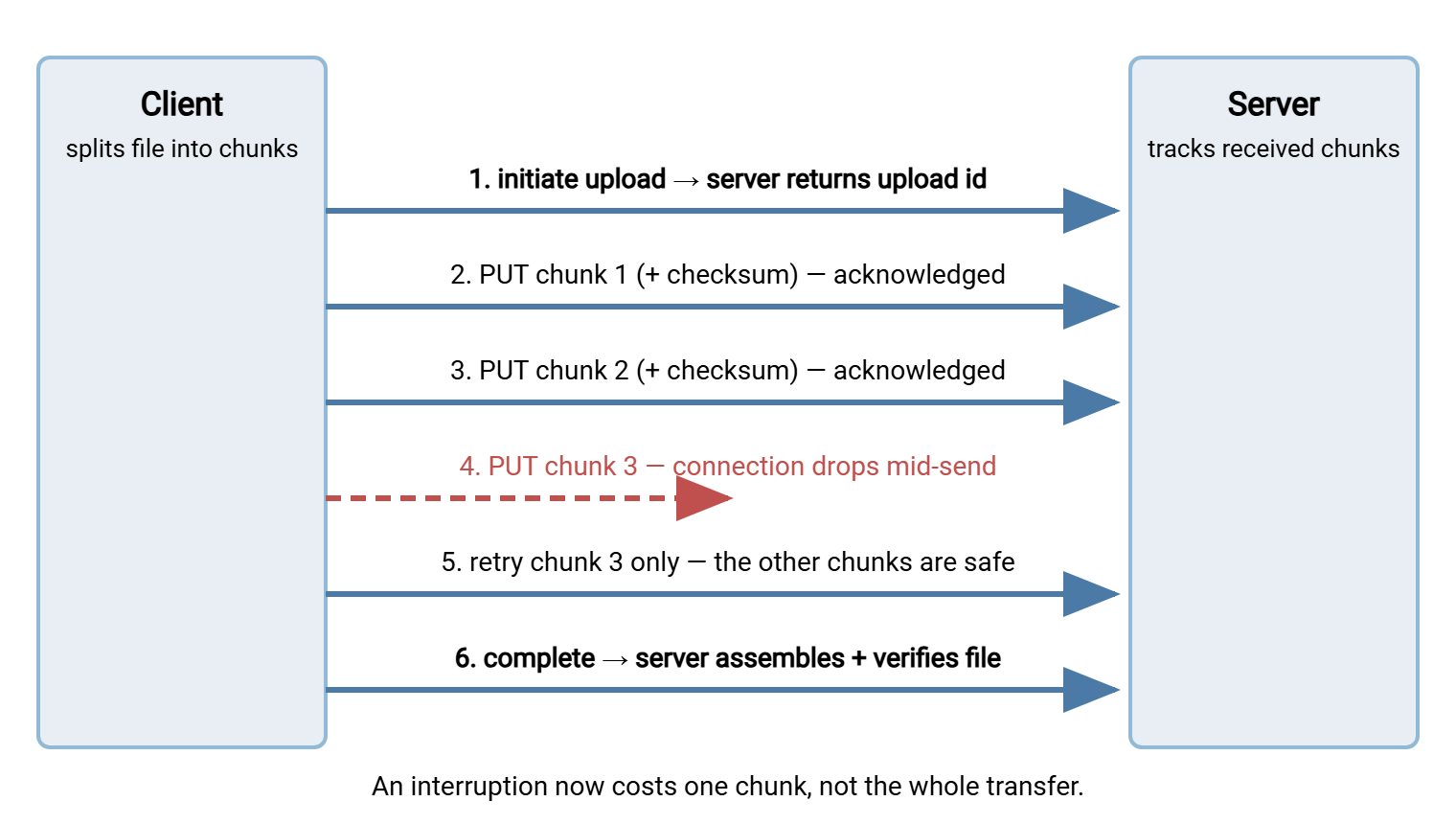
The design decisions that make or break this pattern:
- Chunk size. Common practice lands between 8 and 64 MB. Smaller chunks mean more requests and more per-request overhead. Larger chunks mean more data re-sent when one fails, and more exposure to per-request limits along the path. On very unreliable links, err smaller.
- Idempotent chunk requests. Each chunk should be addressed by its index or offset ("this is chunk 7 of upload 841"). That makes sending it twice harmless — the server just overwrites the identical piece. That property makes blind retry safe, which is the entire point. This is
PUTthinking, as discussed in PUT versus POST semantics. - A "what do you have?" endpoint. After a client crash, the uploader must be able to ask the server which chunks arrived, and send only the gaps. Without it, chunking survives network blips but not client restarts.
- Explicit completion. The final call is the moment of truth. The server checks that every chunk is present, assembles them in order, and verifies the whole-file checksum the client supplied. Only then does it declare the file to exist. Until completion, a partial upload is invisible to consumers — no half-files ever get picked up.
- Cleanup of the abandoned. Some uploads never finish. Their chunks sit on disk forever unless sessions expire and a janitor process removes them. Every chunked-upload system that skips this step eventually fills a volume.
Integrity: Prove the Bytes Arrived
A transfer that completes is not the same as a transfer that arrived correct. TCP checks each packet in flight, but it cannot see corruption introduced by a buggy middlebox or a failing disk. It also cannot see corruption introduced by — the classic — a bad append after a botched resume. The tool for end-to-end certainty is the checksum: a short fingerprint (today, typically SHA-256) computed from the file's entire contents. Any change to any byte produces a different fingerprint.
The workflow is almost embarrassingly simple, and it catches everything the transport missed:
# sending side: publish the fingerprint next to the file
sha256sum vm-image.qcow2 > vm-image.qcow2.sha256

# receiving side: verify after the transfer finishes
sha256sum -c vm-image.qcow2.sha256
vm-image.qcow2: OK
In a chunked design, hash twice. Use a checksum per chunk (so a corrupted chunk is caught and re-sent immediately, at 32 MB cost instead of 40 GB). Use a whole-file checksum verified at completion (the end-to-end guarantee). One caution about a tempting shortcut: HTTP's ETag header is a version identifier, not a promised content hash. For objects assembled from parts it usually is not one. So treat ETags as "did it change?" hints, never as integrity proof. The broader discipline of verify-after-transfer is a theme of our file transfer fundamentals series.
Timeout and Proxy Hazards
Long transfers die in the middle of the path more often than at either end. The usual suspects, and how each one presents:
- Idle timeouts. Most proxies and load balancers cut a connection that goes quiet for some seconds. A transfer that is steadily moving bytes is usually safe. The danger window is after the last byte of an upload. That is while the server assembles, scans, or imports in silence and the intermediary sees nothing flowing.
- Total-duration limits. Some front layers cap a request's total lifetime regardless of activity. A four-hour single-request upload cannot survive a one-hour cap — but chunks sail through, because each chunk is its own short request. This alone justifies chunking in many environments.
- Proxy buffering. Some reverse proxies swallow the entire request body before forwarding it to the application. Here are the consequences. The user's progress bar reaches 100% when the file has merely reached the proxy. The proxy needs temp space for the whole body, and its buffer cap becomes another hidden size limit.
- The 504 double-processing trap. The gateway gives up waiting and hands the client a
504— but the server behind it is still working, and eventually succeeds. The client, seeing failure, retries — and the job runs twice. The cure is an idempotent completion step: the retry must recognize "already done" rather than redo the work. - Middlebox inspection. Security appliances that unwrap TLS to inspect traffic sometimes impose their own body-size ceilings and timeouts, adding a limit nobody can find in any server config. When a transfer fails only from the corporate network, suspect the middle.
Gotcha worth memorizing: a gateway timeout (504) on an upload does not mean the work failed — it means the front door stopped waiting. The server may still finish. Before any retry of a heavy operation, check whether it actually needs retrying. Better yet, design the completion step so a duplicate attempt is recognized and ignored.
Designing for the Flaky Connection: The Checklist
Everything above compresses into one copyable checklist. Whether you are building an upload endpoint, evaluating a vendor's, or scripting against one, this is the standard a large-file design should meet:
LARGE-TRANSFER DESIGN CHECKLIST
[ ] No single giant request: file moves as chunks (8-64 MB typical)
[ ] Chunk requests are idempotent (addressed by index/offset; re-send is harmless)
[ ] Per-chunk retry with backoff; bounded attempts, then a loud failure
[ ] Server can report which chunks it holds (resume after client restart)
[ ] Checksum per chunk + checksum for the whole file, verified at completion
[ ] Explicit completion step; partial uploads invisible until it succeeds
[ ] Completion is idempotent (a retried "complete" cannot run the job twice)
[ ] Abandoned upload sessions expire and get cleaned up
[ ] Timeouts scoped per chunk, never one clock across the whole file
[ ] Downloads: ranges supported, resume verified with 206 + ETag/If-Range
A design that ticks these boxes turns "the network dropped at hour three" from a disaster into a fifteen-second hiccup. That is the entire difference between a transfer system people trust and one they babysit.
When HTTP Is the Wrong Hammer
Honesty requires the last section. HTTP with chunking can be made excellent, but some jobs are better served elsewhere. If the real task is keeping two large directory trees in sync repeatedly, delta-based tools that send only changed pieces beat re-sending files. That is the territory of our rsync series. If single-stream throughput over a long, high-latency international path is the bottleneck, the physics involved (and the accelerated alternatives) are covered in the UDP-accelerated transfer series. And for recurring partner exchanges, SFTP brings standardized resume and mature batch tooling out of the box — the tradeoff explored honestly in when HTTPS beats SFTP. For scheduled recurring moves over SFTP or FTPS, that resilience does not need to be hand-built at all. A tool like Sysax FTP Automation provides the scheduling, retry, and error handling as configuration.
The transferable lesson is the same in every direction: long fragile things must be made short and repeatable. Ranges do it for downloads, chunks do it for uploads, and checksums prove it worked. Once those three ideas are second nature, no file is too large to move calmly.
Frequently Asked Questions
How do I check whether a server supports resumable downloads?
Why do my uploads restart from zero when the connection drops?
What chunk size should I use for chunked uploads?
Is a checksum really necessary if the transfer reported success?
Do parallel segmented downloads actually speed things up?
Why did the upload fail with a 504 but the file appeared anyway?
From the Sysax team: we build secure file transfer software for Windows. Sysax Multi Server is an FTP, FTPS, SFTP, and HTTPS server. Sysax FTP Automation handles scheduled, scripted transfers. Free trials are on the download page.