
Why Consumers Read Half-Written Files
A nightly import that has run cleanly for months suddenly loads half a file. The error — if there is an error at all — says something unhelpful: "unexpected end of file," or "archive is corrupt." Or it says nothing, just a row count that looks a little light. By the time a human investigates the next morning, the file in the folder is complete and perfectly readable. The job reruns without a hitch. Everyone blames the network, closes the ticket, and waits for it to happen again.
What actually happened is a race condition: two independent processes touched the same file, and the outcome depended purely on their timing. The producer is the process writing the file, whether that is an application generating a report, a copy command, or a partner's upload. It was still writing when the consumer started reading. The consumer is the process that picks the file up and acts on it. The consumer read a partial file: a file whose name and location were final but whose bytes were not all there yet.
This article is the anatomy of that race. By the end you will know exactly how the timing works and why the vulnerable window is far bigger than it looks. You will know where the problem bites hardest, what partial reads do downstream, and how to prove it is happening in your own flows. It opens our Partial-File Safety series; the rest of the series is the fixes.
A File Is Not a Fact Until Its Writer Is Finished
Here is the mental model that makes everything else make sense. A file appears in its directory the moment the writer creates it — not the moment the writer finishes. Creation puts the name in the directory listing immediately, usually with a size of zero. The bytes then arrive over time, and the size climbs, until the writer finally closes the file. The filesystem records a name, a size, and some timestamps. It records no flag anywhere that says "this file is still being written."
That single missing bit of information is the entire problem. To every other process on the system, a file that is one-eighth written is indistinguishable from a smaller file that is completely finished. The name looks final. The bytes that exist read back perfectly. There is simply no way to look at a file, by itself, and know whether its writer is done.
Just as important: nothing stops the read. On most systems, a process is free to open and read a file that another process has open for writing. The operating system serves whatever bytes exist at that instant. When the reader reaches the current end of the data it gets an ordinary end-of-file. That is the same signal it would get at the end of a complete file. No error, no warning, no exception. Some Windows programs hold locks that block concurrent readers, but plenty do not, and Unix-style systems do not lock by default at all. You cannot rely on the platform to referee.
An analogy that holds up well: a file name is like the address label on an open shipping box. The label goes on first, while the box is still being packed. Anyone who judges the shipment by the label alone can walk off with a half-packed box, and nothing about the label will ever tell them.
Remember: reading a growing file produces no error. The operating system serves the bytes that exist and reports an ordinary end-of-file where they stop. "The job didn't throw an error" proves nothing about whether the file was complete.
The Race, on a Timeline
Here is the race made concrete. A partner system writes a 48 MB extract, feed_YYYYMMDD.csv, into a pickup folder. On the same machine — or across the network, it makes no difference — a watcher notices new files and launches an import. Interleave the two logs and the failure explains itself:
Mar 14 02:10:00  producer:  begins writing feed_YYYYMMDD.csv  (48 MB to write)
Mar 14 02:10:05  consumer:  watcher sees new file feed_YYYYMMDD.csv
Mar 14 02:10:06  consumer:  import job starts reading
Mar 14 02:10:09  consumer:  end of data reached after 6 MB - import reports success
Mar 14 02:10:45  producer:  write complete, file closed at 48 MB
The consumer began reading five seconds into a forty-five-second write. It read the 6 MB that existed, hit end-of-file, and concluded — reasonably, by everything it could observe — that the file was 6 MB long. It loaded 12,400 rows of a 96,000-row extract and exited with success. Thirty-six seconds later the file quietly became complete, and nothing ever went back to re-read it.
The diagram below shows the same race as a timeline: the producer's write window along the top, and the consumer firing inside that window.
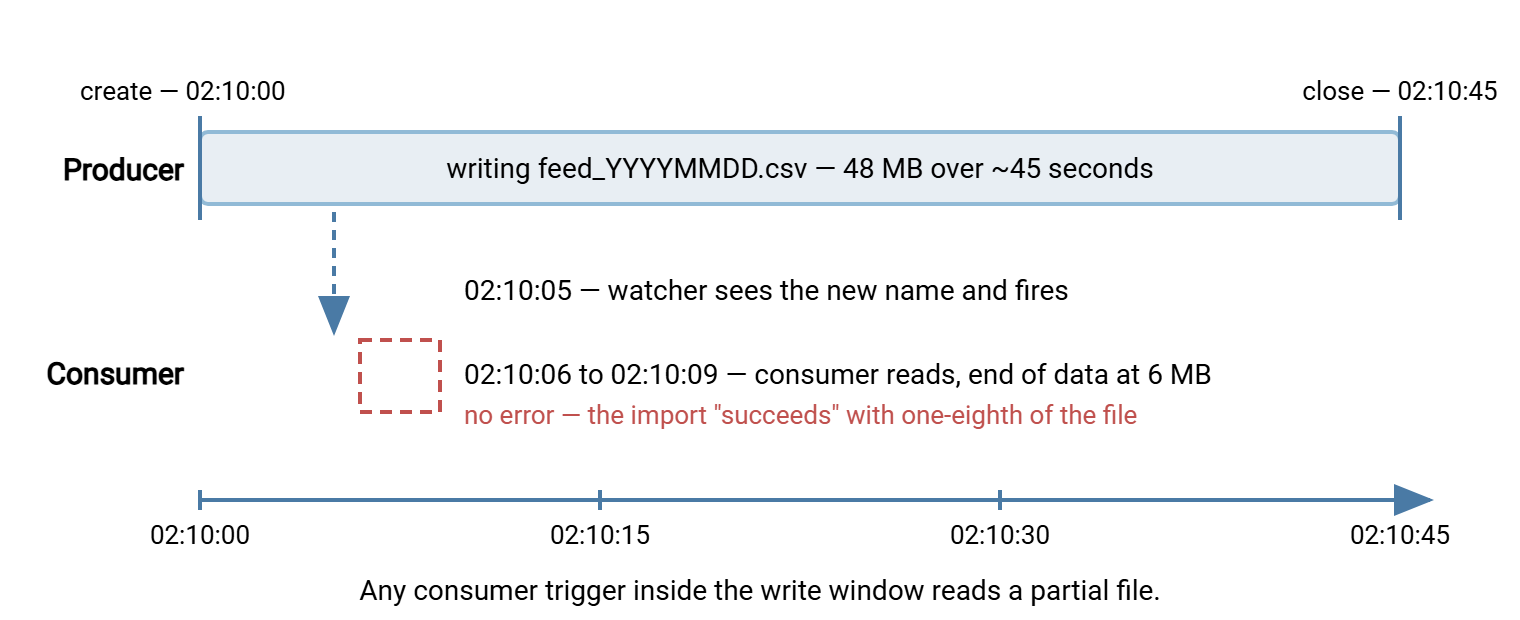
The vulnerable window runs from the instant the file is created to the instant the writer closes it. Any trigger that fires inside that window — a filesystem event, a polling sweep, a scheduled job, a human double-click — starts a partial read. The race is won or lost purely by timing, which is exactly why it feels random.
Why the Window Is Bigger Than You Think
On a developer's machine the window barely exists. A small test file written to a local disk is created and closed within milliseconds, so the race essentially never loses during testing. That is the first reason this bug ships: it is nearly impossible to hit by accident on small, fast, local writes.
Production is different, and the window stretches for several reasons that stack on top of each other:
- Files are bigger and networks are slower. A 48 MB extract crossing a WAN link at a few megabits per second takes a minute or more. Multi-gigabyte backups and media files can be "in flight" for the better part of an hour. The whole transfer duration is window.
- Producers pause mid-write. An application generating a report writes in bursts: query the database, write a chunk, query again. A stall in the source system becomes a silent gap in the middle of the write. The window includes every pause, and pauses are when growing files look most convincingly finished.
- Network shares add lag of their own. When the producer writes to a shared folder from another machine, the name can be visible to other clients before the data finishes trickling across the wire. Cached directory information on the consumer's side can also report sizes that are seconds stale. The name always travels faster than the bytes.
- Compression and encryption stages re-write files. A pipeline that zips or encrypts a file before handoff creates a second write window on the intermediate file, with the same exposure.
Even a short window loses eventually. A two-second write raced by a watcher that fires within a second of creation will collide sooner or later — once a quarter, perhaps. That is precisely the frequency that keeps a bug alive for years. Rare enough to shrug off, common enough to hurt.
Where the Race Bites Hardest
Certain setups are structurally prone to this failure, and they happen to be some of the most common patterns in file automation:
- Watch folders. A hot-folder workflow exists to react quickly to arriving files. That means it is designed to fire near the start of the write window unless something explicitly holds it back. The workflow side of that problem, including how producer and watcher agree on an arrival contract, is covered in our watch folders and event-driven transfers series. This series supplies the mechanics that make the contract safe.
- Scheduled pickups that overlap the sender's schedule. The sender starts writing "around 2:00," and your pickup runs at 02:10. Most nights the write finishes at 02:04. One night the source report runs long and the write is still going at 02:10 — the job reads mid-write. Fixed schedules racing variable durations is a classic setup; see our bash and cron automation series for the scheduling half of that story.
- Server drop folders. A partner uploads to your FTP or SFTP server, and a local job sweeps the upload folder. The upload takes minutes; the sweep takes seconds; the file's name is sitting there the whole time. What the server itself does with in-progress uploads varies, and matters — that is covered in when the transfer itself dies midway.
- Shared folders between applications. Application A exports to a shared directory; application B polls it every minute. Nobody thought of A and B as a "file transfer" at all, so nobody designed a handoff. The folder is the interface, and the race is built in.
What Partial Reads Look Like Downstream
The damage comes in two flavors, and the loud flavor is the lucky one.
Loud failures happen when the truncation lands somewhere structurally fatal. A ZIP or other archive read mid-write is missing its ending. Archive formats keep a table of contents near the end of the file, so a truncated archive typically fails to open at all. A parser dies mid-record with "unexpected end of file." An import aborts on a half-line. If you verify checksums on arrival — the discipline our guide to verifying transfers end to end teaches — the mismatch fires immediately. Loud is good: something clearly failed, tonight, with a timestamp you can investigate.
Silent failures are the expensive ones. A truncated CSV is usually still a valid CSV — it just has fewer rows. The import loads 41,000 rows instead of 96,000, exits zero, and reports success. Totals are quietly wrong. A downstream report understates the month. If the consumer forwards the file onward — to another system, another partner, another pipeline stage — the partial file propagates. Every later stage then inherits a defect it has no way to detect. Weeks can pass before a human notices a number that looks off, and by then the trail is cold.
There is a second-order cost, too: recovery creates its own hazards. When someone notices and re-runs the job against the now-complete file, the rows that loaded the first time load again. That happens unless the pipeline was built to tolerate reprocessing. Partial reads and duplicate loads travel together; the defenses against the second problem live in our duplicate detection and idempotency series.
The table below maps common symptoms back to the race, with the first thing to check for each:
| Symptom | What actually happened | First thing to check |
|---|---|---|
| "Unexpected end of file" during import | Reader hit end of data mid-record | Was the file's final modified time later than the job's start time? |
| Archive reported corrupt, but opens fine later | Archive's table of contents had not been written yet | File size at failure time vs. final size |
| Row or record count lower than usual, no error | Valid-looking truncation — the silent case | Counts vs. the sender's stated totals or control file |
| Job fails, rerun succeeds on the same file | File became complete between the two attempts | Producer's write window vs. both attempt times |
| Checksum mismatch on arrival verification | Hash was computed while bytes were still arriving | Transfer log: when did the upload actually complete? |
Why It Evades Diagnosis for Months
Partial-file races have a talent for staying hidden. It is worth naming the mechanisms, because each one is something you can counter once you see it.
The failure is intermittent by nature. The race only loses when the trigger lands inside the write window. Most nights the write finishes at 02:04 and the pickup at 02:10 reads a complete file. The bug fires when the source runs slow — month-end, a big data day, a congested link. That conveniently makes it look correlated with everything except its real cause.
The evidence heals itself. The file that was partial at 02:10 is complete by 02:11. Whoever investigates finds a flawless file and a job that reruns cleanly. "Could not reproduce" gets written on the ticket, truthfully.
Retries paper over it. A job with automatic retry fails on the partial file, waits, retries, and succeeds against the finished file. The run goes down as a success with a hiccup. Retry logic is essential — our retry and error handling series argues for it at length. But it will quietly absorb this particular failure for years unless someone reads the logs and asks why the first attempt keeps failing at the same minute.
The blame lands elsewhere. Truncation gets attributed to the network, the sender, or "corruption." The sender checks their copy — complete, of course, because their copy was written before sending. Both sides are right; the handoff is what failed. Genuine mid-transfer corruption does exist, but it has different fingerprints — see how transfers stay intact for that side of the story.
The counter to all of this is timestamps. A partial read leaves a precise signature: the consumer's read started inside the producer's write window. Server-side transfer logs give you the producer half. A server like Sysax Multi Server logs every upload session to file and to a database. That includes when the transfer started, when it completed, and how many bytes moved. So you can lay the consumer's start time directly against the upload's actual completion time and watch the overlap appear.
Proving It: Three Checks You Can Run This Week
Suspicion is cheap; evidence changes behavior. Three checks, in increasing order of effort:
1. Log the size at read time. Wrap the consumer so it records the file's size immediately before and immediately after processing. If the two numbers differ — or if the "before" size is smaller than the size sitting in the folder later — the job read a growing file. Two extra lines in a shell wrapper:
f=/data/inbox/feed_YYYYMMDD.csv
echo "$(date '+%b %d %H:%M:%S') size-before $(stat -c %s "$f")" >> /var/log/intake.log
run_import "$f"
echo "$(date '+%b %d %H:%M:%S') size-after  $(stat -c %s "$f")" >> /var/log/intake.log
2. Reproduce it on purpose. Do not wait for the quarterly alignment — write a file slowly and point a test copy of your consumer at it. A deliberate slow writer takes one line of shell:
# write ~60 MB over ~60 seconds, one chunk per second
( for i in $(seq 1 60); do head -c 1048576 /dev/urandom; sleep 1; done \
    > /data/test-inbox/feed_YYYYMMDD.csv ) &

# meanwhile, watch what any consumer would see
while sleep 5; do ls -l /data/test-inbox/feed_YYYYMMDD.csv; done
Run your consumer against that folder mid-write. If it processes the file without complaint, you have reproduced the silent version of the bug in five minutes instead of five months.
3. Read both ends' logs for one incident. Take the most recent mysterious failure, pull the consumer's log, and pull the transfer log from the sending side or the receiving server. Line up the timestamps. One overlap is worth a hundred theories.
The Fix Families: Where This Series Goes Next
Everything that fixes this problem is a way of delivering one missing bit of information — "the writer is done" — from producer to consumer. There are three places to install that bit, and the series walks through each:
- Producer-side fixes make files appear only when complete. The gold standard is writing under a temporary name and renaming at the end — temp names and atomic renames. Use marker and control files as the alternative when renames cannot do the job.
- Consumer-side defenses apply when you do not control the producer: size-stability polling, minimum-age rules, and their honest limits, in settle checks.
- Transfer-level safety covers the case where the network connection itself dies midway and leaves a truncated file behind, in when the transfer itself dies midway.
Whichever defenses you choose, the consumer still needs a harness around it. That means something that watches the folder, runs the job, retries sensibly, and tells a human when a file will not settle. That harness is what a folder-monitoring tool such as Sysax FTP Automation provides. It watches for arriving files, runs transfer tasks against them, and brings retry, error handling, and email notification along. So the checks these articles teach have somewhere solid to live.
Remember: a file name tells you a file exists. Only the producer knows whether it is finished. Every technique in this series is a way of getting that one bit — "done" — across the gap between writer and reader.
The Shape of the Problem, in One Paragraph
Files become visible when created, not when finished; nothing in the filesystem marks the difference; readers get no error for reading too early. So any consumer that triggers on a file's existence is racing its writer. The race is lost inside a window that stretches with file size, network distance, and producer stalls. It then hides behind healed evidence and successful retries. The fix is never to read on existence alone. Start with the atomic-rename pattern if you control the producer. Fall back to settle checks if you do not. When you want the whole picture on one page, the series closes with a checklist article for auditing any flow's exposure.
Frequently Asked Questions
Why doesn't the operating system block reads on a file that is being written?
Is a partial read the same thing as a corrupted transfer?
Can I just wait a few seconds after a file appears before reading it?
How can a consumer ever know a file is complete?
Why don't databases have this problem?
From the Sysax team: we build secure file transfer software for Windows. Sysax Multi Server is an FTP, FTPS, SFTP, and HTTPS server. Sysax FTP Automation handles scheduled, scripted transfers. Free trials are on the download page.