
Temp Names and Atomic Renames: The Core Fix
The previous article in this series showed why consumers read half-written files. A file becomes visible the moment it is created, and nothing in the filesystem says whether its writer is finished. The fix for that problem is used by every mature piece of file-handling software you have ever trusted. It fits in a sentence: write the file under a temporary name, and rename it to its final name only when it is complete.
The sentence is short; the reasons it works, and the handful of ways it can silently fail to work, deserve a full article. By the end of this one you will know why a rename is atomic and a write is not. You will know why the pattern collapses if the temp location is on a different filesystem. You will know which in-flight naming conventions hold up in practice and what the honest platform-by-platform story is. This is the producer-side cornerstone of our Partial-File Safety series. If you control the writing side of a handoff, this is the technique to reach for first.
The Pattern in One Paragraph
The producer writes its output to a name the consumer will never match — .feed_YYYYMMDD.csv.part, say, instead of feed_YYYYMMDD.csv. All the slow, interruptible work — generating, copying, uploading — happens under that temporary name. When the last byte is written and the file is closed, the producer performs one final operation. It renames the temp file to the final name. The consumer, which watches only for final names, sees the file for the first time at the moment it is already complete.
The rename is the commit point: the single instant where the file stops being a work in progress and becomes a fact. Everything before it is invisible to the consumer; everything after it is safe to read. If the producer crashes at any point before the rename, the consumer sees nothing at all. A stale temp file then sits in the folder as evidence. No half-written file ever appears under a name anyone acts on. Failure leaves a mess for the operator instead of bad data for the pipeline, which is exactly the trade you want.
Why Rename Is the Atomic Moment
Atomic, in this context, means indivisible: an operation with no observable in-between. Any process looking at the folder sees the state before the rename or the state after it. It never sees a half-renamed file, never a name pointing at partial content that the rename itself created. Writing is the opposite of atomic: it is a long sequence of small steps, observable at every step. Renaming collapses the handoff into a single step that either happened or did not.
The reason a rename can promise this is that it does not touch the file's data at all. A file's bytes live in one place on disk; the name is an entry in a directory that points at them. Renaming within the same filesystem rewrites that pointer — a tiny metadata change the filesystem performs as one all-or-nothing operation. That is also why a rename takes the same instant for a 4 KB file and a 40 GB file: no data moves. The bytes were written slowly, under a name nobody watches; the pointer flips instantly, to a name somebody does.
The diagram below shows the two states the consumer can observe — during the write, and after the rename — and why there is nothing in between.
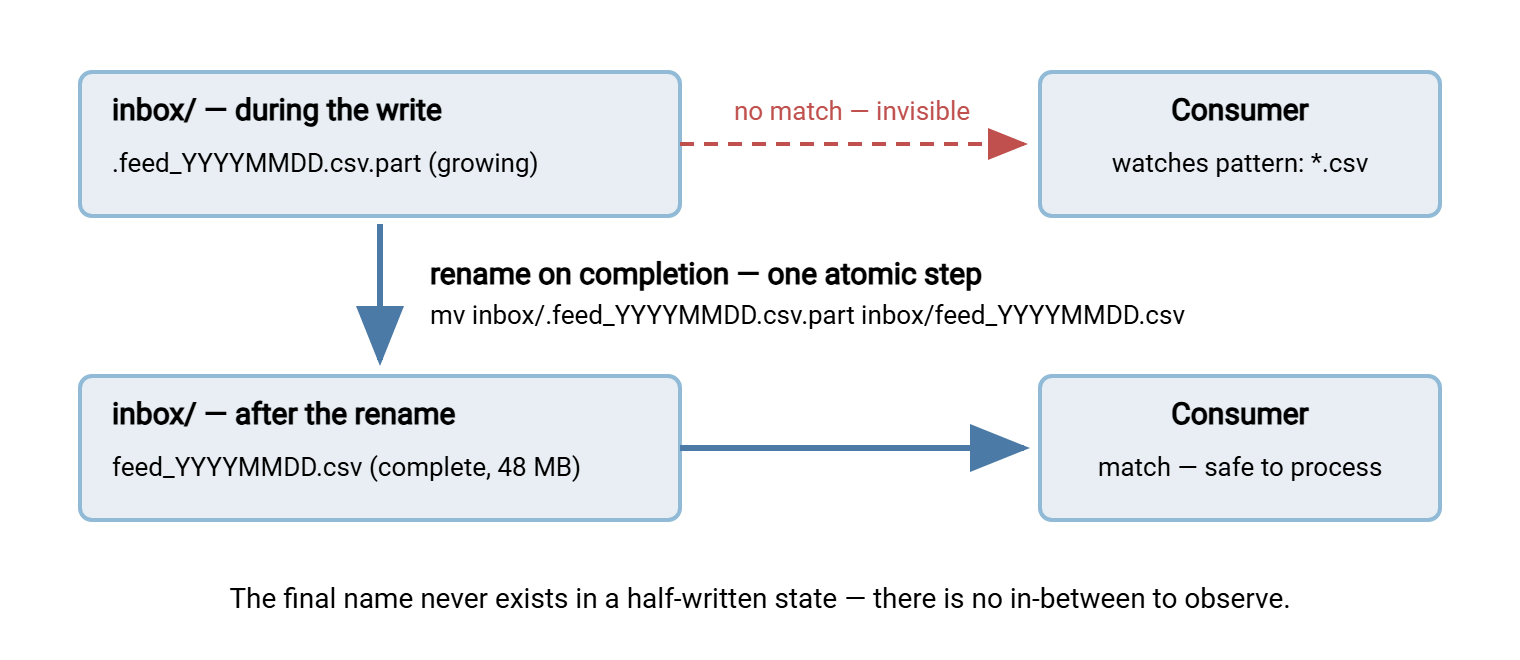
One clarification that saves confusion later: atomic does not mean synchronized. If a reader already has the file open when a rename replaces the name, the reader keeps reading the bytes it opened. Its open handle still points at the old data. That is safe, not broken: no reader ever sees a mixture. The rename controls what new opens will find.
The Same-Filesystem Caveat
Here is the trap that turns the pattern into a placebo. A rename is only that instant pointer-flip within a single filesystem (on Windows, think "within a single volume or drive letter"). Ask the system to "move" a file across filesystems — from /tmp to a data volume, from C: to D:, from a local disk to a network share. There is no pointer to flip, because the destination filesystem cannot point at the source's data blocks. The tools fall back, silently, to copy-then-delete. The destination file is created at size zero and grows byte by byte, exactly like any other write. Same command, same-looking result, none of the protection.
This is not an exotic corner case; it is the default way the pattern gets broken in the field. Temp files gravitate toward temp directories. Those directories are routinely on a different filesystem than the destination. The rule that keeps you safe: the temporary name must live on the same filesystem as the final name. Ideally, it lives in the same directory, or in a staging subdirectory beneath it.
# The pattern, done right: temp and final in the same directory
dir=/data/inbox
tmp="$dir/.feed_YYYYMMDD.csv.part"
final="$dir/feed_YYYYMMDD.csv"

generate_report > "$tmp"      # all the slow work, under the temp name
mv -- "$tmp" "$final"         # the commit: atomic, same filesystem

# The TRAP: /tmp is usually a different filesystem, so this "mv"
# is secretly copy-then-delete -- the destination grows in place:
mv /tmp/feed_YYYYMMDD.csv /data/inbox/feed_YYYYMMDD.csv

# Check whether two paths share a filesystem (same device = same fs):
df --output=source /tmp /data/inbox
The check at the end is worth running once for every flow you build. If df reports the same device for both paths, a move between them is a true rename. If it reports two devices, the move is a copy in disguise, and you need to relocate the staging area. On Windows the equivalent judgment is usually visible at a glance — same drive letter and same underlying volume. But mounted folders and mapped drives can blur it. So when in doubt, test with a large file and watch whether the destination grows gradually.
Remember: mv and its equivalents do not warn you when they downgrade from rename to copy-then-delete. The command looks identical; only the location of the temp file decides whether your commit point is atomic or imaginary.
Choosing the In-Flight Name
Any name the consumer will not match can serve as the temporary name. But conventions differ in how loudly they fail and how easily they are cleaned up. The four that hold up in practice:
| Convention | In-flight name looks like | Why the consumer is safe | Watch out for |
|---|---|---|---|
Suffix (.part, .tmp, .filepart) |
feed_YYYYMMDD.csv.part |
Pattern *.csv no longer matches; the suffix is visible and self-explaining |
Consumers that sweep every file regardless of extension; agree on one exact suffix |
| Dot-prefix (hidden file) | .feed_YYYYMMDD.csv |
Hidden from default Unix listings and from most glob patterns | Invisible files hide problems too — a stuck temp file goes unnoticed; Windows tools still list it |
| Staging subdirectory | inbox/.staging/feed_YYYYMMDD.csv |
Consumer watches inbox/ only; the move into it is the commit |
The staging folder must sit on the same filesystem as the inbox — that is its whole job |
| Suffix plus unique token | feed_YYYYMMDD.csv.7f3a.part |
As above, and two writers (a retry racing its predecessor) never collide on the temp name | Cleanup sweeps must match the token pattern, not one fixed name |
Whichever convention you pick, write it down and share it with everyone who touches the folder. The convention only protects flows whose consumers actually exclude it. Naming is a contract, and it deserves the same care as the final names themselves; our file naming and datestamping series covers that larger discipline.
Plan for orphans from day one. A temp file older than your longest plausible write is the tombstone of a crashed producer. It is harmless to the pipeline, but a signal a run died and its output never arrived. Sweep for them on a schedule — *.part older than a day, say — and alert before deleting. A stale temp file is also your best forensic evidence for what the failed run managed to write.
Doing It by Hand: Local Writes and Remote Uploads
Locally, the pattern is the two-line shape shown earlier: write to the temp name, mv to the final name. The same shape works across the network, because the rename can happen on the far side. Both major transfer protocols support a server-side rename — FTP with its RNFR/RNTO command pair, SFTP with a rename operation. So an uploader can push bytes slowly to a temp name. It can then ask the server to flip it to the final name in one step:
# Upload under a temp name, then commit with a server-side rename
sftp -b - partner@host <<'EOF'
put feed_YYYYMMDD.csv upload/feed_YYYYMMDD.csv.part
rename upload/feed_YYYYMMDD.csv.part upload/feed_YYYYMMDD.csv
EOF
The remote rename inherits the same caveat as the local one: temp and final paths must be on the same filesystem on the server. Uploading to one directory and renaming into a folder that the server has mounted from elsewhere quietly reintroduces the copy. Keep the temp name in the destination directory and the question never arises. The full tour of what SFTP can do beyond uploads — renames included — is in our guide to SFTP file operations.
If your transfers run under an automation tool rather than hand-rolled scripts, build the job in the same shape. In Sysax FTP Automation, for example, you can have a job transfer files into a working folder. You can make its final post-processing step a move into the folder consumers watch. With the working folder on the same volume, that closing move is a rename. The tool's retry and error handling wrap the whole sequence. The pattern is not a feature you buy; it is a shape you give the job.
Platform Notes, Told Honestly
On Unix-family systems, the rename call atomically replaces the destination if a file by that name already exists. Observers see the old file or the new one, never an absence and never a blend. This makes overwrite-style handoffs (a "latest.csv" that is always the newest complete version) straightforward.
On Windows, the standard rename refuses to overwrite an existing destination — the operation fails instead. Replacing an existing file takes an explicit force or replace variant, and the guarantees there are more nuanced than the plain same-volume rename. The practical advice: design flows so every delivery gets a fresh, unique final name — a datestamped name like feed_YYYYMMDD_HHMMSS.csv. Then the rename always creates a new entry, which is the simple, solid case on every platform. Unique names also pay for themselves downstream, in dedup checks and audit trails.
On network shares, the rename executes on the file server and is atomic there: no client can observe a half-renamed state. What client-side caching can do is delay when another machine notices the new name — a consumer's cached directory listing may lag by a moment. That failure direction is safe (the file appears a beat late, complete). This is one of the quiet virtues of the pattern: its edge cases fail toward "not yet" instead of "partial."
After a system crash, one honest footnote. A process crash — the producer dies mid-write — is fully covered: the rename never ran, the final name never existed. A whole-system crash is subtler: filesystems buffer writes in memory. A rename can reach the disk before the last data blocks do. So software that must survive power loss flushes the file to disk before renaming. For transfer pipelines this is rarely the risk that matters — the sender retries after a crash anyway, and verification catches shortfalls. But if a flow must be crash-proof rather than just race-proof, pair the rename with an explicit flush. In that case, also pair it with the verification habits from our end-to-end verification guide.
Tools That Already Do This (and Tools That Do Not)
You have been relying on this pattern for years without noticing. Web browsers download to a .part-style name and rename on completion. rsync writes each incoming file to a hidden temporary name in the destination directory. It renames the file into place when the file is fully transferred. That is one of the behaviors, along with the flag that disables it, covered in the rsync flags that matter. Package managers, mail systems, and databases all commit files the same way. The pattern is not clever; it is standard practice wearing work clothes.
But do not assume every tool does it. Plenty of copy utilities — including some bulk-copy tools admins reach for daily — write directly to the destination name, growing it in place. A consumer watching that destination inherits the full race. And transfer servers vary as a category. Some can write incoming uploads under a temporary name or hide in-progress files from directory listings until completion. Others expose the growing file under its final name from the first byte. The behavior is often configurable and rarely advertised, so test it. Upload a large file, kill the transfer halfway, and look at what the folder shows. We walk through that procedure in when the transfer itself dies midway. However your server behaves with in-progress files, its session log is the ground truth for when an upload actually finished. A server like Sysax Multi Server logs every upload session to file and to a database. So the completion moment is a matter of record when a delivery needs checking after the fact.
Wherever the rename cannot happen, the same "done" signal can travel as a second file instead. Examples include a sender whose tooling cannot be changed or a receiver whose server exposes uploads live. Sending that second file is the marker-file pattern, next in this series.
The Consumer's Half of the Contract
An atomic rename only protects consumers that honor the naming contract. Three habits complete the deal:
- Match final names only. A watcher configured for
*.csvis safe from*.csv.part; a watcher configured for "any new file" is not. Audit the pattern, not the intention. - Treat the rename as the arrival. Folder watchers generally raise the same "new file" event for a rename-in as for a creation. So an event-driven consumer works unchanged — it simply never hears about the temp name. How watchers detect arrivals, and the rest of the workflow around them, is the territory of our watch folders and event-driven transfers series.
- Verify anyway, when stakes are high. The rename proves the producer finished writing; it does not prove the content is what the sender intended. Sizes, counts, and checksums remain the completeness evidence of record for critical flows.
And when the producer is a partner you cannot reconfigure at all, the consumer-side defenses — size-stability polling, minimum-age rules — take over. They are weaker than a rename and worth understanding precisely, which is the business of the next-but-one article, settle checks.
The Commit Point, Recapped
Write under a name nobody watches; rename to the name everybody watches; keep both names on one filesystem so the rename really is a rename. That is the whole fix. It costs nothing at runtime and needs no coordination protocol. It turns the worst failure mode — a plausible-looking partial file — into the best one: a file that simply is not there yet. From here, read marker and control files for the cases renames cannot cover. Read the opening article if you want the race itself made vivid before you argue for the retrofit.
Frequently Asked Questions
Does renaming a file copy its data?
What happens if the producer crashes before the rename?
Is mv always atomic?
Can I use this pattern over FTP or SFTP?
Why not just lock the file while writing instead?
From the Sysax team: we build secure file transfer software for Windows. Sysax Multi Server is an FTP, FTPS, SFTP, and HTTPS server. Sysax FTP Automation handles scheduled, scripted transfers. Free trials are on the download page.