
Verifying a Transfer End to End
Your transfer tool prints "226 Transfer complete," the progress bar hits 100%, and the job log turns green. That feels like proof the file arrived intact. It is not. "Complete" means the connection closed the way the protocol expected. It does not mean the bytes sitting on the destination disk match the bytes you started with. Most of the time they do. The whole point of verification is catching the times they don't. It catches them at the moment it happens, instead of the day a restore fails or a partner rejects a batch.
This article turns hashing into a repeatable habit: hash before, hash after, compare. By the end you will know why protocol-level "success" is not the same as end-to-end integrity. You will know how to run the three-step check by hand on Windows and Linux. You will also know where the check belongs in each kind of pipeline you run. This is part of our Integrity Verification series and the direct sequel to hashes explained. If the idea of a digest is new to you, read that first, then come back.
Why "Transfer Complete" Isn't Proof
Modern transfer protocols are not careless about integrity. It helps to know exactly what they already protect, so you can see the gap they leave.
Every TCP connection carries a small checksum on each segment that catches most line-level corruption. Encrypted protocols do much better: SFTP (over SSH) and FTPS (over TLS) attach a strong message authentication code to each packet. So if a byte flips on the wire, the receiver detects it and the connection fails rather than delivering garbage. On the wire, in other words, you are well protected.
So where does corruption sneak in? Above the wire, at the two ends, in all the places the transport never sees:
- Format translation. If the transfer runs in text (ASCII) mode instead of binary, the protocol itself rewrites line endings and can mangle binary files. That is a "successful" transfer of a corrupted result. This classic trap is dissected in FTP failure modes.
- Truncation. A disk that fills up, a process killed mid-write, or a session that ended a beat early can leave a short file. The protocol closed cleanly; the file is simply missing its tail.
- Bad storage. A failing disk or a bad memory module can corrupt the bytes after they leave the socket and before or as they hit the platter. The network delivered them perfectly; the disk did not keep them.
- Resume bugs. A restarted transfer that stitches a partial file back together at the wrong offset produces a file that is the right size and completely wrong inside.
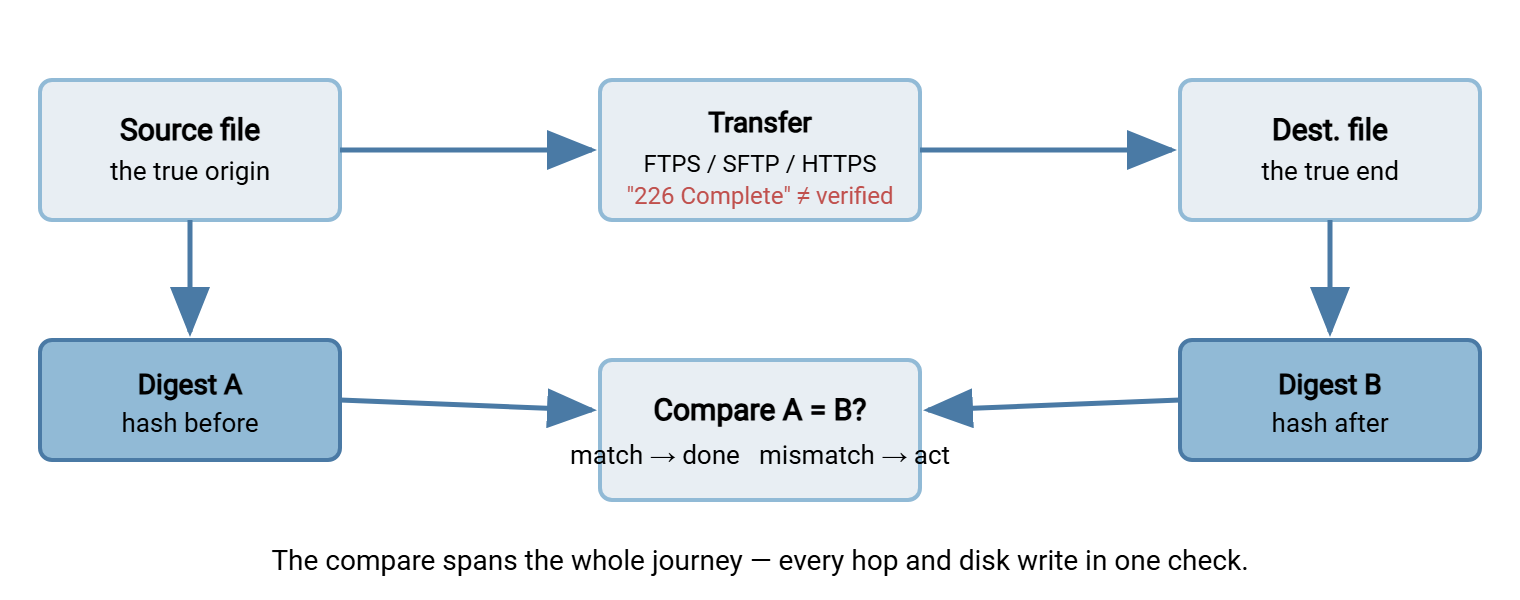
Each per-hop check verifies its own hop. None of them spans the entire journey from the original bytes to the bytes finally at rest on the far disk. Only one check does that: computing a hash of the true source and a hash of the true destination and comparing them. That is what "end to end" means. The two ends are the file before it entered the pipeline and the file after it left it. A single comparison covers every hop and every disk write in between.
A concrete case makes the gap obvious. An overnight job pulls a partner's export over FTP, the connection succeeds, and the log reads "transfer complete." But the session ran in text mode. So the protocol quietly rewrote byte sequences it mistook for line endings inside what was actually a compressed archive. Every hop reported success. TCP was happy, the FTP reply codes were happy — and the archive on disk will not unzip. Nothing on the wire was wrong; the file was damaged by the transfer's own translation step, above the layer any hop check can see. An end-to-end hash catches it on the spot. Nothing else in the pipeline will.
Remember: the protocol verifies the wire; only an end-to-end hash verifies the file. "Transfer complete" and "bytes match" are different claims, and integrity work is about proving the second one.
The Three-Step Ritual
End-to-end verification is always the same three moves, whatever the protocol:
- Hash before. At the true source, compute the digest of the file and record it. This is the reference — the fingerprint of the bytes you intend to deliver.
- Transfer. Move the file however you normally do: FTPS, SFTP, HTTPS, rsync, a physical drive, anything. The method does not matter to the check.
- Hash after and compare. At the true destination, compute the digest of the arrived file and compare it to the reference. Match means the bytes are identical and you are done. Mismatch means something between the two ends changed the file — and you just caught it.
The diagram below shows the flow. Notice that the protocol's own "complete" message sits in the middle, entirely separate from the before/after comparison that actually proves integrity.
What Counts as "the Two Ends"
The words "before" and "after" hide a decision: where exactly are the ends? Many flows are not a single hop. A file might leave an application, land on a staging server, cross a DMZ relay, and finally settle on an internal share. Hash it at the staging server and call that "the source," and you have skipped everything that happened before it got there.
The true source is the earliest point where the file exists in the form you care about — usually the application or export that produced it. The true destination is the last resting place where something will actually read it — often that internal share, not the edge server that first caught it. Per-hop hashes are genuinely useful for locating a fault once you know one exists, because they tell you which leg damaged the file. But the check that answers to the business is the outermost one: original bytes compared to final bytes, jumping over every relay in between. If you can afford only one comparison, make it that one. Pick the two ends deliberately and write them into the runbook. Then the reference digest becomes a shared truth that every team along the path can check their copy against.
Doing It By Hand: A Worked Example
Suppose you are sending bigfile.zip from a Linux server to a Windows machine. Here is the whole cycle, the same three moves you will later teach a script to perform.
Step 1 — hash before, on the source
On the Linux source, compute the digest and save it into a small sidecar file so it travels with the data:
$ sha256sum bigfile.zip
9f2a5b7c1d3e4f6a8b0c2d4e6f8a1b3c5d7e9f0a2b4c6d8e0f1a3b5c7d9e1f2a  bigfile.zip

$ sha256sum bigfile.zip > bigfile.zip.sha256
You now have the reference digest, both on screen and in bigfile.zip.sha256. Transfer both files — the data and its sidecar — to the destination.
Step 2 — hash after, on the destination
On the Windows destination, compute the digest of the arrived file:
PS C:\incoming> (Get-FileHash bigfile.zip -Algorithm SHA256).Hash
9F2A5B7C1D3E4F6A8B0C2D4E6F8A1B3C5D7E9F0A2B4C6D8E0F1A3B5C7D9E1F2A
Step 3 — compare
Now compare the arrived digest with the reference. Do not trust your eyes on 64 characters — let PowerShell do it. String comparison with -eq is case-insensitive by default, so the uppercase-vs-lowercase difference between the two tools does not matter:
PS C:\incoming> $expected = "9f2a5b7c1d3e4f6a8b0c2d4e6f8a1b3c5d7e9f0a2b4c6d8e0f1a3b5c7d9e1f2a"
PS C:\incoming> $actual   = (Get-FileHash bigfile.zip -Algorithm SHA256).Hash
PS C:\incoming> if ($actual -eq $expected) { "MATCH - verified" } else { "MISMATCH - do not use" }
MATCH - verified
That "MATCH - verified" is the guarantee "226 Transfer complete" could never give you. The bytes on the destination are identical to the bytes on the source, end to end.
When Both Ends Are Linux: Let the Tool Do It
If both sides speak the sha256sum family, the sidecar file makes verification a single command. That two-space format the source wrote — digest, two spaces, filename — is exactly what sha256sum -c reads back:
$ sha256sum -c bigfile.zip.sha256
bigfile.zip: OK
One line, human-readable, scriptable. If the file had been damaged in transit, you would see this instead, and the command would exit with a non-zero status your scripts can detect:
$ sha256sum -c bigfile.zip.sha256
bigfile.zip: FAILED
sha256sum: WARNING: 1 computed checksum did NOT match
The same one-command idea scales from one file to a whole directory of them, which is the jump we make in checksum files and manifests. For now, the important thing is the muscle memory: write the sidecar at the source, carry it with the data, verify it at the destination.
Where Verification Belongs in Each Pipeline
The three-step ritual is constant, but where you insert it depends on how the transfer runs. Match the check to the pipeline:
| Pipeline | Where the hash goes | Who compares |
|---|---|---|
| One-off manual copy | You run it before and after by hand | You, on the spot |
| Scripted push | Script hashes source, ships sidecar, hashes remote after upload | The script, before reporting success |
| Scheduled/unattended job | Post-processing step verifies the sidecar automatically | The job; a human only hears on failure |
| Pull from a partner | Partner publishes the digest; you verify after download | You, against their published value |
Two subtleties are worth calling out. First, in a pull, you did not create the source, so you depend on the partner publishing a trustworthy digest through a channel you trust. That point leads straight into the difference between integrity and authenticity, covered in integrity vs authenticity. Second, some tools verify as they go: rsync checks each file's content during transfer and re-sends blocks that do not match. Its dry-run and checksum modes give you an independent audit. Our Group I article on rsync dry runs and verification walks through that audit. Even then, an end-to-end SHA-256 over the final file is the check that answers to an auditor. It does not depend on trusting the transfer tool's own accounting.
When the Digests Don't Match
A mismatch is not a failure of the check — it is the check succeeding. It found a problem you would otherwise have shipped. Work through it calmly:
- Re-hash the source. Confirm the reference digest itself is still what you think. If the source changed between your "before" hash and now, the mismatch is expected, not corruption.
- Re-hash the destination. Rule out a fluke by computing the arrived digest again. It should be stable; if it changes between runs, suspect the destination disk.
- Retry the transfer. Most single-event corruption does not repeat. A fresh transfer that verifies clean tells you the first attempt hit a transient glitch.
- If it repeats, find the cause. A mismatch that survives a retry is systematic — the usual suspects are text-mode translation, truncation, or failing hardware. Diagnosing which is the whole subject of where corruption actually comes from.
The golden rule: a file that fails verification is not delivered. Quarantine it, alert a human, and retry — never let a mismatched file flow downstream where something will consume it as if it were good.
It is worth naming why the retry order above works. Corruption comes in two flavors: transient and systematic. Transient corruption — a cosmic-ray bit flip, a momentary buffer glitch — almost never repeats, so a clean retry is both the fix and the proof. Systematic corruption — text mode, a truncating disk, a broken resume — reproduces every single time, because the same broken step runs again. So the retry is also a diagnostic. If the second attempt verifies, you had a transient blip and you are done. If it fails identically, you have a repeatable bug to hunt down. Either way, you learned something, and no bad file escaped.
Is Verification Worth the Time?
A fair question, since hashing reads the whole file. On a multi-gigabyte transfer the hash adds seconds to a minute at each end — usually a rounding error next to the transfer itself. It is cheap insurance against re-sending or, far worse, restoring from a backup that turns out to be corrupt. Still, judgment applies. For a tiny config file you are about to open and read anyway, a formal hash is overkill; your eyes are the check.
For everything else, a simple rule decides it: the less a human will look at the file before it is used, the more it needs an automatic check. Backups, nightly batches, and firmware images sit at the top of that list — nobody reads them until the day they must work. That is the worst possible moment to discover they don't. When you do verify, hash the whole file, never a sample. The avalanche effect guarantees that a single bad byte flips the digest — but only if the digest actually covered the byte that went bad. Spot-checking the first megabyte of a truncated file will cheerfully report a match while the missing tail sits undetected. Full-file hashing is what makes the guarantee real.
From Manual Check to Automatic Guarantee
Running the three steps by hand is perfect for the occasional big copy. For transfers that happen every night, you want the check to run itself and to fail loudly when it fails. That means wiring verification into the job as a mandatory step, so a mismatch stops the pipeline instead of quietly logging and moving on.
A scheduled-transfer tool is the natural home for this. In Sysax FTP Automation, a post-processing step can compute and compare the hash right after each file lands. Its retry-and-error handling can re-fetch a file whose digest did not match. So the verification and the response both happen without a person watching at 2 a.m. The design patterns for that — fail-closed behavior, retry-on-mismatch, and logging the proof — are the entire focus of building integrity checks into automated jobs. This article gives you the manual version; that one makes it durable.
The Version to Tell a Colleague
"Transfer complete" means the connection ended cleanly, not that the file is intact. The protocol protects each hop on the wire, but only an end-to-end hash spans the whole journey. That includes the disk writes at both ends where a lot of corruption actually happens. So build the habit: hash the source and save the digest. Transfer the file and its sidecar. Hash the destination, and compare case-insensitively with a tool rather than your eyes. Match means done; mismatch means you just caught something before it hurt you — quarantine and retry.
Next, learn to verify whole batches at once in checksum files and manifests, and to make the whole thing self-running in building integrity checks into automated jobs. If a check keeps failing, where corruption actually comes from is your troubleshooting map.
Frequently Asked Questions
If SFTP already protects data on the wire, why hash at all?
Do I need to hash before and after, or is one enough?
The two digests differ only in uppercase versus lowercase. Is the file bad?
Where should the reference digest come from in a download?
What should happen when verification fails in an automated job?
From the Sysax team: we build secure file transfer software for Windows. Sysax Multi Server is an FTP, FTPS, SFTP, and HTTPS server. Sysax FTP Automation handles scheduled, scripted transfers. Free trials are on the download page.