
Orchestrating Multi-Step Transfer Workflows
The individual steps are never the hard part. Your validation script works. The zip step works. The upload works. The hard part is running five of them in order, unattended, at 2 a.m. — and knowing what to do when step 3 dies. Which steps completed? Is it safe to run them again? Do you restart from the top or resume from the middle? Most of what gets reported as "the workflow is buggy" is really none of the steps being buggy. It is the coordination between them being improvised.
Orchestration is that coordination, given a name and built on purpose. It is the layer that sequences steps, carries state between them, decides what happens on failure, and leaves a record of what actually happened. It is worth separating in your head from the work itself. Steps move and reshape files; the orchestrator decides who runs, when, and what "done" means. Small flows get away with informal coordination for a while. Then one midnight failure with no answers converts everyone to doing it deliberately.
This closing article of our pre- and post-processing series takes the stages built throughout — validation, packaging, transformation, routing. It chains them into a machine that can be trusted and, more importantly, recovered. It covers sequencing and dependencies, state that survives the process that wrote it, and the workflow diary. It covers what happens when step 3 of 5 fails. It also covers the honest signs that a growing script has become a job for a workflow tool. The stage vocabulary comes from the anatomy of a transfer pipeline.
What an Orchestrator Actually Does
Strip away every product and pattern, and an orchestrator has exactly three jobs. First, sequencing: run steps in the right order, and only when their inputs exist. Second, state: remember what has happened — which steps finished, with what outcome, for which files. Keep that in a form that outlives the process that did the work. Third, failure policy: for each step, decide in advance what a failure means. Decide whether to retry it, park the file, halt the run, or carry on without it. Everything else an orchestration system offers is decoration on those three.
That framing is useful because it scales in both directions. A single well-structured script can do all three jobs honestly for a small flow. A workflow product does the same three jobs with better furniture. What never works is doing them implicitly. That means order enforced by hope, state held in a person's memory of "it usually finishes by three," failure policy decided fresh during each incident.
Sequencing and Dependencies
Most transfer workflows are honest straight lines: validate, then package, then transfer, then verify, then notify. The elegant trick from the pipeline series makes the sequencing almost enforce itself. Because each step reads from its input folder and writes to the next one, the dependency is a file. Step 3 cannot run ahead of step 2, because until step 2 finishes there is nothing in step 3's input folder to run on. A step that finds an empty input folder does nothing, correctly, and a run naturally drains down the chain.
Branches exist, but fewer than people expect. One common branch is a fan-out after packaging — one file to several destinations. That is the routing stage's problem and stays out of the orchestrator's way if you let it. The other common branches are conditional steps ("encrypt only the HR files"). Keep conditions in configuration next to the flow, not scattered through step code as if-statements, for the same review-and-diff reasons as every other table in this series.
How does each step learn it is time to run? Two styles, both legitimate. Time-chaining schedules the steps at staggered times — step 1 at 02:00, step 2 at 02:30. It works for small, stable flows, but the gap is a guess. The night step 1 runs long, step 2 processes nothing (fine) or, worse, processes a partial hand-off (not fine). That is why hand-offs must be atomic, per the partial-file safety series. Event-chaining lets completion itself trigger the next step. The orchestrating script simply calls step 2 when step 1 returns success, or a folder monitor fires when the hand-off file appears. That is the pattern explored in the watch folders series. Event-chaining removes the guessed gap, which is why grown-up flows drift toward it.
Passing State Between Steps
Workflow state comes in two kinds, and recognizing the split saves a lot of over-engineering. The first kind is the files themselves: a file's location in the stage folders is its status, no bookkeeping required. For everything the next step needs in order to do its work, the hand-off folder already carries it.
The second kind is facts about the run: step 2 finished at 02:10:58 with 12,408 rows. Step 3 produced sales_YYYYMMDD.zip and its archive test passed. Step 4 has failed twice and is waiting to retry. No folder listing tells you that. The moment you need to answer "did step 3 finish?" after the fact — and every failure investigation starts with exactly that question — the run needs a written record.
The critical property of that record is durability. Exit codes evaporate with the shell that saw them; environment variables die with the process; what a step "knows" is gone the instant it exits. State that must survive a crash has to be a file on disk, written as events happen. Give each run an identity — a run ID like YYYYMMDD_0210, date plus sequence. Write the record under that name, so tonight's run can never be confused with the rerun at 06:40.
Run identity also settles the ugliest state question of all: two runs at once. The night step 3 retries for four hours is the night the next scheduled run arrives to find the previous one still alive. Two orchestrators draining the same folders will interleave, double-process, and corrupt each other's diaries. The standard defense is a lock: a marker the run takes at start and releases at the end. That way, a second run either waits or exits with a "previous run still active" alert instead of barging in. Locking mechanics, including what to do about the stale lock a crashed run leaves behind, are covered in the bash and cron automation series. Every multi-step workflow needs the idea, whatever language it is written in.
The Workflow Diary
The simplest durable run record is also the best one for small and mid-sized flows: an append-only text file per run. This is the workflow diary, where every step writes one line when it starts and one when it ends. No database, no schema, no framework. Here is a diary from the nightly sales feed, on a night worth reading about:
# log\run_YYYYMMDD_0210.diary - sales-feed, 5 steps
Mar 14 02:10:04  RUN     start   run=YYYYMMDD_0210  trigger=schedule
Mar 14 02:10:05  STEP 1  validate  start
Mar 14 02:10:58  STEP 1  validate  ok      rows=12408  trailer=match
Mar 14 02:10:59  STEP 2  package   start
Mar 14 02:11:22  STEP 2  package   ok      out=sales_YYYYMMDD.zip  test=pass
Mar 14 02:11:23  STEP 3  transfer  start   dest=partner-sftp
Mar 14 02:14:41  STEP 3  transfer  FAIL    attempt=3/3  error=connection timed out
Mar 14 02:14:42  RUN     halted  at=step3  resume=step3  safe=yes
                 (steps 4 verify, 5 notify never ran; nothing was consumed)
Look at what that one small file answers at 6 a.m., before coffee. It tells you what ran (steps 1 and 2, cleanly, with their counts). It tells you what failed (the transfer, after its retry budget) and what never ran (verify and notify). It tells you where to resume (step 3) and whether resuming is safe (yes — the packaged file still sits in the outbound folder, untouched). The last two lines are the orchestrator writing its own handover note to whoever — human or script — picks the run up next.
Remember: the diary is append-only and written as events happen — never reconstructed afterward. A step that completes without its diary line, or a diary rewritten to look tidy, leaves a record you cannot trust. That matters during the one investigation where you need it.
When Step 3 of 5 Dies
Now the scenario the whole design exists for. The run above halted at step 3; the diagram shows the state it left behind, and where the recovery starts:
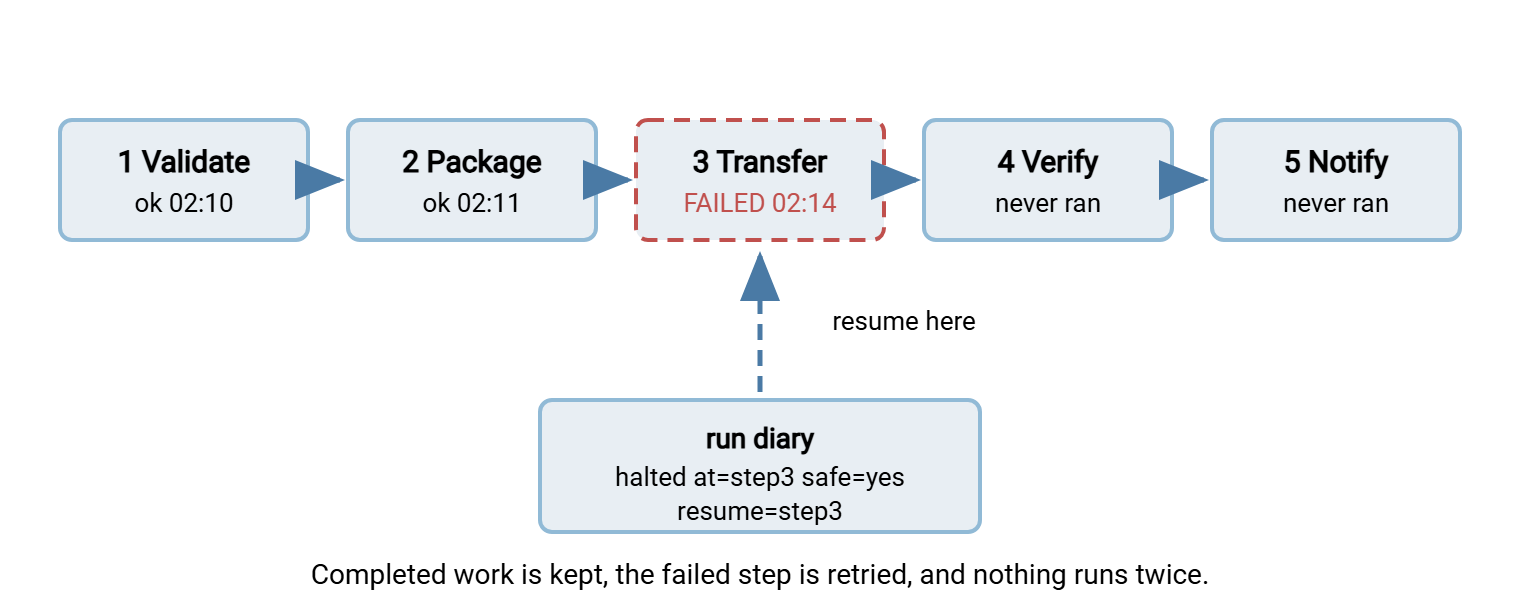
Recovery is easy exactly when three design rules were followed before the failure, and miserable exactly when they were not:
- Steps complete atomically, at boundaries. A step either finishes — output moved into the next hand-off folder,
okline in the diary — or it might as well never have started. Anything in between lives only in the step's private work area, which the step clears on its next start. That rule means the diary's list ofoksteps is also the exact list of work that is real. - Completed steps are never silently repeated. Resume means: read the diary, skip every step marked
ok, clean the failed step's work area, run it again, continue. Re-running step 1 and 2 here would be wasteful but survivable. In flows where a step has external effects — a transfer that already delivered, a notification already sent — re-running is how partners get duplicates. That is why rerun safety is a series of its own: duplicate detection and idempotency. - Each step's failure policy was decided in advance. Step 3's timeout is transient — network weather — so it earns retries with backoff, and after the budget, a halt with resume instructions. A validation failure is permanent — no retry will fix the file — so it parks the file and halts without retrying at all. The taxonomy and the timing patterns are the subject of the retry and error handling series. The orchestrator is where those decisions get wired in, per step, not per workflow.
Notice what the halted run did not do: it did not delete the packaged file or mark the run as finished. It did not carry on to verify-and-notify as though nothing happened. It did not require a human to reconstruct events from five scattered logs. The 06:40 rerun — human-triggered or scheduled — reads resume=step3 and finds sales_YYYYMMDD.zip exactly where step 2 left it. The night ends one transfer late instead of one day late.
One more policy closes the loop: what if the resumed step fails again? Resume attempts need a budget just as retries do. A step that fails on the original run and on two resumes is no longer weather. Something real is wrong with the file, the destination, or the step itself. The third failure should park the work and escalate rather than queue a fourth identical attempt for the next shift to watch fail. Write the resume count into the diary line (resume=step3 attempt=2) so the budget is enforced by the record. Do not leave it to whoever happens to remember how many times this has already been tried.
Notify: The Step That Reports on All the Others
Every run should end by telling someone what happened — and the diary is the message. Success sends a quiet one-line summary (run ID, files, counts, duration) that a human can skim in the morning report. A halt sends the loud version: the diary tail, the failed step's error text, and the resume instruction. That way, the person paged at 02:15 starts with answers instead of questions. And one failure mode writes no diary at all — the run that never started, because the scheduler misfired or the trigger never came. Only an external check that expects a run and misses it can catch that silence; that is freshness monitoring, covered in the transfer job monitoring series.
Script or Workflow Tool? The Honest Signs
Every orchestrator starts life as a script. A well-structured script — functions per step, hand-off folders, a diary, explicit failure policy — is a perfectly respectable orchestrator for a handful of flows. The question is when it stops being one. The signs, from experience rather than theory:
- The glue outweighs the work. More lines now manage ordering, state, and retries than actually touch files. You are maintaining a homemade workflow engine with a user base of one.
- Resume logic keeps growing. The diary-reading, skip-completed, clean-and-rerun machinery sprouts special cases every time a new step joins.
- Flows share steps by copy-paste. The third flow that needs validate-package-transfer got it by duplicating the second's script, and a fix now needs applying in three places.
- Failure policy became a matrix. Different steps need different retry counts, backoffs, and park rules, and the script encodes it all in a thicket of variables nobody dares reorder.
- Triggers multiplied. Some steps run on schedules, some on folder events, some on each other. The only place the full picture exists is the author's memory. When "what runs when" has become an oral tradition, the script has quietly become infrastructure.
When the signs pile up, the ladder has two rungs before "build a platform." The first is splitting the workflow into scheduler-managed jobs — each step its own scheduled or triggered task. That way, the operating system's scheduler provides the visibility and history your glue code was hand-rolling. The disciplines for that live in the scheduled jobs series. The second is a transfer automation tool that carries the standard coordination natively. In Sysax FTP Automation, the task wizard assembles the classic sequence as one generated task. The sequence is zip compression, OpenPGP encryption, the transfer, file and system operations, an email notification. The task is triggered by schedule or folder monitoring, so the glue you were maintaining by hand simply is not yours anymore. When a flow needs a step the wizard did not anticipate, the script editor with line-by-line debugging lets you add and test that step. You do that inside the generated flow rather than around it. Your custom logic stays small; the coordination becomes the tool's problem.
Two-sided workflows deserve the same thinking on the far end. When your outbound run is a partner's inbound one, their post-processing has to start without a human watching. If the receiving side is yours, running Sysax Multi Server, event triggers (Pro and Enterprise editions) can launch the receiving workflow the moment the upload lands. The sender's step 5 hands off, in effect, to the receiver's step 1.
The Version to Tell a Colleague
Orchestration has three jobs. Run steps in order only when their inputs exist. Keep durable state about what happened. Decide every step's failure policy before the failure. Let hand-off folders enforce the sequence. Give every run an ID and an append-only diary. Make steps complete atomically so "resume from step 3" is a read-the-diary operation instead of an archaeology dig. Retry only what retrying can fix. Do that in a script for as long as the glue stays small — and recognize the signs when it no longer does. The machine you end up with is the whole point of this series: seven boring stages, coordinated deliberately. They fail loudly, recover cheaply, and never make you guess at 2 a.m.
If you arrived here first, the series reads best from the anatomy of a transfer pipeline forward. The step most worth hardening today is in validating files before they leave. The config-as-data habit that keeps orchestration reviewable runs through transformation and routing alike.
Frequently Asked Questions
What is the difference between scheduling and orchestration?
What is a workflow diary or state file?
If step 3 of 5 fails, should I rerun the whole workflow?
Can I orchestrate with just cron or Task Scheduler?
How do I know my script has outgrown itself and needs a workflow tool?
From the Sysax team: we build secure file transfer software for Windows. Sysax Multi Server is an FTP, FTPS, SFTP, and HTTPS server. Sysax FTP Automation handles scheduled, scripted transfers. Free trials are on the download page.