
Routing: Getting Each File to the Right Destination
Sooner or later, every transfer setup grows a collection point. That could be one folder where partners upload everything, one share where internal applications drop their exports. Or it could be one server inbox that receives a dozen different file types from a dozen different senders. Every one of those files has exactly one right next stop — the accounts-payable import folder, the HR decryption job, the archive. Something has to make sure it gets there.
That something is routing: the pipeline stage that decides each file's destination and delivers it there. It sounds too simple to write about, and that is precisely why it causes so much quiet grief. A misrouted file produces no error anywhere: the transfer succeeded, the routing step "worked." The file now sits peacefully in the wrong folder while the system that actually needed it starves. Nobody gets an alert. Somebody gets a phone call — days later.
This article covers routing done deliberately: the three keys a routing decision can be based on. It covers why the routing rules belong in a configuration table rather than in code. It covers what must happen to the file that matches no rule, and fan-out to multiple destinations. And — because routing failures are the quietest failures in file transfer — it covers how to detect a misroute before the recipient does. It is part of our pre- and post-processing series. In the pipeline skeleton from the anatomy of a transfer pipeline, routing is the stage after verification — the last hop that puts each file where its consumer looks.
Where Routing Shows Up
Three shapes account for nearly all routing work. The first is inbound sorting: many senders, one entry point, many internal destinations — the partner upload folder that must be split toward finance, HR, and operations. The second is outbound distribution: one file, many recipients — the daily price list that goes to every reseller. The third is the internal hub: an organization that funnels transfers through a central server so that flows are secured and logged in one place. That makes routing the hub's core job.
In pipeline terms, routing is usually post-processing — it happens after a file has arrived and been verified. But the same thinking applies on the sending side. There, "which remote server and folder does this file get uploaded to" is just routing with a network hop in the middle. The mechanics below serve both directions.
The Three Routing Keys
To route a file you need a routing key — the fact about the file that determines its destination. There are only three places that fact can come from, and they are not equally good.
By name — the best key
A well-designed file name already carries the flow, the file type, and the business date. A name like sales_YYYYMMDD.csv tells the router everything it needs without opening the file. Name-based routing is cheap, deterministic, and testable — you can verify the routing of a thousand hypothetical names in a second. Its only requirement is naming discipline from senders. That is why the naming convention belongs in every file contract and why it gets its own series: file naming and datestamping. If you control or negotiate the names, route by name.
By source — the structural key
Sometimes the sender is the key: everything from partner A's account is partner A's data, whatever it is called. Source-based routing uses structure instead of parsing — per-partner upload folders, per-sender accounts — so the location or credential a file arrived through decides its first hop. It is robust against senders with sloppy names, and it pairs naturally with name-based routing. The account chooses the partner lane, the name chooses the destination within it. As a bonus, per-source separation limits the damage when anything else goes wrong, because partner A's misnamed file can never land in partner B's lane.
By content — the last resort
When neither name nor source can decide, the router must open the file and look. It can check a header row, a record-type code in the first line, the root element of an XML document. Content-based routing works, and is sometimes genuinely necessary — but be honest about its costs. It is the slowest option. It requires parsing files that may be malformed (so validation must come first). And a wrong sniff turns into a confident misroute. Treat content routing as a signal that the naming contract has a gap, and close the gap when you can.
The Routing Table: Configuration, Not Code
However the key is chosen, the rules that map keys to destinations should live in a routing table — a small data file. They should not live as a chain of if-statements inside a script. The reasoning is the same as for the mapping tables in transforming files between systems. It is worth spelling out, because this single decision determines whether routing stays manageable as flows multiply. A table can be read and confirmed by the operations person and the business owner. The table can be diffed in version control, printed into the runbook, and changed for a new partner without touching or re-testing a line of logic. An if-chain can do none of that, and every new destination becomes a code change with a code change's risks.
A routing table needs nothing fancier than this:
# routes.csv - evaluated top to bottom, FIRST MATCH WINS
# pattern            destination                        action
sales_*.csv          \\corp\finance\sales\inbox         move
inv_*.csv            \\corp\finance\ap\inbox            move
hr_*.pgp             D:\flows\hr\decrypt\in             move
statement_*.pdf      \\corp\treasury\statements\in      copy
*                    D:\flows\hold\unmatched            move+alert
Three details in that file carry most of the design. First, order matters: rules are evaluated top to bottom and the first match wins, so more specific patterns must sit above broader ones. If a partner ever sends sales_inv_YYYYMMDD.csv, its fate depends entirely on which row it meets first. That is why every table change gets tested (a section below covers how). Second, the catch-all last line: the * rule guarantees that no file can fall through the table into nowhere. Third, the table is under version control and reviewed like code — because it is the logic. The engine that reads it is a dozen lines in any scripting language and almost never changes. The value lives in the table; the engine is a loop.
What the loop actually does is worth stating once, because each duty earns its keep. For every file in the inbox, find the first matching row, log the decision, then deliver — and deliver safely. That means copying to a temporary name at the destination and renaming into place, so the consuming system never sees a half-copied file. That last habit matters most when the destination sits on another volume or a network share. There, a "move" is really a copy-then-delete rather than an instant rename. The reasoning is covered in the partial-file safety series. A router that delivers carelessly recreates, at every destination, the very half-file problems the acquire stage worked to prevent.
As flows multiply, two more columns earn a place in the table before any cleverer syntax does. An owner column names who to contact when this route's files misbehave. It turns the table into the operational directory it will be used as at 6 a.m. anyway. And an enabled flag lets you pause a route during a consumer's maintenance window by flipping one value. That beats deleting the row and rediscovering its details from version control when the window ends. Both changes are data edits, reviewable in one glance — which is the whole point of keeping routing out of code.
Fan-In, Fan-Out, and the File Nobody Expected
The diagram below shows the whole stage at work. Files from many senders land in one collection inbox. The router matches each name against the table. Three kinds of files fan out to their destinations. The file that matches no rule drops into a hold folder and raises an alert instead of being guessed about.
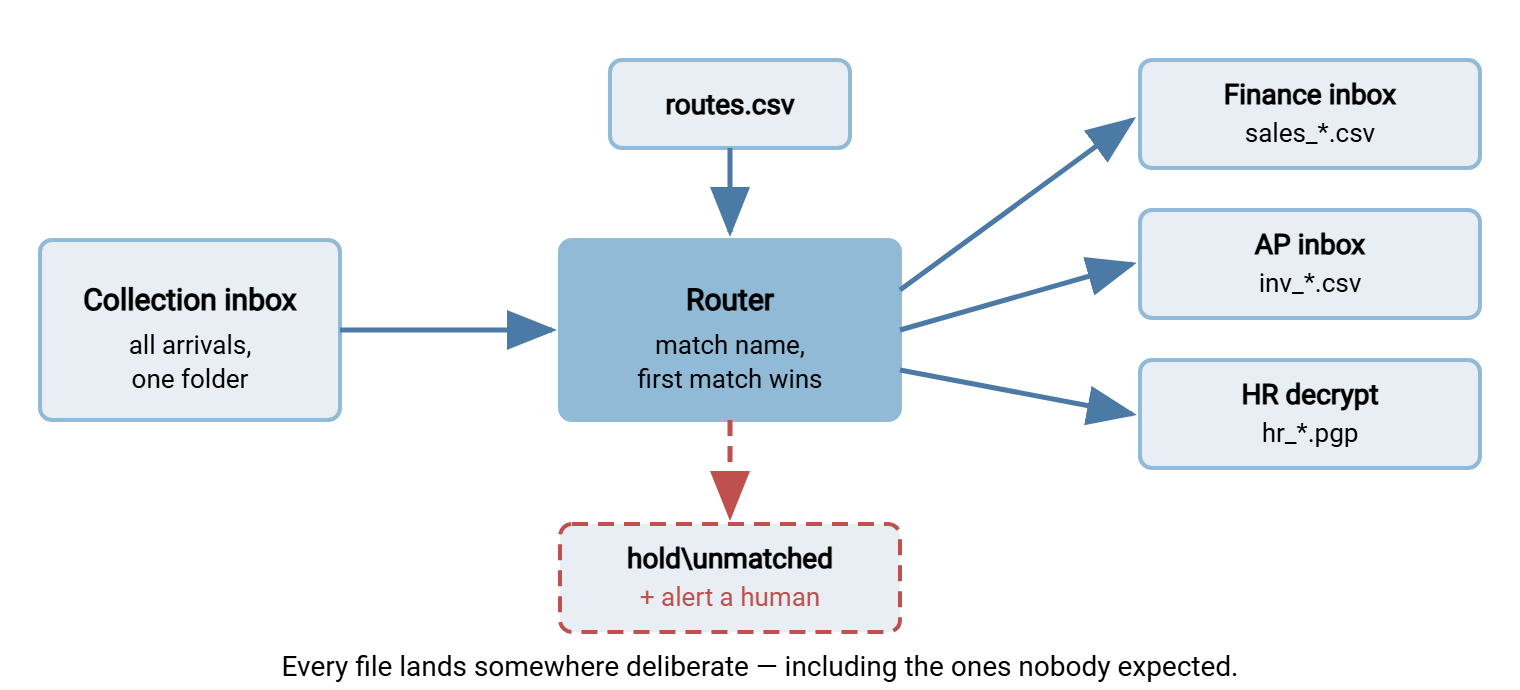
The unmatched path deserves its own rule, because it is where routing designs quietly rot. A file that matches no rule is not noise to be swept somewhere plausible — it is news. Either a sender changed a name without telling you, or a new file type appeared that nobody onboarded, or your table has a typo. All three demand a human. The moment a router starts guessing ("it says sales-ish, send it to finance"), a loud unknown becomes a silent misroute. You have traded a five-minute question for a multi-day search. Park it, alert on it, and treat a hold folder that is not empty as a condition to clear daily. That is the same stuck-file discipline used throughout the watch folder series.
Remember: an unmatched file is news, not noise. Hold it and ask a human. Every "helpful" guess converts a visible unknown into an invisible misroute — the most expensive kind of quiet there is.
Fan-Out: One File, Many Destinations
Some files legitimately go to several places at once — the settlement report that must reach the partner, the archive, and the analytics import. Fan-out is routine, but it changes the bookkeeping in two ways that catch people out.
First, copy, then move last. While deliveries remain outstanding, the router copies; only the final delivery may consume the file (or move it to the sent archive). A router that moves first and thinks later strands the remaining destinations. Delivering to the safest destination first — usually the archive — means that whatever happens later, a pristine copy exists.
Second, per-destination accounting. A fan-out to three destinations is three independent deliveries, each of which can fail alone. The router must record each one separately, and recovery must retry only the failed leg. Re-delivering all three because one failed is how the two healthy destinations receive duplicates. The general machinery for that — per-item retries with backoff, and reruns that do not double-deliver — is the territory of the retry and error handling and duplicate detection and idempotency series. Routing is one of the places it pays rent. In the table, fan-out is simply several rows sharing a pattern with copy actions — resist inventing a richer syntax until you truly need it.
Third, define "done." A fanned-out file is finished only when every leg has been recorded as delivered. That means the routing log must show one line per leg, not one line per file. The file may leave the router's custody only after the last leg's line says ok. Without an explicit completion rule, the two-of-three state has no name, no owner, and no alarm. With one, it is simply a file that is not yet done, visible in the morning report until it is.
Detecting the Misroute Before the Recipient Does
Even with a clean table, misroutes happen. The cause might be an overlapping rule added above an old one, a partner's quiet rename that still matches something. Or it might be a destination path typo that is itself a valid folder. Since the failure produces no error, detection has to be designed in. Five defenses, in the order to add them:
- A routing log. One line per file: timestamp, file name, rule matched, destination, outcome.
Mar 14 02:12 sales_YYYYMMDD.csv rule=sales_*.csv dest=\\corp\finance\sales\inbox moved ok. This log is the entire answer to "where did yesterday's file actually go," and without it every misroute investigation starts from zero. - Per-route daily counts. Roll the log up into files-per-route-per-day. A busy route suddenly at zero, or a hold folder suddenly at five, is drift made visible — ideally in the same morning report your job monitoring already produces.
- Dry-run tests after every table change. Keep a sample set of file names — every current flow plus past troublemakers. Run them through the matcher in a mode that prints decisions without moving anything. Diff against the expected decisions. This is the five-minute test that catches the overlapping-rule mistake on the day it is made instead of the week it bites.
- A clean-hold rule. Nothing lives in
hold\unmatchedlonger than one business day. The folder is a question queue, not a storage tier. - Reconciliation with recipients. For the flows that matter most, compare what you routed with what the consumer ingested. For example, use a daily count exchanged by email, or a manifest listing the files sent, as described in checksum files and manifests. Reconciliation catches the misroutes that slipped past everything else.
And when a misroute is found, run the recovery as a small drill rather than an improvisation. The routing log tells you exactly which files went where under the bad rule, and for how long — that list is the scope. Remove or retrieve the misdelivered copies where you still control the destination. Deliver the files where they should have gone. Fix the table. Then add the offending file name to the dry-run sample set, so this particular mistake becomes a regression test that can never return quietly. The one situation where "retrieve the copies" is not in your power — delivery into someone else's systems — is exactly why the next paragraph exists.
One scenario justifies all this care by itself: the misroute that crosses an organizational boundary. A file intended for partner A delivered to partner B is not an ops hiccup. If it contains personal or commercial data, it is a reportable incident with a clock running, as our article on personal data transfer incidents lays out. Structure helps here more than vigilance: keep per-partner lanes separate end to end — separate folders, separate credentials, separate outbound tasks. That way, even a bad routing decision inside your network cannot physically deliver one partner's file to another partner's endpoint.
Where the Router Runs
On the receiving side, the natural trigger point is the transfer server itself, the moment an upload completes. If you run Sysax Multi Server, event triggers (in the Pro and Enterprise editions) can launch your routing script on arrival. The server's activity logging — to file or to a database — provides an independent record of every upload that your routing log can be reconciled against. Compare files that arrived versus files that were routed, with any gap flagged before breakfast.
On the sending side, routing typically means staging files into per-destination outbound folders that scheduled transfer tasks then deliver. In Sysax FTP Automation, folder monitoring can watch those staging folders and fire the configured transfer for each. The tool's file operations archive what was sent, and an email notification carries the outcome. The routing decision — the table and the dozen-line matcher — remains your script, as it should: nobody else knows your destinations. What the automation contributes is everything around the decision: the triggering, the reliable per-destination delivery, and the notifications when a leg fails.
The Version to Tell a Colleague
Routing is the stage that turns "the file arrived" into "the file is where its consumer looks." Its failures are silent by nature — so it has to be built for visibility. Route by name when you can, by source for structure, by content only when you must. Put the rules in a table under version control, first match wins, with a catch-all that parks the unexpected and alerts a human instead of guessing. Copy-then-move-last for fan-out, account per destination, and instrument the whole stage: a routing log, per-route counts, dry-run tests after every change. The recipient should never be your misroute detector.
From here: orchestrating multi-step workflows shows how routing chains with validation, transformation, and packaging into one dependable machine. The article on the pipeline anatomy is the map the whole series hangs on. For the naming discipline that makes name-based routing possible, see the file naming and datestamping series.
Frequently Asked Questions
Should I route by file name, by sender, or by content?
What should happen to a file that matches no routing rule?
How do I keep a new rule from stealing files that belong to an old one?
When routing to several destinations, should I move or copy?
How would I even notice a misrouted file?
From the Sysax team: we build secure file transfer software for Windows. Sysax Multi Server is an FTP, FTPS, SFTP, and HTTPS server. Sysax FTP Automation handles scheduled, scripted transfers. Free trials are on the download page.