
Seed, Delta, Freeze: Cutting Over Without Losing Files
Every file migration funnels down to one evening. The seed copy ran for days, and the delta passes shrank night after night. Now comes the part users will actually remember: the cutover. In that short window, the source is frozen and the last changes are carried across. The copy is proven complete, and everyone is repointed at the new server. Do it right and Monday morning is silent. Do it loosely and Monday morning is a queue of "my file from Friday is gone" tickets — files stranded on a server you were about to switch off.
The good news is that a cutover is not a heroic event; it is a checklist executed calmly. This article is that checklist, expanded. It covers what must be true before you schedule the night and how to freeze writes properly. It provides the timestamped runbook itself and explains the mechanics of repointing users. It covers what real rollback readiness looks like and the communication that keeps the whole thing boring. Boring is the highest compliment a cutover can earn.
This is the fourth article in our Bulk Internal Moves with Robocopy and Rsync series. It assumes the phased approach from planning the big copy: seed done, deltas converged, engine rehearsed.
The Shape of a Safe Cutover
Recall the fundamental race: the source is alive, so any copy of it is stale the moment it finishes. Delta passes shrink the staleness but cannot remove it — only a write freeze can. It makes the source read-only so the final pass runs against data that is holding still. Everything else in the runbook exists to make that freeze short, and to prove, before users return, that the frozen source and the new copy are identical. The sequence, end to end:
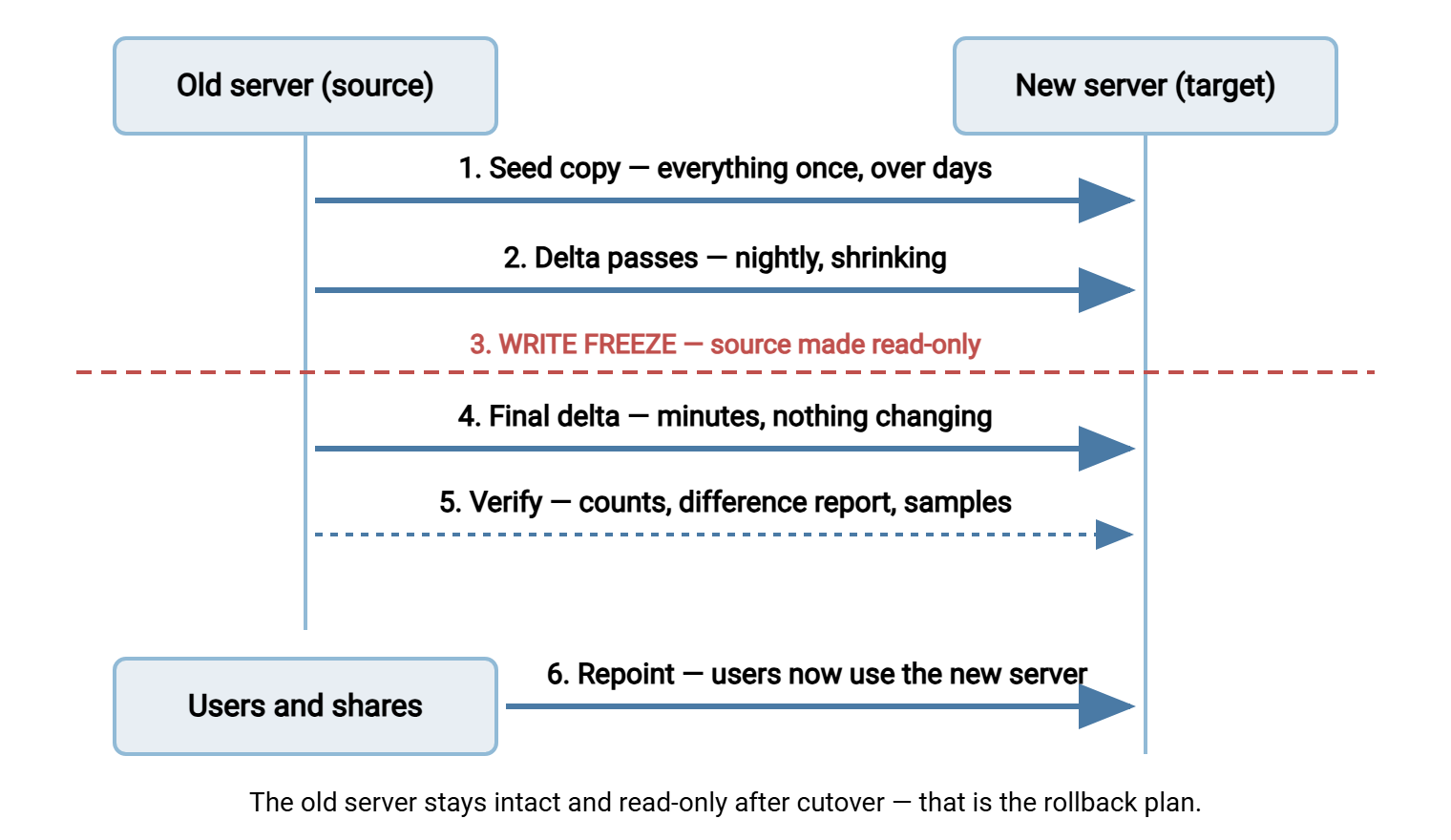
Notice where verification sits: before repointing, inside the frozen window. Verifying after users start writing to the new server proves nothing, because the two sides legitimately differ by then. The full verification toolkit has its own article, verifying nothing was left behind; tonight we only run what it rehearsed.
Entry Criteria: Earning the Night
A cutover date is earned by evidence, not picked by a project plan. Four things must be true before you send the announcement:
- The delta has plateaued, and you know its number. Your last three passes took roughly the same time — say 25 minutes — and moved roughly one day of churn. That plateau is the only honest estimate of the freeze-window copy time. A delta still shrinking, or bouncing unpredictably, means you are not ready.
- Verification is rehearsed. You have run the counts, the dry-run difference report, and the sample hashes against the current copy at least once. You know how long they take and what "clean" output looks like. Cutover night is a terrible time to see a verification tool's output format for the first time.
- The rollback plan is written down. Triggers, steps, and the time by which rollback must be decided. More below.
- The window math closes. Freeze window = final delta + verification + repoint + smoke test, multiplied by 1.5 for the unexpected. If that lands at three hours, do not book a one-hour window and hope.
Choosing the window itself is part of the criteria. Friday evening is the classic pick — it leaves the weekend as slack for problems and a Monday-morning support presence. But check the business calendar first. Never freeze a finance share in the closing days of a quarter. Never freeze an engineering share the night before a release. And confirm who owns the go decision. A cutover touching a whole department is a change the department head should approve, on record, with the window and the rollback plan in the approval.
Hold a short go/no-go the day before: confirm last night's delta duration, confirm people are available, confirm nothing big is landing on the share tomorrow, confirm the approval stands. Cheap meeting, expensive to skip.
The Write Freeze, Properly Done
The freeze makes the source readable but not writable. Readable matters — the final pass and verification still need to read everything — so the freeze is emphatically not "shut the old server down."
On a Windows source, the cleanest lever is share-level permissions. Set the share's permissions to read-only for everyone (leave the migration account full access). Then disconnect open sessions from the server's management console so cached handles cannot keep writing. NTFS deny-write entries work too but are messier to unwind. On a Linux or NAS source, the equivalents are exporting NFS shares read-only or setting the SMB share read-only in the server configuration. Another option is remounting the filesystem read-only. Any of them is reversible in seconds, which is exactly what rollback wants.
Whichever lever you pull, prove the freeze took before starting the final pass. From a client PC, as an ordinary user, try to create a file on the share and watch it fail. Then check the server for surviving sessions holding files open and disconnect them. Remember the paths that bypass the share entirely. A process running on the source server writes straight to the disk, no share permissions consulted. That is why services and scheduled tasks on the old server itself belong on your freeze list, stopped or pointed elsewhere for the night.
Then freeze the non-human writers, which every first-time migration forgets. These include scheduled jobs that import files onto the share and applications that write logs or exports there. They also include the backup system if it locks files while running. Disable them, list them as you do, and re-enable them — pointed at the new location — after cutover. A scheduled import that keeps writing to the frozen-but-reachable old share is how files get orphaned invisibly. Your inventory of such jobs comes straight out of the practices in our scheduled jobs series.
Remember: announce the freeze twice — the day before and thirty minutes before — and make the share read-only rather than invisible. Users who can still see their files stay calm; users whose drive letter vanishes call the helpdesk in waves.
The Cutover-Night Runbook
Here is the runbook skeleton, timestamped for a Friday-evening cutover with a 25-minute delta plateau. Copy it, replace the times with your own math, and put a name against every line. Three roles matter: the driver (runs commands), the verifier (checks results independently), and the communicator (talks to everyone else so the driver never has to).
CUTOVER RUNBOOK - engineering share - driver: AL / verifier: SAM / comms: KIM
Fri 18:00  Reminder to all users: share freezes at 21:00 tonight
Fri 20:30  Driver, verifier, comms online; helpdesk briefed; runbook open
Fri 20:45  Delta pass (normal, pre-freeze) - confirms engine healthy
Fri 21:00  FREEZE: share set read-only; open sessions disconnected
Fri 21:05  Writer jobs disabled: nightly import, report drop, backup agent
Fri 21:10  Final delta pass started            (expect ~25 min)
Fri 21:40  Exit code checked: success family, zero failed items
Fri 21:45  Verify: file/byte counts vs baseline (expect ~20 min)
Fri 22:05  Verify: dry-run difference report shows nothing pending
Fri 22:20  Verify: hash samples + permission spot-checks pass
Fri 22:30  GO / NO-GO point - any check failed means rollback path
Fri 22:40  Repoint: namespace / alias / drive mappings to new server
Fri 22:55  Smoke test: browse, open, edit, save, delete as a test user
Fri 23:05  Old share set read-only permanently (safety net, not target)
Fri 23:15  Comms: all-clear sent; helpdesk handoff note posted
Sat 10:00  Check old server access log for surprise activity
Mon 07:30  Hypercare begins: helpdesk watch, log review, job checks
Two design points. First, every verification step has an expected duration, so silence never stretches unnoticed. If the counts step is still running twenty minutes past its estimate, that is information. Second, there is exactly one go/no-go moment, after all checks and before any repointing: up to that line, aborting costs nothing but the evening.
Runbooks reward rehearsal. Walk the whole sequence once against a test share, or even as a tabletop read-through. The driver narrates each command, and the verifier names the check they would run. Every "wait — who does that?" surfaces a gap while gaps are free. Rehearsal is also where step estimates come from; a runbook with times you have never measured is a wish list with timestamps.
Repointing Users and Everything Else
"Repoint" sounds like one action; it is actually plumbing, and the right plumbing depends on what users were given years ago:
- A namespace layer — if users reach the share through a DFS namespace or similar indirection, cutover is its finest hour. In that case, change the folder target to the new server and clients follow on their next referral. This is the cleanest path, and if you are reading this before a migration, it is an argument for introducing the layer now.
- A DNS alias — if users reach
\\files\shareandfilesis an alias you control, point the alias at the new server. Test alias access against the new server before the night. Name-based authentication on Windows file services can require server-side registration of the alias. Cutover night is not when you want to learn that. - Direct server names — the hard case: drive mappings, shortcuts, and application configs all say
\\oldserver\share. Update the drive mappings centrally (group policy or login script). Then hunt the rest: application config files, scheduled jobs, printers that scan to folders, scripts with hardcoded UNC paths. You will not find them all tonight — which is exactly why the old server stays up, read-only, as a tripwire. Anything still knocking on it shows in its access log, and Saturday's log review turns each entry into a fix.
One trap hides inside repointing on Windows, and it costs an hour at midnight if nobody knew: copy engines move filesystem metadata, not server configuration. Robocopy's /COPYALL faithfully carries NTFS permissions, but share-level permissions are not part of the filesystem. They belong to the server's share definitions. So the shares on the new server, and their share-level permission lists, must be created deliberately, matching (or improving on) the old ones. The same goes for share options like access-based enumeration. Build and check the shares during the delta week, not during the window. The two permission layers and how they combine are explained in permission models explained.
Whichever path, finish with the smoke test from an ordinary client PC as an ordinary user: browse, open, edit, save, delete. Permissions problems surface here, not in tomorrow's ticket queue. If they do surface, the spot checks in the verification article tell you whether it is one folder or a systemic ACL failure.
Rollback Readiness
Copy-based migration has a structural gift: the source was never modified, so rollback is mostly "point everyone back." Readiness means keeping that gift intact and knowing when to use it:
- Never move; always copy. Robocopy's
/MOVEand similar delete-as-you-go options destroy the rollback plan file by file. The source stays complete until the migration is signed off, however tempting the disk-space reclaim is. (Both engines' safe command patterns are in the robocopy article and the rsync article.) - Write the triggers before the night. For example: verification fails and the cause is not found within 45 minutes; the smoke test fails for a critical application; the window's hard stop arrives. Pre-agreed triggers turn a 2 a.m. judgment call into a lookup.
- Rollback has its own mini-runbook. Unfreeze the old share (flip permissions back), and re-enable the writer jobs against the old location. Revert any repointing already done, and announce. And — importantly — keep the new copy and the logs untouched for diagnosis.
- Know when the door closes. The moment users start writing to the new server, simple rollback ends. Going back would abandon their new work, so any later retreat becomes a merge problem. Practically, the rollback window runs from freeze until Monday's first writes — one more reason verification happens inside the window, not during the week after.
Communication That Keeps the Night Boring
Most cutover pain is not technical; it is people surprised by planned events. The communicator's calendar starts with an announcement a week out (what, when, why, what users must do — usually nothing but log off). A reminder follows the day before, then the freeze notice thirty minutes prior. Short progress notes go to stakeholders during the window ("final copy done, verification running, on schedule"). Then comes the all-clear, which includes the one thing users care about. The message is "your files are where they always were; if anything looks odd, call the helpdesk and say 'file server migration.'" Brief the helpdesk with the three predictable Monday tickets and their fixes. Those tickets concern a stale drive mapping, a shortcut to the old path, or an application config still naming the old server. A cutover where the helpdesk knows the script feels, from the outside, like nothing happened at all.
The Morning After
Cutover ends; hypercare begins — a week or two of deliberate watchfulness. Review the old server's access log daily: every hit is a straggler to repoint. Watch the new location's health and capacity. Confirm the re-enabled jobs — backups first among them — now run against the new server and actually succeed. The habits in our transfer job monitoring series apply directly. A backup that silently still targets the old, frozen share is a disaster on a delay timer.
Hypercare is also when migrations reveal what they really were. Suppose the "old site" is staying alive and the two locations must now exchange files nightly — new site to DR, branch to head office. That is no longer a migration but a standing synchronization job. It deserves a real scheduler rather than a leftover migration script. Sysax FTP Automation generates exactly that class of task — mirror, backup, or two-way synchronization over SFTP, FTPS, or FTP. Those tasks run on a schedule, with email notification when a run fails. And suppose the new location must be reachable from outside the trusted network — partners pulling files, a remote office pushing them. In that case, put a secure transfer server in front of it instead of exposing the share itself. An example is Sysax Multi Server with SFTP, FTPS, and HTTPS plus per-session activity logging. When the observation period ends with a quiet access log and clean checks, run one last residue sweep. Then take the old server offline for a final week of "did anyone scream" insurance, and only then retire it.
The Boring Night Is the Won Night
A safe cutover is arithmetic plus rehearsal. It means a measured delta plateau, a freeze that includes the robot writers, and verification inside the frozen window. It means repointing through whatever plumbing you own and a rollback plan that stays possible because the source was never touched. Print the runbook, put names on the lines, and aim for the highest praise available: nobody noticed.
Before your own night, read the two companions this article leans on. Read verifying nothing was left behind for the checks the runbook schedules. Read planning the big copy if you arrived here with the phases still ahead of you.
Frequently Asked Questions
How long should the write freeze last?
Why does verification have to happen before users are repointed?
What does rollback actually involve?
Should the old server be switched off after cutover?
What usually goes wrong on cutover night?
From the Sysax team: we build secure file transfer software for Windows. Sysax Multi Server is an FTP, FTPS, SFTP, and HTTPS server. Sysax FTP Automation handles scheduled, scripted transfers. Free trials are on the download page.