
Permission Models on Transfer Servers, Explained
When a partner logs into your file server over SFTP or FTPS, something has to decide what they are allowed to do once they are inside. Can they download the price list? Can they overwrite yesterday's upload? Can they see the folder that belongs to a different partner entirely? The login proved who they are. Something else decides what they can touch — and that something is a permission model.
Here is the part that trips people up: there is not one permission model, there are three. A single transfer server often leans on all of them at once. Classic permission bits, access control lists, and virtual-user mappings each answer the same question in a different way. The virtual-user mappings live inside the transfer service itself. When the three models quietly disagree, files end up unreadable to the process that needs them, wide open to the world, or visible to the wrong partner.
This article untangles the three models and follows a single protocol login all the way down to the bytes it is allowed to move. Everything is shown on both Linux and Windows, with commands you can run. It is the foundation for the rest of our Permissions series. The later articles on directory design, least privilege, and inheritance all assume you can picture the machinery described here.
The Question Every Permission Model Answers
Strip away the jargon and every permission system is answering one question, over and over, for every single request. The question is: can this identity perform this action on this object? The identity is a user (or a group they belong to, or a service running on their behalf). The action is read, write, list, traverse, delete, or change-permissions. The object is a file or a directory.
A permission model is just a structured way of storing the answers and checking them fast. The three models differ in how expressive that store is — how finely you can slice "who" and "what" — and in where the answers physically live. Understanding all three matters because a transfer server is a stack. The protocol service sits on top of the operating system. A request has to pass every layer's check before a byte moves. A file the operating system says is readable can still be denied by the transfer service, and vice versa. You cannot reason about the whole unless you can see each layer.
Model One: Classic Permission Bits
The oldest and simplest model is the Unix permission bits (also called the POSIX mode). Every file and directory carries three permissions — read, write, and execute, written r, w, x. These apply for each of three classes of user: the file's owner, the file's group, and everyone else ("other"). That is nine bits total, and they are what you see on the left of an ls -l listing.
The three letters mean slightly different things for files and for directories, and the directory meanings are where beginners get surprised:
- Read on a file lets you see its contents. Read on a directory lets you list the names inside it.
- Write on a file lets you change its contents. Write on a directory lets you create, rename, and delete entries in it. Note that this is about the directory, not the files, a fact that matters enormously for delete rights.
- Execute on a file lets you run it as a program. Execute on a directory means traverse — the right to enter it and reach things inside by name. Without execute on a directory, you cannot open anything below it even if the deeper permissions would allow it.
Those nine bits are usually written as a three-digit octal number. Each digit is the sum of read (4), write (2), and execute (1) for one class. So 640 means owner read+write (6), group read (4), other nothing (0). The quick reference:
| Octal digit | Bits | Means (on a file) |
|---|---|---|
| 7 | rwx |
read, write, and execute |
| 6 | rw- |
read and write, no execute |
| 5 | r-x |
read and traverse, no write |
| 4 | r-- |
read only |
| 0 | --- |
no access |
You set ownership with chown and the bits with chmod. Here is a partner's outbound folder — a place they download from but must never write to — being read, then set correctly:
$ ls -l /srv/sftp/partnera/out
drwxr-x---  2 fileadmin partnera  4096 pricelist.csv
-rw-r-----  1 fileadmin partnera 48210 pricelist.csv

  read the mode field:   d rwx r-x ---
                         |  |   |   |
                     type|  |   |   +-- other: nothing
                         |  |   +------ group (partnera): read + traverse
                         |  +---------- owner (fileadmin): full
                         +------------- d = directory

$ chown fileadmin:partnera /srv/sftp/partnera/out/pricelist.csv
$ chmod 640 /srv/sftp/partnera/out/pricelist.csv   # owner rw, group r, other none
Three special bits sit alongside the main nine and show up as a leading fourth octal digit. The setgid bit on a directory makes new files inside it inherit the directory's group instead of the creator's. This is the trick that keeps a pickup process able to read whatever partners upload. The sticky bit on a shared directory restricts deletion so that only a file's owner can remove it. That is how a common drop folder stays safe from cross-tampering. The setuid bit changes which identity a program runs as and has no place on ordinary data folders. You will meet setgid again in the inheritance article and the sticky bit in the least-privilege one. For now, just know the nine bits have three companions.
The strength of permission bits is that they are simple, universal, and cheap to check. The weakness is that they only understand three classes. If two different groups need two different levels of access to the same folder, the nine-bit model cannot express it. In that case, you have run out of slots. That limitation is exactly what the second model was invented to fix.
Model Two: Access Control Lists
An access control list (ACL) replaces "owner, group, other" with an open-ended list of entries. Each entry — an access control entry (ACE) — names a specific user or group and spells out exactly what they may do. Instead of three fixed slots you get as many as you need. So you can say "this partner may read, that service account may read and write, this other group may do nothing" on one folder without contortions. Both major platforms have ACLs; they look different but do the same job.
POSIX ACLs on Linux
Most Linux filesystems support POSIX ACLs layered on top of the classic bits. You read them with getfacl and change them with setfacl. The bits are still there — the ACL extends them with named entries and a mask that caps the maximum effective permission of the named entries:
$ getfacl /srv/sftp/reports
# file: srv/sftp/reports
# owner: fileadmin
# group: staff
user::rwx
user:partnera:r-x        <- extra named user: read + traverse
group::r-x
mask::r-x                 <- ceiling for named entries
other::---

$ setfacl -m u:partnerb:r-x /srv/sftp/reports   # add partnerb, read-only
$ setfacl -x u:partnera    /srv/sftp/reports    # remove partnera's entry
Two cautions worth internalizing early. First, an ls -l shows a small + after the mode (like drwxr-x---+) when a file carries an ACL. That plus sign is your only hint from an ordinary listing that there is more to the story. Second, the mask silently limits named entries. If the mask is r--, a named user granted rwx effectively has only r--. In that case, getfacl flags the difference with an #effective comment. Miss the mask and you will swear a grant is broken when it is merely capped.
Windows ACLs and icacls
Windows has no "classic bits" layer — its native model is the ACL, and a richer one. Every file and folder carries a discretionary access control list (DACL). This is a list of ACEs, each pairing a security identifier (SID — the unique internal ID behind every user and group) with a set of rights. Crucially, each entry also has inheritance flags that say whether the entry flows down to new files and subfolders. Windows also supports deny entries, which override allows.
The command-line tool is icacls. Reading and setting a partner folder looks like this:
C:\> icacls D:\ftproot\partnera
D:\ftproot\partnera BUILTIN\Administrators:(OI)(CI)(F)
                    FILESRV\svc-transfer:(OI)(CI)(M)
                    FILESRV\partnera:(OI)(CI)(RX)

  (OI) object inherit  -> applies to files created inside
  (CI) container inherit -> applies to subfolders created inside
  (F) full  (M) modify  (RX) read & execute

C:\> icacls D:\ftproot\partnera /grant FILESRV\partnera:(OI)(CI)(RX)
C:\> icacls D:\ftproot\partnera /remove FILESRV\partnerb
The rights letters are shorthands: F full control, M modify (read/write/delete but not change permissions), RX read and execute, R read, W write, D delete. You can also spell out granular rights in parentheses — write-data, append-data, delete-child and more. This makes the Windows model able to express "create files here but never delete them." We lean on that distinction heavily in the least-privilege article.
Remember: ACLs add expressiveness, not a second opinion you can ignore. On Windows an explicit deny beats any allow, and on Linux the ACL mask can quietly cap a grant. When access behaves oddly, read the full ACL — never just the three-letter mode.
Model Three: Virtual Users and Login Mapping
The first two models are properties of the filesystem. The third lives inside the transfer service, and it is the one that surprises administrators coming from a pure operating-system background. Many FTP, FTPS, and SFTP servers maintain their own user database — logins, passwords or keys, and home directories. That database is completely separate from the operating system's user accounts. These are virtual users.
Why do this? Because you rarely want each partner to be a real, shell-capable operating-system account. Real accounts can log in interactively, appear in system-wide groups, and generally reach further than a file-drop partner ever should. A virtual user exists only within the transfer service; it can move files and nothing else. The service authenticates the login against its own list, then decides which directory that login is confined to and what it may do there.
Underneath, the service still has to touch the real filesystem, so a virtual user is mapped onto a real filesystem identity in one of a few ways:
- One-to-one with a real account. Each login corresponds to an operating-system user, and the classic bits or ACLs on that user's files do the enforcing. Simple, but every partner is a real account.
- Many logins, one service identity. Every virtual user's file operation runs as a single behind-the-scenes service account. The service itself enforces per-login boundaries — which directory, which rights — because the operating system sees only the one shared identity. This is common and efficient, but it means the service's rules are doing the isolating, so they had better be right.
- Login mapped to a jailed root. The service confines each login to a directory subtree — a chroot or "jail" — so the login literally cannot name a path outside it. Jailing is the backbone of partner isolation. Our companion piece on designing directory trees is built around it. The SSH-specific mechanics live in SFTP server configuration.
On Windows, a server product handles this mapping as a normal part of its configuration. Sysax Multi Server, for instance, keeps its own per-user authentication and can confine each account to its own directory. So a partner login is both authenticated by the service and boxed into a root without you provisioning a Windows logon account for every partner. The broader menu of ways services model accounts — real, virtual, anonymous, shared — is surveyed in FTP account models.
Following One Login All the Way to the Bytes
The three models are not rivals; they are layers a request passes through in order. Picture a partner named alex logging in over SFTP and asking to download pricelist.csv. The diagram below traces that request from the protocol login on the left to the allow-or-deny decision on the right.
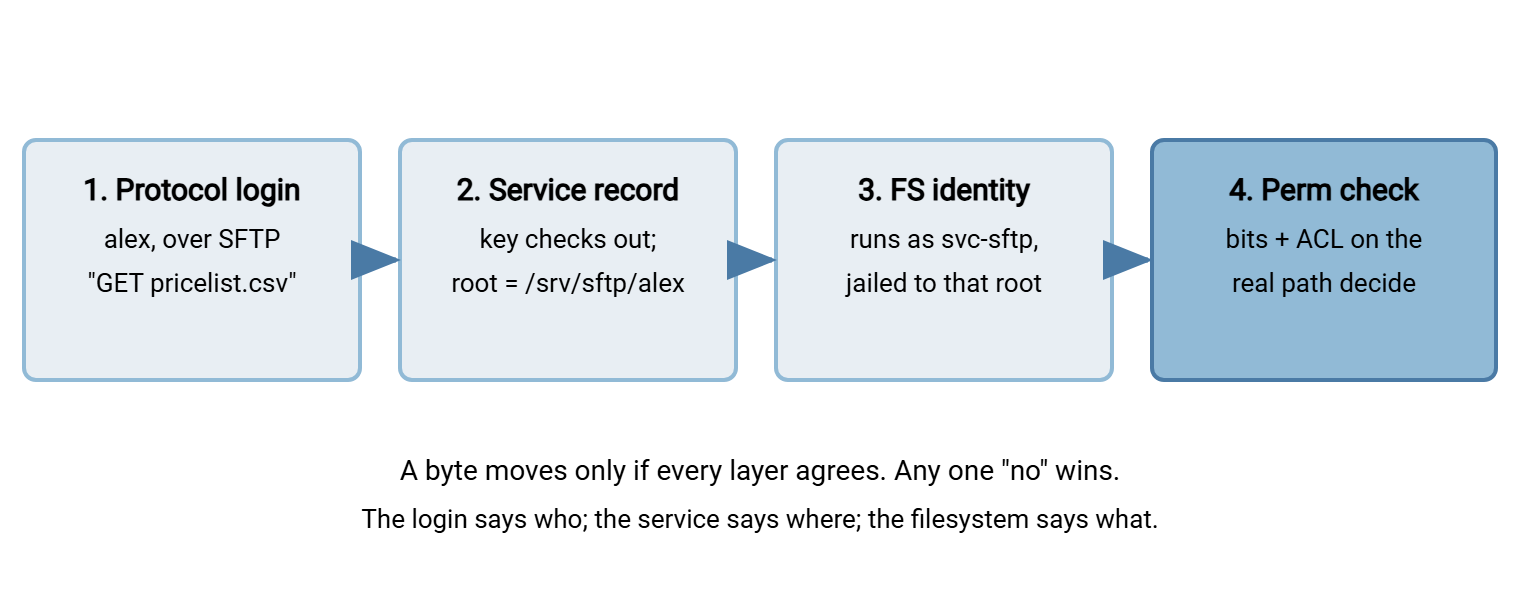
Walk it left to right. First the service authenticates alex against its own user list and confirms the presented key or password. Then it looks up what that virtual user is allowed — which root directory, which operations — and confines the session there. Only then does the request reach the operating system, which applies the permission bits and any ACLs on the actual file path. These are evaluated as whatever filesystem identity the service is using. The download succeeds only if every layer says yes. Any single "no" — a service rule, a missing traverse bit on a parent directory, a deny ACE — stops the transfer.
This layered reality explains the most common permission mysteries on transfer servers. A partner who can log in but sees an empty folder often has a service-level home set correctly. In those cases, the filesystem denies them traverse on a parent. A file that one partner can read and another cannot, despite "the same" folder, usually has an ACL entry doing exactly what it was told. When you troubleshoot, name the layer first, then read that layer's rules.
How the Three Models Compare
Kept side by side, the division of labor is clear. The bits and ACLs are the operating system's enforcement. Virtual users are the service's way of deciding which identity and which subtree the operating system ever gets asked about.
| Aspect | Permission bits | ACLs | Virtual users |
|---|---|---|---|
| Lives where | Filesystem, on every object | Filesystem, on every object | Inside the transfer service |
| Who it can name | Owner, one group, everyone else | Any number of users and groups | Each protocol login |
| Set with | chmod, chown |
setfacl / icacls |
The server's configuration |
| Best at | Simple, universal baselines | Fine-grained, multi-party rules | Isolating partners without real accounts |
| Watch out for | Only three classes; delete is a directory right | Deny wins; the mask caps; inheritance is invisible in a plain listing | The service's rules must match the filesystem's |
Putting the Models to Work
You do not have to choose one model — a well-run transfer server uses each for what it is good at. Virtual users keep partners out of your real account database and pin each login to a jailed root. Permission bits set a sane, restrictive baseline on that root: owner is a file-administration account, group is whatever process picks files up, other is nothing. ACLs handle the exceptions the three-class model cannot express, such as a second service that also needs read access to one folder. The skill is knowing which layer to reach for, and reading all of them when something misbehaves.
The habit that prevents most incidents is to always test as the real identity rather than trusting the configuration screen. Log in as the partner, list the folder, try the upload, attempt the thing they should not be able to do, and confirm each result. The auditing article turns that habit into a repeatable review. The whole picture — service, bits, ACLs — is what you are checking. Authentication decides who gets in the door; these models decide which rooms they can enter. That is why they pair so naturally with the accounts-and-keys material in our transfer authentication series.
From here, the next step in this series is designing directory trees for isolation. There, these models become an actual folder layout that keeps partners invisible to one another. If you want the enforcement mechanics behind jailing first, SFTP server configuration covers how the chroot is set up and the ownership rules it demands.
Frequently Asked Questions
What is the difference between permission bits and ACLs?
What are virtual users on an FTP or SFTP server?
Why can a user log in but not see any files?
Does Windows use the same permissions as Linux?
icacls or the Security tab. It supports deny entries and inheritance flags. Linux has the classic bits plus optional POSIX ACLs managed with getfacl and setfacl. The concepts rhyme, but the tools and the exact rules differ.Which model wins when they disagree?
How do I see a file's full permissions, ACLs included?
ls -l shows the bits and marks ACLs with a trailing +. Run getfacl on the path to see the full list and any effective-permission caps from the mask. On Windows, run icacls on the path, or open the file's Security tab. There, use Advanced then Effective Access to see what a specific account really gets.From the Sysax team: we build secure file transfer software for Windows. Sysax Multi Server is an FTP, FTPS, SFTP, and HTTPS server. Sysax FTP Automation handles scheduled, scripted transfers. Free trials are on the download page.