
Mirroring and One-Way Sync Patterns That Hold Up in Production
Almost every rsync job in the wild is a variation on one idea: make that directory over there match this one over here, on a schedule, without a human watching. Deployments, backups, mirrors of build artifacts, log collection — different names, same shape. And because the shape repeats, so do the mistakes. Those include mirrors that quietly stopped mirroring and backups that faithfully replicated a ransomware infection. They include cron jobs that piled up on top of each other until the disk filled.
This article is a pattern book. It covers the three one-way sync patterns that account for most real jobs. Those are the staging-to-production push, the hard-link snapshot backup, and the central collector. The article also covers the two disciplines that keep any of them trustworthy: verification passes and overlap-safe scheduling. This article is part of our rsync & Delta Transfer series and leans on flag knowledge from the flags that matter. Skim that first if --delete and trailing-slash semantics aren't yet reflexes.
First, the Vocabulary: Mirror, Accumulate, One-Way
Three terms carry this whole article, so let's pin them down.
A mirror is a destination that matches the source exactly — additions, changes, and removals all propagate. In rsync terms that means -a --delete: without --delete, files removed from the source linger at the destination forever. An accumulating copy is the without---delete variant — the destination only ever gains. Both are legitimate; the failure is not knowing which one you are running. A mirror used for disaster recovery must delete; an archive of "everything we have ever produced" must not.
One-way means changes flow in a single direction per job: one side is the source of truth, the other is a replica that will be overwritten wherever it disagrees. rsync is strictly one-way per run. It has no concept of merging changes made on both sides — if someone edits the replica, the next run erases the edit without comment. Two-way synchronization (both sides editable, conflicts detected) is a genuinely different and harder problem solved by different tools. Do not try to fake it with two opposing rsync jobs, which simply overwrite each other's changes depending on who ran last. If you are weighing sync against live shared storage or replication generally, our network shares vs file transfer series maps that territory.
Remember: every one-way sync job needs a sentence someone can recite: "the source of truth is X; Y is a replica; edits made on Y do not survive." If nobody can say that sentence, someone eventually edits the replica, and the next scheduled run destroys their work.
Push or Pull? Choosing the Direction of Trust
Any sync has two possible initiators. In a push, the machine holding the source of truth runs rsync and writes to the replica. In a pull, the replica machine runs rsync and reads from the source. The data moves the same way; what changes is where the credentials live and which machine can touch which.
That difference matters most for backups. If every server pushes to the backup host, then every server holds credentials that can write to the backup store. In that case, an attacker who compromises one server can reach the backups, exactly the thing you built backups to survive. If instead the backup host pulls from each server using read-only access, compromising a server yields nothing. In that setup, the credentials that touch backup storage exist only on the backup host, which accepts no inbound logins from the machines it protects. Push is natural for deployments (the build system decides when production updates); pull is the safer default for backup collection. Choose deliberately, per job.
There is a third direction worth naming: one-to-many distribution, where a single source pushes the same tree to a fleet. Examples are web nodes behind a load balancer, kiosk machines, and lab workstations. Structurally it is the deployment push repeated per host, and the same rules apply, plus one more: make the loop record which hosts succeeded. A fleet where 19 of 20 nodes updated is a subtle outage — every host serves confidently, and one of them serves yesterday. Only your per-host exit codes know.
Pattern 1: The Staging-to-Production Push
The task: a built site or application tree on a staging machine must replace what a production server is serving. The naive rsync -a --delete staging/ prod:/var/www/site/ works, but production has two properties staging lacks — runtime data that must survive, and users mid-request while you deploy. The pattern accounts for both:
# Deploy: mirror the build, protect runtime data, batch the switch
rsync -ai --delete --delay-updates \
      --exclude='/uploads/' --exclude='/.env' --exclude='*.log' \
      --max-delete=200 \
      /build/site/ deploy@web01:/var/www/site/

# Verify: a converged mirror prints nothing
rsync -ain --delete \
      --exclude='/uploads/' --exclude='/.env' --exclude='*.log' \
      /build/site/ deploy@web01:/var/www/site/
The load-bearing choices:
- Excludes protect what production owns. User uploads, environment files, logs — anything created on the production side must be excluded, or
--deletewill remove it (it isn't in the source, after all). Excluded files are protected from deletion by default, which is exactly the behavior you want here. Anchor the patterns (leading/) so they match only the intended paths. --delay-updatesnarrows the inconsistent window. Normally rsync updates files one at a time as it goes, so a visitor mid-deploy can see new pages referencing old assets. With--delay-updates, every changed file is staged in a hidden directory and the renames happen together in one quick batch at the end. Not a true atomic transaction — but the window shrinks from minutes to moments. (Fully atomic deploys use a symlink-flip scheme, with rsync into a fresh directory and a finalln -nsf— the same move the snapshot pattern below uses.)--max-deleteis the deploy tripwire. A botched build directory should abort the deploy, not empty production.
Pattern 2: Snapshot Backups with Hard Links (--link-dest)
A plain mirror is a poor backup: it faithfully copies today's mistakes over yesterday's good data. What you want is history — a directory per run, each looking like a complete copy of that moment — without paying full disk for every copy. rsync's --link-dest delivers exactly that, using hard links.
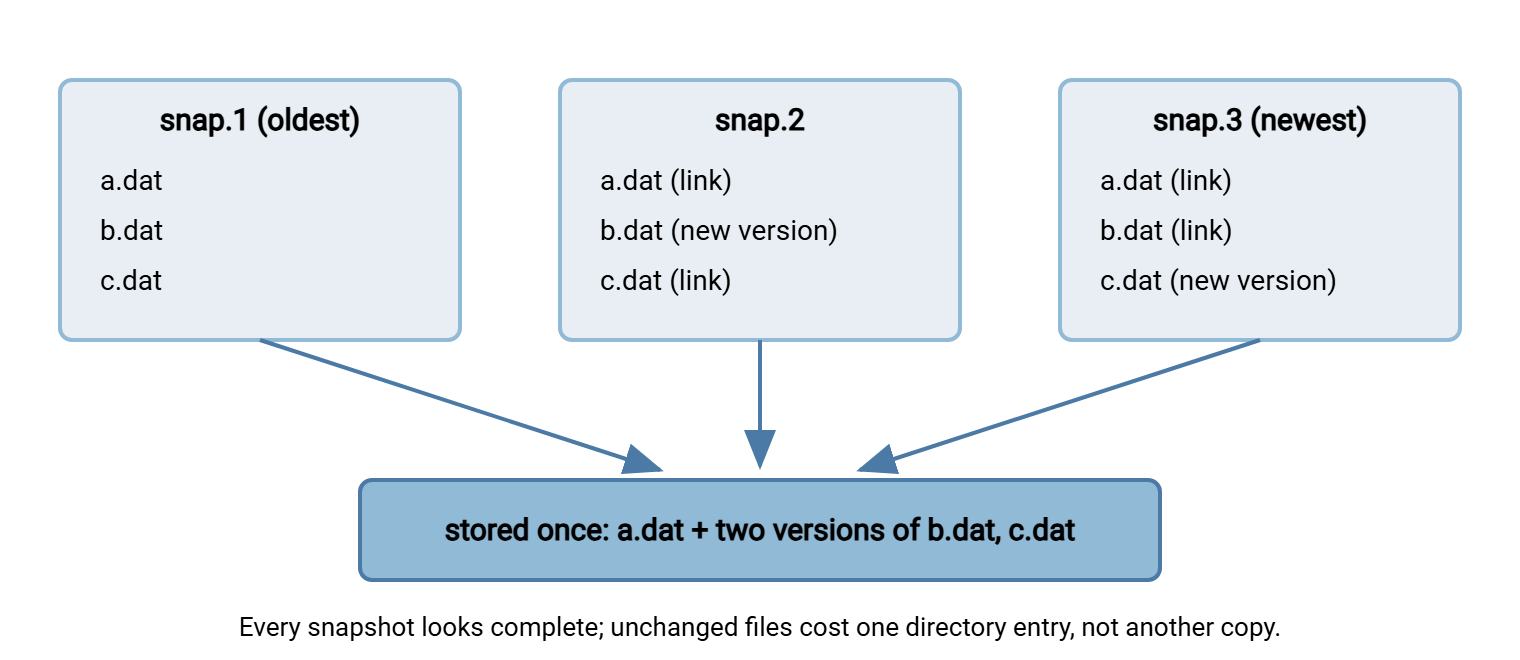
A hard link is a second directory entry for the same underlying file data. The file exists once on disk, and both names refer to it, each costing essentially nothing. --link-dest=DIR tells rsync: "as you build this new destination, compare against DIR; when a file is unchanged, don't copy it — hard-link to DIR's copy." Changed and new files are transferred normally. The result is a directory that reads as a full snapshot but stores only what changed since the previous one.
The diagram below shows three nightly snapshots of a tree where one file changes each night. Each snapshot directory appears complete, but unchanged files are shared — a single stored copy with multiple names.
Here is the whole recipe as a script you can adapt. It keeps a latest symlink pointing at the newest snapshot, so every run links against the one before:
#!/bin/sh
# snapshot.sh — hard-link snapshot backup with rsync
set -eu

SRC="root@app01:/srv/data/"          # note trailing slash: contents
DEST="/backup/app01"                  # local storage on the backup host
NEW="$DEST/snap-$(date +%Y%m%d-%H%M%S)"

# Refuse to run if the backup volume isn't mounted
mountpoint -q /backup || { echo "backup volume not mounted" >&2; exit 1; }

# Build the new snapshot, hard-linking unchanged files to the previous one
rsync -a --delete --link-dest="$DEST/latest" "$SRC" "$NEW"

# Atomically repoint 'latest' at the finished snapshot
ln -nsf "$NEW" "$DEST/latest"

# Prune: keep the newest 30 snapshots
ls -1d "$DEST"/snap-* | sort | head -n -30 | xargs -r rm -rf
Four caveats that keep this pattern healthy:
--link-destand the new snapshot must live on the same filesystem — hard links cannot cross filesystems. Use a relative or same-volume path for both.- Never add
--inplace. Rewriting a file in place would modify the shared data that older snapshots link to, silently corrupting history. rsync's default write-temp-then-rename behavior is what makes the scheme safe: a changed file becomes a new file, and old snapshots keep the old one. - Metadata changes break sharing per-file. A file whose permissions or mtime changed gets stored anew even if its bytes didn't — expected, occasionally surprising when a stray
chmod -Rdoubles a snapshot's size. - Deleting old snapshots is safe and simple:
rm -rfon the oldest directory removes its directory entries; file data survives as long as any newer snapshot still links to it. That is what makes the prune line honest.
On the ransomware question, since backups are why we're here: with pull-based collection and snapshots, an attacker who encrypts the source can only poison future snapshots. Existing ones are separate directory trees the source has no credentials to touch. Your recovery point is the last snapshot before the incident. That protection depends entirely on the backup host being unreachable from the machines it backs up. A snapshot tree on a share the source can write to protects against mistakes, not attackers.
Pattern 3: The Central Collector
The third recurring shape: one backup or aggregation host pulls from many machines — the inverse of a distribution mirror. The structure is a loop over hosts, a directory per host, and the snapshot pattern applied per host:
for h in web01 web02 db01; do
    rsync -a --delete --link-dest="/backup/$h/latest" \
          "backup@$h:/srv/data/" "/backup/$h/snap-$STAMP" \
          && ln -nsf "/backup/$h/snap-$STAMP" "/backup/$h/latest"
done
These operational notes separate a tidy collector from a 3 a.m. mystery. Give the collector a dedicated read-only account on each source (SSH keys, ideally restricted to rsync). See rsync over SSH vs the daemon for the options. Stagger the pulls rather than launching thirty at once. Record per-host exit codes, because "the backup ran" is not the same claim as "every host's backup succeeded." When the far end of a collection flow is a business partner rather than your own server, a raw shell account is usually the wrong interface to offer. A managed SFTP endpoint with its own users and activity logging, such as Sysax Multi Server on Windows, gives the partner a contained drop point. It gives you an audit trail, with your collector then syncing from the server's local folders.
Verification: Trust, Then Check
A mirror that nobody verifies is a rumor. Two cheap habits turn it back into a fact:
- The convergence check. Immediately after a mirror run, repeat the identical command with
-n(dry run) added. A converged mirror produces no output — every line it does print is a discrepancy. That could be a file that changed mid-run, a permission that couldn't be applied, or an exclude that isn't doing what you thought. Empty output is a strong, machine-checkable statement. - The periodic deep audit. The quick check trusts size and mtime; silent corruption on either side can hide beneath matching metadata. On a schedule you can afford — weekly, monthly — run the comparison with
-c(--checksum), which reads and hashes every byte on both sides. Expensive by design, and the only pass that would catch bit rot.
A third, even cheaper signal: add --stats to routine runs and glance at the numbers over time. Suppose a nightly mirror normally reports a few hundred changed files and suddenly reports fifty thousand — or zero. It is telling you something happened upstream. A one-line sanity check in the wrapper script ("alert if files transferred is outside the usual band") catches whole categories of upstream accidents. It catches them before anyone asks where the data went. Both habits, plus the itemize codes that make their output readable, get full treatment in dry runs and verification.
Scheduling Without Overlap
Scheduled syncs have a failure mode entirely their own: the run that outlives its interval. A nightly job is fine until the night a huge file lands and the run takes nine hours. An every-15-minutes job is fine until the WAN slows and runs start stacking. Two rsyncs writing the same destination race each other into partial, interleaved state — and with --link-dest they can link against a half-built snapshot. The fix is a lock: a mechanism ensuring only one instance runs at a time. On Linux, flock does it in one line of crontab:
# crontab: mirror every 15 minutes, but never two at once
*/15 * * * *  flock -n /run/lock/mirror.lock /usr/local/bin/mirror.sh >> /var/log/mirror.log 2>&1
flock -n takes the lock or, if a previous run still holds it, exits immediately. In the latter case, this cycle is simply skipped and the next one tries again, which is almost always the behavior you want. Log every run's start, end, and exit code to a file; a sync job with no log is invisible precisely when you need to reconstruct what happened. And watch for the quieter overlap cousin: syncing a source that is being actively written gives you a consistent copy of an inconsistent moment. Snapshot the source first (filesystem or application-level) when the data is a live database rather than ordinary files.
Cron plus flock plus a log file is honest tooling, and for many jobs it is enough. The pattern outgrows shell scripting when the requirements become retry-with-backoff, alert-a-human-on-failure, chain-this-after-that, and prove-it-ran-for-the-auditor. That is scheduling software's job: on Windows, Sysax FTP Automation exists for exactly this shape. It provides scheduled and folder-triggered transfer tasks with built-in retry, error handling, and logging. That trades the flexibility of scripts for jobs a whole team can see and maintain.
The Version to Tell a Colleague
One-way sync has three working patterns. Deployments: push a mirror with --delete, exclude what production owns, batch the switch with --delay-updates, tripwire with --max-delete. Backups: pull snapshots with --link-dest, where every run is a full-looking tree and unchanged files are hard links costing nothing. Never use --inplace; prune freely. Collection: one host pulls many, read-only credentials, per-host logs. Around all three: know which side is the source of truth, verify with an empty dry run, audit occasionally with -c, and lock scheduled runs so they cannot overlap.
From here: the flag-level details live in rsync flags that matter. The bandwidth side of scheduled mirrors is in syncing over WAN links. The safety discipline is in dry runs and verification.
Frequently Asked Questions
Is rsync by itself a backup tool?
How much disk do hard-link snapshots really use?
Do snapshots protect me from ransomware on the source?
Can rsync do two-way synchronization?
What happens if a scheduled run takes longer than its interval?
Why must --link-dest point to the same filesystem as the new snapshot?
From the Sysax team: we build secure file transfer software for Windows. Sysax Multi Server is an FTP, FTPS, SFTP, and HTTPS server. Sysax FTP Automation handles scheduled, scripted transfers. Free trials are on the download page.