
rsync over SSH vs the rsync Daemon: Two Transports, Two Trade-offs
Sooner or later you meet an rsync command with a double colon in it — rsync -av files/ backup01::archive/. You discover that the single-colon syntax you have used for years is only one of two entirely different ways rsync can reach another machine. Same program, same delta algorithm, but different network transport, different authentication, different security properties, and different setup work.
The choice matters more than it first appears. One transport inherits industrial-strength encryption for free but hands every user a real login on your server. The other confines users to tidy, read-only "modules" with its own password list. It sends every byte in the clear unless you do something about it. This article lays out how each transport actually works and compares them honestly. It gives you the short list of situations where the daemon repays its setup cost. It is part of our rsync & Delta Transfer series. The delta machinery both transports carry is explained in how the rsync algorithm works.
How rsync Reaches Another Machine at All
A fact that reframes everything: rsync is not a client talking to a fixed "rsync service" the way an FTP client talks to an FTP server. rsync is one program that runs on both ends and talks to itself. The delta algorithm is a two-sided conversation — one side fingerprints and rebuilds, the other matches and sends. So a copy of rsync must execute on each machine. The two copies need a byte pipe between them. The "transport" question is simply: what provides that pipe, and what starts the far-end copy of rsync?
There are exactly two answers. A remote shell — SSH in practice — logs in and starts rsync on the far side. Or a long-running rsync daemon is already listening on the far side, waiting for connections. The command syntax tells you which is in play:
# Single colon = remote shell transport (SSH starts rsync over there)
rsync -av docs/ alex@backup01:/srv/docs/

# Double colon = daemon transport (rsyncd already listening on port 873)
rsync -av docs/ alex@backup01::docs/

# Same daemon transport, URL style
rsync -av docs/ rsync://alex@backup01/docs/
Notice the daemon syntax names a module (docs), not a filesystem path. That difference is the heart of the design, as we'll see.
Transport 1: rsync over SSH
With the single-colon form, rsync runs your system's ssh client under the hood. It logs into the remote machine as the named user and executes rsync there with the right internal options. From then on, the two rsync processes converse through the encrypted SSH channel exactly as if connected by a local pipe. When the transfer finishes, the remote rsync exits and nothing remains running.
Everything about this transport is inherited from SSH, which is mostly excellent news:
- Authentication is SSH authentication. Passwords, or far better for automation, key pairs — the same keys, agents, and
~/.ssh/configconveniences you already use for administration. No new credential system to manage. - Encryption is SSH encryption. Every byte — file data, file names, the checksum exchange — travels through the encrypted channel. There is nothing to configure and no way to forget it.
- The server side needs nothing special. If a machine runs an SSH server and has the rsync binary installed, it is already an rsync destination. No extra service, no extra open port: everything rides the SSH port (
22by default), a single outbound connection that firewalls rarely obstruct. (Protocols that juggle separate control and data connections have a much harder time with firewalls — the story our active-FTP article tells.)
Because the shell command is just SSH, all of SSH's plumbing is available through rsync's -e option. A server listening on a nonstandard port: rsync -av -e "ssh -p 2222" docs/ alex@host:/srv/docs/. A specific identity key for an unattended job: -e "ssh -i /etc/backup/id_backup". Better still, put host aliases, ports, usernames, and keys in ~/.ssh/config once. Every rsync command shrinks to rsync -av docs/ backuphost:/srv/docs/. The same hygiene benefits every other SSH tool you run.
The inherited property that is not good news: an SSH login is, by default, a full login. The account you rsync as can also open an interactive shell, run arbitrary commands, and read whatever the account can read. For your own admin account that is fine. For a dozen backup clients or a partner feed, handing out shell accounts as a side effect of file sync is more trust than the job requires. SSH has answers — a forced command in authorized_keys can pin a key to a single wrapper. The rrsync helper script distributed with rsync exists for exactly this, restricting that key to rsync-only access on a chosen directory. But you must know to reach for these answers. Broader SSH transfer patterns, including keys and lockdown options, are covered in our SCP & SSH copying series.
Transport 2: The rsync Daemon
The double-colon form talks to rsyncd — rsync running as a standing service, listening on TCP port 873. No SSH involved, no system login performed. Instead, the daemon offers named modules: exported directory trees with per-module rules, defined in a config file (conventionally /etc/rsyncd.conf):
# /etc/rsyncd.conf — a read-only distribution module and a write module
uid = rsyncd
gid = rsyncd
use chroot = yes
max connections = 20
log file = /var/log/rsyncd.log

[artifacts]                       # clients address this as host::artifacts
    path = /srv/artifacts         # what the module actually exports
    comment = Build artifacts, read-only
    read only = yes
    hosts allow = 10.20.0.0/16    # LAN only

[intake]
    path = /srv/intake
    read only = no
    auth users = feeder           # daemon's own user list, not OS accounts
    secrets file = /etc/rsyncd.secrets   # lines of user:password, mode 600
    hosts allow = 10.20.5.0/24
Read the config and the daemon's personality emerges. Clients never see filesystem paths — they see module names, and the daemon maps those to directories. read only is enforced by the server regardless of what clients ask for. auth users and the secrets file form a self-contained user list, completely decoupled from operating-system accounts. "feeder" exists only inside rsyncd and can log into nothing else. It never gets a shell because there is no shell to get. use chroot confines each session to the module's directory tree so path tricks cannot escape it. hosts allow, connection caps, and per-module logging round out a genuinely thoughtful access-control model.
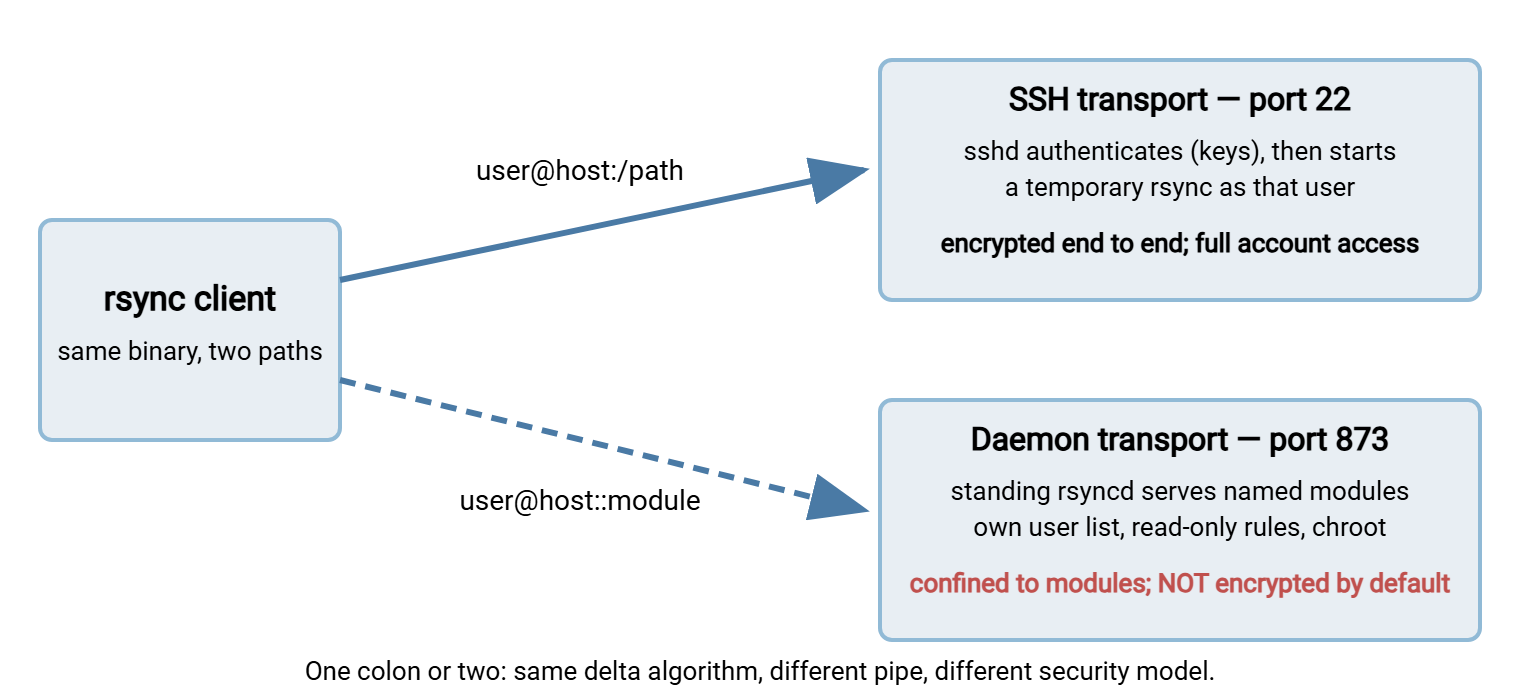
The diagram below contrasts the two transports side by side: SSH starting a temporary rsync on demand versus a standing daemon exporting modules.
Standing Up a Daemon: A Minimal Checklist
If you decide the daemon fits, the setup is genuinely small. The cost is less the first hour than the ongoing fact of one more service to patch, monitor, and reason about. The sequence:
- Write
rsyncd.confwith global settings and your modules, as above. Start every moduleread only = yesand loosen deliberately. - Create the secrets file if any module uses
auth users— plain lines ofuser:password— and set its permissions to600, owner root. The daemon refuses lax permissions on this file, and it is right to. - Start the service. On systemd distributions an
rsyncorrsyncdservice unit ships ready to enable. The daemon can also run standalone withrsync --daemonor under a socket-activation supervisor. Whichever way, arrange for it to start on boot — a backup transport that dies at reboot fails silently months later. - Open TCP 873 on the server's firewall, from exactly the networks in your
hosts allowlines and no wider. Defense in two layers, matching rules. - Test like a client:
rsync host::with no module name lists the modules the daemon is willing to show. Then run a real transfer against each module and confirm read-only modules refuse a push. - Watch the log file for the first week. Per-module logging is one of the daemon's gifts — connections, files, byte counts — and a quick glance tells you whether reality matches your intent.
The Honest Trade-off: Encryption
Now the part that must be said plainly, because the daemon's tidy config can lull you: the daemon transport does not encrypt anything by default. File contents, file names, directory structure — all of it crosses the network in the clear. The password exchange for auth users uses a challenge-response scheme, so the secret itself is not transmitted literally. But that protects only the login moment. Every byte after it is readable by anyone positioned on the path.
Remember: plain daemon transport belongs on networks you already trust — an internal LAN, an isolated backup VLAN, a lab. Across the internet, an office-to-office link you don't control, or anywhere data is sensitive, use SSH transport, tunnel the daemon, or don't send it.
If you want the daemon's module model and encryption, you have real options. The neatest is the hybrid built into rsync: rsync -av -e ssh files/ user@host::intake/. It uses daemon-style modules, reached through an SSH connection that starts a single-use daemon on the far end. So module rules apply and everything is encrypted. Alternatives are a VPN or an ordinary TLS/stunnel wrapper around port 873. All work; the sin is only forgetting the question.
Auth Models: An Instructive Inversion
Put the two transports side by side and an odd symmetry appears — each is strong exactly where the other is weak:
- SSH transport encrypts everything but authorizes broadly. Wire security is superb. The trailing risk is that the authenticated user is a real system account, with everything that implies. That risk remains unless you deliberately fence the account with forced commands and restricted keys.
- Daemon transport authorizes narrowly but encrypts nothing. Users exist only in the daemon's world, confined to modules, read-only where you say so, chrooted, connection-limited. That is a better containment story than a bare shell account. And every byte is exposed in transit.
Neither default is "secure" in the absolute; they fail differently. The practical conclusion: over untrusted networks the wire matters most, so SSH wins. Inside a trusted network with many users or machines touching one export, the containment model matters most. In that case, the daemon (or the SSH-tunneled daemon, taking both columns) wins.
Performance and Overhead
Encryption costs CPU. On the WAN links where most remote sync happens, that cost is irrelevant — the network is the bottleneck. On those links, delta transfer plus the tips in syncing over WAN links dominate the outcome. The daemon's absent encryption becomes measurable in one setting: fast internal networks. There, a single SSH-encrypted stream can hit a CPU ceiling on one core before it saturates a multi-gigabit link. A daemon transfer on the same hardware skips that ceiling entirely.
The daemon has two quieter efficiencies. There is no login and process spawn per connection. Consider jobs that fire every few minutes against the same box, or a fleet of hundreds of clients hitting one distribution point. The per-connection overhead stays flat and the max connections cap protects the server from stampedes. And a standing daemon can serve anonymous read-only modules, which is how public mirror infrastructure has always distributed software. There are no accounts at all, just rsync -av rsync://mirror.example.net/releases/ . against a read-only module.
Side by Side
| Question | rsync over SSH | rsync daemon |
|---|---|---|
| Syntax | user@host:/path (one colon) |
user@host::module or rsync:// |
| Port | 22 (SSH) | 873 |
| Server prerequisite | sshd + rsync binary (usually already there) | rsyncd service + rsyncd.conf to write and maintain |
| Authentication | System accounts, SSH keys | Daemon's own users + secrets file; anonymous possible |
| Encryption | Always, inherited from SSH | None by default; tunnel to add it |
| Containment | Whatever the account can do (fence with forced commands) | Module paths, read-only rules, chroot, host filters |
| Best on | Untrusted networks; ad-hoc and low-setup jobs | Trusted LANs; mirrors and fleets hitting one export |
When the Daemon Is Worth Its Setup Cost
Default to SSH transport. It needs no server-side work, and its security posture is safe even when you configure nothing. For one machine syncing to another on any schedule it is simply the correct amount of machinery. Stand up a daemon when you recognize one of these shapes:
- Distribution to a fleet or the public. Many consumers, one read-only export, possibly anonymous: the daemon was built for this, and connection caps keep it civil.
- High-volume sync inside a trusted network where encryption overhead measurably bites and the wire is yours end to end.
- You must not hand out shell accounts. Contributors or machines need to drop files into exactly one place;
auth usersplus a write-only module grants that and nothing else. - Many small frequent jobs against one server, where per-connection SSH overhead adds up and a standing service with logging per module is operationally cleaner.
And recognize the shape that is neither: an endpoint for outside parties across the internet. A raw daemon fails on encryption; raw SSH accounts fail on containment and manageability. That job usually belongs to a managed transfer server speaking SFTP or FTPS — per-user directories, passwords or keys, activity logs an auditor can read. On Windows, that is what Sysax Multi Server is for. You trade rsync's delta efficiency for a protocol every partner already speaks and an admin surface a whole team can operate. Our SFTP series covers that world. The delta advantage matters less than it seems for typical partner feeds. Files that arrive once and are new each time gain nothing from block matching anyway.
The Version to Tell a Colleague
rsync always runs on both machines; the transports differ only in what connects them. One colon means SSH: it logs in, starts rsync remotely, and encrypts everything. It requires nothing installed server-side beyond sshd and rsync. But the user is a real account with real reach. Two colons mean the daemon on port 873: a standing service exporting named modules with its own users, read-only enforcement, and chroot containment. But there is no encryption at all unless you tunnel it. Use SSH by default and across anything untrusted. Use the daemon for mirrors, fleets, and trusted-LAN volume. Use the -e ssh hybrid when you want module discipline and encryption at once.
Next in the series: putting either transport to scheduled work in mirroring and one-way sync patterns, and squeezing slow links in syncing over WAN links.
Frequently Asked Questions
Do I need to set up the rsync daemon to use rsync?
Is rsync daemon traffic encrypted?
What is the difference between one colon and two colons in an rsync path?
What port does the rsync daemon listen on?
Are daemon users the same as system users?
Can one server offer both transports at the same time?
From the Sysax team: we build secure file transfer software for Windows. Sysax Multi Server is an FTP, FTPS, SFTP, and HTTPS server. Sysax FTP Automation handles scheduled, scripted transfers. Free trials are on the download page.