
SFTP Performance: Why People Call It Slow and What Actually Helps
"SFTP is slow" is one of those claims that circulates until it feels like a law of nature. A transfer to a nearby server flies; the same file to a partner across an ocean crawls at a tenth of the line speed. A folder of ten thousand small files takes an afternoon that a single archive of the same size would finish in minutes. The usual explanation — "well, encryption has overhead" — is repeated everywhere and is almost always wrong. That matters, because a wrong diagnosis sends you tuning the one thing that was never the bottleneck.
This article gives you the real map of where SFTP time goes: round trips, three stacked flow-control windows, and the punishing per-file cost of small-file workloads. Then it turns diagnosis into practice — a short list of tuning steps in the order they pay off. These are wrapped in the only methodology that produces trustworthy results: measure, change one thing, measure again. Everything builds on the request-and-response mechanics from how SFTP actually works, the foundation of our SFTP In Depth series.
Step Zero: Turn "Slow" Into a Number
Before touching a single setting, get a baseline. "Slow" is a feeling; megabytes per second is a fact you can compare before and after a change. Time a transfer of one known, large file:
# A 1 GiB test file, timed. Note the client prints its own rate too.
time sftp partner@files.example.com:/outgoing/testfile-1g.bin .

# Record alongside the result:
#  - round-trip time to the server:
ping -c 5 files.example.com          # note the average RTT in ms
#  - what the link should carry: link speed in Mbps divided by 8 = MB/s
#    (100 Mbps is ~12.5 MB/s; 1 Gbps is ~125 MB/s)
Two numbers from that exercise drive everything that follows. One is your achieved rate as a fraction of the link's theoretical rate. The other is the round-trip time (RTT) — how long a packet takes to reach the server and return. A transfer achieving 90% of the link is already healthy; tune nothing. A transfer achieving 10% on a high-RTT path is the classic case this article exists for.
The Encryption Myth
Encryption is the first thing people blame because it is the visible difference from plain FTP. The arithmetic says otherwise. Modern CPUs include hardware instructions for AES, and the ChaCha20 cipher is designed to be fast in plain software. Either way, a single ordinary core encrypts at rates far beyond common network links — typically hundreds of megabytes to gigabytes per second. On a 100 Mbps or even 1 Gbps path, the cipher spends most of its time waiting for the network, not the other way around.
Here are the honest exceptions, so you can recognize them rather than fear them. One is very fast local networks (multi-gigabit), where a single stream can genuinely become CPU-bound and cipher choice starts to matter. Another is underpowered endpoints — appliances, tiny virtual machines, ancient hardware — where crypto competes for a weak CPU. There are also badly chosen legacy ciphers forced by old configurations. The test is cheap: run the same timed transfer with two modern ciphers and watch CPU while it runs. If a core is pinned at 100% during the transfer, crypto (or the disk) deserves a look. If CPU is loafing along at 15% while the transfer crawls, the bottleneck is elsewhere. That is what you will see in most real "SFTP is slow" cases. In that case, the bottleneck is almost certainly the subject of the next section.
Where the Time Really Goes: Round Trips and Windows
Networks have a property that surprises everyone the first time: you cannot use bandwidth you haven't filled. A sender may only keep a limited amount of data "in flight" — sent but not yet acknowledged. When that allowance is smaller than the path can hold, the sender spends part of every round trip idle, waiting for acknowledgments. The amount a path can hold is its bandwidth-delay product (capacity times RTT), a concept our UDP and accelerated transfer series explores for the extreme cases.
An SFTP transfer has not one but three stacked allowances, and the smallest governs:
- The TCP window — the operating system's in-flight limit. Modern systems auto-tune it well, so it is the least common culprit today.
- The SSH channel window — SSH's own flow control per channel. Historically small in some implementations, a classic cause of "SSH-anything is slow over the WAN"; maintained implementations have grown it substantially.
- The SFTP request pipeline — the one you can usually see and set. The client keeps some number of read/write requests outstanding, each carrying a block of data. Outstanding requests times block size = data in flight at the SFTP layer.
The arithmetic makes the ceiling concrete. A common client default is 64 outstanding requests of 32 KiB each — 2 MiB in flight. On a path with 100 ms RTT, that pipeline can deliver at most 2 MiB per round trip. That is 20 MiB/s, call it ~21 MB/s — even on a 10 Gbps link. Take the same client and same server, with 1 ms RTT on the office LAN. The identical math allows ~2 GiB/s, and something else (disk, CPU, the link itself) becomes the limit first. This is why SFTP "feels fast nearby and slow far away," and why the fix is not a faster line but a fuller pipe.
The diagram shows the difference between a starved pipeline and a full one on the same high-RTT path.
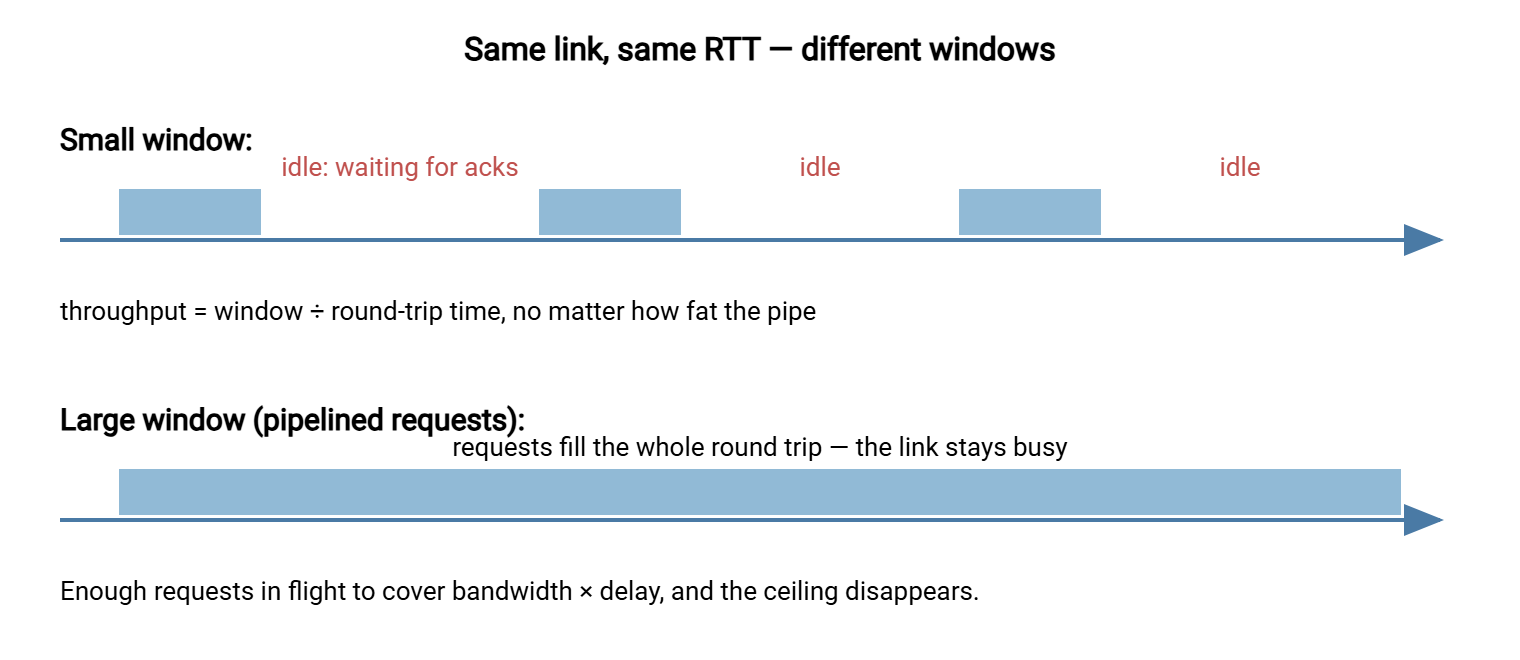
The ceiling formula: maximum throughput ≈ data in flight ÷ round-trip time. Before blaming the server, the cipher, or the vendor, compute it with your own numbers. If your achieved rate sits near that ceiling, you have a window problem — and window problems have cheap fixes.
The Small-File Tax
The second great performance sink has nothing to do with bytes. Every file transferred costs a fixed overhead: an open request and its reply, attribute handling, a close and its reply — a few round trips minimum, regardless of size. For one large file, that cost is invisible. For a directory of thousands of small files, it is the transfer. Ten thousand files at four round trips each on a 50 ms path is 10,000 × 4 × 0.05 s = 2,000 seconds. That is over half an hour of pure protocol pleasantries before counting a single byte of payload. The same data as one archive would pay the per-file cost once.
Recognize the signature: throughput graphs that look like a comb (tiny burst, gap, tiny burst). Other signs are total time wildly out of proportion to total bytes, and "it's fast for the big export but slow for the images folder." The fixes are workflow, not knobs. You can archive before transfer (one tar or zip, then extract on arrival) when the receiver can cope. You can parallelize several files at once so the round trips overlap, or reshape the producer to emit fewer, larger files. Where the receiving side is a partner you cannot change, parallelism is usually the only lever left — which brings us to concurrency.
Concurrency: When Two Streams Beat One
A single SFTP transfer rides one TCP connection, and within one file, pipelined requests are the parallelism. Across many files, you can do better: run several transfers concurrently — multiple worker sessions each taking files from the queue. Each worker's window rides the RTT independently, so four workers on a window-limited path can approach four times the single-stream rate. Concurrency also overlaps the small-file overhead: while one worker waits on opens and closes, others are moving data.
Three cautions keep concurrency a tool rather than an incident. Servers impose connection and session limits, and administrators set them deliberately. A partner opening fifty parallel sessions looks less like optimization and more like abuse. Stay in low single digits unless the server's operator agrees otherwise. Disks pay for parallelism: many concurrent writes turn sequential I/O into scattered I/O, and on modest server hardware the disk becomes the new bottleneck. And fairness matters: a transfer that saturates the link starves every other user of the same path; scheduled off-peak runs sidestep the conflict entirely.
The Tuning Steps, in Paying Order
The method first, because it is half the value: change one variable per experiment, and re-run the same timed baseline after each. Two changes at once produce a number you cannot attribute; an unmeasured change produces a folk belief. The steps, ordered by how often they pay:
- Re-verify the baseline path. Confirm raw capacity and RTT; a saturated link or a rerouted path explains many "sudden" slowdowns with no SFTP cause at all.
- Rule out the disks. Copy the test file locally on each end. If the destination disk (or its antivirus scanner — a very real factor on Windows servers) cannot sustain the target rate, no network tuning will.
- Widen the SFTP pipeline. On the OpenSSH client, request size and count are flags:
sftp -B 262144 -R 128asks for 128 outstanding requests of 256 KiB. That is 32 MiB in flight versus the default ~2 MiB. Recompute your ceiling with the new number and re-measure. Graphical and automation clients often expose the same idea as a buffer or "simultaneous blocks" setting. - Try a second modern cipher. Cheap to test, occasionally meaningful on fast LANs or weak CPUs: time the same transfer under ChaCha20-Poly1305 and an AES-GCM variant and keep the winner.
- Use compression only where it earns it. SSH can compress in transit (
-C). On slow links moving compressible data (logs, CSV, text), it multiplies effective speed. On fast links, or for already-compressed payloads (zip, media, encrypted archives), it burns CPU to gain nothing — and can slow the transfer. Measure both ways. - Batch the small files. Archive-then-transfer, or parallel workers, per the section above — the biggest wins for the comb-shaped workloads.
- Reuse sessions for repeated jobs. Each fresh connection pays key exchange and authentication — noticeable when a job runs every few minutes or touches many hosts. Transferring several files per session instead of one session per file trims a fixed cost off every run.
A Worked Example: Before and After
Here is the method applied end to end, with the shape of numbers you should expect. The setup: two well-provisioned sites, 1 Gbps at each end, 80 ms RTT between them, one 1 GiB test file. The link's theoretical best is ~125 MB/s. The path's bandwidth-delay product is 125 MB/s × 0.08 s = 10 MB. The pipe holds 10 MB, so anything less in flight leaves it partly empty.
# Baseline: client defaults (~2 MiB in flight)
$ time sftp partner@remote:/outgoing/testfile-1g.bin .
#   observed: ~25 MB/s, ~41 s
#   predicted ceiling: 2 MiB / 0.08 s = 25 MiB/s  -- matches: window-bound

# Experiment 1: widen the pipeline to 128 requests x 256 KiB (32 MiB in flight)
$ time sftp -B 262144 -R 128 partner@remote:/outgoing/testfile-1g.bin .
#   observed: ~105 MB/s, ~10 s
#   new ceiling: 32 MiB / 0.08 s = 400 MiB/s -- no longer the binding limit

# Experiment 2: push further (-R 512)
#   observed: ~105 MB/s -- unchanged. The LINK is now the limit. Stop here.
Three lessons ride along with the numbers. The baseline matched its predicted ceiling, which is how you confirm a window diagnosis rather than assume it. The first change produced a four-times improvement because it attacked the binding constraint. And the second change produced nothing — the signature of a constraint that has moved elsewhere. That is your signal to stop tuning that knob rather than cargo-cult it higher. Every path deserves its own version of this table; the numbers differ, the reasoning never does. (Do not promise a partner "four times faster" from a lab run, either. Production paths carry other traffic, and honest tuning reports quote measured ranges, not best cases.)
Reading the Symptoms: A Quick Decision Table
| Symptom | Likely bottleneck | What helps |
|---|---|---|
| Fast on LAN, slow to distant sites; rate ≈ window ÷ RTT | Flow-control windows on a high-RTT path | More/larger pipelined requests (-B/-R); parallel workers |
| Big files fine; folders of small files crawl | Per-file round-trip overhead | Archive first; concurrency; fewer, larger files |
| One CPU core pinned during transfer | Cipher/MAC or compression on a fast path | Modern AEAD cipher; disable compression; faster hardware |
| Rate collapses only under parallel load | Server disk or session limits | Fewer workers; faster storage; off-peak scheduling |
| Every transfer slow, even locally | Disk, antivirus scanning, or an underpowered endpoint | Fix the endpoint first — the protocol is not the problem |
Keeping It Fast in Production
Tuning is an event; performance is a habit. Three practices keep the gains. First, schedule the heavy jobs deliberately — nightly syncs and archive pushes belong off-peak, where they can use the whole link without competing with humans. This is precisely what a scheduler such as Sysax FTP Automation is for: the job runs at the planned hour, retries on failure, and logs its outcome. Keep a benchmark file and a log of your measurements — the same 1 GiB file, the same command, a one-line record per test. When someone reports "it got slow," you can compare against last month instead of guessing. And watch the server's own view — transfer durations in the server's activity log are a standard capability of server products like Sysax Multi Server. Those durations reveal whether slowness afflicts one partner's path or everyone. That splits the diagnosis in half before you run a single test.
One more expectation-setter: a well-tuned SFTP transfer approaches the link on ordinary paths. But on extreme bandwidth-delay products (intercontinental multi-gigabit), single-stream TCP protocols of every kind run out of road. That frontier belongs to the acceleration techniques in our UDP acceleration series. Knowing where the protocol's honest limits are is part of tuning too.
The Version to Tell a Colleague
SFTP is rarely slow because of encryption — CPUs encrypt faster than networks carry. It is slow when the data in flight cannot cover the round trip: throughput tops out at window ÷ RTT. So distant servers crawl until you widen the pipeline (bigger/more outstanding requests, or parallel transfers). The other classic sink is the per-file overhead that makes ten thousand small files cost an afternoon — archive them or run workers in parallel. Diagnose with a timed baseline and the ceiling formula, change one thing at a time, and re-measure. Most "SFTP is slow" tickets close after the window step or the small-file step.
Related reading in this series starts with how SFTP actually works for the pipelining machinery. There is file operations and their quirks for resume and small-file workflow design. There is also non-interactive SFTP for turning your tuned transfer into a scheduled job that runs itself.
Frequently Asked Questions
Is SFTP slower than FTP because of encryption?
Why is my transfer fast to nearby servers but slow to distant ones?
What do the -B and -R options on the sftp command do?
Should I enable compression to speed up transfers?
Why does a folder of thousands of tiny files take so long?
How many parallel transfers is it reasonable to run?
From the Sysax team: we build secure file transfer software for Windows. Sysax Multi Server is an FTP, FTPS, SFTP, and HTTPS server. Sysax FTP Automation handles scheduled, scripted transfers. Free trials are on the download page.