
Beyond Copying: SFTP's File Operations and Their Quirks
Ask most people what SFTP does and they will say "uploads and downloads, securely." True — and incomplete in a way that matters. SFTP is a full remote filesystem protocol: it renames, deletes, creates directories, changes permissions, reads attributes, and resumes interrupted transfers. That richness is why serious transfer workflows are built on it. It is also why SFTP generates a distinctive family of support tickets. They include the upload that a downstream system read while it was half-written, and the file that arrived with permissions nobody can use. They include the timestamp that broke a sync job, and the rename that works against one server and fails against another.
This article tours the operations beyond plain copying and the quirks attached to each — rename semantics, permission and umask surprises, timestamp preservation, and resume. Then it takes an honest look at what changes when this POSIX-shaped protocol lands on a Windows server. By the end you will know the handful of defensive patterns that make transfer workflows behave identically against any server. It is part of our SFTP In Depth series, and it leans on the request-and-handle mechanics introduced in how SFTP actually works.
A Remote Filesystem, Not a Copier
Because SFTP's protocol is a set of filesystem requests — open, read, write, rename, remove, make-directory, read-attributes, set-attributes — a client can manage the remote side, not merely move bytes at it. The standard command-line client exposes most of it:
sftp> ls incoming/
incoming/orders_a.csv    incoming/orders_b.csv    incoming/manifest.txt
sftp> mkdir processed
sftp> rename incoming/orders_a.csv processed/orders_a.csv
sftp> chmod 640 processed/orders_a.csv
sftp> get -p processed/orders_a.csv        # -p preserves permissions and times
sftp> put -a report.pdf                    # -a resumes a partial upload
sftp> rm incoming/orders_b.csv
sftp> df -h .                       # server support varies for this one
sftp> !ls                           # lines starting with ! run LOCALLY, not remotely
Contrast this with SFTP's cousin SCP, which copies files and does nothing else — the comparison our SCP and SSH-based copying series draws in full. The catch is that each of these operations has semantics — precise rules about what happens in edge cases — and the semantics are where implementations differ. Four operations deserve close study because workflows lean on them hardest; before those, one word on the operation you use most without thinking about it.
Directory Listings: Structured Records, Not Text to Parse
When an SFTP client lists a directory, the server returns each entry as a structured record. It contains the name, plus an attribute block carrying size, permissions, ownership, and timestamps as separate typed fields. This sounds like plumbing, but it is one of SFTP's quiet superpowers. Old-style FTP returns listings as human-formatted text — essentially a screenshot of ls -l in characters. Every FTP client contains fragile code guessing at column positions. That guessing game breaks the moment a server formats dates differently. SFTP clients read fields, not columns; a folder-monitoring job that acts on "files larger than X" or "modified since the last run" can trust the numbers it gets.
Two practical notes on listings. First, wildcards are the client's job. When you type get incoming/orders_*.csv, the protocol has no wildcard operation — the client fetches the directory listing, expands the pattern locally, and issues one download per match. That matters for performance on huge directories (the client must read every entry to match a pattern) and explains why pattern behavior varies slightly between clients. Second, a listing is a snapshot. Between your listing and your next operation, another session may have added, renamed, or removed entries. Robust jobs treat "file vanished between list and get" as a normal event to handle, not a crash-worthy surprise.
Rename: The Most Load-Bearing Operation in File Transfer
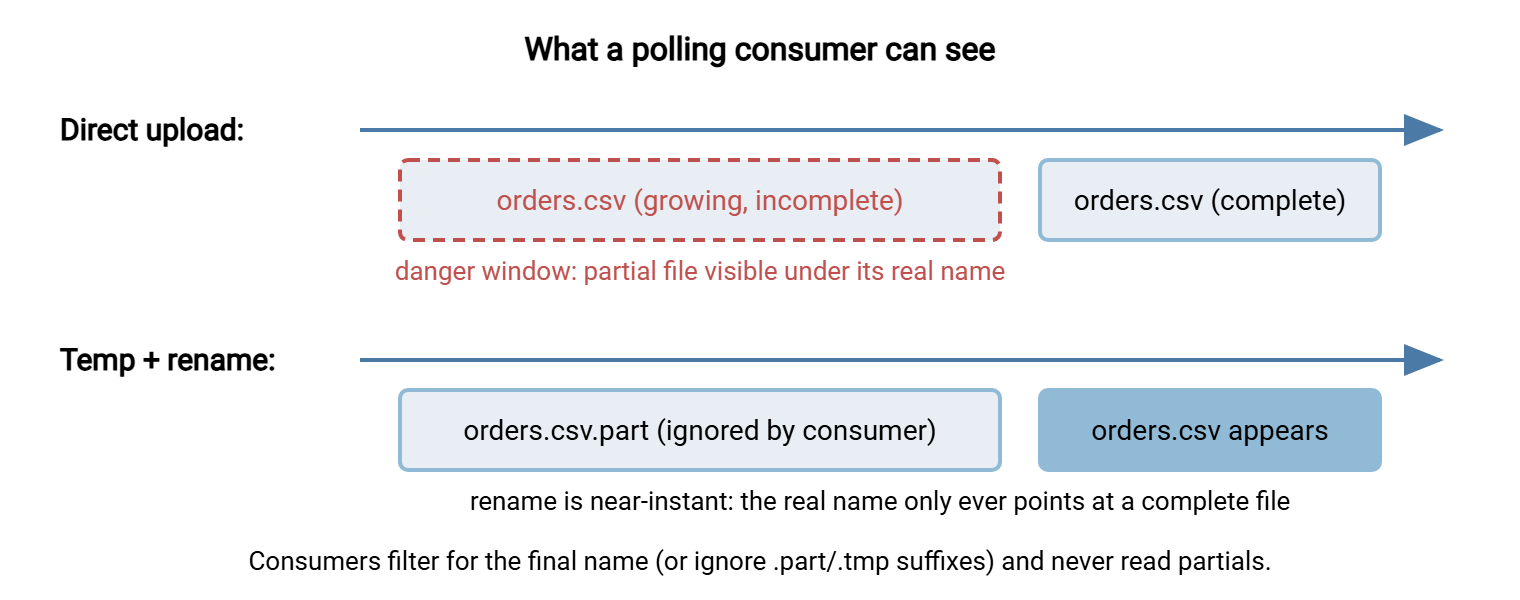
Rename looks trivial and is actually the backbone of reliable delivery. The reason is a race condition every transfer designer eventually meets: uploads are not instantaneous. While a 2 GB file is being written, it exists on the server as a growing partial file — same name, wrong contents. Any downstream consumer that polls the directory (an import job, a partner's collector, a folder monitor) can grab it mid-write and process garbage.
The universal cure is the temp-then-rename pattern: upload to a temporary name the consumer ignores, then rename to the real name only after the upload completes. Rename within one directory is a metadata operation — the server just relabels the entry — so the real name appears in a single instant, complete or not at all.
The diagram below contrasts what a polling consumer can see with and without the pattern.
Now the quirk. The SFTP protocol version in universal use (version 3) specified rename conservatively: if the target name already exists, the rename fails rather than overwriting. POSIX filesystems traditionally do the opposite — rename atomically replaces the target. Implementations split the difference. OpenSSH added a posix-rename extension that overwrites atomically and its client uses it when the server offers it. Other servers overwrite on plain rename; others faithfully refuse. So the same script can behave three ways against three servers.
Practical guidance: when your workflow re-delivers files under a recurring name (today's orders.csv replacing yesterday's), test rename-over-existing against the actual server. If it fails, one workaround is delete-then-rename — accepting a brief window where the name is absent. The other is versioned names (a orders_YYYYMMDD.csv-style stamp) so overwrite never happens. Build the choice into the job, not into an operator's memory.
Remember: never let a consumer read a file that is still arriving. Upload to a temporary name, rename on completion, and have consumers ignore the temporary suffix. This one pattern eliminates the largest single class of "corrupt transfer" incidents — no protocol setting can substitute for it.
Permissions and the umask Surprise
SFTP carries POSIX-style permission bits (the familiar rwxr-x--- sets for owner, group, and others) inside its file attributes. This produces the classic morning-after ticket: "the upload worked, but the web server can't read the file." Here is what happened. When a client creates a file it proposes a permission mode — many clients copy the local file's mode. The server then applies its own policy on top, typically a umask. That is a mask that strips permission bits from every file the session creates. A restrictive server umask turns a proposed 644 (owner writes, everyone reads) into 600 (owner only), and the downstream reader loses access.
There are three places to fix it, in order of preference. First is server-side policy — set the account's umask or forced-mode setting so files land with the intended permissions for everyone. (OpenSSH's in-process SFTP service accepts a -u umask option for exactly this.) Next is client-side follow-up — have the job chmod after upload, which works but must be remembered in every job. Or use group design — put producer and consumer accounts in a shared group and let group permissions do the work. Prefer the server-side fix: it applies to every client, including the partner's software you do not control.
Also know what chmod can and cannot do remotely. It sends a set-attributes request, which the server may honor, ignore, or reject depending on ownership and platform. That foreshadows the Windows section below.
Timestamps: Preserved Only on Request
By default, an uploaded file's modification time is the moment it finished arriving, not the moment the original was last edited. The server is simply writing a new file; nothing preserves the source's history unless the client explicitly asks. The standard client's -p flag (and equivalent "preserve timestamps" options in graphical and scheduled clients) does exactly that. After writing the data, it sends a set-attributes request stamping the original modification time onto the remote file.
Two clarifications keep this subject tidy. The times in play include the file's modification time (when contents last changed — the one everything cares about). They also include its access time (when it was last read — rarely meaningful, often disabled server-side). And times travel as counts of seconds since a fixed reference point, so time zones cannot corrupt them — but clock skew can. If the server's clock runs minutes ahead of yours, a freshly uploaded file is "newer" than the source that produced it. In that case, naive newer-than comparisons misfire. Keep transfer endpoints on synchronized clocks and this whole class of oddity disappears.
When does preservation matter? Whenever a downstream process uses timestamps as a signal: sync tools deciding "newer than my copy," retention jobs deleting "files older than 30 days," audit trails answering "when was this produced?" Take a retention job pointed at a directory of freshly migrated files — all bearing migration-day timestamps instead of their real ages. It will faithfully keep everything for another 30 days. Or worse, a sync tool may re-copy an entire archive it believes has changed. If timestamps carry meaning in your workflow, preserve them deliberately and verify with ls -l after a test transfer. If they do not, the default is fine and one more setting is spared.
Resume: Powerful, With One Honest Caveat
Every SFTP read and write names an explicit byte offset (a design gift explained in the architecture article). So resuming an interrupted transfer is natural: check the size of the partial file, continue from that offset. The command-line client exposes this as reget and reput; graphical clients offer resume buttons; automation tools retry-with-resume.
The caveat: resume assumes the part already transferred still matches the source. The protocol does not verify this for you — baseline SFTP has no built-in checksum operation (some servers offer a checksum extension, but you cannot count on it). If the remote file changed between attempts, or the partial file was truncated oddly, resuming produces a silently spliced file. Its first half is from one version, and its second half is from another. Sensible policy follows from the risk. Resume is excellent for large, static files — installers, backups, exports that are written once. It is wrong for files that may have been regenerated between attempts, where a clean re-transfer costs bandwidth but never correctness. When stakes are high, verify after transfer by comparing sizes at minimum, or exchange a checksum file alongside the payload. The performance-tuning companion to this subject — including why many small files behave so differently from one large one — is the SFTP performance article.
When a POSIX-Shaped Protocol Meets a Windows Server
SFTP's vocabulary — permission bits, case-sensitive paths, forward slashes, symlinks — is Unix's vocabulary. Plenty of SFTP servers run on Windows, storing files on NTFS, and they do a faithful job of translation. But translation has edges, and knowing them turns "weird partner server" mysteries into expected behavior. The honest differences:
| Behavior | POSIX-backed server | Windows-backed server (typical) |
|---|---|---|
| Name case | Report.csv and report.csv are different files |
Same file; case is preserved but not distinguished |
| Paths and roots | One tree rooted at / |
Forward slashes still; drive letters hidden behind a virtual root the administrator maps |
| Permission bits / chmod | Fully meaningful | Synthesized from ACLs; chmod may be a no-op or return an error |
| Deleting/renaming an in-use file | Generally allowed (POSIX permits unlinking open files) | Often refused with a sharing violation surfacing as permission-denied or failure |
| Symbolic links | Supported | Frequently unsupported or restricted |
| Special names | Almost anything except / and NUL |
Reserved names (CON, NUL, …), no : * ? " < > |, no trailing dots or spaces |
Read the table defensively and a few rules of thumb emerge. A workflow that distinguishes files only by letter case will lose data on a Windows-backed server — one name silently overwrites the other. A cleanup job that deletes files "right after processing" may hit sharing violations if an antivirus scanner or indexer still holds them. The fix is a retry with a short delay, not a louder error. And a filename convention invented on Linux (colons in timestamps are the classic) will be rejected outright. None of this makes Windows servers lesser SFTP citizens. A dedicated Windows server such as Sysax Multi Server speaks SSH2/SFTP to any standard client while its administrator manages users and folders with Windows conventions. But the translation layer is real, and portable workflows are designed for the intersection of both worlds, not the union.
Designing Transfers That Survive Any Server
The quirks above compress into a short defensive checklist. It is worth applying to every recurring transfer job, and doubly to jobs that run unattended. The follow-through patterns for unattended jobs live in non-interactive SFTP:
- Deliver atomically. Upload as
name.part, rename tonameon completion; consumers ignore.part. Test rename-over-existing against the real server and choose overwrite, delete-first, or versioned names accordingly. - Name conservatively. Lowercase, letters-digits-dash-underscore-dot, no character that any platform reserves. Treat names as case-insensitive even when the server is not.
- Set permissions by policy, not by hope. Decide where permissions are enforced (server umask/forced mode, group design, or a post-upload chmod), and do not assume chmod works everywhere.
- Preserve timestamps on purpose or not at all. If anything downstream reads mtimes, enable preservation and verify it survived the trip.
- Resume static files; re-send volatile ones. And when correctness matters, verify size — or a checksum exchanged out of band — after every transfer.
- Probe new servers before trusting them. Five minutes in an interactive session — create, rename over an existing file, chmod, delete, and list the results — documents a server's personality better than any spec sheet. Automation platforms formalize the follow-through. A job in Sysax FTP Automation can run pre- and post-processing steps around the transfer itself. That is where rename-on-completion and verification naturally live.
The Version to Tell a Colleague
SFTP is a remote filesystem protocol, and its operations have semantics worth respecting. Rename is the atomic-delivery tool — always upload to a temp name and rename when complete — but overwrite-on-rename varies by server, so test it. Permissions on arrival are the product of client proposal and server umask; fix mismatches server-side. Timestamps reflect arrival time unless you ask for preservation. Resume works on byte offsets and is safe for static files, risky for regenerated ones. And when the server runs on Windows, expect case-insensitivity, synthesized permissions, locked-file refusals, and reserved names. Then design your jobs for the intersection of both worlds and they will run anywhere.
To continue the series: the SFTP server configuration guide shows the server-side controls behind several of these behaviors. The article SFTP performance explains why the small-file workloads these operations enable can feel slow — and what actually helps.
Frequently Asked Questions
Why did my upload arrive with permissions nobody else can read?
Why does rename fail with "file exists" on one server but overwrite on another?
How do I stop a downstream system from processing half-uploaded files?
Is resuming an interrupted SFTP transfer safe?
Why can't I chmod files on my partner's SFTP server?
Why do uploaded files show today's date instead of their original date?
From the Sysax team: we build secure file transfer software for Windows. Sysax Multi Server is an FTP, FTPS, SFTP, and HTTPS server. Sysax FTP Automation handles scheduled, scripted transfers. Free trials are on the download page.