
How SFTP Actually Works: The SSH Subsystem Architecture
Most administrators meet SFTP the easy way: a client asks for a hostname, a username, and a password, files move, and everything is encrypted. That is enough to use it — but not enough to configure it confidently or troubleshoot it under pressure. It is not enough to explain to an auditor why one open port covers the whole thing. And the name actively sabotages understanding, because SFTP looks like "FTP with an S," which suggests it is FTP plus security. It is not. It shares almost nothing with FTP except the general idea of moving files.
SFTP stands for SSH File Transfer Protocol. It is a file transfer service that runs inside an SSH connection — the same SSH that gives you a remote terminal on a Linux server. Understanding SFTP therefore means understanding a little about how SSH itself is built. That includes its layers, its channels, and the "subsystem" mechanism that lets one SSH connection carry different kinds of work.
This article walks through that architecture from the TCP connection upward, then follows a real session step by step. It finishes with the payoff. Once you hold the right mental model, firewall rules, resume support, restricted accounts, and automation all become obvious rather than mysterious. It is the foundation article of our SFTP In Depth series — everything else in the series builds on it.
The Name Is the Problem
Three different things get called "secure FTP" in the wild, and they are three genuinely different technologies:
- SFTP — the SSH File Transfer Protocol. A file transfer protocol designed from scratch to run over SSH. One TCP connection, normally to
port 22. No relationship to FTP's design at all. - FTPS — classic FTP wrapped in TLS encryption (the same encryption HTTPS uses). It keeps all of FTP's machinery, including its famously firewall-hostile separate data connections. Our FTPS series covers it in depth.
- FTP over SSH — a fragile trick from the past: tunneling an ordinary FTP session through an SSH port forward. Almost never a good idea, because FTP's data connections don't fit through the tunnel cleanly.
When this article says SFTP, it means the first one, and only the first one. If a partner or a vendor says "secure FTP" and you are not sure which they mean, the tell-them-apart guide is the companion article SFTP is not FTPS. For now, hold onto the key fact: SFTP is a service provided by an SSH server, exactly like a remote shell is a service provided by an SSH server. To see how, we need to look at SSH's structure.
SSH Is a Layered System
SSH is not one monolithic protocol. It is three layers stacked on top of a TCP connection, each with one job. The layers matter to you because different problems live in different layers. A host key warning, a wrong password, and a hung transfer are failures in three different places.
Layer 1: the transport layer. This is the bottom layer, sitting directly on the TCP connection. Its job is to turn a raw, readable byte stream into a private, tamper-evident one. When client and server first connect, they exchange version strings (that is the SSH-2.0-... banner you can see with any port scanner). They negotiate which cryptographic algorithms they both support, and perform a key exchange. That is a mathematical handshake that lets both sides agree on secret encryption keys without ever sending those keys across the network. During this handshake the server proves its identity with its host key, a cryptographic keypair belonging to the server machine itself. That is what the famous "are you sure you want to continue connecting?" fingerprint prompt is about. Your client is asking you to vouch for the server's host key the first time it sees it. From this point on, everything — passwords, commands, file contents — travels encrypted and integrity-checked.
Layer 2: the user authentication layer. Once the pipe is private, the client proves who the user is. One standard method is password (the server checks a secret you type). Another is public key (the client proves it holds a private key matching a public key registered on the server). There is also keyboard-interactive (a flexible challenge-response used for one-time codes and multi-factor prompts). Because authentication happens inside the already-encrypted transport, a password sent over SSH never crosses the network in readable form. That is one of the most important practical differences from plain FTP. The full menu of options, including combining methods, is covered in SFTP authentication: passwords, keys, and combinations.
Layer 3: the connection layer. Here is where SSH gets interesting. The connection layer takes the single encrypted pipe and divides it into multiple independent channels — think of lanes on one highway. Each channel is numbered, flow-controlled, and independent of the others. This is how one SSH connection can simultaneously carry your terminal session, a forwarded port, and a file transfer without them interfering.
The diagram below shows the stack: one TCP connection to port 22, the three SSH layers, and channels at the top — one of which carries SFTP.
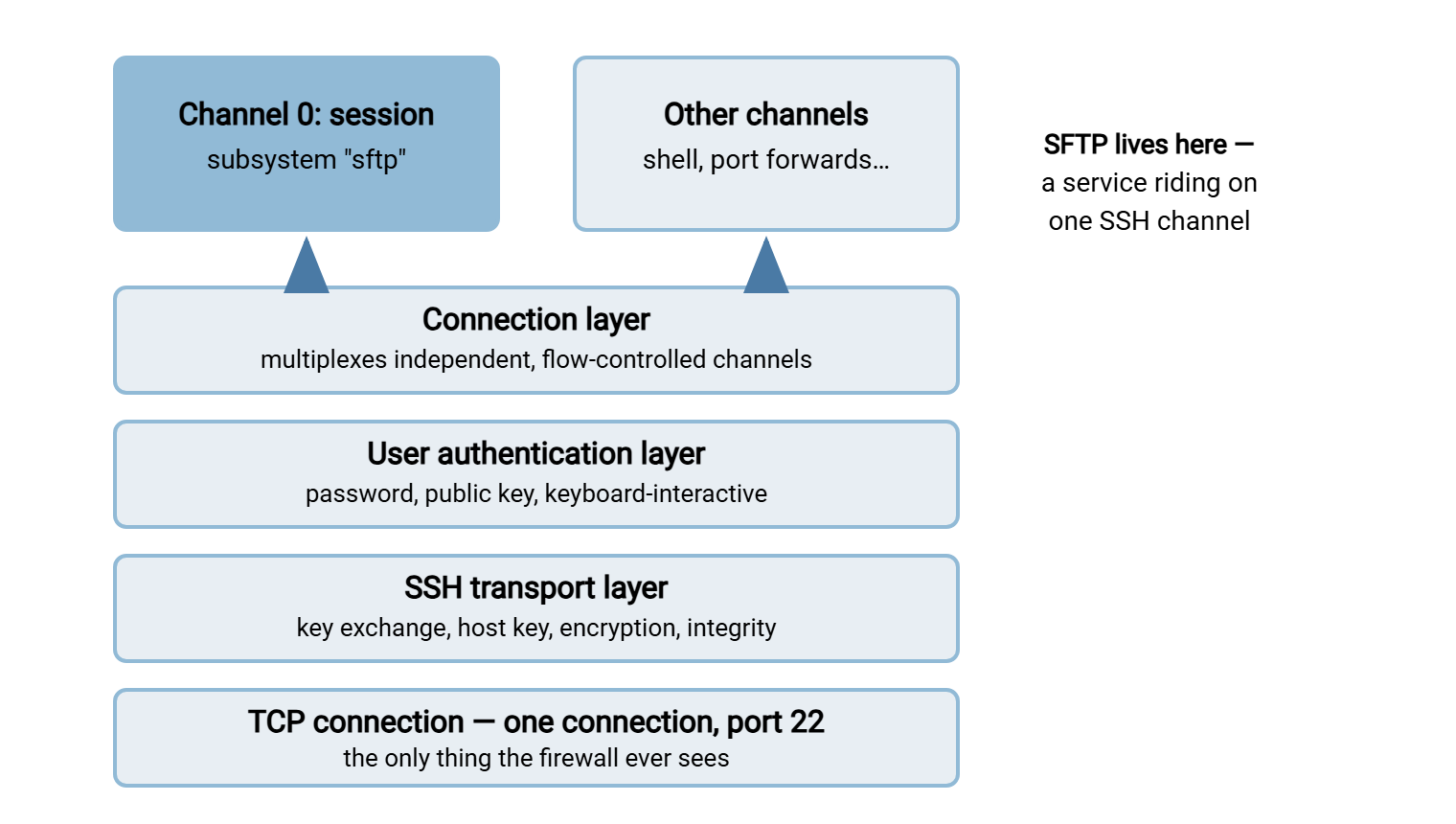
Channels and Subsystems: Where SFTP Plugs In
When an SSH client wants to do something after logging in, it opens a session channel. Then it asks the server to attach that channel to a particular kind of work. There are three standard requests:
- "shell" — give me an interactive command prompt. This is what a plain
ssh user@hostasks for. - "exec" — run this one command and give me its output. This is what
ssh user@host uptimeasks for. - "subsystem" — connect me to a named, well-known service. This is what SFTP uses.
A subsystem is simply a service the SSH server knows by name. The client says "subsystem: sftp," and the server looks up what to do with that name in its configuration. On an OpenSSH server, the mapping is one line in sshd_config:
# Either: run a helper program to serve SFTP...
Subsystem sftp /usr/lib/openssh/sftp-server

# ...or: serve SFTP from inside the SSH daemon itself
Subsystem sftp internal-sftp
Once the subsystem request is accepted, the channel stops being a terminal-shaped thing entirely. It becomes a private, encrypted pipe between two programs: the SFTP code in your client on one end, and the SFTP server code on the other. Everything that happens next — listing directories, reading files, renaming, deleting — is a conversation in the SFTP protocol flowing through that one channel. The subsystem design is also why an administrator can grant a user file transfer access without shell access. The server can be told to accept the sftp subsystem for that user and refuse everything else. This series' server configuration guide walks through that lockdown step by step.
Remember: SFTP is not a protocol that uses port 22 the way FTP uses port 21. SFTP has no port of its own at all. It is a passenger — SSH owns the connection, and SFTP rides inside it. That single fact explains SFTP's firewall friendliness, its authentication options, and its name.
What Happens When You Type sftp admin@host
With the layers in mind, a real connection becomes easy to read. Here is the sequence, followed by what it looks like in a client's verbose output:
- TCP connect. The client opens one TCP connection to the server, normally
port 22. - Version exchange and key exchange. Both sides announce
SSH-2.0version strings, agree on algorithms, and run the key exchange. The server presents its host key; the client checks it against its list of known hosts. - User authentication. The client proves the user's identity — here, with a public key.
- Channel open. The client opens a session channel over the now-authenticated connection.
- Subsystem request. The client sends "subsystem: sftp" on that channel. The server wires the channel to its SFTP service.
- SFTP handshake. Inside the channel, client and server exchange
INITandVERSIONpackets to agree on an SFTP protocol version (version 3 is the one nearly everything implements). Thesftp>prompt appears.
$ sftp -v admin@files.example.com
debug1: Connecting to files.example.com [203.0.113.10] port 22.
debug1: Connection established.
debug1: SSH2_MSG_KEXINIT sent
debug1: SSH2_MSG_KEXINIT received
debug1: kex: algorithm: curve25519-sha256
debug1: Server host key: ssh-ed25519 SHA256:d0Yqz2ap3Tk...
debug1: Host 'files.example.com' is known and matches the ED25519 host key.
debug1: Authenticating to files.example.com:22 as 'admin'
debug1: Offering public key: /home/admin/.ssh/id_ed25519
debug1: Server accepts key
debug1: Authentication succeeded (publickey).
debug1: channel 0: new [client-session]
debug1: Sending subsystem: sftp
Connected to files.example.com.
sftp>
Every line maps to a layer. KEXINIT and the host key lines are the transport layer. The "Authenticating... publickey" lines are the authentication layer. "channel 0" and "Sending subsystem: sftp" are the connection layer doing its multiplexing job. When a connection fails, the last layer mentioned in this output tells you where to look. That is why sftp -v is the first tool to reach for when a session will not come up.
Inside the SFTP Protocol: Requests, Handles, and Status
Now zoom into the channel itself. The SFTP protocol is a clean, binary request-and-response design. The client sends request packets; the server answers each one. Three ideas carry the whole protocol:
Request IDs. Every request carries a number the client chose, and the server's reply quotes it back. Because replies are matched by ID rather than by order, the client does not have to wait for one answer before sending the next question. It can keep dozens of requests "in flight" at once — a property called pipelining. That turns out to be the key to SFTP speed over long distances, as the performance article explores.
Handles. To work on a file, the client first sends an OPEN request with the path and the access it wants. The server replies with a handle — a short opaque token meaning "the thing you opened." All further operations quote the handle instead of the path, and a CLOSE releases it. Directories work the same way: open a directory handle, then read entries from it in batches.
Explicit offsets. Here is the quietly brilliant part. Every READ and WRITE request names an exact byte position in the file: "write these 32,768 bytes at offset 1,048,576." The server keeps no notion of a current position. Restarting an interrupted download is therefore trivial — start reading again at the offset where you stopped. A client can even fetch different regions of one file in parallel. FTP needed a bolted-on REST command to approximate this; in SFTP it is simply how reading and writing work.
The everyday commands you type translate into small bundles of these requests:
| You type | Requests on the wire | Server replies with |
|---|---|---|
ls |
OPENDIR, then READDIR until done, then CLOSE | A handle, then batches of names with attributes |
get report.pdf |
OPEN, many pipelined READs at increasing offsets, CLOSE | A handle, DATA blocks, a final end-of-file status |
put backup.zip |
OPEN (create), many pipelined WRITEs with offsets, CLOSE | A handle, then a status reply per write |
rename a.tmp a.csv |
RENAME | A single status reply |
rm old.log |
REMOVE | A single status reply |
Status replies carry defined codes — OK, end-of-file, no such file, permission denied, and a general failure code — rather than English sentences a script must guess at. Directory entries come back as structured records: name, size, permissions, timestamps as separate fields. Compare that with FTP, where a directory listing is a blob of human-formatted text the client must parse and hope for the best. SFTP behaves less like a transfer program and more like a remote filesystem API. That is exactly why graphical clients can offer drag-and-drop trees. It is also why the protocol supports rename, delete, mkdir, permission changes, and symlink operations natively. Those operations, and their sharp edges, get their own article: SFTP's file operations and their quirks.
Why "FTP over SSH" Is the Wrong Mental Model
It is worth being precise about why the folk explanation fails, because each difference has an operational consequence.
FTP is two connections; SFTP is one. An FTP session uses a control connection for commands plus a brand-new data connection for every transfer or listing. The data connection is negotiated by PORT or PASV commands. Those mechanics are explained in active vs passive FTP. Those extra connections are why FTP and firewalls have been at war for decades. SFTP has no second connection to negotiate. Commands, data, and listings all flow through the same SSH channel on the same TCP connection. There is no active mode, no passive mode, no port range to open, and no NAT address-announcement problem. The entire family of failures described in why firewalls block active FTP simply has no SFTP equivalent.
FTP bolted security on; SSH was built around it. FTPS adds TLS encryption around FTP's existing machinery and authenticates servers with X.509 certificates. SFTP inherits SSH's model instead: host keys for the server, passwords or SSH keys for users, everything encrypted from the first byte after key exchange. Neither model is "more encrypted" than the other — both use strong, modern ciphers. But they differ in ports, credentials, and firewall behavior, which is why choosing between them is a real decision. Our SFTP vs FTPS vs FTP series is devoted to exactly that comparison.
FTP transfers have modes; SFTP transfers are just bytes. FTP's ASCII-versus-binary transfer modes have corrupted countless files when a client guessed wrong. SFTP version 3 has no text mode: the bytes you send are the bytes that arrive. Line-ending conversion, if you want it, is your job — the protocol will never silently rewrite a file.
FTP replies are text; SFTP replies are structured. A script driving FTP parses numeric reply codes and free-form messages. A program driving SFTP gets typed packets and defined status codes. That difference is a large part of why SFTP automates so cleanly — a subject this series turns into working patterns in its non-interactive SFTP cookbook.
What the Right Model Unlocks
Hold the picture — one TCP connection, three SSH layers, a channel carrying a file-service subsystem — and a series of practical facts fall out of it for free:
- Firewall rules become one line. Allow TCP to port 22 (or whichever port your SSH server listens on) and SFTP works completely. Nothing else to open, nothing that breaks behind NAT.
- Resume is native. Explicit offsets mean an interrupted transfer can restart where it stopped, and clients expose this as reget/reput or "resume" buttons.
- Distance hurts less than you'd fear — if pipelining is used. Because requests carry IDs, a good client keeps the pipe full instead of waiting a round trip per block. When SFTP is slow, the cause is almost always windows and round trips, not encryption — the myth-busting is in the performance article.
- File-transfer-only accounts are possible. Because SFTP is a subsystem, the server can offer it while refusing shells — the foundation of locked-down partner accounts.
- One credential system. Users and automation authenticate with the same passwords and keys as SSH, managed the same way, logged the same way.
The model also demystifies server products. Any SFTP server — OpenSSH on Linux, or a Windows server such as Sysax Multi Server — is implementing the same stack. The Windows product provides SFTP alongside FTP, FTPS, and HTTPS. The stack accepts the connection, runs the SSH layers, authenticates the user, and answers SFTP requests against some directory tree. The differences between products are in how you administer that stack (config files versus a GUI), not in the protocol itself. The same goes for client-side automation. A scheduled job in Sysax FTP Automation is, on the wire, exactly the session walked through above — minus the human.
The Version to Tell a Colleague
SFTP is not FTP with security added. It is a file transfer service that rides inside SSH. SSH provides three layers. There is an encrypted transport with a host key proving the server's identity. There is a user authentication step, and a connection layer that splits the link into channels. An SFTP session is one of those channels attached to the "sftp" subsystem, carrying a tidy request-and-response protocol with request IDs, file handles, and explicit byte offsets. One TCP connection to port 22 carries everything, which is why firewalls like it; offsets make resume natural; pipelining makes it fast when clients use it well.
From here, the natural next steps start with SFTP is not FTPS to permanently separate the two look-alike names. Other natural next steps are SFTP authentication to set up keys properly, and SFTP's file operations for what the protocol can do beyond copying.
Frequently Asked Questions
What is SFTP, in one paragraph?
What port does SFTP use?
Is SFTP just FTP running through an SSH tunnel?
What is an SSH subsystem?
Does SFTP encrypt the files themselves or just the login?
Why can I connect with SSH but not SFTP to the same server?
Can one file be resumed or downloaded in parallel over SFTP?
From the Sysax team: we build secure file transfer software for Windows. Sysax Multi Server is an FTP, FTPS, SFTP, and HTTPS server. Sysax FTP Automation handles scheduled, scripted transfers. Free trials are on the download page.