
Digital Signatures Explained with Files
A partner drops a file on your SFTP server, or a supplier emails you a price list. Two questions ought to nag at you before you act on it. First: is this really from who it claims to be from? Second: is it exactly what they sent, down to the last digit, with nobody having altered a number along the way? The login that carried the file told you who connected at that moment. But once the file is sitting in a folder, it carries no proof of anything. Copy it, forward it, or find it a month later, and all that context is gone.
A digital signature is the tool that fixes this. It travels with the file, and it answers both questions at once: who produced this content, and has it changed since. This article explains what a signature actually is and why it works by running encryption "backwards." It explains how verification checks the file. And, just as importantly, it explains the one thing a valid signature does not prove on its own. Everything here is explained from the ground up, no cryptography background assumed. This is part of our Signatures & Receipts series, and it is the foundation the rest of the series builds on.
Two Different Jobs: Hiding a File vs Vouching for It
People lump "encryption" and "signing" together because both involve keys and math, but they do opposite jobs, and keeping them straight is half the battle.
Encryption is about confidentiality — hiding a file's contents so that only the intended reader can make sense of it. Anyone who intercepts the scrambled file sees noise.
Signing is about authenticity and integrity — vouching that a file came from a particular source and has not been changed. A signed file is not hidden at all; anyone can read it. The signature simply lets a reader confirm its origin and that it is intact.
These are independent. You can sign without encrypting (a public price list you want people to trust but don't need to hide). You can encrypt without signing (a secret you don't need to prove authorship of), do both, or do neither. Confusing the two leads to real mistakes — such as assuming an encrypted file is automatically "verified." Encryption alone tells you nothing about who created it.
Both jobs rely on the same building block: a key pair. A key pair is two mathematically linked keys. There is a private key you keep secret and never share, and a public key you hand out freely. Their special property is that what one key does, only the other can undo. Hold that idea; it is the hinge everything turns on.
An old analogy helps here. Encryption is a locked box; a signature is a wax seal pressed with a signet ring. The box hides what is inside, while the seal hides nothing. The seal simply shows the letter is genuinely from the ring's owner and has not been opened in transit. Nobody else can reproduce the seal, because nobody else has the ring. Throughout this article, the private key is that ring: the one thing only the signer holds.
The One-Minute Version of a Signature
Here is the whole mechanism, stripped to two moves.
To sign a file, you first compute a hash of it. A hash is a short, fixed-length fingerprint of the file's exact bytes — change a single character anywhere and the fingerprint comes out completely different. Then you transform that hash using your private key. The result is the signature, a small blob of data you send alongside the file.
To verify a file, the receiver does two things independently. They compute the hash of the file they received, and they use your public key to check the signature. If the signature matches the hash, two facts fall out together. The file is unchanged since you signed it. And the signature could only have been produced by your private key.
That "two facts at once" is the quiet power of a signature. A plain fingerprint proves the file is intact. A signature proves it is intact and tells you who vouched for it — in a single check.
Why Signing Runs Encryption Backwards
This is the part that makes signatures click, so it is worth going slowly.
When you encrypt a file for someone's eyes only, you scramble it with the recipient's public key. Because only the matching private key can unscramble it, only that person can read it. The pattern is public key in, private key out: anyone can lock a message for you, but only you can unlock it.
Signing uses the very same key pair the other way round. You produce the signature with your own private key, and anyone can check it with your public key. The pattern is private key in, public key out. Because only you hold your private key, a signature that your public key successfully checks could only have come from you. The secrecy direction and the proof direction are mirror images of each other.
The diagram below shows the two flows side by side: signing on top, verifying below. It includes a reminder of how encryption uses the same keys in the opposite direction.
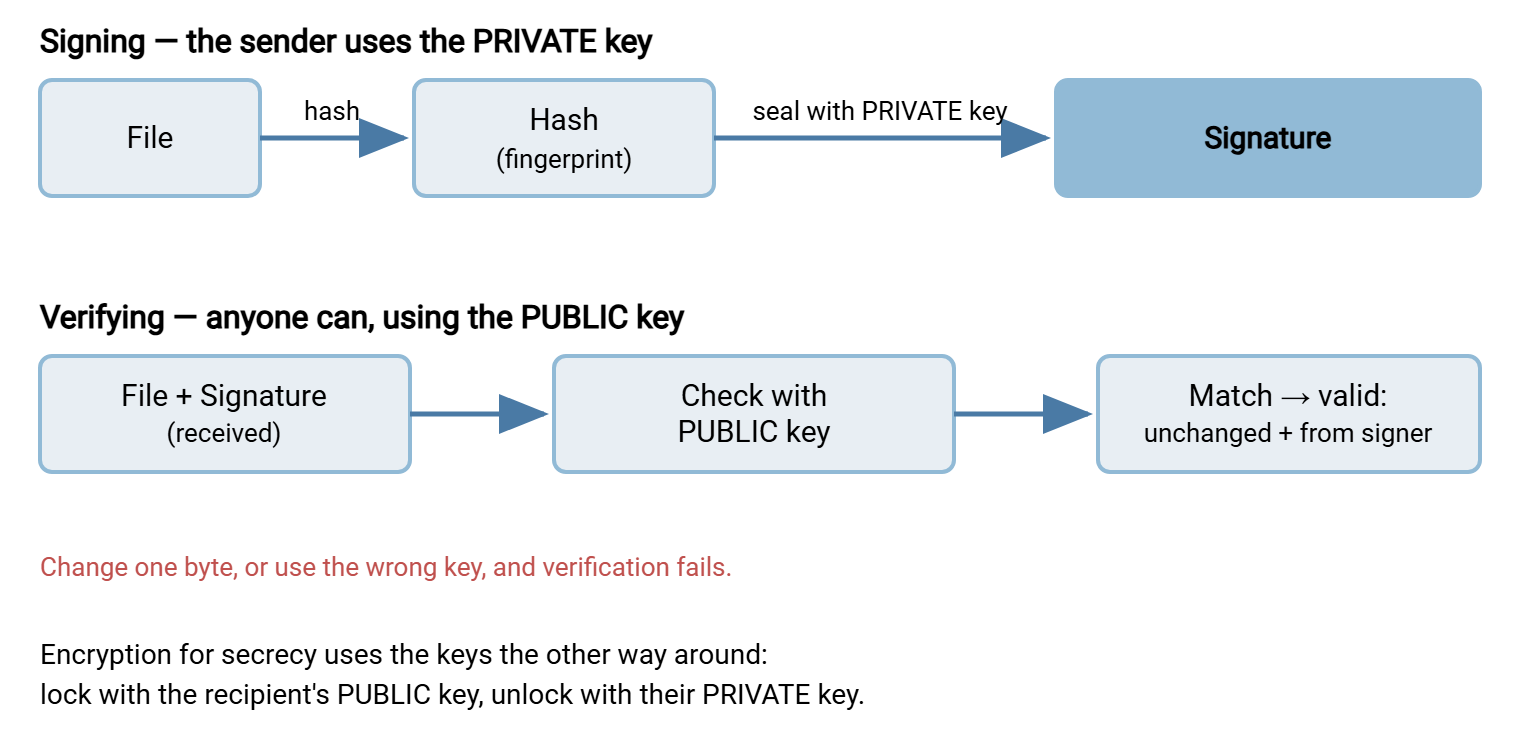
One honest footnote for the curious. "Seal the hash with your private key" is the classic mental model, and for some signature schemes it is almost literally what happens. Other modern algorithms compute the signature with different math and never perform anything you'd call encryption. The principle is identical in every case, though: only the private key can create a signature that the matching public key will accept. If you want the confidentiality direction spelled out in the same plain style, see our companion article on how PGP file encryption works. It walks through locking with the public key and unlocking with the private one.
What Verifying Actually Checks, Step by Step
Verification feels like magic until you see the steps, at which point it becomes obvious. When your software says "good signature," here is what it did:
- It started with three things: the file, the signature, and the signer's public key.
- It computed the hash of the file in front of it — the fingerprint of the exact bytes on disk right now.
- It used the public key to check the signature, recovering the hash that was sealed in at signing time.
- It compared the two hashes. If they are identical, the signature is valid.
Now trace what breaks a match. If anyone altered the file after signing, step 2 produces a different fingerprint from the one sealed into the signature. Even flipping one character in one cell is enough. In that case, the comparison fails. If the signature was made by some other key, the public key you hold will not validate it, and verification fails. There is no way to quietly change the file and still have the signature check out. The signature is welded to the file's exact content and to one specific private key. That welding is the whole point.
Remember: a valid signature establishes exactly one thing cryptographically. The holder of the private key that pairs with this public key signed this exact content. It does not, by itself, tell you the real-world or legal identity of that holder. Binding a key to a known person or company is a separate step, covered next.
What a Valid Signature Proves — and What It Doesn't
This section is where careful admins pull ahead of people who just run the verify command and trust the green checkmark.
A valid signature proves this file is unchanged since it was signed. It also proves the file was signed by whoever controls the private key matched to the public key you used. Those are strong, useful facts.
A valid signature does not prove, on its own, who that key holder is in the real world. Suppose you grabbed a partner's public key from an ordinary email. If an impostor sent that email, then a signature that "verifies" against their key only proves the impostor signed it. The math is flawless and the conclusion is worthless. The cryptography is only as trustworthy as your confidence that the public key really belongs to the party you think it does. Establishing that link is a deliberate act, not something the signature performs for you. One way is to check the key's fingerprint through a separate, trusted channel. A fingerprint is a short hash of the public key itself. Another way is to rely on a certificate authority that vouches for the key.
A valid signature also does not prove the private key was in the right hands at signing time. If someone steals or is loaned a private key, their signatures verify perfectly. That is why protecting private keys is not an afterthought but the load-bearing assumption underneath the entire scheme. When a dispute turns on whether a signature is genuine, "could the key have been compromised?" is a fair question. The honest answer is what separates a technical fact from an airtight legal one.
These gaps are not flaws to be embarrassed about; they are the boundary between what math can do and what process must do. The series article on non-repudiation for business picks up exactly here. It covers how much a signature is actually worth when someone denies sending a file.
A Worked Example: The Invoice That Might Be Fake
Concrete beats abstract, so walk through one everyday case. Your accounts team receives a monthly invoice from a supplier as a file called invoice.csv, dropped on your SFTP server overnight. Beside it sits a second, tiny file, invoice.csv.asc — the detached signature. When you first onboarded this supplier, you imported their public key and confirmed its fingerprint over a phone call. You placed that call to a number from the signed contract, not from an email footer.
This month the invoice total looks higher than usual. Before anyone pays it, you verify. Your tool hashes invoice.csv, checks the signature in invoice.csv.asc against the supplier's public key, and reports a good signature. That result tells you two concrete things. The file is byte-for-byte what the supplier signed. And it was signed by the private key paired with the public key you verified by phone. The high total is genuine — it really is their invoice. So the conversation is now about the amount, not about whether the file can be trusted.
Now flip the outcome. Suppose an attacker who had quietly gained access to the drop folder edited the bank details inside invoice.csv to divert your payment. They can change the numbers, but they cannot produce a matching signature without the supplier's private key. Verification fails, the file is held, and a redirected-payment fraud dies at the checkpoint. Notice what did the work: not the transfer being encrypted, not the login succeeding, but the thirty seconds you spent checking a signature.
Signatures vs Plain Hashes
If you have read our material on file integrity verification, you already know a hash proves a file hasn't changed. So why bother with signatures? Because a bare hash only proves integrity if you trust where the hash came from. An attacker who can alter the file in transit can just as easily recompute its hash and hand you the new one. That fingerprint will match the tampered file perfectly. Nothing about a lone hash ties it to a trustworthy author.
A signature closes that hole by binding the hash to a private key. To forge a signature, an attacker would need the signer's private key, not merely the ability to run a hashing tool. This is the leap from integrity (the bytes are intact) to authenticity (and we know who stands behind them).
| Property | Plain hash / checksum | Digital signature |
|---|---|---|
| Detects accidental corruption | Yes | Yes |
| Detects deliberate tampering | Only if the hash itself is trustworthy | Yes — forging it needs the private key |
| Tells you who produced it | No | Yes — the private-key holder |
| Proves real-world identity by itself | No | No — needs key-to-identity binding |
| What you must protect | The channel the hash arrives on | The signer's private key |
Read the table as a progression, not a contest. Hashes are the honest workhorse for catching corruption; signatures add the "and we know who" that hostile situations demand. Most robust transfer setups use both. The hash inside a signature is doing exactly the integrity job a checksum does — just with an author attached.
Where You'll Meet Signatures on Files
Now that the concept is solid, here is where it shows up in an admin's day, so the idea has hooks to hang on:
- Detached signatures on transferred files. The most common pattern in file transfer is a small signature file that rides alongside the data file. It often ends in
.ascor.sig. The data file stays exactly as-is and readable; the sidecar carries the proof. Our next article, signing and verifying files in practice, walks through creating and checking these hands-on. - Signed acknowledgments and receipts. When a receiver signs a short "I got exactly this file" message and sends it back, that signed receipt becomes proof of delivery. The patterns are covered in proof-of-delivery patterns outside AS2.
- Software and update signing. When you install a package and the system says it verified the publisher, that is the same mechanism. It keeps a stranger from slipping you tampered code. The vendor signs with their private key, and your system checks with their public key.
Signing also folds naturally into automated pipelines. A scheduled-transfer client such as Sysax FTP Automation, which includes OpenPGP support, can sign a file during the same unattended job that moves it. So the proof is generated the moment the file leaves rather than bolted on later by hand.
The Version to Tell a Colleague
If a coworker asks for the short version at the coffee machine, it is this. Encryption hides a file; a signature vouches for it — different jobs. You sign with your private key and anyone verifies with your public key. That is the exact reverse of how encryption uses the two keys. A valid signature proves the file is unchanged and was produced by the private-key holder, both in one check. What it does not prove by itself is who that holder really is. Tying the key to a real person or company is a separate, deliberate step. It is where signatures stop being pure math and start needing good process.
From here, the natural next read in this series is signing and verifying files in practice for the hands-on mechanics. Read non-repudiation for business for what all of this is worth when someone disputes a transfer.
Frequently Asked Questions
Is a signed file also encrypted?
If someone changes one byte of the file, will the signature still verify?
Does a valid signature prove who the person legally is?
What happens if the signer's private key was stolen?
Which is stronger for a file I received, a checksum or a signature?
Do I need special software to verify a signature?
From the Sysax team: we build secure file transfer software for Windows. Sysax Multi Server is an FTP, FTPS, SFTP, and HTTPS server. Sysax FTP Automation handles scheduled, scripted transfers. Free trials are on the download page.